Page 211 of 419
4133
Features of your vehicle
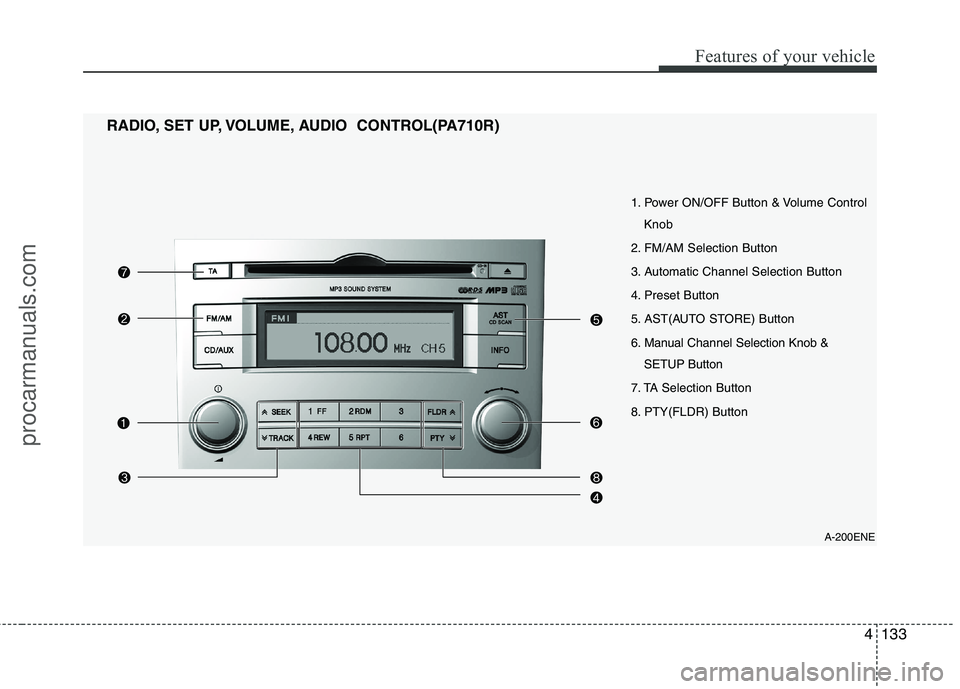
A-200ENE
1. Power ON/OFF Button & Volume Control
Knob
2. FM/AM Selection Button
3. Automatic Channel Selection Button
4. Preset Button
5. AST(AUTO STORE) Button
6. Manual Channel Selection Knob & SETUP Button
7. TA Selection Button
8. PTY(FLDR) Button
RADIO, SET UP, VOLUME, AUDIO CONTROL(PA710R)
procarmanuals.com
Page 212 of 419
Features of your vehicle
134
4
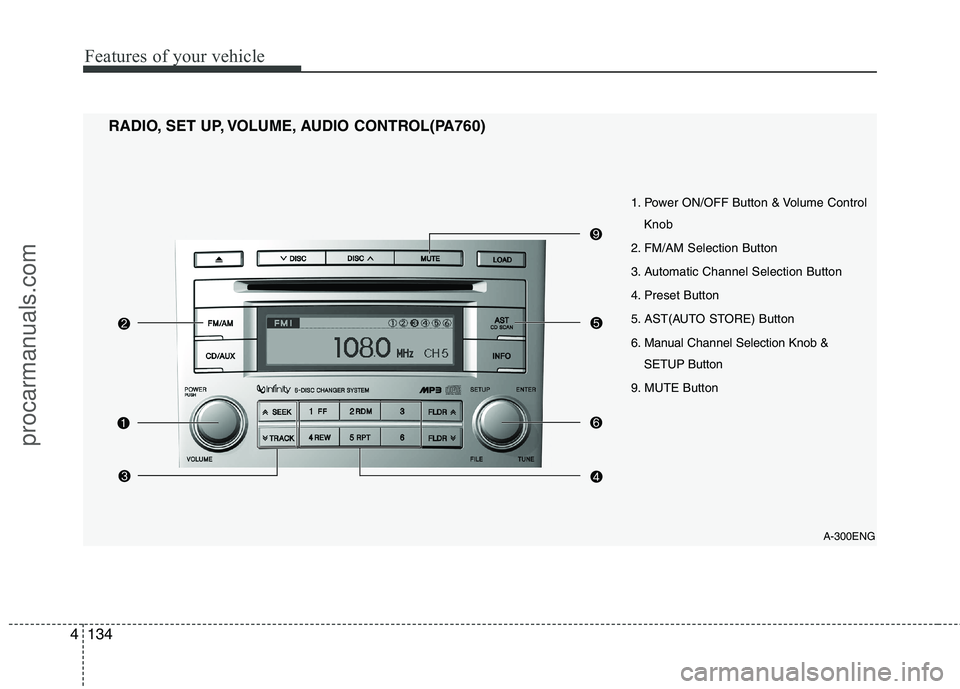
1. Power ON/OFF Button & Volume Control
Knob
2. FM/AM Selection Button
3. Automatic Channel Selection Button
4. Preset Button
5. AST(AUTO STORE) Button
6. Manual Channel Selection Knob & SETUP Button
9. MUTE Button
RADIO, SET UP, VOLUME, AUDIO CONTROL(PA760)
A-300ENG
procarmanuals.com
Page 213 of 419
4135
Features of your vehicle
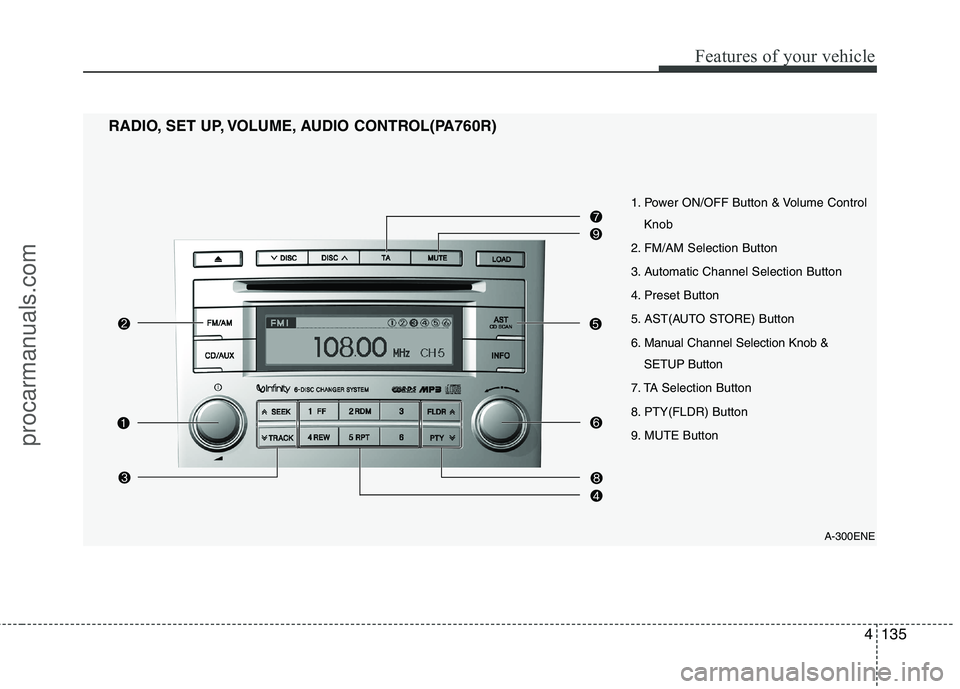
1. Power ON/OFF Button & Volume ControlKnob
2. FM/AM Selection Button
3. Automatic Channel Selection Button
4. Preset Button
5. AST(AUTO STORE) Button
6. Manual Channel Selection Knob & SETUP Button
7. TA Selection Button
8. PTY(FLDR) Button
9. MUTE Button
RADIO, SET UP, VOLUME, AUDIO CONTROL(PA760R)
A-300ENE
procarmanuals.com
Page 214 of 419

Features of your vehicle
136
4
1. Power ON/OFF Button &
Volume Control Knob
Turns the set on/off when the ignition
switch is on ACC or ON. If the button is
turned to the right, it increases the vol-
ume and left, it decreases the volume.
2. FM/AM Selection Button
Turns to FM or AM mode, and toggles in the order of FM1 ➟ FM2 ➟ AM ➟ FM1...
when the button is pressed each time.
3. Automatic Channel Selection
Button
] button is pressed, it increases the band frequency to auto- matically select a channel.
Stops at the previous frequency if no
channel is found.
] button is press- ed, it reduces the band frequency toautomatically select a channel.
Stops at the previous frequency if no
channel is found. 4. Preset Button
Push [1]~[6] buttons less than 0.8 sec-
ond to play the channel saved in each
button. Push Preset button for 0.8 sec-
ond or longer to save current channel to
the respective button with a beep.
5. AST(AUTO STORE) Button
When the button is pressed, it automati-
cally selects and saves channels with
high reception rate to PRESET buttons
[1]~[6] and plays the channel saved in
PRESET1. If no channel is saved after
AST, it will play the previous channel.
6. Manual Channel Selection
Knob & SETUP Button
Manual Channel Selection knob
Turn this control while listening to a radio
channel to manually adjust frequency.
Turn clockwise to increase frequency and
counterclockwise to reduce frequency. SETUP Button
PA710/715/760
Press this button to turn to the SCROLL
adjustment mode. If no action is taken for
5 seconds after pressing the button, it will
return to the play mode. (After entering
SETUP mode, PUSH functions of the
[TUNE] button to adjust SCROLL.)
PA710R/760R
Press this button to turn to the RDS
option, SCROLL adjustment mode. If no
action is taken for 5 seconds after press-
ing the button, it will return to the play
mode.(After entering SETUP mode,
move between items using the left, right
and PUSH functions of the [TUNE] but-
ton.) The setup item changes from
SCROLL
➟
AF ➟ RDSNEWS ➟ REGION
➟ TA V O L
Sound Quality Control Knob
Pressing the button changes the TONE
and POSITION mode. The mode select-
ed is shown on the display. After select-
ing each mode, rotate the Audio control
knob clockwise or counterclockwise.
procarmanuals.com
Page 300 of 419

69
What to do in an emergency
F060200AEN-EETPMS (Tire Pressure Monitoring System)malfunction indicator
The TPMS malfunction indicator
comes on and stays on when there is
a problem with the Tire Pressure
Monitoring System. If the system is
able to correctly detect an underinfla-
tion warning at the same time as sys-
tem failure then it will illuminate both
the TPMS malfunction and the lowtire pressure and position telltales
e.g. if Front Left sensor fails, theTPMS malfunction indicator illumi-
nates, but if the Front Right, RearLeft, or Rear Right tire is under-inflat-
ed, the low tire pressure and position
telltales may illuminate together with
the TPMS malfunction indicator.
Have the system checked by an
authorized HYUNDAI dealer as soon
as possible to determine the cause
of the problem.
WARNING - Low pressure
damage
Significantly low tire pressure
makes the vehicle unstable and
can contribute to loss of vehicle
control and increased brakingdistances.
Continued driving on low pres- sure tires can cause the tires to
overheat and fail.
TPMS
CAUTION
The TPMS malfunction indica- tor may be illuminated if thevehicle is moving around elec- tric power supply cables orradios transmitter such as atpolice stations, government and public offices, broadcast-ing stations, military installa-tions, airports, or transmitting towers, etc. This can interferewith normal operation of theTire Pressure Monitoring System (TPMS).
The TPMS malfunction indica- tor may be illuminated if snowchains are used or some sep-arate electronic devices such as notebook computer, mobilecharger, remote starter or nav-igation etc., are used in the vehicle. This can interfere withnormal operation of the TirePressure Monitoring System(TPMS).
procarmanuals.com