2011 Hyundai Sonata display
[x] Cancel search: displayPage 199 of 380

4 119
Features of your vehicle
1. USB Selection ButtonIf USB is connected, it switches to the
USB mode from the previous mode to
play the song files stored in the USB. If a
CD or auxiliary device is not connected,
it displays "NO Media" for 3 seconds and
returns to the previous mode.2. Track Moving Button• Press the [TRACK ] button for lessthan 0.8 second to play from the begin-
ning of the song currently played.
Press the button for less than 0.8 sec-
ond and press it again within 1 sec-
onds to move and play the previous
track. Press the button for 0.8 second
or longer to play the song in reverse
direction in fast speed.
• Press the [SEEK ] button for less than 0.8 second to move to the next
track. Press the button for 0.8 second
or longer to play the song in forward
direction in fast speed.
3. RANDOM Playback ButtonPress this button for less than 0.8 sec-
onds to activate 'RDM' mode and more
than 0.8 seconds to activate 'ALL RDM'
mode.
• RDM : Only files in a folder are playedback in a random sequence.
• ALL RDM : All files in a USB memory are played back in the random sequence.4. REPEAT ButtonPress this button for less than 0.8 sec-
onds to activate ‘RPT’ mode and more
than 0.8 seconds to activate ‘ RPT’
mode.
• RPT : Only a file is repeatedly playedback.
• RPT : Only files in a folder are repeatedly played back.5. SCAN Selection ButtonPlays 10 seconds of each song in the
USB device. Press the button once again
to cancel scanning.
6. INFO Selection ButtonDisplays the information of the file cur-
rently played in the order of FILE NAME➟TITLE
➟ARTIST
➟ALBUM
➟FOLDER
➟
TOTAL FILE
➟NORMAL DISPLAY
➟FILE
NAME
➟... (Displays no information if the
file has no song information.)
7. Folder Moving Button• Press the [FOLDER ] button to move to child folder of the current fold-
er and displays the first song in the
folder. Press TUNE/ ENTER knob(for
PA760YF, Press [ENTER] button) to
move to the folder It will play the first
song in the folder.
• Press the [FOLDER ] button to
move to parent folder and displays the
first song in the folder.
Press TUNE/ENTER knob(for PA760YF,
press [ENTER] button) to move to the
folder displayed.
YF HMA 4-104~(AUDIO).QXP 12/24/2009 5:21 PM Page 119
Page 200 of 380

Features of your vehicle120
48. Search/ENTER ButtonTurn this button clockwise to display the
songs next to the currently played song.
Turn the button counterclockwise to dis-
play the songs before the currently
played song. Press the button to skip and
play the selected song.9. Search ButtonPress the [TUNE ] button to display the
songs next to the currently played song.
Press the [ TUNE] button to display the
songs before to the currently played song.10. ENTER ButtonPress the [ENTER] button to play the
selected song.
YF HMA 4-104~(AUDIO).QXP 12/24/2009 5:21 PM Page 120
Page 203 of 380
4 123
Features of your vehicle
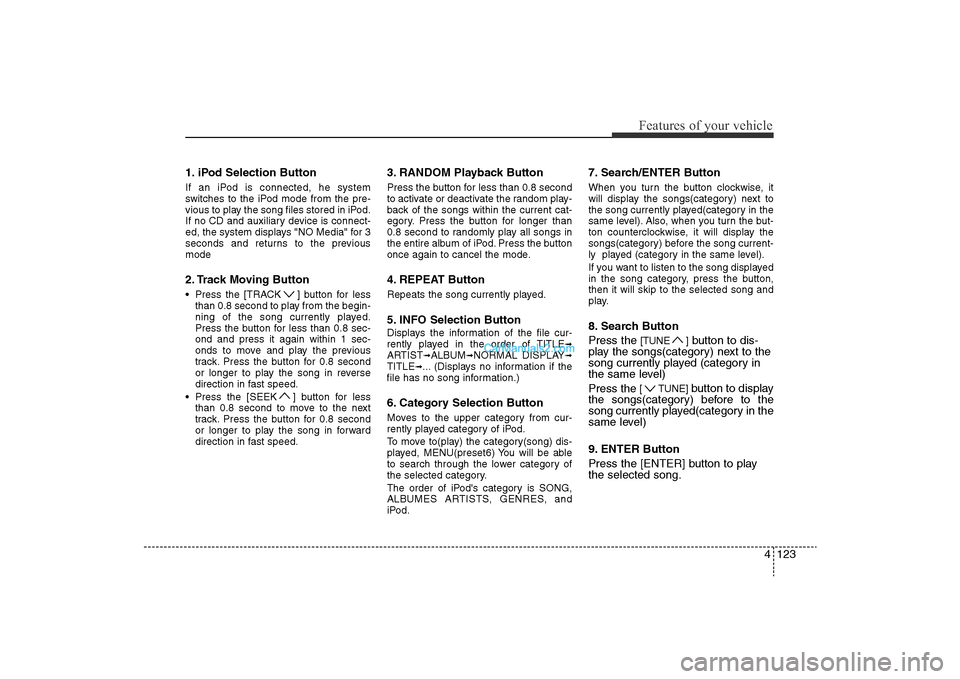
1. iPod Selection ButtonIf an iPod is connected, he system
switches to the iPod mode from the pre-
vious to play the song files stored in iPod.
If no CD and auxiliary device is connect-
ed, the system displays "NO Media" for 3
seconds and returns to the previous
mode2. Track Moving Button• Press the [TRACK ] button for lessthan 0.8 second to play from the begin-
ning of the song currently played.
Press the button for less than 0.8 sec-
ond and press it again within 1 sec-
onds to move and play the previous
track. Press the button for 0.8 second
or longer to play the song in reverse
direction in fast speed.
• Press the [SEEK ] button for less than 0.8 second to move to the next
track. Press the button for 0.8 second
or longer to play the song in forward
direction in fast speed.
3. RANDOM Playback ButtonPress the button for less than 0.8 second
to activate or deactivate the random play-
back of the songs within the current cat-
egory. Press the button for longer than
0.8 second to randomly play all songs in
the entire album of iPod. Press the button
once again to cancel the mode.4. REPEAT ButtonRepeats the song currently played.5. INFO Selection ButtonDisplays the information of the file cur-
rently played in the order of TITLE
➟
ARTIST
➟ALBUM
➟NORMAL DISPLAY
➟
TITLE
➟... (Displays no information if the
file has no song information.)
6. Category Selection ButtonMoves to the upper category from cur-
rently played category of iPod.
To move to(play) the category(song) dis-
played, MENU(preset6) You will be able
to search through the lower category of
the selected category.
The order of iPod's category is SONG,
ALBUMES ARTISTS, GENRES, and
iPod.
7. Search/ENTER ButtonWhen you turn the button clockwise, it
will display the songs(category) next to
the song currently played(category in the
same level). Also, when you turn the but-
ton counterclockwise, it will display the
songs(category) before the song current-
ly played (category in the same level).
If you want to listen to the song displayed
in the song category, press the button,
then it will skip to the selected song and
play.8. Search Button
Press the
[TUNE ]
button to dis-
play the songs(category) next to the
song currently played (category in
the same level)
Press the
[ TUNE]
button to display
the songs(category) before to the
song currently played(category in the
same level)
9. ENTER Button
Press the [ENTER] button to play
the selected song.
YF HMA 4-104~(AUDIO).QXP 12/24/2009 5:22 PM Page 123
Page 205 of 380
4 125
Features of your vehicle
Using XM satellite RadioYour vehicle is equipped with 3 months
complimentary period of XM Satellite
Radio. XM provides access to over 130
channels of music, information, and
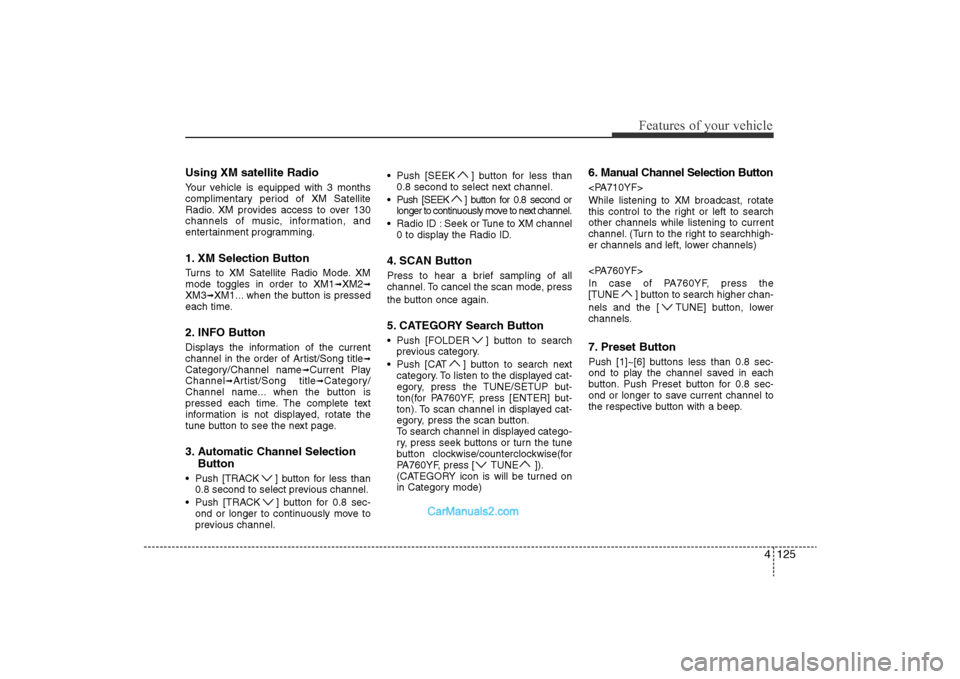
entertainment programming.1. XM Selection ButtonTurns to XM Satellite Radio Mode. XM
mode toggles in order to XM1
➟XM2
➟
XM3
➟XM1... when the button is pressed
each time.
2. INFO ButtonDisplays the information of the current
channel in the order of Artist/Song title
➟
Category/Channel name
➟Current Play
Channel
➟Artist/Song title
➟Category/
Channel name... when the button is
pressed each time. The complete text
information is not displayed, rotate the
tune button to see the next page.
3. Automatic Channel Selection Button• Push [TRACK ] button for less than
0.8 second to select previous channel.
• Push [TRACK ] button for 0.8 sec- ond or longer to continuously move to
previous channel. • Push [SEEK ] button for less than
0.8 second to select next channel.
• Push [SEEK ] button for 0.8 second or longer to continuously move to next channel.
• Radio ID : Seek or Tune to XM channel 0 to display the Radio ID.
4. SCAN ButtonPress to hear a brief sampling of all
channel. To cancel the scan mode, press
the button once again.5. CATEGORY Search Button• Push [FOLDER ] button to searchprevious category.
• Push [CAT ] button to search next category. To listen to the displayed cat-
egory, press the TUNE/SETUP but-
ton(for PA760YF, press [ENTER] but-
ton). To scan channel in displayed cat-
egory, press the scan button.
To search channel in displayed catego-
ry, press seek buttons or turn the tune
button clockwise/counterclockwise(for
PA760YF, press [ TUNE ]).
(CATEGORY icon is will be turned on
in Category mode)
6. Manual Channel Selection Button
While listening to XM broadcast, rotate
this control to the right or left to search
other channels while listening to current
channel. (Turn to the right to searchhigh-
er channels and left, lower channels)
In case of PA760YF, press the
[TUNE ] button to search higher chan-
nels and the [ TUNE] button, lower
channels.7. Preset ButtonPush [1]~[6] buttons less than 0.8 sec-
ond to play the channel saved in each
button. Push Preset button for 0.8 sec-
ond or longer to save current channel to
the respective button with a beep.
YF HMA 4-104~(AUDIO).QXP 12/24/2009 5:22 PM Page 125
Page 208 of 380
Features of your vehicle128
4Automatic switching between dig-
ital and analog broadcastingIf the reception of the digital signal is lost,
the system switches automatically to the
analog signal. As soon as the digital sig-
nal is available again it will switch back.
Due to the fact that sub channels are
only broadcasted digital, the system
mutes playback if you have tuned to a
sub channel and the digital signal is lost.
The main line shows the message No
HD signal in place of station name.
After approximately one minute with the
digital signal lost, the system will auto-
matically tune to the analog signal of the
corresponding frequency.Text based informationHD Radio
TM
stations are able to broad-
cast text based information, e.g. station
name, song title and artist name. The
Driver Information System is able to dis-
play this information.
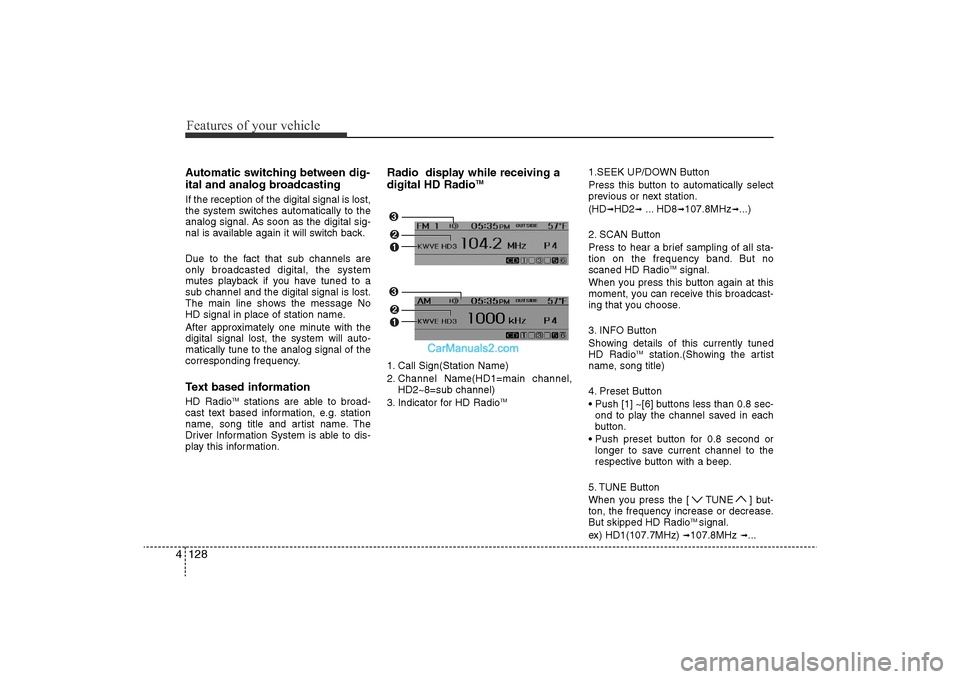
Radio display while receiving a
digital HD Radio
TM
1. Call Sign(Station Name)
2. Channel Name(HD1=main channel, HD2~8=sub channel)
3. Indicator for HD Radio
TM
1.SEEK UP/DOWN Button
Press this button to automatically select
previous or next station.
(HD
➟HD2
➟... HD8
➟107.8MHz
➟...)
2. SCAN Button
Press to hear a brief sampling of all sta-
tion on the frequency band. But no
scaned HD Radio
TMsignal.
When you press this button again at this
moment, you can receive this broadcast-
ing that you choose.
3. INFO Button
Showing details of this currently tuned
HD Radio
TM
station.(Showing the artist
name, song title)
4. Preset Button
• Push [1] ~[6] buttons less than 0.8 sec- ond to play the channel saved in each
button.
• Push preset button for 0.8 second or longer to save current channel to the
respective button with a beep.
5. TUNE Button
When you press the [ TUNE ] but-
ton, the frequency increase or decrease.
But skipped HD Radio
TMsignal.
ex) HD1(107.7MHz)
➟107.8MHz
➟...
YF HMA 4-104~(AUDIO).QXP 12/24/2009 5:22 PM Page 128
Page 209 of 380

4 129
Features of your vehicle
BLUETOOTH PHONE OPERATION1. TALK button : Activates voice recognition.
2. CALL button : Places and transfers calls.
3. END button : Ends calls or cancel functions.■What is Bluetooth
®?
Bluetooth
®is a wireless technology that
allows multiple devices to be connected
in a short range, low-powered devices
like hands-free, stereo headset, wireless
remocon, etc. For more information, visit
the
Bluetooth
®website at
www
.Bluetooth.com
■General Features• This audio system supports Bluetooth
®
hands-free and stereo-headset features.
- HANDS-FREE feature: Making or receiving calls wirelessly through
voice recognition.
- STEREO-HEADSET feature: Playing music from cellular phones (that sup-
ports A2DP feature) wirelessly.
• Voice recognition engine of the Bluetooth
®system supports 3 types of
languages:
- English
- US Spanish
- Canadian French
✽ NOTICE• The phone must be paired to the sys-
tem before using Bluetooth
®features.
• Only one selected (linked) cellular phone can be used with the system at
a time.
• Some phones are not fully compatible with this system.
■Bluetooth Language SettingThe system language can be changed by
the following steps:
1. Power on the audio system with the
volume set to an audible level.
2. Press and hold button on the steering wheel until the audio displays
“Please Wait”.
- The Bluetooth
®
system will reply in
currently selected language that it is
changing to the next language.
- System language cycles between English, Canadian French and US
Spanish.
3. When completed, the audio display returns to normal.
4. Repeat steps 2 and 3 for the next lan- guage selection.
NOTE:The phone needs to be paired again
after changing system language.
- Avoid resting your thumb or fingeron the as the language could
unintentionally change.
1
3
2
YF HMA 4-104~(AUDIO).QXP 12/24/2009 5:22 PM Page 129
Page 211 of 380

4 131
Features of your vehicle
■Voice Recognition Activation• The voice recognition engine containedin the Bluetooth System can be activat-
ed in the following conditions:
- Button Activation The voice recognition system will be
active when the button is
pressed and after the sound of a
Beep.
- Active Listening The voice recognition system will be
active for a period of time when the
Voice Recognition system has asked
for a customer response.
• The system can recognize single digits- from zero to nine while numbers greater
than ten will not be recognized.
• If the command is not recognized, the system will announce "Pardon" or No
input voice signal from microphone. (No
response)
• The system shall cancel voice recogni- tion mode in following cases : When
pressing the button and saying
cancel following the beep. When not
making a call and pressing the but-
ton. When voice recognition has failed 3
consecutive times.
• At any time if you say “help”, the system
will announce what commands are
available.
■Menu treeThe menu tree identifies available voice
recognition Bluetooth
®functions.
■Voice Operation TipTo get the best performance out of the
Voice Recognition System, observe the
following:
- Keep the interior of the vehicle as quietas possible. Close the window to elimi-
nate surrounding noise (traffic noise,
vibration sounds, etc), which may dis-
turb recognizing the voice command
correctly.
- Speak a command after a beep sound within 5 seconds. Otherwise the com-
mand will not be received properly.
- Speak in a natural voice without paus- ing between words.
The Bluetooth
®
icon appears on the
upper side of audio display when a
phone is connected.
Pair phone
Select phone
Change priority
Delete phone
Bluetooth off
Setup
Add entry
Phonebook
Change
Delete name
By Phone
By voice
Call
By name
By number
YF HMA 4-104~(AUDIO).QXP 12/24/2009 5:22 PM Page 131
Page 212 of 380
Features of your vehicle132
4■Phone SetupAll Bluetooth
®related operations can be
performed by voice command or by man-
ual operation.<
• By Voice Command: Press button on the steeringwheel to activate voice recognition.
Push the TUNE knob to enter SETUP
mode.
Select desired item by pressing the [
FOLDER ] button, then push the
[ENTER] button.
Select “BT” item by rotating the TUNE
knob, then push the knob.
Select desired item by rotating the TUNE
knob, then push the knob.
Press the [SET UP] button to enter
SETUP MODE.
Select "BLUETOOTH" item by pressing
the [ FOLDER ] button, then push
the [ENTER] button. • Pairing phone
Before using Bluetooth
®
features, the
phone must be paired (registered) to the
audio system. Up to 5 phones can be
paired in the system.
Note:• The pairing procedure of the phone varies according to each phone model.
Before attempting to pair phone, please
see your phone’s User’s Guide for
instructions.
• Once pairing with the phone is com- pleted, there is no need to pair with that
phone again unless the phone is delet-
ed manually from the audio system
(refer “Deleting Phone” section) or the
vehicle’s information is removed from
the phone.
1. Press button.
2. Say “Set Up”. - The system replies with availablecommands.
- To skip the information message, press again and then a beep is
heard.
3. Say “Pair Phone”
4. Say “Yes” to proceed.
5. Say the name of your phone when prompted. - Use any name to uniquely describe
your phone.
6. Bluetooth
®
system will repeat the
name you stated.
7. Say "Yes" to confirm.
8. The audio displays “searching ----
passkey: 0000” and asks you to initiate
pairing procedure from the phone.
9. Search the Bluetooth
®
system on your
phone. Your phone should display your [vehi-
cle model name] on the Bluetooth
®device
list. Then attempt pairing on your phone.
10. After Pairing is completed, your phone will start to transfer phone/contact list
to the audio system.
- This process may take from a few minutes to over 10 minutes depend-
ing on the phone model and number
of entries in the phone/contact list.
11. By manual operation: - Select “PAIR” in PHONE menu, then-proceed from step 5.
YF HMA 4-104~(AUDIO).QXP 12/24/2009 5:22 PM Page 132