2011 Hyundai Sonata battery
[x] Cancel search: batteryPage 152 of 380
Features of your vehicle72
4To signal a lane change, move the turn
signal lever slightly and hold it in position
(B). The lever will return to the OFF posi-
tion when released.
If an indicator stays on and does not
flash or if it flashes abnormally, one of the
turn signal bulbs may be burned out and
will require replacement.One-touch triple turn signal To activate an one-touch triple turn signal
move the turn signal lever up or down
slightly and then release it. The lane
change signals will blink 3 times.✽
NOTICEIf an indicator flash is abnormally quick
or slow, a bulb may be burned out or
have a poor electrical connection in the
circuit.
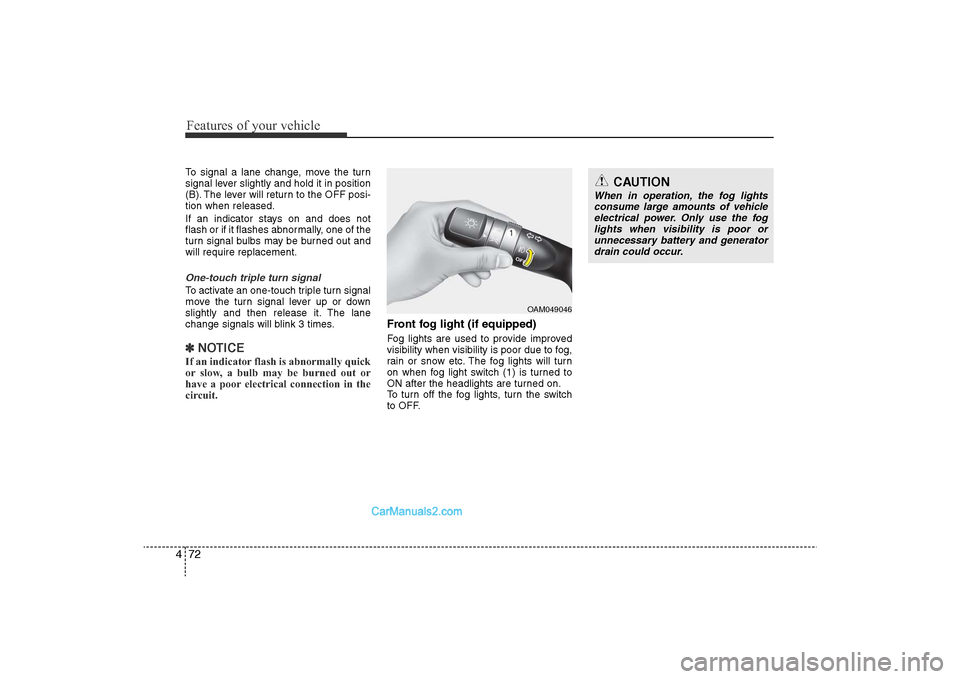
Front fog light (if equipped) Fog lights are used to provide improved
visibility when visibility is poor due to fog,
rain or snow etc. The fog lights will turn
on when fog light switch (1) is turned to
ON after the headlights are turned on.
To turn off the fog lights, turn the switch
to OFF.
CAUTION
When in operation, the fog lights
consume large amounts of vehicle electrical power. Only use the foglights when visibility is poor orunnecessary battery and generatordrain could occur.
OAM049046
YF HMA 4-103.QXP 12/24/2009 5:14 PM Page 72
Page 155 of 380

475
Features of your vehicle
Map lamp Push the lens to turn the map lamp on or
off. This light produces a spot beam for
convenient use as a map lamp at night or
as a personal lamp for the driver and the
front passenger.
• DOOR : In the DOOR position, the maplamp and the room lamp come
on when any door is opened
regardless of the ignition
switch position. When doors are unlocked by
the transmitter (or smart key),
the map lamp and the room
lamp come on for approximate-
ly 30 seconds as long as any
door is not open. The map lamp
and the room lamp goes out
gradually after approximately 30
seconds if the door is closed.
However, if the ignition switch is
ON or all doors are locked, the
map lamp and the room lamp
will turn off immediately. If a
door is opened with the ignition
switch in the ACC or LOCK
position, the map lamp and the
room lamp stay on for about 20
minutes. However, if a door is
opened with the ignition switch
in the ON position, the map
lamp and the room lamp stay on
continuously.
• ON : The light stays on at all times.
• OFF : The lights turn off even if a door is opened.
❈ When the lamp is turned ON
by pressing the lens (1) the
lamp does not turn off even if
the switch (2) is in the OFF
position.
OYF049104K
INTERIOR LIGHT
CAUTION
Do not use the interior lights for
extended periods when the engineis not running.
It may cause battery discharge.
YF HMA 4-103.QXP 12/24/2009 5:14 PM Page 75
Page 177 of 380
497
Features of your vehicle
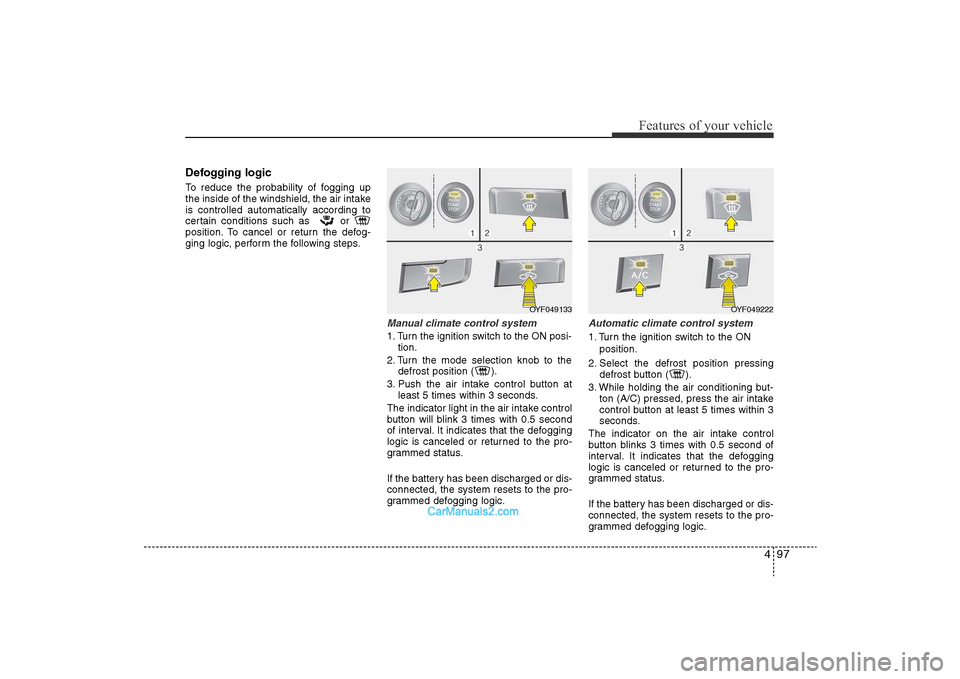
Defogging logicTo reduce the probability of fogging up
the inside of the windshield, the air intake
is controlled automatically according to
certain conditions such as or
position. To cancel or return the defog-
ging logic, perform the following steps.
Manual climate control system1. Turn the ignition switch to the ON posi-tion.
2. Turn the mode selection knob to the defrost position ( ).
3. Push the air intake control button at least 5 times within 3 seconds.
The indicator light in the air intake control
button will blink 3 times with 0.5 second
of interval. It indicates that the defogging
logic is canceled or returned to the pro-
grammed status.
If the battery has been discharged or dis-
connected, the system resets to the pro-
grammed defogging logic.
Automatic climate control system1. Turn the ignition switch to the ON position.
2. Select the defrost position pressing defrost button ( ).
3. While holding the air conditioning but- ton (A/C) pressed, press the air intake
control button at least 5 times within 3
seconds.
The indicator on the air intake control
button blinks 3 times with 0.5 second of
interval. It indicates that the defogging
logic is canceled or returned to the pro-
grammed status.
If the battery has been discharged or dis-
connected, the system resets to the pro-
grammed defogging logic.
OYF049222
OYF049133
YF HMA 4-103.QXP 12/24/2009 5:18 PM Page 97
Page 181 of 380

4 101
Features of your vehicle
Adjust the sunvisor extension forward or
backward (4).
To use the vanity mirror, pull down the
visor and slide the mirror cover (3).
Push the switch to turn the light on or off.
(if equipped)
• : The light turns on.
•
O
: The light turns off.
Power outletThe power outlet is designed to provide
power for mobile telephones or other
devices designed to operate with vehicle
electrical systems. The devices should
draw less than 10 amps with the engine
running.
CAUTION
• Use the power outlet only whenthe engine is running and removethe accessory plug after use.Using the accessory plug for pro-longed periods of time with theengine off could cause the bat- tery to discharge.
• Only use 12V electric accessories which are less than 10A in elec-tric capacity.
• Adjust the air-conditioner or heater to the lowest operatinglevel when using the power outlet.
• Close the cover when not in use. • Some electronic devices can cause electronic interferencewhen plugged into a vehicle’spower outlet. These devices maycause excessive audio static andmalfunctions in other electronicsystems or devices used in yourvehicle.
WARNING
Do not put a finger or a foreign ele-
ment (pin, etc.) into a power outlet
and do not touch with a wet hand.
You may get an electric shock.
OYF049146N
CAUTION
- Vanity mirror
lamp (if equipped)
• Always have the switch in the off
position when the vanity mirrorlamp is not in use. If the sunvisoris closed without the lamp off, it may discharge the battery ordamage the sunvisor.
• Always use the sunvisor exten- sion, after swing the sunvisor tothe side.
YF HMA 4-103.QXP 12/24/2009 5:18 PM Page 101
Page 182 of 380

Features of your vehicle102
4Digital clock (if equipped)Whenever the battery terminals or relat-
ed fuses are disconnected, you must
reset the time.
When the ignition switch is in the ACC or
ON position, the clock buttons operate as
follows:
Hour (1)Pressing the H button with your finger, a
pencil or similar object will advance the
time displayed by one hour.Minute (2)Pressing the M button with your finger, a
pencil or similar object will advance the
time displayed by one minute.Display conversionTo change the 12 hour format to the 24
hour format, press the “H” and “M” but-
tons at the same time for more than 3
seconds.
For example, if the “H” and “M” buttons
are pressed for more than 3 seconds
while the time is 10:15 p.m., the display
will be changed to 22:15.
Clothes hanger (if equipped)To use the hanger, pull down the upper
portion of hanger.
OYF049224
WARNING
Do not adjust the clock while driv-
ing. You may lose your steering
control and cause an accident that
results in severe personal injury or
death.
OUN026348
CAUTION
Do not hang heavy clothes,
because it may damage the hook.
YF HMA 4-103.QXP 12/24/2009 5:19 PM Page 102
Page 201 of 380
4 121
Features of your vehicle
✽NOTICE FOR USING iPod
DEVICE• Some iPod models might not sup- port the communication protocol
and the files will not be played.
Supported iPod models:
- iPod Mini
- iPod 4th(Photo) ~ 6th(Classic)
generation
- iPod Nano 1st~4th generation
- iPod Touch 1st~2nd generation
• The order of search or playback of songs in the iPod can be different
from the order searched in the
audio system.
• If the iPod disabled due to its own malfunction, reset the iPod. (Reset:
Refer to iPod manual)
• An iPod may not operate normally on low battery.
(Continued)
• Deactivate (turn off) the equalizer function of an iPod when adjust-ing the audio system’s volume,and turn off the equalizer of the audio system when using theequalizer of an iPod.
• When the iPod cable is connected, the system can be switched to theAUX mode even without the iPoddevice and may cause noise.Disconnect the iPod cable when you are not using the iPod device.
• When not using an iPod with the car audio, detach the iPod cablefrom iPod. Otherwise, the iPod may remain in accessary mode, andmay not work properly.
CAUTION IN USING
iPod DEVICE
• The Hyundai iPod Power Cable is
needed in order to operate aniPod with the audio buttons on the audio system. The USB cableprovided by Apple may cause a malfunction and should not beused for Hyundai vehicles.❋ The Hyundai iPod Power Cable may be purchased through yourHyundai Dealership.
• When connecting an iPod with the iPod Power Cable, insert the con-nector into the multimedia socketcompletely. If not inserted com-pletely, communications betweenthe iPod and audio may be inter- rupted.
• When adjusting the sound effects of an iPod and the audio system,the sound effects of both devices will overlap and might reduce ordistort the quality of the sound.
(Continued)
YF HMA 4-104~(AUDIO).QXP 12/24/2009 5:21 PM Page 121
Page 221 of 380

55
Driving your vehicle
Ignition switch positionLOCKWithout the immobilizer
The steering wheel locks to protect
against theft. The ignition key can be
removed only in the LOCK position.
When turning the ignition switch to the
LOCK position, push the key inward at
the ACC position and turn the key toward
the LOCK position.
With the immobilizer
The ignition key can be removed only in
the LOCK position.
ACC (Accessory)Without the immobilizer
The steering wheel is unlocked and elec-
trical accessories are operative.✽NOTICEIf difficulty is experienced in turning the
ignition switch to the ACC position, turn
the key while turning the steering wheel
right and left to release the tension.With the immobilizerThe electrical accessories are opera-
tive.ONThe warning lights can be checked
before the engine is started. This is the
normal running position after the engine
is started.Do not leave the ignition switch ON if the
engine is not running to prevent batterydischarge. START
Turn the ignition switch to the START
position to start the engine. The engine
will crank until you release the key; then
it returns to the ON position. The brake
warning lamp can be checked in this
position.
WARNING -
Ignition
switch
• Never turn the ignition switch to
LOCK or ACC while the vehicle is
moving. This would result in loss
of directional control and braking
function, which could cause an
accident.
• The anti-theft steering column lock is not a substitute for the parking
brake. Before leaving the driver’s
seat, always make sure the shift
lever is engaged in P (Park) set the
parking brake fully and shut the
engine off. Unexpected and sud-
den vehicle movement may occur
if these precautions are not taken.
(Continued)
OYF059016
YF hma 5.qxp 11/25/2009 5:42 PM Page 5
Page 224 of 380
Driving your vehicle8
5ACC(Accessory)Press the engine start/stop button while it
is in the OFF position without depressing
the brake pedal.
The electrical accessories are operative.
If you leave the engine start/stop button
in the ACC position for more than 1 hour,
the battery power will turn off automati-
cally to prevent the battery from dis-
charging.ONPress the engine start/stop button while it
button is in the ACC position without
depressing the brake pedal.
The warning lights can be checked
before the engine is started. Do not leave
the ON position if the engine is not run-
ning to prevent battery discharge.STARTTo start the engine, press the brake
pedal and press the engine start/stop
button with the shift lever in the P(Park)
or the N(Neutral) position.
For your safety, start the engine with the
shift lever in the P(Park) position.
✽
NOTICE• If you press the engine start/stop but-
ton without depressing the brake
pedal, the engine does not start and
the engine start/stop button changes
as follows :
OFF →
ACC →
ON →
OFF
• If you leave the engine start/stop but- ton in the ACC or the ON position for
a long time, the battery will be dis-
charged.
WARNING
• Never press the engine start/stop
button while the vehicle is in
motion. This would result in loss
of directional control and braking
function, which could cause an
accident.
• Before leaving the driver’s seat, always make sure the shift lever
is engaged in P (Park), set the
parking brake fully and shut the
engine off. Unexpected and sud-
den vehicle movement may occur
if these precautions are not
taken.
• Never reach for the engine start/stop button, or any other
controls through the steering
wheel while the vehicle is in
motion. The presence of your
hand or arm in this area could
cause a loss of vehicle control,
an accident and serious bodily
injury or death.
• Do not place any movable objects around the driver’s seat as they
may move while driving, interfere
with the driver and lead to an
accident.
YF hma 5.qxp 11/25/2009 5:42 PM Page 8