Page 146 of 380
Features of your vehicle66
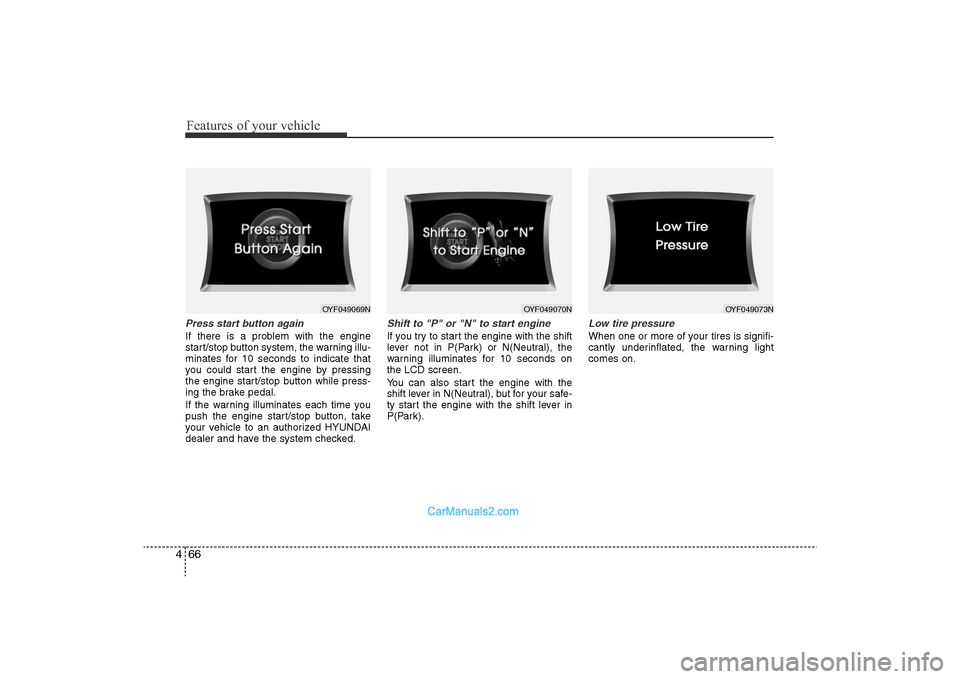
4Press start button againIf there is a problem with the engine
start/stop button system, the warning illu-
minates for 10 seconds to indicate that
you could start the engine by pressing
the engine start/stop button while press-
ing the brake pedal.
If the warning illuminates each time you
push the engine start/stop button, take
your vehicle to an authorized HYUNDAI
dealer and have the system checked.
Shift to "P" or "N" to start engineIf you try to start the engine with the shift
lever not in P(Park) or N(Neutral), the
warning illuminates for 10 seconds on
the LCD screen.
You can also start the engine with the
shift lever in N(Neutral), but for your safe-
ty start the engine with the shift lever in
P(Park).
Low tire pressureWhen one or more of your tires is signifi-
cantly underinflated, the warning light
comes on.
OYF049069N
OYF049070N
OYF049073N
YF HMA 4-103.QXP 12/24/2009 5:13 PM Page 66
Page 156 of 380
Features of your vehicle76
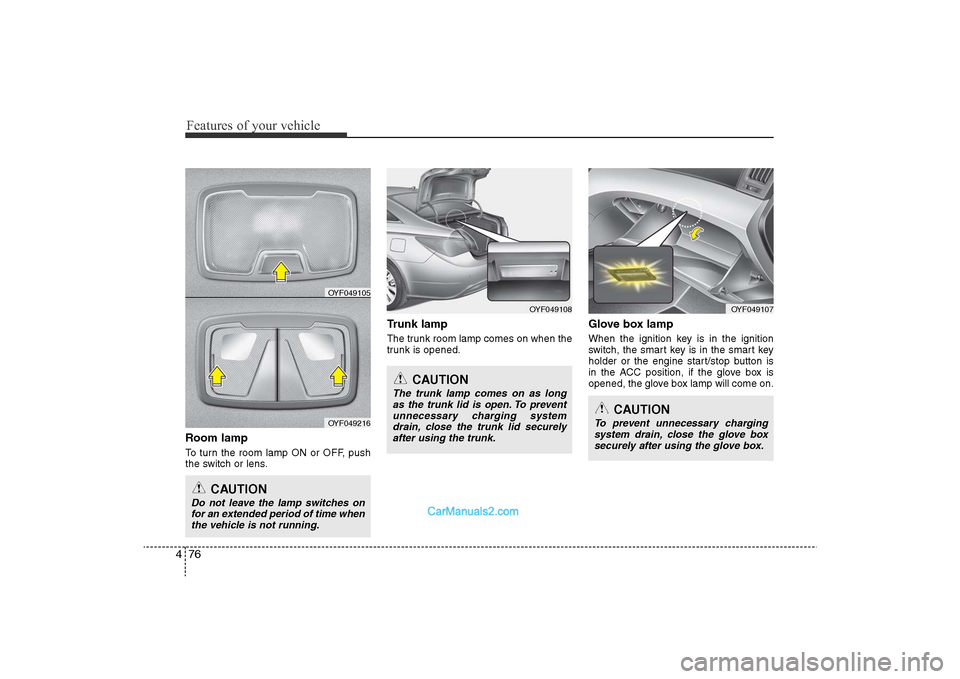
4Room lampTo turn the room lamp ON or OFF, push
the switch or lens.
Trunk lampThe trunk room lamp comes on when the
trunk is opened.
Glove box lampWhen the ignition key is in the ignition
switch, the smart key is in the smart key
holder or the engine start/stop button is
in the ACC position, if the glove box is
opened, the glove box lamp will come on.
OYF049108
CAUTION
Do not leave the lamp switches on
for an extended period of time when the vehicle is not running.
CAUTION
The trunk lamp comes on as longas the trunk lid is open. To preventunnecessary charging systemdrain, close the trunk lid securelyafter using the trunk.
OYF049105
OYF049216
OYF049107
CAUTION
To prevent unnecessary charging system drain, close the glove boxsecurely after using the glove box.
YF HMA 4-103.QXP 12/24/2009 5:15 PM Page 76
Page 190 of 380
![Hyundai Sonata 2011 Owners Manual
Features of your vehicle110
41. AM Selection ButtonPressing the [AM] button selects the AM
band. AM Mode is displayed on the LCD.2. FM Selection ButtonTurns to FM mode and toggles FM1and
FM2 when the](/manual-img/35/16817/w960_16817-189.png "Hyundai Sonata 2011 Owners Manual
Features of your vehicle110
41. AM Selection ButtonPressing the [AM] button selects the AM
band. AM Mode is displayed on the LCD.2. FM Selection ButtonTurns to FM mode and toggles FM1and
FM2 when the")
Features of your vehicle110
41. AM Selection ButtonPressing the [AM] button selects the AM
band. AM Mode is displayed on the LCD.2. FM Selection ButtonTurns to FM mode and toggles FM1and
FM2 when the button is pressed each
time.3. FM/AM ButtonTurns to FM or AM mode, and toggles in
the order of FM1
➟FM2
➟AM
➟FM1...
when the button is pressed each time.
4.
Power ON/OFF Button & VolumeControl Knob
Turns on/off the set when the IGNITION
SWITCH is on ACC or ON. If the button
is turned to the right, it increases the vol-
ume and left,decreases the volume.
• Adjusts the volume of the car audio system. Rotate clockwise to increase
the volume or counterclockwise to
decrease.
5. Preset ButtonPush [1]~[6] buttons less than 0.8 sec-
ond to play the channel saved in each
button.Push Preset button for 0.8 second
or longer to save current channel to the
respective button with a beep.6. SCAN Button• When the button is pressed, it automat-ically scans the radio stations upwards.
• The SCAN feature steps through each station, starting from the initial station,
for ten seconds.
• press the [SCAN] button again to stop the scan feature and to listen to the cur-
rently selected channel.7. MUTE ButtonPress the button to mute the sound.
8. SETUP Button
Press this button to turn to the XM option
and the other adjustment mode.
If no action is taken for 5 seconds after
pressing the button, it will return to the
play mode.(After entering SEPUP mode,
move between items using the left, right
and PUSH functions of the [TUNE]
knob.)
The setup changes in the order of TEXT
SCROLL
➟AV C
➟BT
➟XM
In case of PA760YF, Using the
[ FOLDER ] and [ENTER] button.
The setup Change in the order of
SOUND
➟XM
➟HD RADIO
➟ AVC
➟ CLOCK
➟SCROLL
➟PHONE
➟RETURN
• SCROLL This funtion is used to display charac-
ters longer than the LCD text display
and can be turned ON/OFF through the
sound quality control knob.
(For PA760YF, Press the [ FOLDER ]
button.)
YF HMA 4-104~(AUDIO).QXP 12/24/2009 5:21 PM Page 110
Page 217 of 380
5
Before driving / 5-3
Key / 5-4
Engine start/stop button / 5-7
Manual transaxle /5-11
Automatic transaxle / 5-14
Brake system / 5-21
Cruise control system / 5-31
Economical operation / 5-35
Special driving conditions / 5-37
Winter driving / 5-41
Vehicle load limit / 5-45
Vehicle weight / 5-50
Trailer towing / 5-51
Driving your vehicle
YF hma 5.qxp 11/25/2009 5:41 PM Page 1
Page 223 of 380

57
Driving your vehicle
Illuminated engine start/stop but-
tonWhenever the front door is opened, the
engine start/stop button will illuminate for
your convenience. The light will go off
after about 30 seconds when the door is
closed.
Engine start/stop button positionOFFTo turn off the engine, press the engine
start/stop button with the engine
start/stop button in the ON position and
the shift lever in P(Park). When you press
the engine start/stop button without the
shift lever in P(Park), the engine
start/stop button does not turn to the
OFF position, but turns to the ACC posi-
tion.
✽NOTICEWhen you turn off the engine, the vehi-
cle should be stopped.
ENGINE START/STOP BUTTON (IF EQUIPPED)
OYF059001
WARNING
In an emergency situation while the
vehicle is moving, you can turn off
the engine and turn the engine
start/stop button to the ACC posi-
tion by pressing the engine
start/stop button for more than 2
seconds or 3 times successively
within 3 seconds. If the vehicle is
moving, you can restart the engine
without pressing the brake pedal
by pressing the engine start/stop
button with the shift lever in the
N(Neutral).
YF hma 5.qxp 11/25/2009 5:42 PM Page 7
Page 224 of 380
Driving your vehicle8
5ACC(Accessory)Press the engine start/stop button while it
is in the OFF position without depressing
the brake pedal.
The electrical accessories are operative.
If you leave the engine start/stop button
in the ACC position for more than 1 hour,
the battery power will turn off automati-
cally to prevent the battery from dis-
charging.ONPress the engine start/stop button while it
button is in the ACC position without
depressing the brake pedal.
The warning lights can be checked
before the engine is started. Do not leave
the ON position if the engine is not run-
ning to prevent battery discharge.STARTTo start the engine, press the brake
pedal and press the engine start/stop
button with the shift lever in the P(Park)
or the N(Neutral) position.
For your safety, start the engine with the
shift lever in the P(Park) position.
✽
NOTICE• If you press the engine start/stop but-
ton without depressing the brake
pedal, the engine does not start and
the engine start/stop button changes
as follows :
OFF →
ACC →
ON →
OFF
• If you leave the engine start/stop but- ton in the ACC or the ON position for
a long time, the battery will be dis-
charged.
WARNING
• Never press the engine start/stop
button while the vehicle is in
motion. This would result in loss
of directional control and braking
function, which could cause an
accident.
• Before leaving the driver’s seat, always make sure the shift lever
is engaged in P (Park), set the
parking brake fully and shut the
engine off. Unexpected and sud-
den vehicle movement may occur
if these precautions are not
taken.
• Never reach for the engine start/stop button, or any other
controls through the steering
wheel while the vehicle is in
motion. The presence of your
hand or arm in this area could
cause a loss of vehicle control,
an accident and serious bodily
injury or death.
• Do not place any movable objects around the driver’s seat as they
may move while driving, interfere
with the driver and lead to an
accident.
YF hma 5.qxp 11/25/2009 5:42 PM Page 8
Page 225 of 380

59
Driving your vehicle
Starting the engine1. Carry the smart key or leave it insidethe vehicle.
2. Make sure the parking brake is firmly applied.
3. Place the shift lever in the P(Park) position.
4. Depress the brake pedal.
5. Press the engine start/stop button.
6. In extremely cold weather (below - 18°C / 0°F) or after the vehicle has not
been operated for several days, let the
engine warm up without depressing
the accelerator.
Whether the engine is cold or warm, itshould be started without depressing
the accelerator. •
Even if the smart key is in the vehicle,
if it is far away from you, the engine
may not start.
• When the engine start/stop button is in
the ACC or ON position, if any door is
open, the system checks for the smart
key. If the smart key is not in the vehi-
cle, the warning, "Key is not in vehicle"
will come on, and if all doors are
closed, the chime will also sound for
about 5 seconds. The indicator will turn
off while the vehicle is moving. Keep
the smart key in the vehicle when
using the ACC position or if the vehicle
engine is on.
WARNING
Always wear appropriate shoes
when operating your vehicle.
Unsuitable shoes (high heels, ski
boots, etc.) may interfere with your
ability to use the brake and acceler-
ator pedal.
WARNING
The engine will start only when the
smart key is in the vehicle. Never
allow children or any person who is
unfamiliar with the vehicle to touch
the engine start/stop button or
related parts.
CAUTION
If the engine stalls while you are in
motion, do not attempt to move theshift lever to the P (Park) position. Iftraffic and road conditions permit,you may put the shift lever in theN(Neutral) position while the vehi-cle is still moving and press theengine start/stop button in an attempt to restart the engine.
YF hma 5.qxp 11/25/2009 5:42 PM Page 9
Page 226 of 380
Driving your vehicle10
5✽
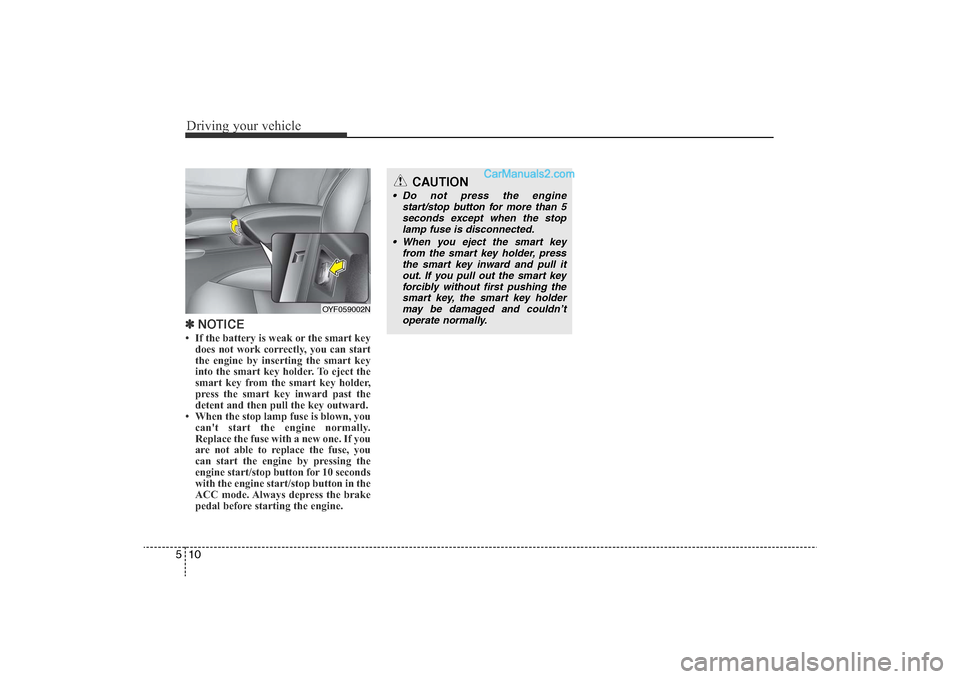
NOTICE• If the battery is weak or the smart key
does not work correctly, you can start
the engine by inserting the smart key
into the smart key holder. To eject the
smart key from the smart key holder,
press the smart key inward past the
detent and then pull the key outward.
• When the stop lamp fuse is blown, you can't start the engine normally.
Replace the fuse with a new one. If you
are not able to replace the fuse, you
can start the engine by pressing the
engine start/stop button for 10 seconds
with the engine start/stop button in the
ACC mode. Always depress the brake
pedal before starting the engine.
OYF059002N
CAUTION
• Do not press the engine
start/stop button for more than 5seconds except when the stop lamp fuse is disconnected.
• When you eject the smart key from the smart key holder, pressthe smart key inward and pull itout. If you pull out the smart keyforcibly without first pushing the smart key, the smart key holdermay be damaged and couldn’t operate normally.
YF hma 5.qxp 11/25/2009 5:42 PM Page 10