2011 Hyundai Azera remove
[x] Cancel search: removePage 201 of 403
4125
Features of your vehicle
✽NOTICE
• If you install an aftermarket HID
head lamp, your vehicle’s audio and
electronic device may malfunction.
• Prevent chemicals such as perfume,
cosmetic oil, sun cream, hand cleaner,
and air freshener from contacting the
interior parts because they may cause
damage or discoloration.
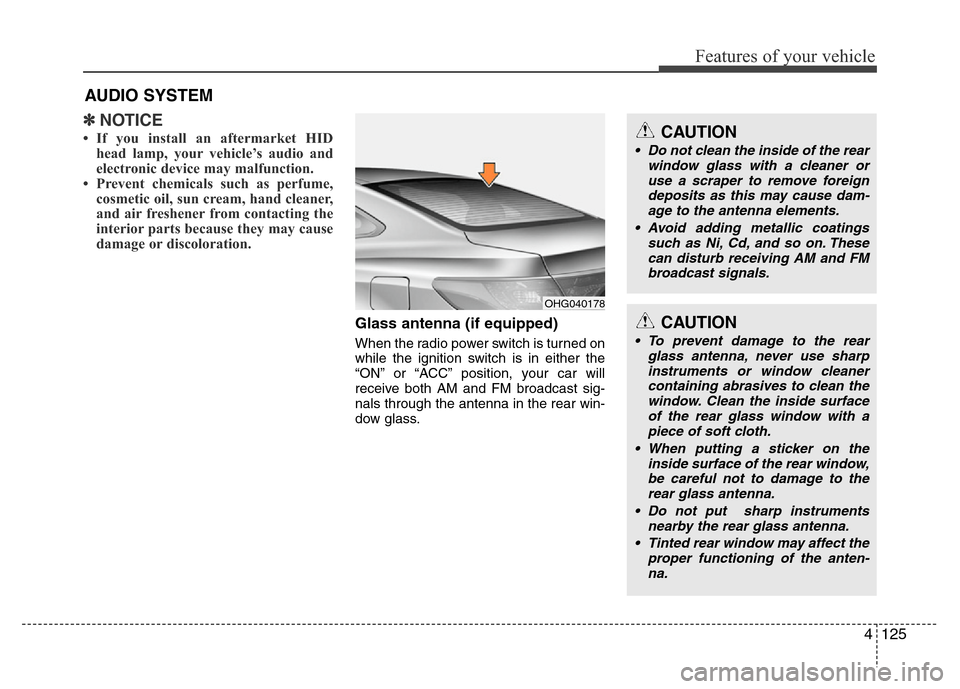
Glass antenna (if equipped)
When the radio power switch is turned on
while the ignition switch is in either the
“ON” or “ACC” position, your car will
receive both AM and FM broadcast sig-
nals through the antenna in the rear win-
dow glass.
AUDIO SYSTEM
OHG040178
CAUTION
• Do not clean the inside of the rear
window glass with a cleaner or
use a scraper to remove foreign
deposits as this may cause dam-
age to the antenna elements.
• Avoid adding metallic coatings
such as Ni, Cd, and so on. These
can disturb receiving AM and FM
broadcast signals.
CAUTION
• To prevent damage to the rear
glass antenna, never use sharp
instruments or window cleaner
containing abrasives to clean the
window. Clean the inside surface
of the rear glass window with a
piece of soft cloth.
• When putting a sticker on the
inside surface of the rear window,
be careful not to damage to the
rear glass antenna.
• Do not put sharp instruments
nearby the rear glass antenna.
• Tinted rear window may affect the
proper functioning of the anten-
na.
Page 220 of 403

Features of your vehicle
144 4
• Pairing a phone
Before using Bluetooth®Wireless
Technology features, the phone must be
paired (registered) with the audio sys-
tem. Up to 5 phones can be paired with
the system.
NOTE:
• The pairing procedure of the phone
varies according to each phone
model. Before attempting to pair
phone, please see your phone’s
User’s Guide for instructions.
• Once pairing with the phone is com-
pleted, there is no need to pair with
that phone again unless the phone
is deleted manually from the audio
system (refer “Deleting a Phone”
section) or the vehicle’s information
is removed from the phone.
1. Press button to enter SETUP
mode.
2. Select “Phone”, then “Pair” in PHONE
menu.
3. The audio displays “searching
----
passkey: 0000”4. Search the
Bluetooth®Wireless
Technology system on your phone.
Your phone should display your [vehi-
cle model name] on the
Bluetooth®
Wireless Technology device list. Then
attempt pairing on your phone.
NOTE:
If the phone is paired to two or more
vehicles of the same model, i.e. both
vehicles are HYUNDAI
AZERA/GRANDEUR, some phones
may not handle
Bluetooth®Wireless
Technology devices of that name cor-
rectly. In this case, you may need to
change the name displayed on your
phone from AZERA/ GRANDEUR to
AZERA1/GRANDEUR1 and
AZERA2/GRANDEUR2.
Refer to your phone’s User’s Guide, or
contact your cellular carrier or phone
manufacturer for instructions.• Connecting a phone
When the
Bluetooth®Wireless
Technology system is enabled, the
phone previously used is automatically
selected and re-connected. If you want to
select different phone previously paired,
the phone can be selected through
“Select Phone” menu.
Only a selected phone can be used with
the hands-free system at a time.
1. Press button to enter SETUP
mode.
2. Select “Phone”, then “Select” in
PHONE menu.
3. Select desired phone name from the
list shown.
• Deleting a Phone
The paired phone can be deleted.
- When the phone is deleted, all the infor-
mation associated with that phone is
also deleted (including phonebook).
- If you want to use the deleted phone
with the audio system again, pairing
procedure must be completed once
more.
1. Press button to enter SETUP
mode.
2. Select “Phone”, then “Delete” in
PHONE menu.
3. Select desired phone name from the
list shown.
SETUP
SETUP
SETUP
Page 228 of 403
55
Driving your vehicle
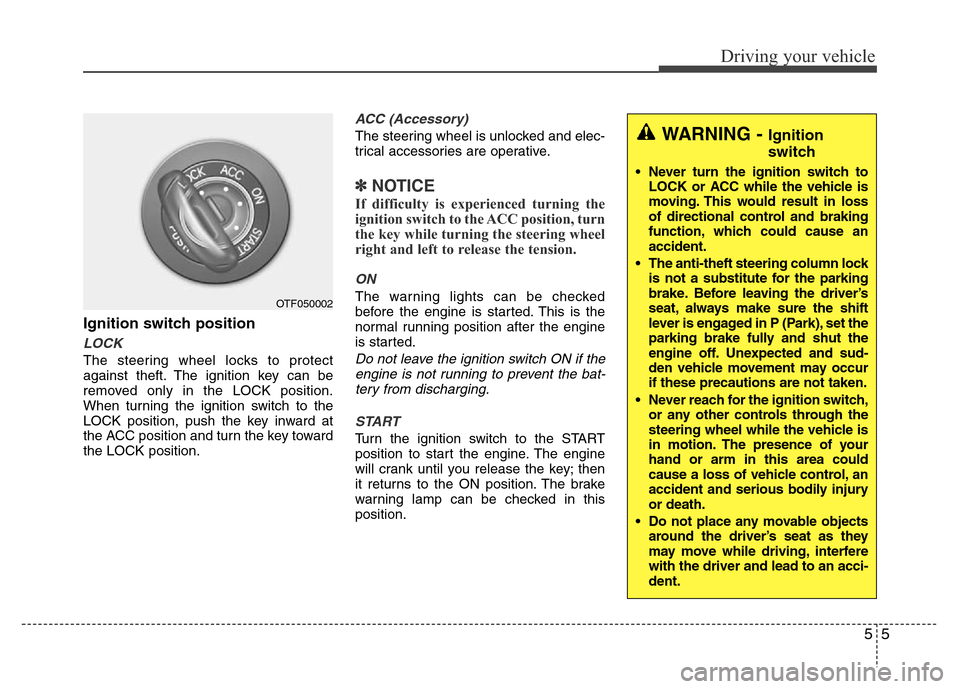
Ignition switch position
LOCK
The steering wheel locks to protect
against theft. The ignition key can be
removed only in the LOCK position.
When turning the ignition switch to the
LOCK position, push the key inward at
the ACC position and turn the key toward
the LOCK position.
ACC (Accessory)
The steering wheel is unlocked and elec-
trical accessories are operative.
✽NOTICE
If difficulty is experienced turning the
ignition switch to the ACC position, turn
the key while turning the steering wheel
right and left to release the tension.
ON
The warning lights can be checked
before the engine is started. This is the
normal running position after the engine
is started.
Do not leave the ignition switch ON if the
engine is not running to prevent the bat-
tery from discharging.
START
Turn the ignition switch to the START
position to start the engine. The engine
will crank until you release the key; then
it returns to the ON position. The brake
warning lamp can be checked in this
position.
OTF050002
WARNING - Ignition
switch
• Never turn the ignition switch to
LOCK or ACC while the vehicle is
moving. This would result in loss
of directional control and braking
function, which could cause an
accident.
• The anti-theft steering column lock
is not a substitute for the parking
brake. Before leaving the driver’s
seat, always make sure the shift
lever is engaged in P (Park), set the
parking brake fully and shut the
engine off. Unexpected and sud-
den vehicle movement may occur
if these precautions are not taken.
• Never reach for the ignition switch,
or any other controls through the
steering wheel while the vehicle is
in motion. The presence of your
hand or arm in this area could
cause a loss of vehicle control, an
accident and serious bodily injury
or death.
• Do not place any movable objects
around the driver’s seat as they
may move while driving, interfere
with the driver and lead to an acci-
dent.
Page 238 of 403
515
Driving your vehicle
✽NOTICE
• In sports mode, the driver must exe-
cute upshifts in accordance with road
conditions, taking care to keep the
engine speed below the red zone.
• In sports mode, only the 6 forward
gears can be selected. To reverse or
park the vehicle, move the shift lever
to the R (Reverse) or P (Park) position
as required.
• In sports mode, downshifts are made
automatically when the vehicle slows
down. When the vehicle stops, 1st gear
is automatically selected.
• In sports mode, when the engine rpm
approaches the red zone shift points
are varied to upshift automatically.
• To maintain the required levels of
vehicle performance and safety, the
system may not execute certain
gearshifts when the shift lever is oper-
ated.
• When driving on a slippery road,
push the shift lever forward into the
+(up) position. This causes the
transaxle to shift into the 2nd gear
which is better for smooth driving on
a slippery road. Push the shift lever to
the -(down) side to shift back to the 1st
gear.
Shift lock system
For your safety, the automatic transaxle
has a shift lock system which prevents
shifting the transaxle from P (Park) into R
(Reverse) unless the brake pedal is
depressed.
To shift the transaxle from P (Park) into R
(Reverse):
1. Depress and hold the brake pedal.
2. Start the engine or turn the ignition
switch to the ON position.
3. Move the shift lever.
If the brake pedal is repeatedly
depressed and released with the shift
lever in the P (Park) position, a chattering
noise near the shift lever may be heard.
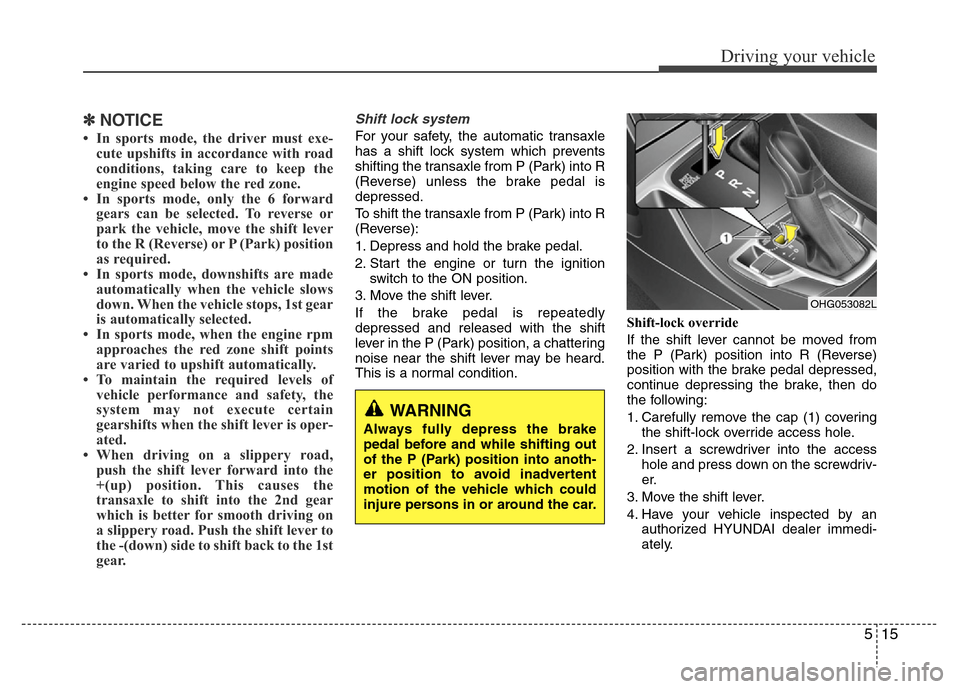
This is a normal condition.Shift-lock override
If the shift lever cannot be moved from
the P (Park) position into R (Reverse)
position with the brake pedal depressed,
continue depressing the brake, then do
the following:
1. Carefully remove the cap (1) covering
the shift-lock override access hole.
2. Insert a screwdriver into the access
hole and press down on the screwdriv-
er.
3. Move the shift lever.
4. Have your vehicle inspected by an
authorized HYUNDAI dealer immedi-
ately.
WARNING
Always fully depress the brake
pedal before and while shifting out
of the P (Park) position into anoth-
er position to avoid inadvertent
motion of the vehicle which could
injure persons in or around the car.
OHG053082L
Page 239 of 403
Driving your vehicle
16 5
Ignition key interlock system
(if equipped)
The ignition key cannot be removed
unless the shift lever is in the P (Park)
position.
Good driving practices
• Never move the shift lever from P
(Park) or N (Neutral) to any other posi-
tion with the accelerator pedal
depressed.
• Never move the shift lever into P (Park)
when the vehicle is in motion.
• Be sure the car is completely stopped
before you attempt to shift into R
(Reverse) or D (Drive).
• Never take the car out of gear and
coast down a hill. This may be
extremely hazardous. Always leave the
car in gear when moving.
• Do not "ride" the brakes. This can
cause them to overheat and malfunc-
tion. Instead, when you are driving
down a long hill, slow down and shift to
a lower gear. When you do this, engine
braking will help slow the car.
• Slow down before shifting to a lower
gear. Otherwise, the lower gear may
not be engaged.
• Always use the parking brake. Do not
depend on placing the transaxle in P
(Park) to keep the car from moving.• Exercise extreme caution when driving
on a slippery surface. Be especially
careful when braking, accelerating or
shifting gears. On a slippery surface,
an abrupt change in vehicle speed can
cause the drive wheels to lose traction
and the vehicle to go out of control.
• Optimum vehicle performance and
economy is obtained by smoothly
depressing and releasing the accelera-
tor pedal.
Page 283 of 403

Driving your vehicle
60 5
Tire chains
Since the sidewalls of radial tires are
thinner, they can be damaged by mount-
ing some types of snow chains on them.
Therefore, the use of snow tires is rec-
ommended instead of snow chains. Do
not mount tire chains on vehicles
equipped with aluminum wheels; snow
chains may cause damage to the wheels.
If snow chains must be used, use wire-
type chains with a thickness of less than
12 mm (0.47 in). Damage to your vehicle
caused by improper snow chain use is
not covered by your vehicle manufactur-
ers warranty.
Install tire chains only on the front tires.Chain installation
When installing chains, follow the manu-
facturer's instructions and mount them as
tightly as you can. Drive slowly with
chains installed. If you hear the chains
contacting the body or chassis, stop and
tighten them. If they still make contact,
slow down until it stops. Remove the
chains as soon as you begin driving on
cleared roads.
CAUTION
• Make sure the snow chains are
the correct size and type for your
tires. Incorrect snow chains can
cause damage to the vehicle body
and suspension and may not be
covered by your vehicle manufac-
turer warranty. Also, the snow
chain connecting hooks may be
damaged from contacting vehicle
components causing the snow
chains to come loose from the
tire. Make sure the snow chains
are SAE class “S” certified.
• Always check chain installation
for proper mounting after driving
approximately 0.5 to 1 km (0.3 to
0.6 miles) to ensure safe mount-
ing. Retighten or remount the
chains if they are loose.
WARNING
- Mounting chains
When mounting snow chains, park
the vehicle on level ground away
from traffic. Turn on the vehicle
Hazard Warning flashers and place
a triangular emergency warning
device behind the vehicle if avail-
able. Always place the vehicle in P
(Park), apply the parking brake and
turn off the engine before installing
snow chains.
1JBA4068
Page 285 of 403

Driving your vehicle
62 5
To keep locks from freezing
To keep the locks from freezing, squirt an
approved de-icer fluid or glycerine into
the key opening. If a lock is covered with
ice, squirt it with an approved de-icing
fluid to remove the ice. If the lock is
frozen internally, you may be able to thaw
it out by using a heated key. Handle the
heated key with care to avoid injury.
Use approved window washer
anti-freeze in system
To keep the water in the window washer
system from freezing, add an approved
window washer anti-freeze solution in
accordance with instructions on the con-
tainer. Window washer anti-freeze is
available from an authorized HYUNDAI
dealer and most auto parts outlets. Do
not use engine coolant or other types of
anti-freeze as these may damage the
paint finish.
Don't let your parking brake
freeze
Under some conditions your parking
brake can freeze in the engaged position.
This is most likely to happen when there
is an accumulation of snow or ice around
or near the rear brakes or if the brakes
are wet. If there is a risk the parking
brake may freeze, apply it only temporar-
ily while you put the shift lever in P (Park)
and block the rear wheels so the vehicle
cannot roll. Then release the parking
brake.
Don't let ice and snow accumu-
late underneath
Under some conditions, snow and ice
can build up under the fenders and inter-
fere with the steering. When driving in
severe winter conditions where this may
happen, you should periodically check
underneath the car to be sure the move-
ment of the front wheels and the steering
components is not obstructed.
Carry emergency equipment
Depending on the severity of the weath-
er where you drive your car, you should
carry appropriate emergency equipment.
Some of the items you may want to carry
include tire chains, tow straps or chains,
flashlight, emergency flares, sand, shovel,
jumper cables, window scraper, gloves,
ground cloth, coveralls, blanket, etc.
Don't place foreign objects or
materials in the engine compart-
ment
Placement of foreign objects or materials
which prevent cooling of the engine, in
the engine compartment, may cause a
failure or combustion. The manufacturer
is not responsible for the damage caused
by such placement.
Page 294 of 403
67
What to do in an emergency
IF THE ENGINE OVERHEATS
If your temperature gauge indicates over-
heating, you will experience a loss of
power, or hear loud pinging or knocking,
the engine is probably too hot. If this hap-
pens, you should:
1. Pull off the road and stop as soon as it
is safe to do so.
2. Place the shift lever in P (Park) and set
the parking brake. If the air condition-
ing is on, turn it off.
3. If engine coolant is running out under
the car or steam is coming out from
the hood, stop the engine. Do not open
the hood until the coolant has stopped
running or the steaming has stopped.
If there is no visible loss of engine
coolant and no steam, leave the
engine running and check to be sure
the engine cooling fan is operating. If
the fan is not running, turn the engine
off.4. Check to see if the water pump drive
belt is missing. If it is not missing,
check to see that it is tight. If the drive
belt seems to be satisfactory, check for
coolant leaking from the radiator,
hoses or under the car. (If the air con-
ditioning had been in use, it is normal
for cold water to be draining from it
when you stop).
5. If the water pump drive belt is broken
or engine coolant is leaking out, stop
the engine immediately and call the
nearest authorized HYUNDAI dealer
for assistance.6. If you cannot find the cause of the
overheating, wait until the engine tem-
perature has returned to normal. Then,
if coolant has been lost, carefully add
coolant to the reservoir to bring the
fluid level in the reservoir up to the
halfway mark.
7. Proceed with caution, keeping alert for
further signs of overheating. If over-
heating happens again, call an author-
ized HYUNDAI dealer for assistance.
WARNING
While the engine is running, keep
hair, hands and clothing away from
moving parts such as the fan and
drive belts to prevent injury.
WARNING
Do not remove the radiator cap
when the engine is hot. This can
allow coolant to blow out of the
opening and cause serious burns.
CAUTION
• Serious loss of coolant indicates
there is a leak in the cooling sys-
tem and this should be checked
as soon as possible by an author-
ized HYUNDAI dealer.
• When the engine overheats from
low engine coolant, suddenly
adding engine coolant may cause
cracks in the engine. To prevent
damage, add engine coolant
slowly in small quantities.