Page 275 of 427

These indicators on the instrument
panel show which position the shif t
lever is in.The ‘‘D’’ indicator comes on f or a
f ew seconds when you turn the
ignition switch to the ON (II)
position. If it f lashes while driving (in
any shif t position), it indicates a
possible problem in the transmission.
If the malf unction indicator lamp
comes on along with the ‘‘D’’
indicator, there is a problem with the
automatic transmission control
system. Avoid rapid acceleration, and
have the transmission checked by
your dealer as soon as possible.
To shif t f rom Park to any position,
pressfirmlyonthebrakepedal,and
pull the shif t lever toward you. You
cannot shif t out of Park when the
ignition switch is in the LOCK (0) or
ACCESSORY (I) position.
When the ‘‘D’’ indicator warns of a
possible problem with the
transmission, you will see a ‘‘CHECK
TRANSMISSION’’ message on the
multi-inf ormation display (see page
).
91
CONT INUED
On models with navigation system
Shif t L ever Position Indicators Shif ting
Automatic Transmission
Driving
271
SHIFT LEVER
Main MenuTable of Contents
Page 276 of 427

�µ�µThis position mechani-
cally locks the transmission. Use
Park whenever you are turning of f or
starting the engine. To shif t out of
Park, you must press on the brake
pedal and have your f oot of f the
accelerator pedal. Pull the shif t lever
towards you, then move it out of
Park.
If you have done all of the above and
still cannot move the lever out of
Park, see on
page .
You must also pull the shif t lever
towards you to shift into Park. To
avoid transmission damage, come to
a complete stop bef ore shif ting into
Park. The shif t lever must be in Park
for you to remove the key from the
ignition switch. Press the brake
pedal and pull the shif t lever towards
you to shif t f rom Park to reverse. To
shif t f rom reverse to neutral, come
to a complete stop, and then shif t.
Pull the shif t lever towards you
bef ore shif ting into reverse f rom
neutral.
275
To shift from: PtoR
RtoP
NtoR Dto2 2to1
1to2
2toD
DtoN
NtoD RtoN Do this:
Press the brake pedal, and
pull the shif t lever towardsyou.
Pull the shif t lever towards you.
Move the shift lever.
Automatic Transmission
Park (P)
Shif t L ock Release Reverse (R)
272
Main MenuTable of Contents
Page 277 of 427

�µ
�µ
CONT INUED
Press the D3 switch on the end of
the shif t lever to turn this mode on
or of f ; the D3 indicator comes on
whenever D3 is selected.
TheD3switchcanbeoperatedonly
when the ignition switch is in the ON
(II) position and the shif t lever is in
the D position.
Use this position f or
your normal driving. The
transmission automatically selects a
suitable gear (1 through 5) f or your
speed and acceleration. You may
notice the transmission shif ting up at
higher engine speeds when the
engine is cold. This helps the engine
warm up f aster.
Af ter you stop in D, 2, 1, N, or R
position with the ignition switch in
the ACCESSORY (I) position f or an
extended period, you may not be
able to move the shift lever from
neutral to reverse or Park. In this
case, press the brake pedal, and turn
the ignition switch to the ON (II)
position, then shif t out of neutral. Use neutral if you
need to restart a stalled engine, or if
it is necessary to stop brief ly with
the engine idling. Shif t to the Park
position if you need to leave your
vehicle for any reason. Press on the
brake pedal when you are moving
the shift lever from neutral to
another gear.
Automatic Transmission
D3Drive (D)
Neutral (N)
Driving
273
D3 SWITCH
Main MenuTable of Contents
Page 279 of 427

�µTo shif t f rom second to
first, pull the shift lever towards you,
then shif t to the lower gear. This
position locks the transmission in
f irst gear. By upshif ting and
downshif ting through 1, 2, and D,
you can operate the transmission
much like a manual transmission
without a clutch pedal.
If you shif t into f irst position when
the vehicle speed is above 28 mph
(45 km/h), the transmission shif ts
into second gear first to avoid
sudden engine braking. If you exceed the maximum speed
f or the gear you are in, the engine
speed will enter into the tachometer’s
red zone. If this occurs, you may f eel
the engine cut in and out. This is
caused by a limiter in the engine’s
computer controls. The engine will
run normally when you reduce the
rpm below the red zone.
This allows you to move the shif t
lever out of Park if the normal
method of pushing on the brake
pedal and pulling the shif t lever does
not work.
Set the parking brake.
Make sure the ignition switch is in
the LOCK (0) position.
Putaclothonthenotchof the
shif t lock release slot cover to
prevent scratches. Using a small
f lat-tip screwdriver or a metal
f ingernail f ile, caref ully pry on the
notch of the cover to remove it.
1. 2. 3.
CONT INUED
First (1) Engine Speed Limiter Shift Lock Release
Automatic Transmission
Driving
275
Main MenuTable of Contents
Page 280 of 427
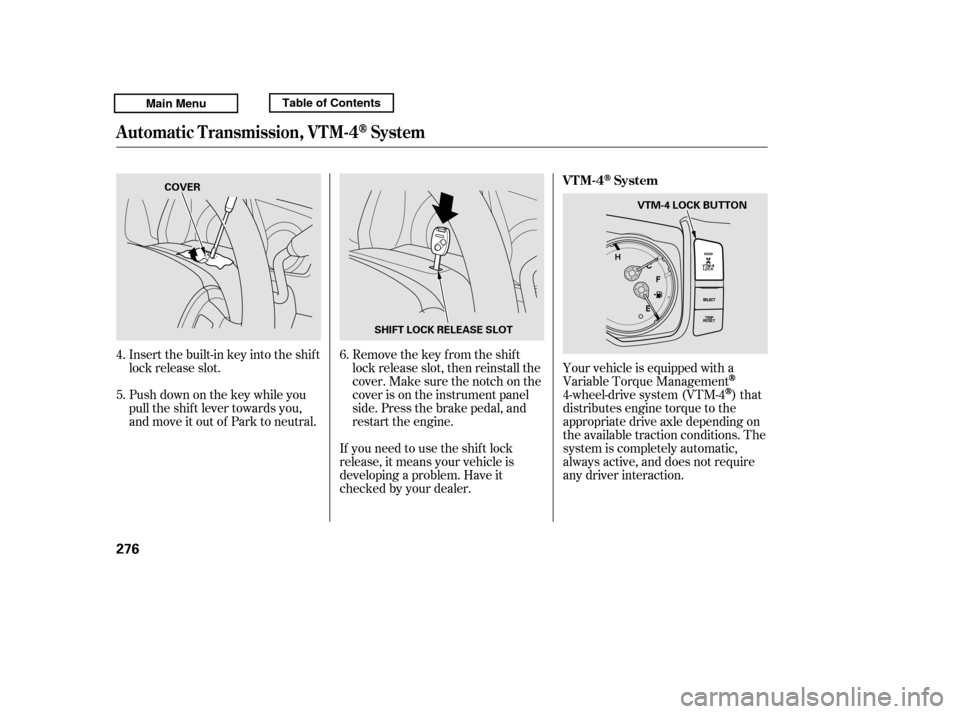
Insert the built-in key into the shift
lock release slot.
Push down on the key while you
pull the shif t lever towards you,
and move it out of Park to neutral.Remove the key from the shift
lock release slot, then reinstall the
cover. Make sure the notch on the
cover is on the instrument panel
side. Press the brake pedal, and
restart the engine.
If you need to use the shif t lock
release, it means your vehicle is
developing a problem. Have it
checked by your dealer. Your vehicle is equipped with a
Variable Torque Management
4-wheel-drive system (VTM-4)that
distributes engine torque to the
appropriate drive axle depending on
the available traction conditions. The
system is completely automatic,
always active, and does not require
any driver interaction.
6.
4. 5.
Automatic Transmission, VTM-4System
VTM-4System
276
SHIFT LOCK RELEASE SLOT
COVER
VTM-4 LOCK BUTTON
Main MenuTable of Contents
Page 290 of 427

As required by the FCC:This device complies with Part 15 of theFCC rules. Operation is subject to the
f ollowing two conditions: (1) This devicemay not cause harmf ul interf erence, and (2) this device must accept any
interf erence received, includinginterf erence that may cause undesiredoperation.
Changes or modif ications not expresslyapproved by the party responsible f or
compliance could void the user’sauthority to operate the equipment. This device complies with Industry
Canada Standard RSS-210.Operation is subject to the f ollowing two
conditions: (1) this device may not cause interf erence, and (2) this device mustaccept any interf erence that may cause
undesired operation of the device.
Always use the parking brake when
you park your vehicle. Make sure
the parking brake is set f irmly, or
your vehicle may roll if it is parked
on an incline.
Set the parking brake bef ore you put
the transmission in Park. This keeps
the vehicle from moving and putting
pressure on the parking mechanism
in the transmission.
Tire Pressure Monitoring System (TPMS), Parking
Parking
286
Main MenuTable of Contents
Page 291 of 427
Make sure the parking brake is
f ully released bef ore driving away.
Driving with the parking brake
partially set can overheat or
damage the rear brakes.
Make sure the moonroof (if
equipped) and the windows are
closed.
Turn of f the lights.
Place any packages, valuables, etc.
in the cargo area in your vehicle or
the In-Bed Trunk, or take them
with you.
Lock the doors.
Check the indicator on the driver’s
door to verify that the security
system is set.
Never park over dry leaves, tall
grass, or other f lammable
materials. The hot three way
catalytic converter could cause
these materials to catch on fire.If the vehicle is f acing uphill, turn
the f ront wheels away f rom the
curb.
If the vehicle is f acing downhill,
turn the front wheels toward the
curb.
On vehicles with security system
Parking
Parking T ips
Driving
287
Main MenuTable of Contents
Page 292 of 427

Your vehicle is equipped with disc
brakes at all f our wheels. A power
assist helps reduce the ef f ort needed
on the brake pedal. The emergency
brake assist system increases the
stopping f orce when you depress the
brake pedal hard in an emergency
situation. The anti-lock brake system
(ABS) helps you retain steering
control when braking very hard.
Resting your f oot on the pedal keeps
the brakes applied lightly, builds up
heat, reduces their ef f ectiveness and
reduces brake pad lif e. In addition,
f uel economy can be reduced. It also
keeps your brake lights on all the
time, conf using drivers behind you.Constant application of the brakes
when going down a long hill builds
up heat and reduces their ef f ective-
ness. Use the engine to assist the
brakes by taking your f oot of f the
accelerator and downshif ting to a
lower gear.
Check the brakes after driving
through deep water. Apply the
brakes moderately to see if they f eel
normal. If not, apply them gently and
f requently until they do. Be extra
cautious and alert in your driving.
The hydraulic system that operates
the brakes has two separate circuits.
Each circuit works diagonally across
the vehicle (the lef t-f ront brake is
connected with the right-rear brake,
etc.). If one circuit should develop a
problem, you will still have braking
at two wheels.
If the brake pads need replacing, you
will hear a distinctive, metallic
screeching sound when you apply
the brake pedal. If you do not have
the brake pads replaced, they will
screech all the time. It is normal f or
the brakes to occasionally squeal or
squeak when you apply them.
Braking System Design
Brake Pad Wear Indicators
Braking System
288
Main MenuTable of Contents