Page 464 of 574
�Û�Ý
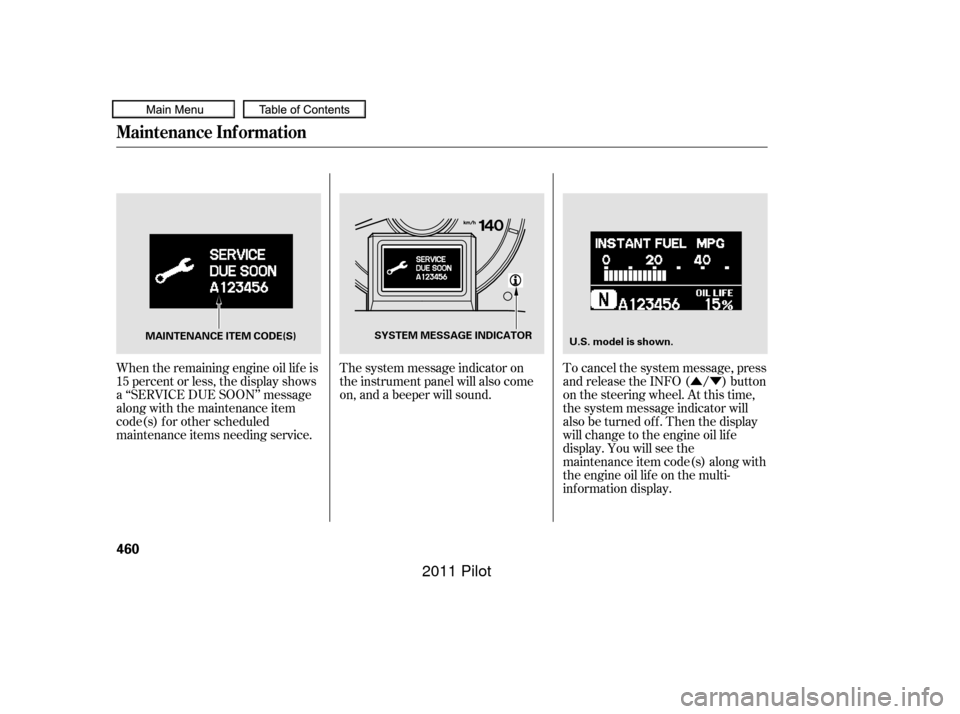
When the remaining engine oil lif e is
15 percent or less, the display shows
a ‘‘SERVICE DUE SOON’’ message
along with the maintenance item
code(s) f or other scheduled
maintenance items needing service. The system message indicator on
the instrument panel will also come
on, and a beeper will sound.
To cancel the system message, press
and release the INFO ( / ) button
on the steering wheel. At this time,
the system message indicator will
also be turned of f . Then the display
will change to the engine oil lif e
display. You will see the
maintenance item code(s) along with
the engine oil lif e on the multi-
inf ormation display.
Maintenance Inf ormation
460
MAINTENANCE ITEM CODE(S)
SYSTEM MESSAGE INDICATOR
U.S. model is shown.
10/01/26 19:43:26 31SZA620_465
2011 Pilot
Page 465 of 574
You will also see the system
message every time you turn the
ignition switch to the ON (II)
position until you have the indicated
maintenance perf ormed by your
dealer.
The maintenance item code(s)
indicate the main and sub items
required at the time of the oil change
(see page ).The system message indicator on
the instrument panel will also come
on, and a beeper will sound.
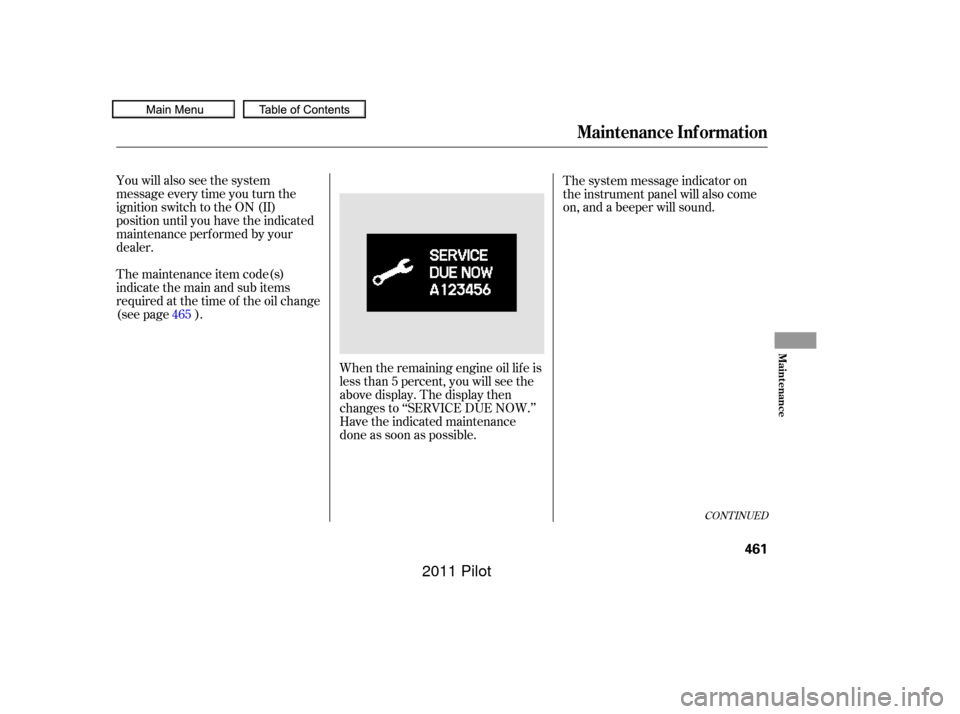
When the remaining engine oil lif e is
less than 5 percent, you will see the
above display. The display then
changes to ‘‘SERVICE DUE NOW.’’
Have the indicated maintenance
done as soon as possible.
465
CONT INUED
Maintenance Inf ormation
Maint enance
461
10/01/26 19:43:34 31SZA620_466
2011 Pilot
Page 466 of 574
�Û�ÝYou will also see the system
message every time you turn the
ignition switch to the ON (II)
position until you have the indicated
maintenance perf ormed by your
dealer.
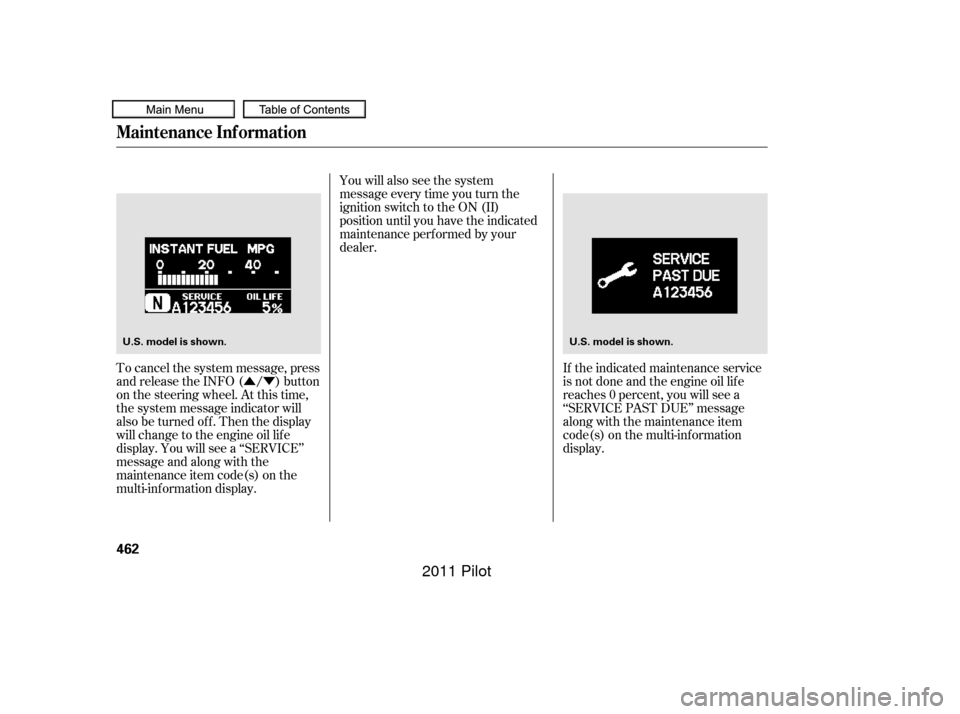
To cancel the system message, press
and release the INFO ( / ) button
on the steering wheel. At this time,
the system message indicator will
also be turned of f . Then the display
will change to the engine oil lif e
display. You will see a ‘‘SERVICE’’
message and along with the
maintenance item code(s) on the
multi-inf ormation display. If the indicated maintenance service
is not done and the engine oil lif e
reaches 0 percent, you will see a
‘‘SERVICE PAST DUE’’ message
along with the maintenance item
code(s) on the multi-inf ormation
display.
Maintenance Inf ormation
462
U.S. model is shown.
U.S. model is shown.
10/01/26 19:43:40 31SZA620_467
2011 Pilot
Page 467 of 574
�Û�Ý�Û�Ý
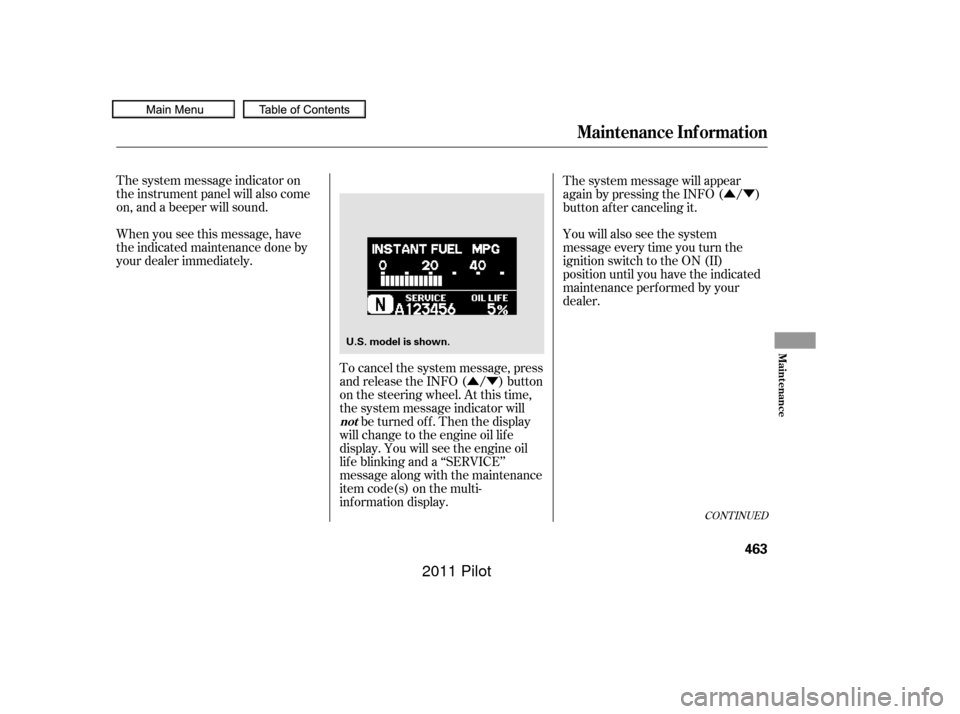
When you see this message, have
the indicated maintenance done by
your dealer immediately. The system message indicator on
the instrument panel will also come
on, and a beeper will sound. You will also see the system
message every time you turn the
ignition switch to the ON (II)
position until you have the indicated
maintenance perf ormed by your
dealer.
To cancel the system message, press
and release the INFO ( / ) button
on the steering wheel. At this time,
the system message indicator will be turned of f . Then the display
will change to the engine oil lif e
display. You will see the engine oil
lif e blinking and a ‘‘SERVICE’’
message along with the maintenance
item code(s) on the multi-
inf ormation display. The system message will appear
again by pressing the INFO ( / )
button after canceling it.
CONT INUED
Maintenance Inf ormation
not
Maint enance
463
U.S. model is shown.
10/01/26 19:43:49 31SZA620_468
2011 Pilot
Page 468 of 574
�Û�Ý
�Û�Ý Negative distance traveled means
your vehicle has passed the
maintenance required point. The system message will appear
again by pressing the INFO ( / )
button after canceling it.
You will also see the system
message every time you turn the
ignition switch to the ON (II)
position until you have the indicated
maintenance perf ormed by your
dealer.
Immediately have the service
perf ormed, and make sure to reset
the display as described on page .
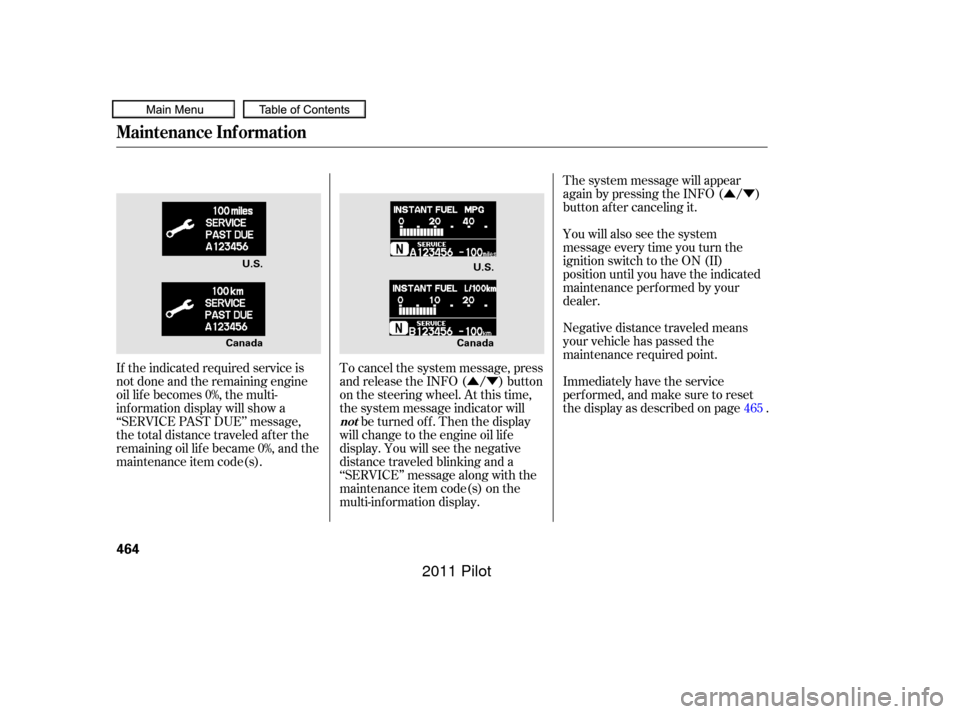
If the indicated required service is
not done and the remaining engine
oil lif e becomes 0%, the multi-
inf ormation display will show a
‘‘SERVICE PAST DUE’’ message,
the total distance traveled after the
remaining oil lif e became 0%, and the
maintenance item code(s). To cancel the system message, press
and release the INFO ( / ) button
on the steering wheel. At this time,
the system message indicator will
be turned of f . Then the display
will change to the engine oil lif e
display. You will see the negative
distance traveled blinking and a
‘‘SERVICE’’ message along with the
maintenance item code(s) on the
multi-inf ormation display. 465
Maintenance Inf ormation
not
464
U.S.
U.S.
Canada Canada
10/01/26 19:43:59 31SZA620_469
2011 Pilot
Page 487 of 574
CONT INUED
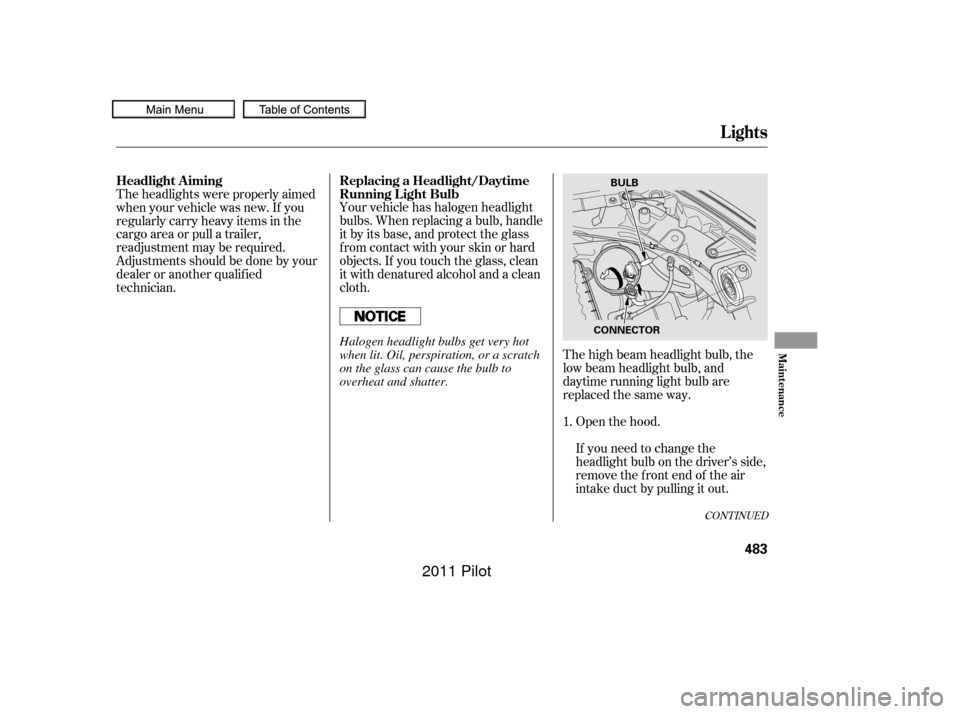
Your vehicle has halogen headlight
bulbs. When replacing a bulb, handle
it by its base, and protect the glass
f rom contact with your skin or hard
objects. If you touch the glass, clean
it with denatured alcohol and a clean
cloth.Open the hood.
If you need to change the
headlight bulb on the driver’s side,
remove the f ront end of the air
intake duct by pulling it out.
Theheadlightswereproperlyaimed
when your vehicle was new. If you
regularly carry heavy items in the
cargo area or pull a trailer,
readjustment may be required.
Adjustmentsshouldbedonebyyour
dealer or another qualif ied
technician.
The high beam headlight bulb, the
low beam headlight bulb, and
daytime running light bulb are
replaced the same way.
1.
Headlight A iming
Replacing a Headlight/Daytime
Running L ight Bulb
Lights
Maint enance
483
CONNECTOR BULBHalogen headlight bulbs get very hot
when lit. Oil, perspiration, or a scratch
on the glass can cause the bulb to
overheat and shatter.
10/01/26 19:47:00 31SZA620_488
2011 Pilot
Page 564 of 574

CONT INUED
..............................
Economy, Fuel .399
Electronic Stability Control (ESC) ........................................
System .431
..................................
Emergencies .507
.............
Battery, Jump Starting . 517
...........
Brake System Indicator . 523
................
Changing a Flat Tire . 509
.....
Charging System Indicator . 521
..................
Checking the Fuses . 525
...........
Driving with a Flat Tire . 508
.......
Hazard Warning Flashers . 130
............................
Jump Starting .517
.....
Low Oil Pressure Indicator . 521
...
Malf unction Indicator Lamp . 522
..................
Overheated Engine . 519.......................................
Towing .531
.........................
Emergency Brake .169
....................
Emergency Flashers .130
......................
Emergency Towing .531
.......................
Emissions Controls .547
........................
Emissions Testing .550
Engine ..............
Check Starter System . 412
....
Coolant Temperature Gauge . 82
.........................
If it Won’t Start .516
Malf unction Indicator ................................
Lamp .70, 522
.......................................
Oil Lif e .455
........
Oil Pressure Indicator . 70,521
..............
Oil, What Kind to Use . 472
...............................
Overheating .519
............................
Specif ications .539
............................
Speed Limiter .416
.......................................
Starting .411
.
Evaporative Emissions Controls . 547
...............................
Exhaust Fumes .61
Exhaust Gas Recirculation ........................................
System .548
...................................
Dashboard .3, 66
..............
Daytime Running Lights . 128
.................................
Dead Battery .517
............
Def ects, Reporting Saf ety . 556
..............
Def ogger, Rear Window . 130
......
Def rosting the Windows . 194,203
..........................
Dif f erential Fluid .538
....................................
Dimensions .538
.............
Dimming the Headlights . 126
Dipstick ..........
Automatic Transmission . 478
..................................
Engine Oil .398
..........................
Directional Signals .73
........
Disc Brake Wear Indicators . 429
.......................................
Disc Care .285
........................
Disc Changer .242, 274
Disc Changer Error ...........................
Messages .251, 284
....................
Disc Player .218, 242,274
.....................
Disposal of Used Oil .474
Doors .................................
Indicator .13, 95
............
Locking and Unlocking . 138
..................
Lockout Prevention . 144
....................
Power Door Locks . 138
..........
DOT Tire Quality Grading . 540 ...........
Driver and Passenger Safety . 5
...........................................
Driving .409
....................................
Economy .399
Driving Position Memory ........................................
System .173
..................
Dust and Pollen Filter . 490
......
DVD Player Error Messages . 345
...................................
DVD Player .320
Index
E
INDEX
III
10/01/26 19:59:26 31SZA620_566
2011 Pilot
Page 574 of 574

T his owner’s manual should be considered
a permanent part of the vehicle and should
remain with the vehicle when it is sold.
T he inf ormation and specif ications included
in this publication were in ef f ect at the time
of approval f or printing. Honda Motor Co.,
Ltd. reserves the right, however, to
discontinue or change specif ications or
design at any time without notice and
without incurring any obligation whatsoever. T his owner’s manual covers all models of
the Pilot. You may f ind descriptions of
equipment and f eatures that are not on your
particular model.
Owner’s Identif ication
POUR CLIENTS CANADIEN
A VIS IMPORT A NT : Si vous avez
besoin d’un Manuel du Conduct eur
en f rançais, veuillez demander à
votreconcessionnairede
commander le numéro de pièce
33SZAC20
OWNER
ADDRESS
V. I. N.
DELIVERY DATE
DEALER NAMEDEALER NO.
ADDRESS
OWNER’S SIGNATURE
DEALER’S SIGNATURE
STREET
CITY STATE/PROVINCE/TERRITORY ZIP CODE/
POSTAL CODE
(Date sold to original retail purchaser)
STREET
CITY STATE/PROVINCE/TERRITORY ZIP CODE/
POSTAL CODE
10/01/26 18:22:26 31SZA620_001
2011 Pilot