Page 195 of 574

The standard audio system has
many f eatures. This section
describes those f eatures and how to
use them.
Your vehicle has an anti-theft audio
system that requires a code number
to enable it. The heating and air conditioning
system in your vehicle provides a
comf ortable driving environment in
all weather conditions.
The security system helps to dis-
courage vandalism and thef t of your
vehicle.
Theclimatecontrolsystemandthe
audio system have a voice control
feature. Refer to the navigation
system manual f or more inf ormation...............
Vents, Heating and A/C . 192
.........
Using the Rear A/C Unit . 197
...............
Climate Control System . 199
..............
Rear Climate Controls . 204
................................
Audio System .208
..........
Playing the FM/AM Radio . 210
................................
Playing a Disc .218
.......
Disc Player Error Messages . 225
................................
Audio System .226
..........
Playing the FM/AM Radio . 227
................
Playing the XM
Radio . 236
.................................
Playing Discs .242
...
Disc Changer Error Messages . 251
................................
Audio System .252
..........
Playing the FM/AM Radio . 253
................
Playing the XM
Radio . 266
.................................
Playing Discs .274
...
Disc Changer Error Messages . 284
..................
Protecting Your Discs . 285
............................
PlayinganiPod
. 288
.................
iPod
Error Messages . 297Playing a USB Flash Memory
........................................
Device .298
USB Flash Memory Device Error ...................................
Messages .307
............
FM/AM Radio Reception . 308
......................
Auxiliary Input Jack .310
................
Remote Audio Controls . 311
.................
Radio Thef t Protection . 313
..........................
Setting the Clock .314
........
Rear Entertainment System . 317
............................
Security System .349
...............................
Cruise Control .350
.........................................
Compass .353
HomeLink
Universal ................................
Transceiver .357
........
HandsFreeLink. 361
................
Parking Sensor System . 386
...
Rearview Camera and Monitor . 390
LX models
EX and EX-L models without navigation system
Models with navigation system Bluetooth
On vehicles with navigation system
Except LX models
Features
Features
191
10/01/26 18:55:40 31SZA620_196
2011 Pilot
Page 295 of 574
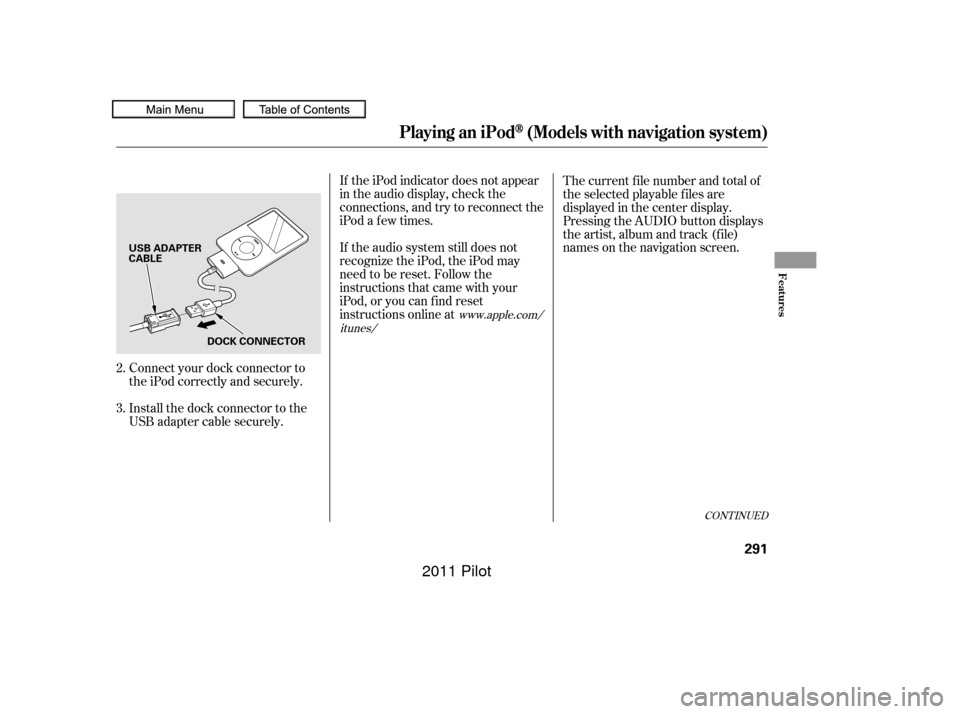
Connect your dock connector to
the iPod correctly and securely.
Install the dock connector to the
USB adapter cable securely.If the iPod indicator does not appear
in the audio display, check the
connections, and try to reconnect the
iPod a f ew times.
If the audio system still does not
recognize the iPod, the iPod may
need to be reset. Follow the
instructions that came with your
iPod, or you can f ind reset
instructions online at
The current f ile number and total of
the selected playable f iles are
displayed in the center display.
Pressing the AUDIO button displays
the artist, album and track (f ile)
names on the navigation screen.
2.
3.
www.apple.com/
itunes/
CONT INUED
Playing an iPod(Models with navigation system)
Features
291
USB ADAPTER
CABLE
DOCK CONNECTOR
10/01/26 19:13:01 31SZA620_296
2011 Pilot
Page 303 of 574

�Î
�ΠThis audio system can operate the
audio f iles on a USB f lash memory
device with the same controls used
f or the in-dash disc changer. To play
a USB f lash memory device, connect
it to the USB adapter cable in the
console compartment, then press the
AUX button. The ignition switch
must be in the ACCESSORY (I) or
ON (II) position.Only AAC f ormat f iles recorded
with iTunes are playable on this
audio unit. Do not keep a USB f lash memory
device in the vehicle. Direct
sunlight and high heat will damage
it.
We recommend backing up your
data bef ore playing a USB f lash
memory device.
Depending on the type and
number of f iles, it may take some
time bef ore they begin to play.
Depending on the sof tware the
f iles were made with, it may not be
possibletoplaysomefiles,or
display some text data.
You can select the AUX mode by
using the navigation system voice
control buttons, but cannot operate
theplaymodefunctions.
The recommended USB f lash
memory devices are 256 MB or
higher, and f ormatted with the FAT
f ile system. Some digital audio
players may be compatible as well.
The audio system reads and plays
the audio f iles on the USB f lash
memory device in MP3, WMA or
AAC f ormats. Depending on the
f ormat, the display shows MP3,
WMA or AAC when a USB flash
memory device is playing. The USB
f lash memory device limit is up to
700 f olders or up to 65535 f iles. Some USB f lash memory devices
(such as devices with security lock-
out f eatures, etc.) will not work in
this audio unit.
Do not use a device such as a card
reader or hard drive as the device
or your f iles may be damaged.
Do not connect your USB f lash
memory device using a hub.
Do not use an extension cable to
the USB adapter cable equipped
with your vehicle.
:
CONT INUED
To Play a USB Flash Memory
Device
Voice Cont rol Syst em
Playing a USB Flash Memory Device (Models with navigation system)
Features
299
NOTE:
10/01/26 19:14:14 31SZA620_304
2011 Pilot
Page 305 of 574
When the USB device is connected
andtheUSBmodeisselectedonthe
audio system, the USB indicator is
showninthecenterdisplay.Italso
shows the f older and f ile numbers.
Pressing the AUDIO button displays
the f older and f ile names, and the
elapsed time in the navigation screen.
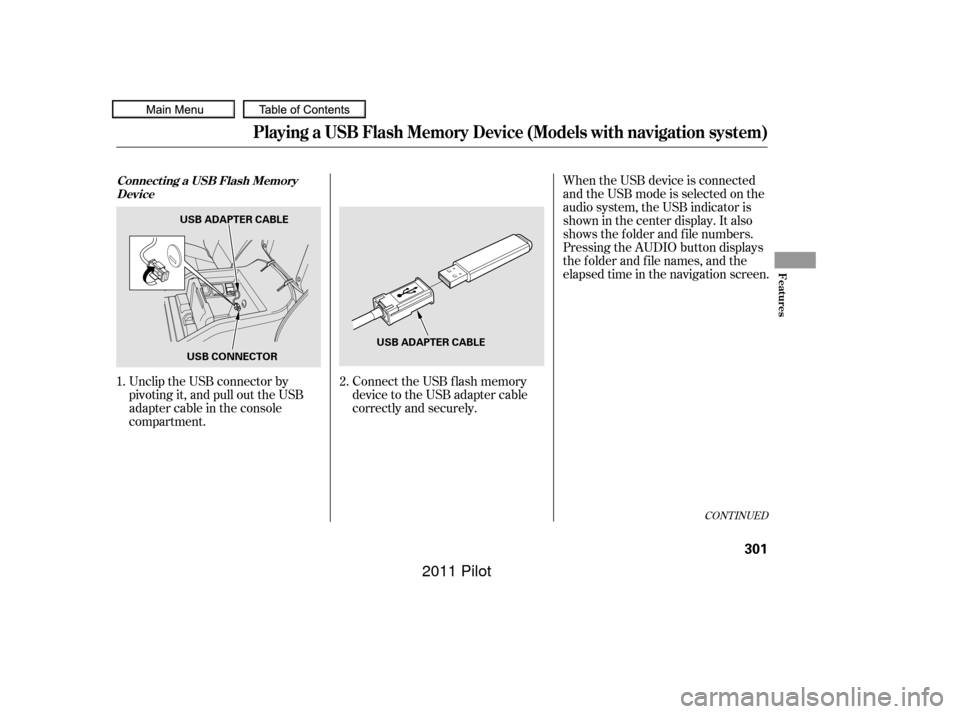
Unclip the USB connector by
pivoting it, and pull out the USB
adapter cable in the console
compartment. Connect the USB f lash memory
device to the USB adapter cable
correctly and securely.
2.
1.
CONT INUED
Connect ing a USB Flash Memory
Device
Playing a USB Flash Memory Device (Models with navigation system)
Features
301
USB ADAPTER CABLE
USB CONNECTOR USB ADAPTER CABLE
10/01/26 19:14:40 31SZA620_306
2011 Pilot
Page 353 of 574

The security system automatically
sets 15 seconds after you lock the
doors, the hood, the tailgate, and the
glass hatch. For the system to
activate, you must lock the doors,
thetailgateandtheglasshatchfrom
the outside with the key, driver’s
lock tab, door lock master switch, or
remote transmitter. The security
system indicator on the instrument
panel starts blinking immediately to
show you the system is setting itself . The security system helps to protect
your vehicle and valuables f rom thef t.
The horn sounds and a combination
of headlights, parking lights, side
marker lights and taillights f lashes if
someone attempts to break into your
vehicle or remove the audio unit.
This alarm continues for two
minutes, then the system resets. To
reset an activated system bef ore the
two minutes have elapsed, unlock
the driver’s door with the key or the
remote transmitter.Once the security system is set,
opening any door, the tailgate, the
glass hatch, or the hood without
using the key or the remote
transmitter will cause the alarm to
activate. It will also activate if the
radio is removed f rom the dashboard
or the wiring is cut.The security system will not set if
the hood, the tailgate, the glass
hatch, or any door is not f ully closed.
If the system will not set, check that
thedoors,thetailgateandthehood
are f ully closed.
Do not attempt to alter this system
or add other devices to it.
Except LX models
Security System
Features
349
SECURITY SYSTEM INDICATOR
10/01/26 19:22:28 31SZA620_354
2011 Pilot
Page 361 of 574
The HomeLinkUniversal
Transceiver built into your vehicle
canbeprogrammedtooperateupto
three remote controlled devices
around your home, such as garage
doors, lighting, or home security
systems. Bef ore programming your
HomeLink to operate a garage door
opener, conf irm that the opener has
an external entrapment protection
system, such as an ‘‘electronic eye,’’
or other saf ety and reverse stop
f eatures.
If your garage door was
manuf actured bef ore April 1, 1982,
you may not be able to program
HomeLink to operate it. These units
do not have safety features that
cause the motor to stop and reverse
it if an obstacle is detected during
closing, increasing the risk of injury.Do not use HomeLink with any
garage door opener that lacks saf ety
stop and reverse f eatures.
CONT INUED
Except LX modelsGeneral Saf ety Inf ormation
HomeL inkUniversal Transceiver
Features
357
10/01/26 19:23:50 31SZA620_362
2011 Pilot
Page 371 of 574
�Î
�Î
CONT INUED
BluetoothHandsFreeL ink
Features
367
‘‘Change Language’’‘‘Hands Free Help’’
‘‘System
Set up’’
‘‘Tutorial’’ ‘‘Clear’’
‘‘Auto Transfer’’ ‘‘Call Notification’’ ‘‘Security’’
‘‘Change Passcode’’
Press HFL
Talk button
Press and release the HFL Talk button each time you give a command.
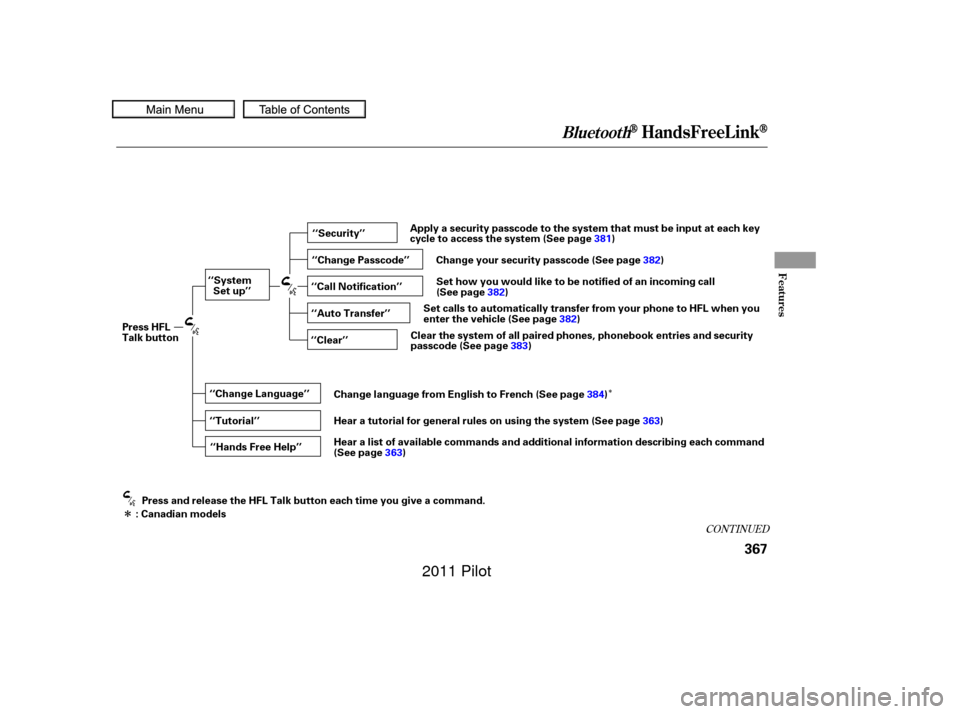
: Canadian models Apply a security passcode to the system that must be input at each key
cycle to access the system (See page
381)
Change your security passcode (See page 382)
Set how you would like to be notified of an incoming call
(See page 382)
Set calls to automatically transfer from your phone to HFL when you
enter the vehicle (See page 382)
Clear the system of all paired phones, phonebook entries and security
passcode (See page 383)
Change language from English to French (See page 384)
Hear a tutorial for general rules on using the system (See page 363)
Hear a list of available commands and additional information describing each command
(See page 363)
10/01/26 19:25:22 31SZA620_372
2011 Pilot
Page 385 of 574
This command group allows you to
change or customize HFL basic
settings.Press and release the HFL Talk
button bef ore a command.
Say ‘‘ .’’ Once a passcode is set, you
will need to enter it to use HFL each
time you start the vehicle. If you
f orget the code, your dealer will have
toresetitforyou,oryouwillhaveto
clear the entire system (see page ).
Follow the HFL prompts to
conf irm the number. Follow the HFL prompts and say
the 4-digit passcode you want to
set. Say‘‘ ’’aftertheprompts.
1.
2.
3.
4. 383
CONT INUED
System Setup
System setup
Security
BluetoothHandsFreeL ink
T o set a 4-digit passcode t o lock t heHFL system f or security purposes:
Features
381
NOTE:
10/01/26 19:28:43 31SZA620_386
2011 Pilot