Page 83 of 574

This indicator normally comes on f or
a f ew seconds when you turn the
ignition switch to the ON (II)
position. If it comes on at any other
time, there is a problem with the
automatic lighting control system.
Have your vehicle checked by your
dealer as soon as possible.
If you see a ‘‘CHECK LIGHT
CONTROL SYSTEM’’ message on
the multi-information display, there
is a problem with the automatic
headlight control system. Take your
vehicle to a dealer to have it checked.If this indicator comes on when the
ignition switch is turned to the ON
(II) position and the parking brake is
released, it means there is a problem
in the high beam headlight’s circuit.
Have your vehicle checked by your
dealer.
If you see a ‘‘CHECK DRL
SYSTEM’’ message on the multi-
inf ormation display, there is a
problem with the daytime running
light system. Take your vehicle to a
dealer to have it checked.While the engine is operating in its
most economical range, this
indicator may come on and stay on.
It goes of f when your vehicle uses
extra f uel.
This indicator comes on if any door
is not closed tightly.
On vehicles without navigation system On vehicles without navigation system
On vehicles with navigation system On vehicles with navigation system
Light Control Indicator
Daytime Running Lights
Indicator
Door-open Indicator Fuel Economy Indicator
Instrument Panel Indicators
Inst rument s and Cont rols
79
10/01/26 18:36:57 31SZA620_084
2011 Pilot
Page 127 of 574

�Î
�Î
�Î
�Î �Î
�Î
�Î �Î
�Î
�Î �Î
�Î
�Î
�Î
�Î
�Î
To use the horn, press the center pad of the steering wheel.
Only on vehicles equipped with navigation system. Ref er to the navigation system manual.
If equipped
1:
2:
3:
4 : 4WD models only
Controls Near the Steering Wheel
Inst rument s and Cont rols
123
HORN HAZARD WARNING
BUTTON
Vehicle with navigation system is shown. GLASS HATCH RELEASE BUTTON/
POWER TAILGATE SWITCH FUEL FILL DOOR RELEASE
HANDLE POWER WINDOW
SWITCHES POWER DOOR LOCK MASTER
SWITCH MIRROR CONTROLS DRIVING POSITION MEMORY
SYSTEM VEHICLE STABILITY ASSIST
SYSTEM OFF SWITCH
PARKING SENSOR SYSTEM
SWITCH HEADLIGHT/TURN SIGNAL/
FRONT FOG LIGHTS
STEERING WHEEL AUDIO CONTROLS
(P.361)
PARKING BRAKE RELEASE
HANDLE STEERING WHEEL
ADJUSTMENT
VOICE CONTROL
BUTTONS WINDSHIELD WIPERS/
WASHERS
PASSENGER AIRBAG
OFF INDICATOR
VTM-4 LOCK
BUTTON
ACCESSORY POWER
SOCKET
SEAT HEATER
SWITCHES
CRUISE CONTROL
BUTTONS
MULTI-INFORMATION
BUTTONS REAR WINDOW
DEFOGGER/HEATED
MIRROR BUTTON
(P.126)
(P.432)
(P.386) (P.173) (P.171)
(P.138)
(P.165)
(P.395)
(P.145) (P.169) (P.133)(P.87)(P.350)
(P.164)
(P.
186 )
(P.130,
172)(P.
418 )
(P.
36)
(P.
124 )
(P.130)
(P.311)
BLUETOOTH
HANDSFREELINK SYSTEM
VOICE CONTROL BUTTONS1
3
3
3 3
3
2 4
3
3 3
3
10/01/26 18:44:12 31SZA620_128
2011 Pilot
Page 132 of 574

Turn the f og lights on and of f by
turning the switch next to the
headlight switch.
You can use the f og lights only when
the headlights are on low beam.
With the light switch in the AUTO
position, you can also use the f og
lights when the headlights turn on
automatically. They will go of f when
the headlights turn of f .With the headlight switch off, the
daytime running lights come on
when you turn the ignition switch to
the ON (II) position and release the
parkingbrake.Theyremainonuntil
you turn the ignition switch of f , even
if you set the parking brake.
When the headlights are on, the
daytime running lights are of f .
If you see a ‘‘CHECK DRL
SYSTEM’’ message on the multi-
inf ormation display, there is a
problem with the daytime running
light system. Take your vehicle to a
dealer to have it checked.
When the multi-information display
shows a ‘‘DRL OFF’’ message, the
daytime running lights are of f .
Follow the procedure in the lef t
column to turn them on.
On vehicles with navigation system
Except LX models
Headlights
Fog L ights Daytime Running L ights
128
10/01/26 18:45:00 31SZA620_133
2011 Pilot
Page 143 of 574
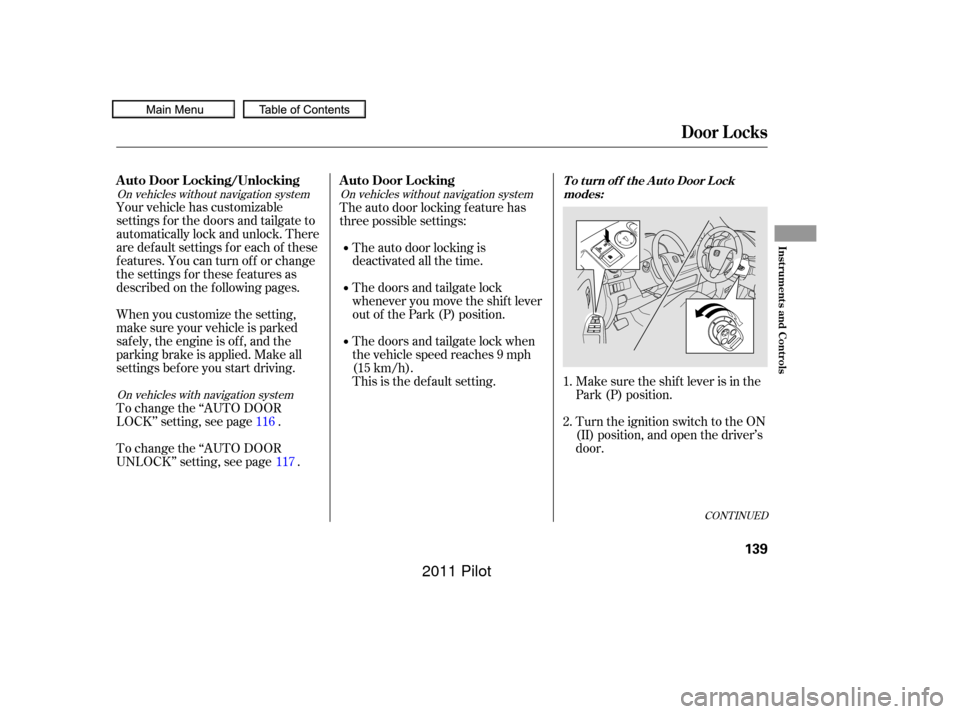
Make sure the shif t lever is in the
Park (P) position.
Turn the ignition switch to the ON
(II) position, and open the driver’s
door.
Your vehicle has customizable
settings f or the doors and tailgate to
automatically lock and unlock. There
are default settings for each of these
f eatures. You can turn of f or change
the settings for these features as
described on the f ollowing pages.
When you customize the setting,
make sure your vehicle is parked
saf ely, the engine is of f , and the
parking brake is applied. Make all
settings bef ore you start driving.
To change the ‘‘AUTO DOOR
LOCK’’ setting, see page .
To change the ‘‘AUTO DOOR
UNLOCK’’ setting, see page . The auto door locking f eature has
three possible settings:
The auto door locking is
deactivated all the time.
The doors and tailgate lock
whenever you move the shif t lever
out of the Park (P) position.
The doors and tailgate lock when
the vehicle speed reaches 9 mph
(15 km/h).
This is the def ault setting. 1.
2.
116
117
CONT INUED
On vehicles without navigation system On vehicles without navigation system
On vehicles with navigation system
A uto Door L ocking/Unlocking A uto Door L ockingT o t urn of f t he A ut o Door L ockmodes:
Door L ocks
Inst rument s and Cont rols
139
10/01/26 18:46:42 31SZA620_144
2011 Pilot
Page 145 of 574
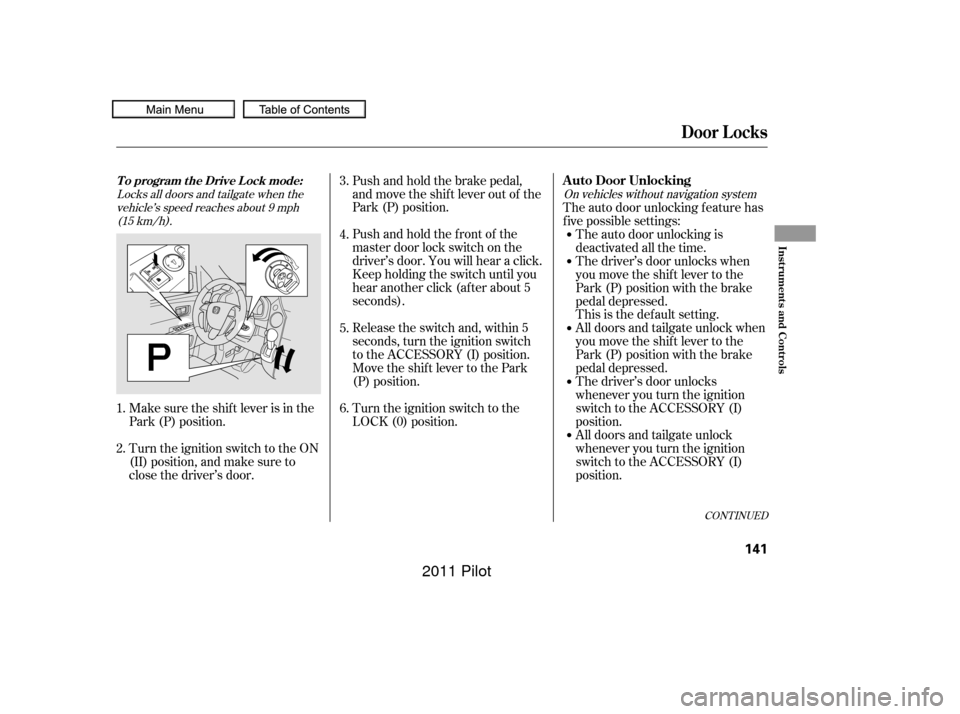
Locks all doors and tailgate when thevehicle’s speed reaches about 9 mph(15 km/h). On vehicles without navigation system
Make sure the shif t lever is in the
Park (P) position.Pushandholdthefrontof the
master door lock switch on the
driver’s door. You will hear a click.
Keep holding the switch until you
hear another click (after about 5
seconds). Push and hold the brake pedal,
and move the shif t lever out of the
Park (P) position.
Release the switch and, within 5
seconds, turn the ignition switch
to the ACCESSORY (I) position.
Move the shift lever to the Park
(P) position.
Turn the ignition switch to the
LOCK (0) position.
Turn the ignition switch to the ON
(II) position, and make sure to
close the driver’s door. The auto door unlocking f eature has
f ive possible settings:
The auto door unlocking is
deactivated all the time.
The driver’s door unlocks when
you move the shif t lever to the
Park (P) position with the brake
pedal depressed.
This is the def ault setting.
All doors and tailgate unlock when
you move the shif t lever to the
Park (P) position with the brake
pedal depressed.
The driver’s door unlocks
whenever you turn the ignition
switch to the ACCESSORY (I)
position.
All doors and tailgate unlock
whenever you turn the ignition
switch to the ACCESSORY (I)
position.
3.
4.
1.
2. 5.
6.
CONT INUED
T o program t he Drive L ock mode:A uto Door Unlocking
Door L ocks
Inst rument s and Cont rols
141
10/01/26 18:47:09 31SZA620_146
2011 Pilot
Page 146 of 574
Unlocks the driver’s door or all doorsand tailgate when the shif t lever ismoved into the Park (P) position withthe brake pedal depressed.
Make sure the shif t lever is in the
Park (P) position.
Turn the ignition switch to the ON
(II) position, and open the driver’s
door. Pushandholdtherearof the
master door lock switch on the
driver’s door. You will hear a click,
and after about 5 seconds, you will
hear another click.
Release the switch, and within 5
seconds, turn the ignition switch
to the LOCK (0) position.
Make sure the shif t lever is in the
Park (P) position.
Turn the ignition switch to the ON
(II) position, and make sure to
close the driver’s door.
1.
2.
1.
2. 3.
4.
To program the Park Unlock mode:
T o t urn of f t he A ut o Door Unlock
modes:
Door L ocks
142
10/01/26 18:47:21 31SZA620_147
2011 Pilot
Page 147 of 574
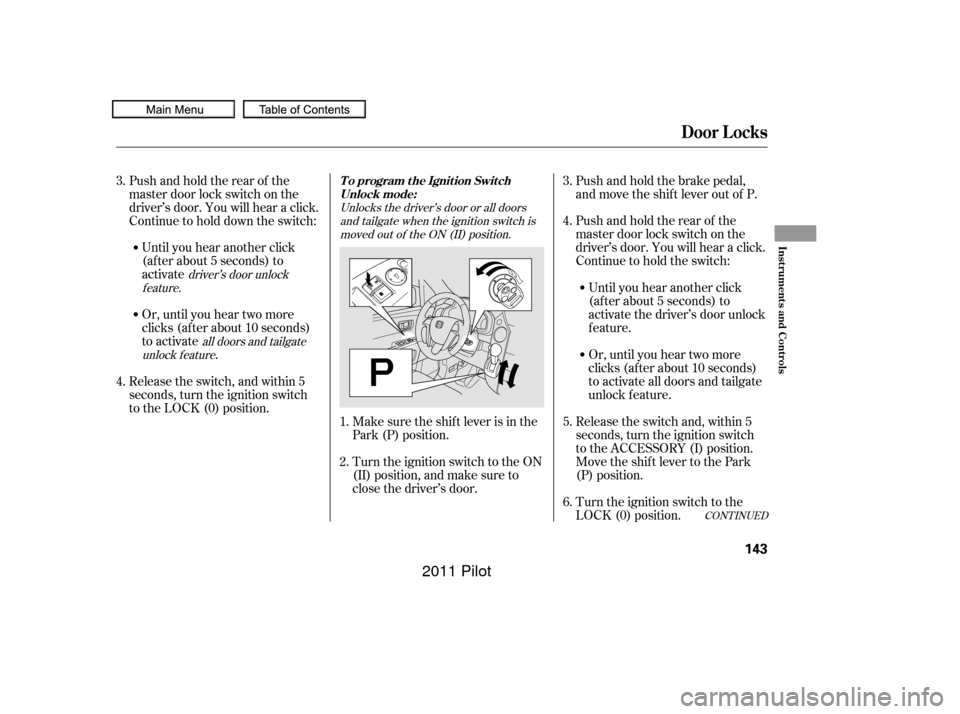
Unlocks the driver’s door or all doorsand tailgate when the ignition switch ismoved out of the ON (II) position.
all doors and tailgate
unlock f eature driver’s door unlock
feature.
Make sure the shif t lever is in the
Park (P) position. Pushandholdtherearof the
master door lock switch on the
driver’s door. You will hear a click.
Continue to hold the switch:
Release the switch and, within 5
seconds, turn the ignition switch
to the ACCESSORY (I) position.
Move the shift lever to the Park
(P) position.
Turn the ignition switch to the ON
(II) position, and make sure to
close the driver’s door. Push and hold the brake pedal,
and move the shif t lever out of P.
Release the switch, and within 5
seconds, turn the ignition switch
to the LOCK (0) position. Pushandholdtherearof the
master door lock switch on the
driver’s door. You will hear a click.
Continue to hold down the switch: Or, until you hear two more
clicks (af ter about 10 seconds)
to activate
.
Until you hear another click
(af ter about 5 seconds) to
activate the driver’s door unlock
feature.
Or, until you hear two more
clicks (af ter about 10 seconds)
to activate all doors and tailgate
unlock f eature.
Until you hear another click
(af ter about 5 seconds) to
activate
Turn the ignition switch to the
LOCK (0) position.
4.
5.
1.
2. 3.
6.
3.
4.
CONT INUED
T o program t he Ignit ion Swit ch
Unlock mode:
Door L ocks
Inst rument s and Cont rols
143
10/01/26 18:47:37 31SZA620_148
2011 Pilot
Page 166 of 574
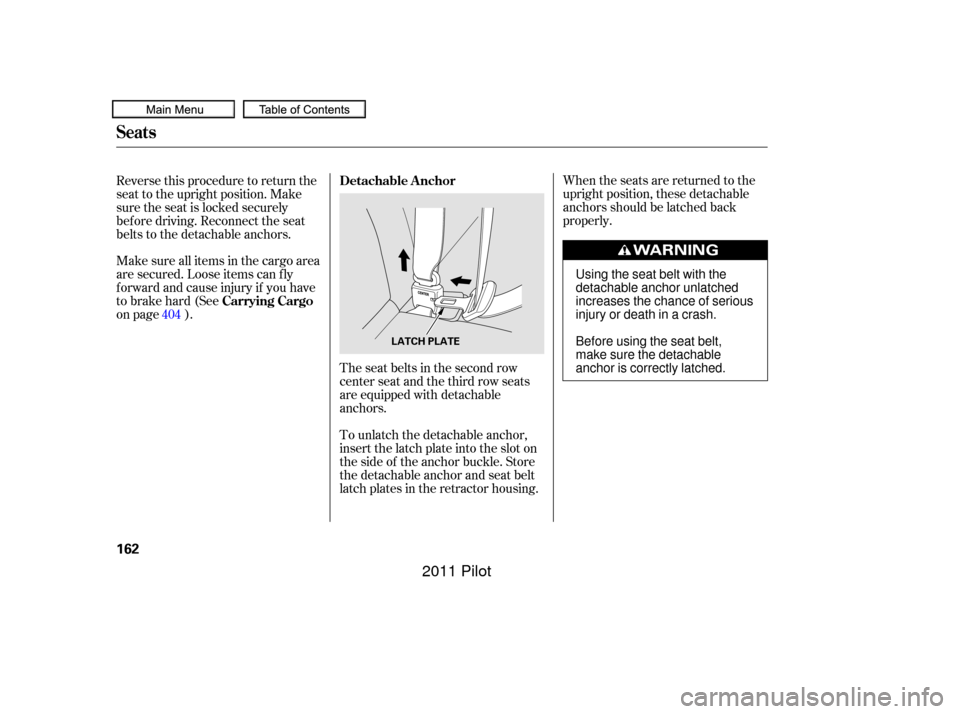
When the seats are returned to the
upright position, these detachable
anchors should be latched back
properly.
The seat belts in the second row
center seat and the third row seats
are equipped with detachable
anchors.
To unlatch the detachable anchor,
insert the latch plate into the slot on
the side of the anchor buckle. Store
the detachable anchor and seat belt
latch plates in the retractor housing.
Reverse this procedure to return the
seat to the upright position. Make
sure the seat is locked securely
bef ore driving. Reconnect the seat
belts to the detachable anchors.
Make sure all items in the cargo area
are secured. Loose items can f ly
f orward and cause injury if you have
to brake hard (See
on page ).
404 Detachable Anchor
Carrying Cargo
Seats
162
LATCH PLATE
Using the seat belt with the
detachable anchor unlatched
increases the chance of serious
injury or death in a crash.
Before using the seat belt,
make sure the detachable
anchor is correctly latched.
10/01/26 18:50:59 31SZA620_167
2011 Pilot