Page 71 of 722

This indicator comes on f or several
seconds when you turn the ignition
switch to the ON (II) position. If it
comes on at any other time, it
indicates that the passenger’s side
airbag has automatically shut off.
For more inf ormation, see page .
You will also see a ‘‘PASSENGER
SIDE AIRBAG OFF’’ message on the
multi-inf ormation display (see page). You will also see a ‘‘CHECK ABS
SYSTEM’’ message on the multi-
inf ormation display (see page
).
This indicator normally comes on
f or a f ew seconds when you turn
the ignition switch to the ON (II)
position. If it comes on at any
other time, there is a problem with
theABS.If thishappens,have
your vehicle checked at a dealer.
With this indicator on, your
vehicle still has normal braking
ability but no anti-lock f unction.
For more inf ormation, see page
.
33
90 91
568
On Touring models
On Touring models
Instrument Panel Indicators
Anti-lock Brake System
(A BS) Indicator
Side A irbag Of f
Indicator
68
Canada
U.S.
10/07/17 09:43:27 31TK8600_073
2011 Odyssey
Page 76 of 722

If this indicator comes on when the
ignition switch is turned to the ON
(II) position and the parking brake is
released, it means there is a problem
in the high beam headlight’s circuit.
Have your vehicle checked by your
dealer.
This indicator reminds you that the
exterior lights are on. It comes on
when the light switch is in either the
or position. If you turn the
ignition switch to the ACCESSORY
(I) or the LOCK (0) position without
turning of f the light switch, this
indicator will remain on. A reminder
chime will also sound when you open
the driver’s door without the key in
the ignition switch. If you see a ‘‘CHECK DRL
SYSTEM’’ message on the multi-
inf ormation display, there is a
problem in the high beam headlight’s
circuit. Take your vehicle to a dealer
to have it checked (see page ).This indicator comes on with the
high beam headlights. For more
inf ormation, see page .
This indicator comes on when you
turn on the fog lights. See page
f or inf ormation on f og light
operation.
This indicator also comes on when
the light switch is in AUTO and the
lights turn on automatically. 92137
139
On all models except LX On Touring models
On Touring models
Instrument Panel Indicators
Lights On Indicator
Daytime Running Lights
IndicatorHigh Beam Indicator
Fog L ight Indicator
Instruments and Controls
73
10/07/17 09:44:12 31TK8600_078
2011 Odyssey
Page 84 of 722
�µ�µ�µ�µ
�µ�µ �µ
�µ �µ
�µ
Select the outside temperature
display by pressing and releasing the
select/reset knob. Press and hold
the same knob f or a f ew seconds to
enter this setting, then turn it to
adjust the temperature. The
f ollowing sequence will appear f or
each:0,1,2,3,4,5, 5, 4, 3, 2,
1,0(U.S.)or0,1,2,3, 3, 2,
1, 0 (Canada). IGN ON (II) Immediately turn of f
all electrical devices (interior lights,
air conditioning, audio, heated seats,
etc.). Try not to operate other
electrically operated controls such as
the power windows. Driving the
vehicle will recharge the battery. If
the message continues to display
while driving, see your dealer.
IGN ACCESSORY (I) or LOCK (0)
Follow the message and turn of f
all electrical devices. Driving the
vehicle will recharge the battery,
however the vehicle may not start. If
it does not start, see jump starting
(see page ), or contact your
dealer.
When the temperature reaches the
desired value, release the select/
reset knob. You should see the new
outside temperature displayed.
In certain weather conditions,
temperature readings near f reezing
(32°F, 0°C) could mean that ice is
f orming on the road surf ace. Whenthebattery’sstateof chargeis
low, the vehicle’s battery
management system triggers a
‘‘BATT LOW’’ message if the
ignition switch is on or of f .
Depending on how low the battery’s
state of charge dropped and how
long it remained low, these
messages may occur f requently. It
may take a number of trips to
sufficiently recharge the battery and
the messages to no longer appear.
665
Gauges
Battery Charge Low
Instruments and Controls
81
10/07/17 09:45:25 31TK8600_086
2011 Odyssey
Page 90 of 722
�µ�µ
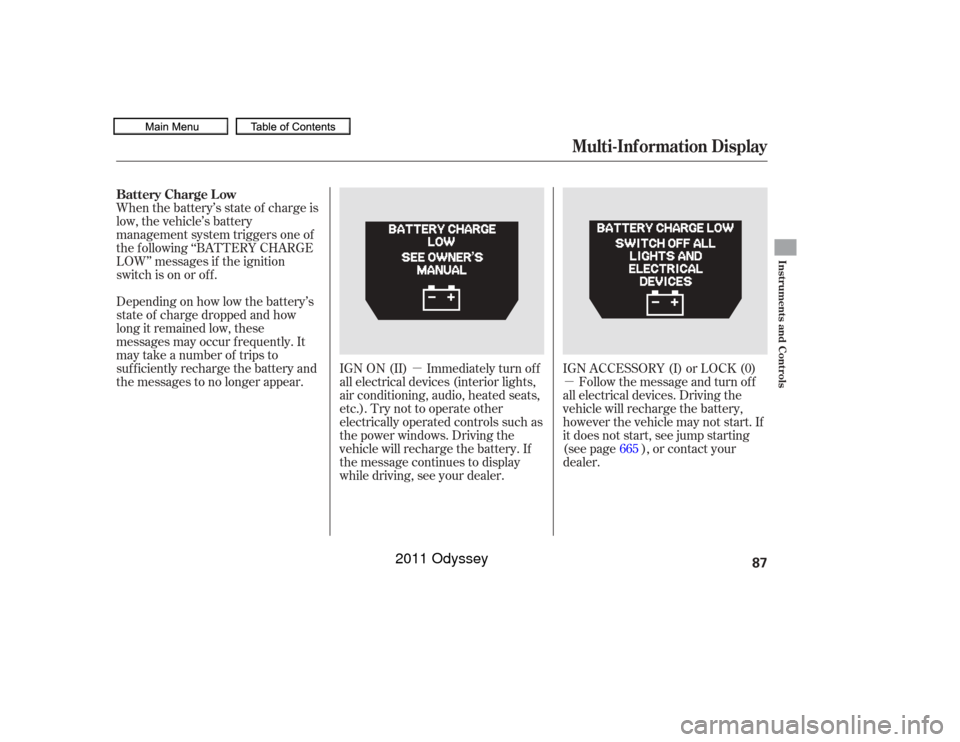
Whenthebattery’sstateof chargeis
low, the vehicle’s battery
management system triggers one of
the f ollowing ‘‘BATTERY CHARGE
LOW’’ messages if the ignition
switch is on or of f .
Depending on how low the battery’s
state of charge dropped and how
long it remained low, these
messages may occur f requently. It
may take a number of trips to
sufficiently recharge the battery and
the messages to no longer appear.
IGN ON (II) Immediately turn of f
all electrical devices (interior lights,
air conditioning, audio, heated seats,
etc.). Try not to operate other
electrically operated controls such as
the power windows. Driving the
vehicle will recharge the battery. If
the message continues to display
while driving, see your dealer.IGN ACCESSORY (I) or LOCK (0)
Follow the message and turn of f
all electrical devices. Driving the
vehicle will recharge the battery,
however the vehicle may not start. If
it does not start, see jump starting
(see page ), or contact your
dealer. 665
Multi-Inf ormation Display
Battery Charge Low
Instruments and Controls
87
10/07/17 09:46:07 31TK8600_092
2011 Odyssey
Page 96 of 722
�Û�Ý
CONT INUED
On Touring ModelsYou can customize some vehicle
control settings. To change the
settings, the ignition switch must be
in the ON (II) position, and the
vehicle must be stopped with the
transmission in Park.
To enter the customizing mode,
press either INFO button ( / )
repeatedly until ‘‘CUSTOMIZE
SETTINGS’’ is displayed, then press
the SEL/RESET button.
If you try to enter the customizing
mode while the vehicle is moving,
you will see a ‘‘MUST STOP AND
SHIFTTOPARKTOCHANGE
SETTINGS’’ message and you
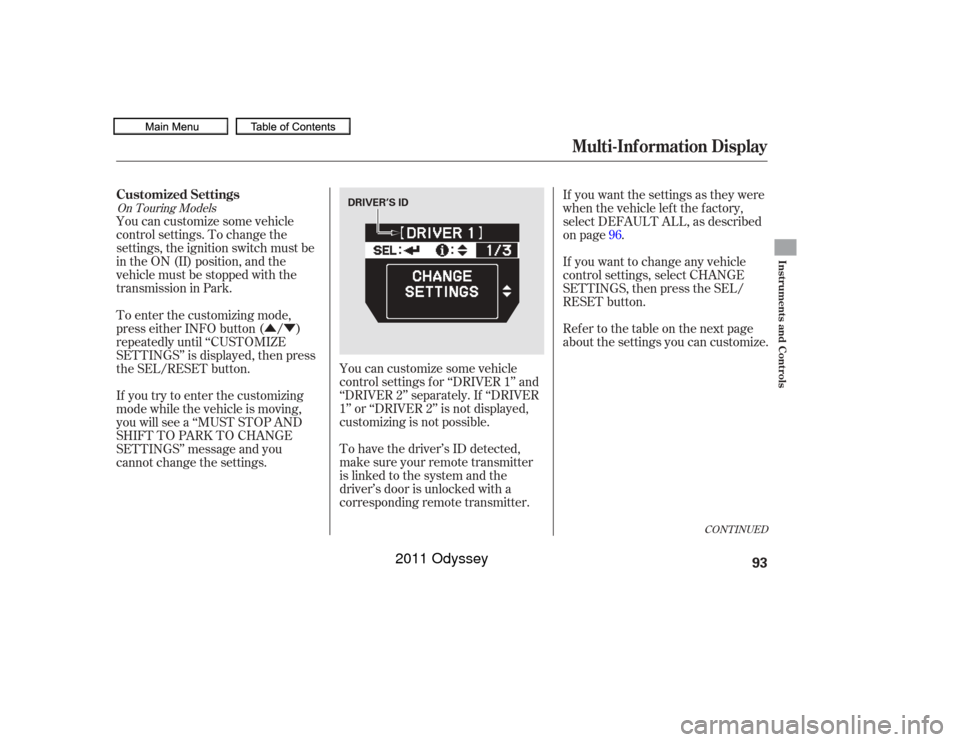
cannot change the settings.You can customize some vehicle
control settings f or ‘‘DRIVER 1’’ and
‘‘DRIVER 2’’ separately. If ‘‘DRIVER
1’’ or ‘‘DRIVER 2’’ is not displayed,
customizing is not possible.
To have the driver’s ID detected,
make sure your remote transmitter
is linked to the system and the
driver’s door is unlocked with a
corresponding remote transmitter. If you want the settings as they were
when the vehicle lef t the f actory,
select DEFAULT ALL, as described
on page .
If you want to change any vehicle
control settings, select CHANGE
SETTINGS, then press the SEL/
RESET button.
Ref er to the table on the next page
about the settings you can customize.
96
Multi-Inf ormation Display
Customized Settings
Instruments and Controls
93
DRIVER’S ID
10/07/17 09:47:14 31TK8600_098
2011 Odyssey
Page 98 of 722
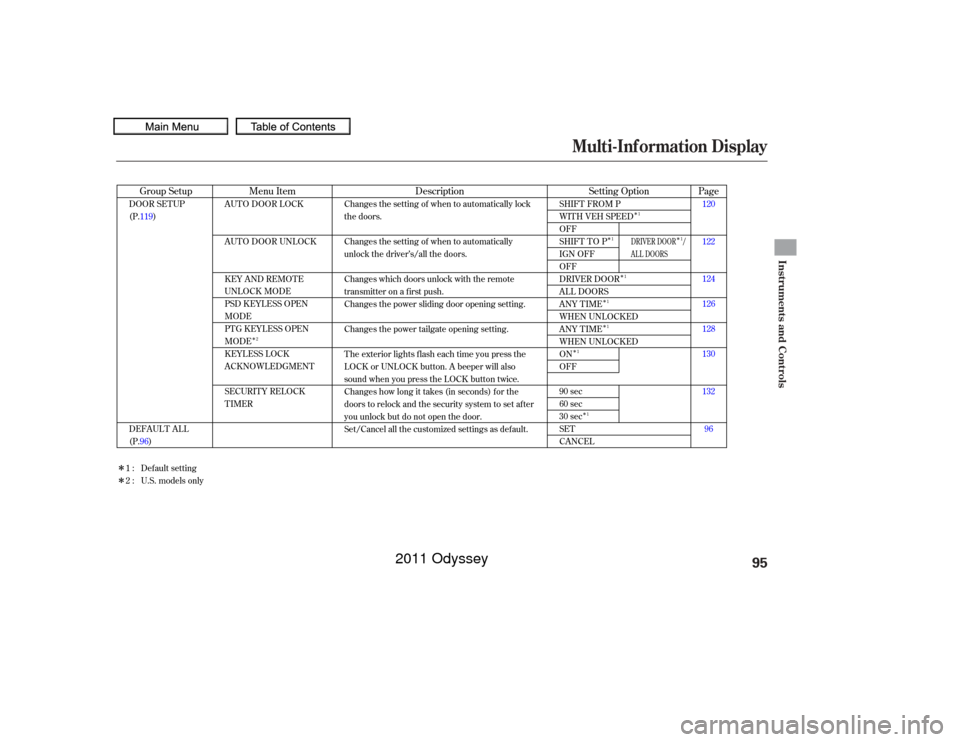
Multi-Inf ormation Display
Instruments and Controls
95
10/07/17 09:47:14 31TK8600_098
�Î�Î
�Î
�Î
�Î
�Î
�Î
�Î �Î
�Î
�Î
Page
Menu Item Setting Option
Group Setup Description120
122
124
126
128
130
132
96
AUTO DOOR LOCK
AUTO DOOR UNLOCK
KEY AND REMOTE
UNLOCK MODE
PSD KEYLESS OPEN
MODE
PTG KEYLESS OPEN
MODE
KEYLESS LOCK
ACKNOWLEDGMENT
SECURITY RELOCK
TIMER
SHIFT FROM P
WITH VEH SPEED
OFF
SHIFT TO P
IGN OFF
OFF
DRIVER DOOR
ALL DOORS
ANY TIME
WHEN UNLOCKED
ANY TIME
WHEN UNLOCKED
ON
OFF
90 sec
60 sec
30 sec
SET
CANCEL
DOOR SETUP
(P.119)
DEFAULT ALL
(P.96) Changes the setting of when to automatically lock
the doors.
Changes the setting of when to automatically
unlock the driver’s/all the doors.
Changes which doors unlock with the remote
transmitter on a first push.
Changes the power sliding door opening setting.
Changes the power tailgate opening setting.
The exterior lights flash each time you press the
LOCK or UNLOCK button. A beeper will also
sound when you press the LOCK button twice.
Changes how long it takes (in seconds) for the
doors to relock and the security system to set after
you unlock but do not open the door.
Set/Cancel all the customized settings as default.
Default setting
1:
2 : U.S. models only
2 1
1
1
1
1
1
1 1
DRIVER DOOR /
AL L DOORS
2011 Odyssey
Page 110 of 722
�µ
�µ
�µ
�Û�Ý�Û�Ý
CONT INUED
There are three elapsed time reset
choices you can make:
IGN OFF The elapsed time is
reset when you turn the ignition
switch to the LOCK (0) position.
TRIP A The elapsed time is reset
when Trip A is reset.
TRIP B The elapsed time is reset
when Trip B is reset. You can choose this item to
customize f rom ‘‘METER SETUP’’
by pressing the INFO ( / ) button
repeatedly. Press the SEL/RESET button to see
the selections.
Select the desired setting by
pressing the INFO ( / ) button,
then enter your selection by pressing
the SEL/RESET button.Elapsed T ime Reset
Multi-Inf ormation Display
Instruments and Controls
107
10/07/17 09:48:41 31TK8600_112
2011 Odyssey
Page 122 of 722
�Û�Ý
Here are the seven custom settings
f or the door setup:
While ‘‘DOOR SETUP’’ is shown,
press the SEL/RESET button to
enter the customize mode.AUTO DOOR LOCK
AUTO DOOR UNLOCK
KEY AND REMOTE UNLOCK
MODE
PSD (POWER SLIDING DOORS)
KEYLESS OPEN MODE
PTG (POWER TAILGATE)
KEYLESS OPEN MODE
KEYLESS LOCK
ACKNOWLEDGMENT
SECURITY RELOCK TIMER
CONT INUED
Door Setup
Multi-Inf ormation Display
Instruments and Controls
119
: Press the INFO ( / ) button.
: Press the SEL/RESET button.
U.S. models only
10/07/17 09:50:00 31TK8600_124
2011 Odyssey