Page 411 of 722
Turn the dial to select a sound setup
mode, then press ENTER to set your
selection. See page f or more
sound setting inf ormation.
If you receive a call when the
Audio is playing, press the
PICK-UPbuttononthesteering
wheel. The screen and the center
displayswitchtotheHFLmode(see
page ).
Af ter ending the call, press the
HANG-UP button to go back to theAudio mode. To take the system out of the
Audio mode, press one of
the other source buttons than the
USB/AUX button. When a
compatible audio unit is connected to
the auxiliary input jack, press the
USB/AUX button to select it.
Switching to another mode pauses
the music playing f rom your phone.
329
517
As required by the FCC: This device complies with Part 15 of theFCC rules. Operation is subject to thef ollowing two conditions: (1) This devicemay not cause harmf ul interf erence, and(2) this device must accept anyinterf erence received, includinginterf erence that may cause undesiredoperation.
Changes or modif ications not expresslyapproved by the party responsible f orcompliance could void the user’sauthority to operate the equipment.
This device complies with IndustryCanada Standard RSS-210.Operation is subject to the f ollowing twoconditions: (1) this device may not causeinterf erence, and (2) this device mustaccept any interf erence that may causeundesired operation of the device.
Bluetooth
Bluetooth Bluetooth
T o t urn of f t he Bluet oot h
Audio
mode
T o switch to HFL mode
Bluetooth
Audio System (Models with navigation system)
408
10/07/17 10:28:45 31TK8600_413
2011 Odyssey
Page 413 of 722
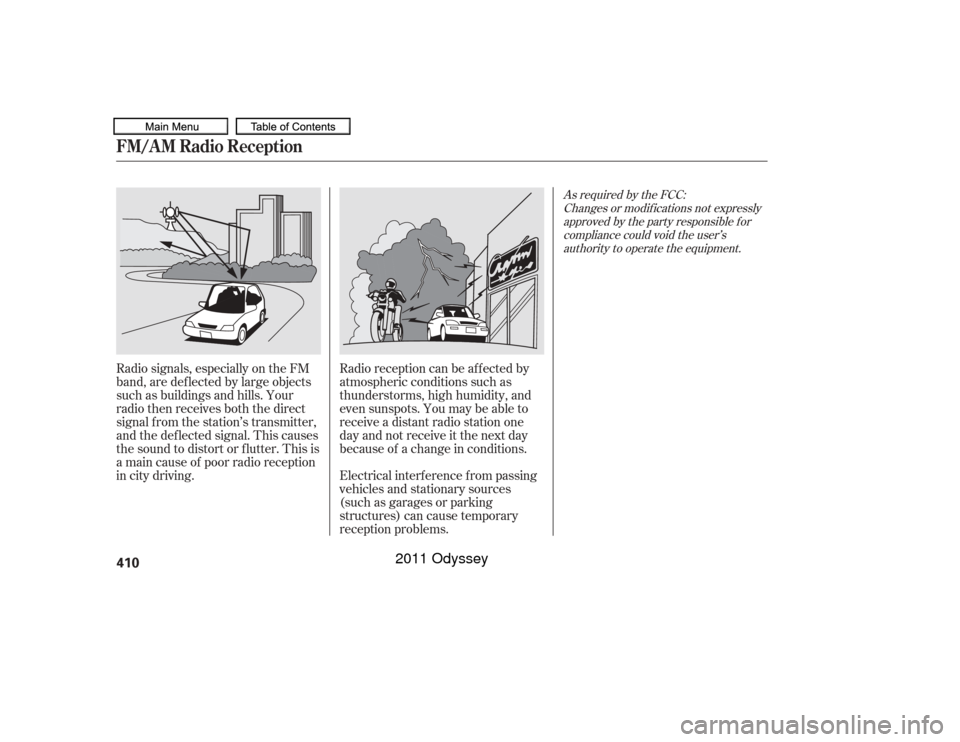
Radio signals, especially on the FM
band, are def lected by large objects
such as buildings and hills. Your
radio then receives both the direct
signal f rom the station’s transmitter,
and the def lected signal. This causes
the sound to distort or flutter. This is
a main cause of poor radio reception
in city driving.Radio reception can be af f ected by
atmospheric conditions such as
thunderstorms, high humidity, and
even sunspots. You may be able to
receive a distant radio station one
day and not receive it the next day
because of a change in conditions.
Electrical interf erence f rom passing
vehicles and stationary sources
(such as garages or parking
structures) can cause temporary
reception problems.
As required by the FCC:
Changes or modif ications not expresslyapproved by the party responsible f orcompliance could void the user’sauthority to operate the equipment.
FM/A M Radio Reception410
10/07/17 10:29:00 31TK8600_415
2011 Odyssey
Page 473 of 722
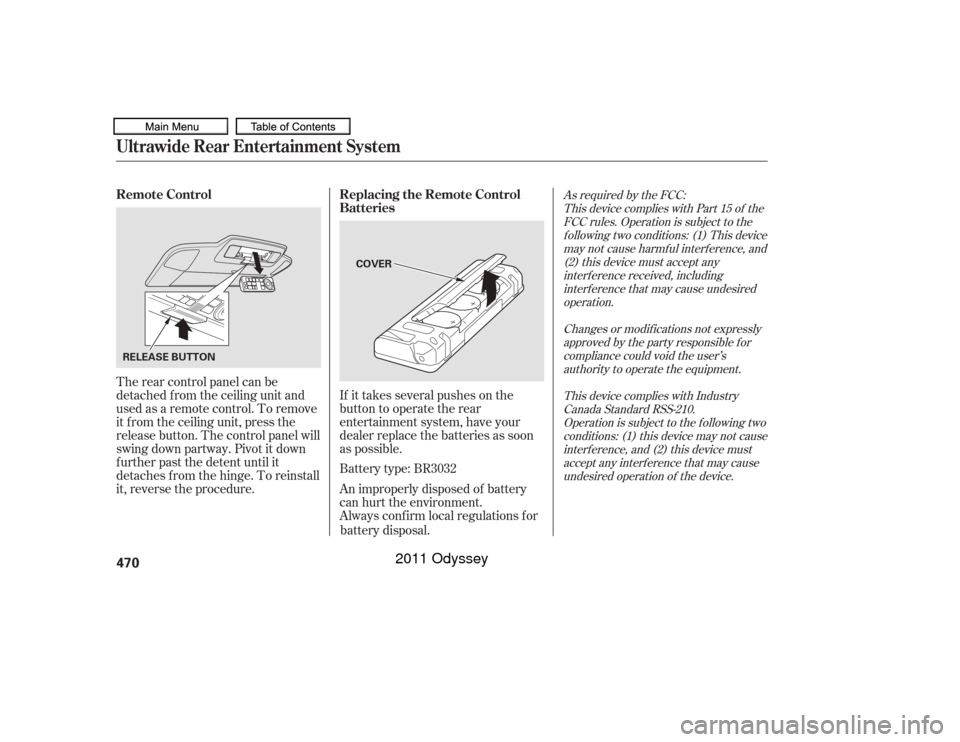
If it takes several pushes on the
button to operate the rear
entertainment system, have your
dealer replace the batteries as soon
as possible.
The rear control panel can be
detached f rom the ceiling unit and
used as a remote control. To remove
it f rom the ceiling unit, press the
release button. The control panel will
swing down partway. Pivot it down
f urther past the detent until it
detaches f rom the hinge. To reinstall
it, reverse the procedure.
Battery type: BR3032
An improperly disposed of battery
can hurt the environment.
Always conf irm local regulations f or
battery disposal.
As required by the FCC: This device complies with Part 15 of theFCC rules. Operation is subject to thef ollowing two conditions: (1) This devicemay not cause harmf ul interf erence, and(2) this device must accept anyinterf erence received, includinginterf erence that may cause undesiredoperation.
Changes or modif ications not expresslyapproved by the party responsible f orcompliance could void the user’sauthority to operate the equipment.
This device complies with IndustryCanada Standard RSS-210.Operation is subject to the f ollowing twoconditions: (1) this device may not causeinterf erence, and (2) this device mustaccept any interf erence that may causeundesired operation of the device.
Remote Control Replacing the Remote Control
BatteriesUltrawide Rear Entertainment System470
COVER
RELEASE BUTTON
10/07/17 10:37:23 31TK8600_475
2011 Odyssey
Page 485 of 722
You can cancel cruise control in any
of these ways:Tap the brake pedal.
Push the CANCEL button on the
steering wheel.
Push the CRUISE button on the
steering wheel.
The cruise control will be canceled
when the vehicle speed reaches
about 25 mph (40 km/h) or less. When you push the CANCEL button
or tap the brake pedal, the system
remembers the previously set speed.
To return to that speed, accelerate to
above25mph(40km/h),thenpress
and release the RES/ACCEL button.
The CRUISE CONTROL indicator
comes on. The vehicle accelerates to
thesamespeedasbefore.
Pressing the CRUISE button turns
the system completely of f and erases
the previous set speed.
Canceling Cruise Control
Resuming the Set SpeedCruise Control482
10/07/17 10:39:02 31TK8600_487
2011 Odyssey
Page 488 of 722
As required by the FCC:This device complies with Part 15 of theFCC rules. Operation is subject to thef ollowing two conditions: (1) This devicemay not cause harmf ul interf erence, and(2) this device must accept anyinterf erence received, includinginterf erence that may cause undesiredoperation.
Changes or modif ications not expresslyapproved by the party responsible f orcompliance could void the user’sauthority to operate the equipment.
This device complies with IndustryCanada Standard RSS-210.Operation is subject to the f ollowing twoconditions: (1) this device may not causeinterf erence, and (2) this device mustaccept any interf erence that may causeundesired operation of the device.
HomeLink
is a registered
trademark of Johnson Controls, Inc.
HomeL ink
Universal Transceiver
Features
485
10/07/17 10:39:29 31TK8600_490
2011 Odyssey
Page 516 of 722
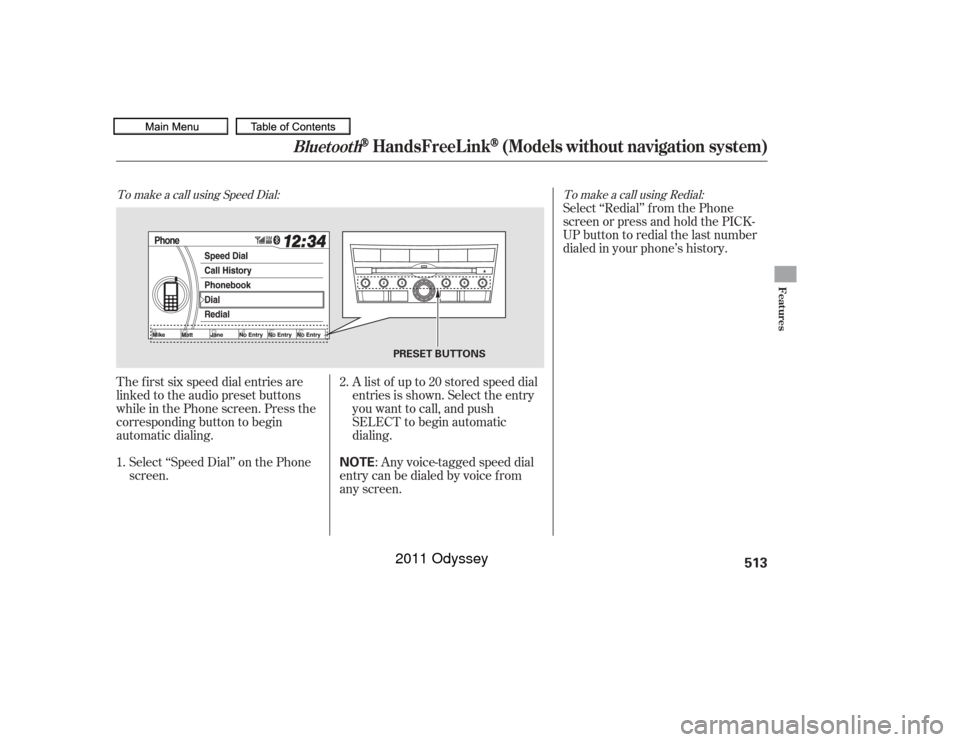
The f irst six speed dial entries are
linked to the audio preset buttons
while in the Phone screen. Press the
corresponding button to begin
automatic dialing.Select ‘‘Speed Dial’’ on the Phone
screen. Alistof upto20storedspeeddial
entries is shown. Select the entry
you want to call, and push
SELECT to begin automatic
dialing.
: Any voice-tagged speed dial
entry can be dialed by voice f rom
any screen. Select ‘‘Redial’’ f rom the Phone
screen or press and hold the PICK-
UP button to redial the last number
dialed in your phone’s history.
2.
1.To make a call using Speed Dial: To make a call using Redial:
Bluetooth
HandsFreeL ink
(Models without navigation system)
Features
513
NOTE
PRESET BUTTONS
10/07/17 10:43:20 31TK8600_518
2011 Odyssey
Page 518 of 722
As required by the FCC:This device complies with Part 15 of theFCC rules. Operation is subject to thef ollowing two conditions: (1) This devicemay not cause harmf ul interf erence, and(2) this device must accept anyinterf erence received, includinginterf erence that may cause undesiredoperation.
Changes or modif ications not expresslyapproved by the party responsible f orcompliance could void the user’sauthority to operate the equipment.
This device complies with IndustryCanada Standard RSS-210.Operation is subject to the f ollowing twoconditions: (1) this device may not causeinterf erence, and (2) this device mustaccept any interf erence that may causeundesired operation of the device.
Bluetooth
Bluetooth
An incoming call on HFL will
interrupt
Audio when it is
playing. Audio will resume when the
call is ended.
The
name and logos are
registered trademarks owned by
Bluetooth SIG, Inc. and any use of
such marks by Honda Motor Co.,
Ltd. is under license. Other
trademarks and trade names are
those of their respective owners.
If your phone has Call Waiting, a
beep sounds f or an incoming call.
Press and release the PICK-UP
button to put the original call on hold
and answer the incoming call.
To return to the original call, press
the PICK-UP button again. If you
don’t want to answer the incoming
call, disregard it and continue with
your original call. If you want to hang
up the original call and answer the
new call, press the HANG-UP button. HFL L imitations
Wireless Technology
Call Wait ing
Bluet oot h
Bluetooth
HandsFreeL ink
(Models without navigation system)
Features
515
10/07/17 10:43:37 31TK8600_520
2011 Odyssey
Page 540 of 722
As required by the FCC:This device complies with Part 15 of theFCC rules. Operation is subject to thef ollowing two conditions: (1) This devicemay not cause harmf ul interf erence, and(2) this device must accept anyinterf erence received, includinginterf erence that may cause undesiredoperation.
Changes or modif ications not expresslyapproved by the party responsible f orcompliance could void the user’sauthority to operate the equipment.
This device complies with IndustryCanada Standard RSS-210.Operation is subject to the f ollowing twoconditions: (1) this device may not causeinterf erence, and (2) this device mustaccept any interf erence that may causeundesired operation of the device.
Bluetooth
Bluetooth
An incoming call on HFL will
interrupt
Audio when it is
playing. Audio will resume when the
call is ended. The
name and logos are
registered trademarks owned by
Bluetooth SIG, Inc. and any use of
such marks by Honda Motor Co.,
Ltd. is under license. Other
trademarks and trade names are
those of their respective owners.
HFL L imitations
Wireless Technology
Bluet oot h
Bluetooth
HandsFreeL ink
(Models with navigation system)
Features
537
10/07/17 10:46:50 31TK8600_542
2011 Odyssey