Page 244 of 416

Press and release the HFL Talk
button bef ore a command.Press and release the HFL Talk
button bef ore a command.
Say ‘‘ .’’
Say‘‘ ’’aftertheprompts.
Say the name you want to delete
and follow the HFL prompts to
complete the deletion. Say ‘‘ .’’
Say‘‘ ’’aftertheprompts.
HFL begins reading the names in
the order they were stored.
If you hear a name you want to call,
immediatelypresstheHFLTalk
button and say ‘‘ .’’Press and release the HFL Talk
button bef ore a command.
Follow the HFL prompts, select a
number f rom your cell phone, and
send it to HFL.
Say ‘‘ ’’ af ter the
prompts.
Say ‘‘ .’’
Follow the HFL prompts and
name the number, or say
‘‘ ’’ if it is not the number
you want to store.
Follow the HFL prompts if you
want to store another number.
1. 2.3.
4.
1.2.3.
4.
1.2. 3. 5.
Phonebook
Delete
Phonebook
List
Call Receive contact
Phonebook
Discard
T o delet e a name: T o list all names in t he phonebook: T o st ore a specif ic phone number f rom your cell phone direct ly t o t heHFL phonebook (available on some phones):
BluetoothHandsFreeL ink(Models without navigation syst em)
240
Page 245 of 416
This command group allows you to
change or customize HFL basic
settings.Press and release the HFL Talk
button bef ore a command.
Say ‘‘ .’’ Once a passcode is set, you
will need to enter it to use HFL each
time you start the vehicle. If you
f orget the code, your dealer will have
toresetitforyou,oryouwillhaveto
clear the entire system (see page ).
Follow the HFL prompts to
conf irm the number.
Follow the HFL prompts and say
the 4-digit passcode you want to
set.
Say‘‘ ’’aftertheprompts.
1. 2.3. 4. 243
CONT INUED
System Setup
System setup
SecurityT o set a 4-digit passcode t o lock t heHFL syst em f or securit y purposes:
BluetoothHandsFreeL ink(Models without navigation syst em)
Features
241
NOTE:
Page 246 of 416

�Î
�ÎIf you get into the vehicle while you
are on the phone, the call can be
automatically transferred to HFL
with the ignition switch in the
ACCESSORY (I) or ON (II) position.
Press and release the HFL Talk
button bef ore a command.
Say ‘‘ .’’
Press and release the HFL Talk
button bef ore a command.
Say ‘‘ .’’ Press and release the HFL Talk
button bef ore a command.
Say ‘‘ .’’
Follow the HFL prompts to
conf irm the number.
Follow the HFL prompts and say
the new 4-digit passcode.
Say ‘‘ ’’ af ter the
prompts.
The def ault setting is a ring tone.
Follow the HFL prompts and say
‘‘ ’’ or ‘‘ .’’ You
can also say ‘‘ ’’ f or no audible
incoming call notif ication.
Say ‘‘ ’’ af ter the
prompts.
HFL will let you know if auto
transf er is on or of f , depending on
the previous setting. Follow the
HFL prompts to change the
setting.
Say ‘‘ ’’ af ter the
prompts.
2. 3.
4.
1. 2. 3.
1. 2. 3.
1.
: System setup
System setup
System setup
Change passcode
Ring tone PromptOf f
Call notif ication
Auto transf er
T o change your securit y passcode: T o select eit her a ring t one or a prompt as t he incoming callnotification : To activate or deactivate the auto
transfer function:
BluetoothHandsFreeL ink(Models without navigation syst em)
242
Page 247 of 416
This operation clears the passcodes,
paired phones, all names in the HFL
phonebook, and all imported
phonebook data.
Press and release the HFL Talk
button bef ore a command.Say ‘‘ .’’
Say‘‘ ’’aftertheprompts.
Follow the HFL prompts to
continue to complete the clearing
procedure.
You can also clear the system when
you have f orgotten the passcode and
cannot access HFL. When HFL asks
you f or the passcode, say ‘‘ .’’ Paired phones, all names in
the HFL phonebook and all imported
phonebook data will be lost. Press and release the HFL Talk
button bef ore a command.
Follow the HFL prompts.
Say the language you want to
change to in that language.
1. 2.3. 2.
1.Canadian models only
System setup
Clear
System
clear Quick L anguage Selection
T o clear t he syst em:
T o quickly change the language:
BluetoothHandsFreeL ink(Models without navigation syst em)
Features
243
Page 248 of 416

As required by the FCC:This device complies with Part 15 of the FCC rules. Operation is subject to thef ollowing two conditions: (1) This device may not cause harmf ul interf erence, and(2) this device must accept any interf erence received, includinginterf erence that may cause undesired
operation.
Changes or modif ications not expresslyapproved by the party responsible f orcompliance could void the user’s authority to operate the equipment.
Bluetooth
This device complies with IndustryCanada Standard RSS-210. Operation is subject to the f ollowing twoconditions: (1) this device may not cause interf erence, and (2) this device mustaccept any interf erence that may cause undesired operation of the device.
Canadian models only
Press and release the HFL Talk
button bef ore a command.
Say ‘‘ .’’
Follow the HFL prompts to
change the language to English or
French.
If you have not named your paired
phone in the language you just
selected, HFL will ask you to name it
in the current language.
When French is your currently
selected language, you can give voice
commands in French. The
word mark and logos
are registered trademarks owned by
Bluetooth SIG, Inc. and any use of
such marks by Honda Motor Co.,
Ltd. is under license. Other
trademarks and trade names are
those of their respective owners.
1. 2.
Bluet oot h
To change the system language bet ween English and French:Wireless T echnology
Change Language
Change language
BluetoothHandsFreeL ink(Models without navigation syst em)
244
Page 258 of 416

�µ�µ
�µ
�µ�µ�µ
Aggressive driving (hard
acceleration and braking)
Excessive idling, accelerating and
braking in stop-and-go traf f ic
Cold engine operation (engines
aremoreefficientwhenwarmedup)
Driving with a heavy load or the
air conditioner running
Improperly inf lated tires
The f ollowing f actors can lower your
vehicle’s f uel economy:
A properly maintained vehicle
maximizes f uel economy. Poor
maintenance can signif icantly reduce
f uel economy. Always maintain your
vehicle according to the maintenance
messages displayed on the multi-
inf ormation display (see
on page ).
For example: Rapid
acceleration, abrupt cornering,
and hard braking increase f uel
consumption.
Aerodynamic drag has a big ef f ect
on f uel economy at speeds above
45 mph (75 km/h). Reduce your
speed and you reduce the drag.
Trailers, car top carriers, roof
racks and bike racks are also big
contributors to increased drag.
An underinf lated tire increases
‘‘rolling resistance,’’ which reduces
f uel economy.
It puts a heavier
load on the engine, increasing f uel
consumption.
In
particular, a build-up of snow or
mud on your vehicle’s underside
adds weight and rolling resistance.
Frequent cleaning helps your f uel
economy. Idling
results in 0 miles per gallon (0 kms
per liter).
Use the ECON mode as much as
possible.
309
Fuel Economy Factors Use the recommended viscosity
motor oil, displaying the A PI
Certif ication Seal (see page).
Improving Fuel Economy Owner’s
Maintenance Checks Drive moderately
Observe the speed limit
Maintain proper tire inf lation
A void carrying excess weight in
your vehicle
K eep your vehicle clean A void excessive idling 313
Vehicle Maint enance Drive Ef f icient ly
Fuel Economy
254
Page 261 of 416

�Î
�Î
Some examples are:
Removing parts f rom your vehicle,
or replacing components with
non-Honda components could
seriously af f ect your vehicle’s
handling, stability, and reliability.
If you plan to modif y your vehicle,
consult your dealer.Modif ying your steering wheel or
any other part of your vehicle’s
safety features can make the
systems inef f ective.
Larger or smaller wheels and tires
can interf ere with the operation of
your vehicle’s anti-lock brakes and
other systems.
Non-Honda wheels, because they
are a universal design, can cause
excessive stress on suspension
components and will not be
compatible with the tire pressure
monitoring system (TPMS) .
Raising your vehicle with a
non-Honda suspension kit can
af f ect the handling, stability, and
reliability.
Lowering your vehicle with a
non-Honda suspension kit that
signif icantly reduces ground
clearance can allow the
undercarriage to hit speed bumps
or other raised objects, which
could cause the airbags to deploy.
: U.S. models
Modif ying Your Vehicle
A ccessories and Modif icat ions
Bef ore Driving
257
Page 262 of 416
�Î
�Î
�Î
�Î �Î�Î
�Î
�Î �Î
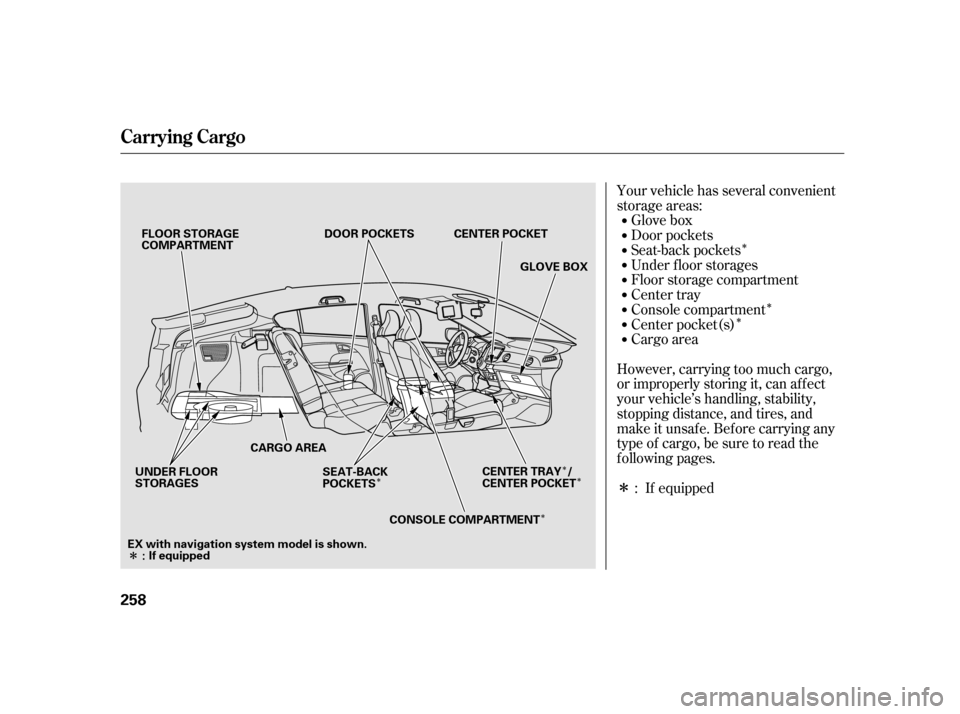
Your vehicle has several convenient
storage areas:
Glove box
Door pockets
Cargo area
Center tray
Floor storage compartment
Under f loor storages
However, carrying too much cargo,
or improperly storing it, can af f ect
your vehicle’s handling, stability,
stopping distance, and tires, and
make it unsaf e. Bef ore carrying any
type of cargo, be sure to read the
f ollowing pages. Console compartment
Seat-back pockets
Center pocket(s)
: If equipped
Carrying Cargo
258 CARGO AREADOOR POCKETS
GLOVE BOX
FLOOR STORAGE
COMPARTMENT
UNDER FLOOR
STORAGES SEAT-BACK
POCKETS
CONSOLE COMPARTMENT
: If equipped
EX with navigation system model is shown. CENTER POCKET
CENTER TRAY /
CENTER POCKET