2011 HONDA ELEMENT oil
[x] Cancel search: oilPage 153 of 286

Fuel Economy FactorsThe following factors can lower your
vehicle's fuel economy:●Aggressive driving (hard
acceleration and braking)●Excessive idling, accelerating and
braking in stop-and-go traffic●Cold engine operation (engines are
more efficient when warmed up)●Driving with a heavy load or the air
conditioner running●Improperly inflated tiresImproving Fuel EconomyVehicle MaintenanceA properly maintained vehicle
maximizes fuel economy. Poor
maintenance can significantly reduce
fuel economy. Always maintain your
vehicle according to the maintenance
messages displayed on the
information display (seeOwner's
Maintenance Checks on page 190).
For example:
●Use the recommended viscosity
motor oil, displaying the API
Certification Seal (see page 193).●Maintain proper tire inflation -
An underinflated tire increases
‘‘ rolling resistance, ’’which reduces
fuel economy.●Avoid carrying excess weight in
your vehicle -It puts a heavier
load on the engine, increasing fuel
consumption.●Keep your vehicle clean -In
particular, a build-up of snow or
mud on your vehicle's underside
adds weight and rolling resistance.
Frequent cleaning helps your fuel
economy.
Drive Efficiently●Drive moderately -Rapid
acceleration, abrupt cornering, and
hard braking increase fuel
consumption.●Observe the speed limit -
Aerodynamic drag has a big effect
on fuel economy at speeds above
45 mph (75 km/h). Reduce your
speed and you reduce the drag.
Trailers, car top carriers, roof
racks and bike racks are also big
contributors to increased drag.●Avoid excessive idling -Idling
results in 0 miles per gallon (0 kms
per liter).●Minimize the use of the air
conditioning system -The A/C
puts an extra load on the engine
which makes it use more fuel. Use
the fresh-air ventilation when
possible.
CONTINUED
Fuel Economy
147
Before Driving
10/08/06 08:34:41 11 ELEMENT MMC North America Owner's Man 50 31SCV680 enu
Page 187 of 286

Check Out Your Vehicle
Before you leave the pavement, be
sure to do all scheduled maintenance
and service, and inspect your vehicle
for any problems. Pay special
attention to the condition of the tires,
and check the tire pressures.
After you return to the pavement,
carefully inspect your vehicle to
make sure there is no damage that
could make driving it unsafe.
Recheck the condition of the tires
and the tire pressures.
Remember
The route presents limits (too steep
or bumpy roads). You have limits
(driving skill and comfort). And your
vehicle has limits (traction, stability,
and power).
Driving off-highway can be
hazardous if you fail to recognize
limits and take the proper
precautions.Accelerating and Braking
For better traction on all surfaces,
accelerate slowly and gradually build
up speed. If you try to start too fast
on wet soil, mud, snow, or ice, you
might not have enough traction to
get underway, and you may dig
yourself a hole. Starting with the shift
lever in second (2) gear will help you
have a smoother start on snow or ice.
Keep in mind that you will usually
need more time and distance to
brake to a stop on unpaved surfaces.
Avoid hard braking. Do not
‘‘pump ’’
the brakes; let the anti-lock braking
system pump them for you. Avoiding Obstacles
Debris on the road can damage your
suspension or other components.
Because your vehicle has a high
center of gravity, driving over a large
obstacle, or allowing a wheel to drop
into a deep hole can cause your
vehicle to tip or roll over.
Driving on Slopes
If you can't clearly see all conditions
or obstacles on a slope, walk the
slope before you drive on it. If you
have any doubt whether or not you
can safely drive on the slope, don't
do it. Find another route.
If you are driving up a hill and find
that you cannot continue,
do not try to
turn around.
Your vehicle could roll
over. Slowly back down the hill,
following the same route you took up
the hill.
CONTINUED
Off-Highway Driving Guidelines
181
Driving
10/08/06 08:34:41 11 ELEMENT MMC North America Owner's Man 50 31SCV680 enu
Page 189 of 286

This section explains why it is important
to keep your vehicle well maintained and
how to follow basic maintenance safety
precautions.
This section also includes instructions
on how to read the Maintenance Minder
messages on the information display,
and instructions for simple maintenance
tasks you may want to take care of
yourself.
If you have the skills and tools to
perform more complex maintenance
tasks on your vehicle, you may want to
purchase the service manual. See page
267 for information on how to obtain a
copy, or see your dealer.Maintenance, replacement, or repair
of emissions control devices and
systems may be done by any
automotive repair establishment or
individual using parts that are
‘‘
certified ’’to EPA standards.
Maintenance Safety
.....................
184
Maintenance Minder
TM
...............
185
Fluid Locations
...........................
192
Adding Engine Oil
......................
193
Changing the Engine Oil and Filter
.......................................
194
Engine Coolant
...........................
196
Windshield Washers
...................
197
Automatic Transmission Fluid
....
198
Brake Fluid
.................................
199
Power Steering Fluid
..................
200
Cleaning the Body Panels
...........
201
Lights
..........................................
201
Cleaning the Seat Belts
...............
209
Floor Mats
..................................
209
Dust and Pollen Filter
.................
210
Wiper Blades
..............................
210
Wheels
........................................
212
Tires
...........................................
212
Checking the Battery
..................
218
Vehicle Storage
...........................
219
Maintenance
183
Maintenance
10/08/06 08:34:41 11 ELEMENT MMC North America Owner's Man 50 31SCV680 enu
Page 191 of 286

Your vehicle displays engine oil life
and maintenance service items on
the information display to show you
when you should have your dealer
do engine oil replacement and
indicated maintenance service.
Based on the engine operating
conditions and accumulated engine
revolutions, the onboard computer in
your vehicle calculates the remaining
engine oil life and displays it as a
percentage.Engine Oil Life Display
To see the current engine oil life,
turn the ignition switch to the ON
(II) position, then press and release
the select/reset knob repeatedly
until the engine oil life indicator
appears.The remaining engine oil life is
shown on the display according to
this table:
Calculated Engine
Oil Life (%) Displayed
Engine Oil Life (%)
100% -91% 100%
90% -81% 90%
80% -71% 80%
70% -61% 70%
60% -51% 60%
50% -41% 50%
40% -31% 40%
30% -21% 30%
20% -16% 20%
15% -11% 15%
10% -6% 10%
5% -1% 5%
0% 0%
ENGINE OIL LIFE INDICATOR SELECT/RESET KNOB
CONTINUED
Maintenance Minder
TM185
Maintenance
10/08/06 08:34:41 11 ELEMENT MMC North America Owner's Man 50 31SCV680 enu
Page 192 of 286

If the remaining engine oil life is 15
to 6 percent, you will see the engine
oil life indicator every time you turn
the ignition switch to the ON (II)
position. The Maintenance Minder
indicator will also come on, and the
maintenance item code(s) for other
scheduled maintenance items
needing service will be displayed
above the‘‘OIL LIFE’’ message.
The 15 and 10 percent oil life
indicator reminds you that the time is
coming soon to take your vehicle in
for the required maintenance.
When the remaining engine oil life is
5 to 1 percent, you will see a
‘‘SERVICE ’’message along with the
same maintenance item code(s),
every time you turn the ignition
switch to the ON (II) position.
MAINTENANCE MINDER INDICATOR
MAINTENANCE
ITEM CODE(S) ENGINE OIL LIFE
INDICATORMaintenance Minder
TM
18610/08/06 08:34:41 11 ELEMENT MMC North America Owner's Man 50 31SCV680 enu
Page 193 of 286
The maintenance item code or codes
indicate the main and sub items
required at the time of the oil change
(see page 188).
You can switch the information
display from the engine oil life
display to the odometer or the trip
meter. Press and release the select/
reset knob on the instrument panel.
When the engine oil life is 15 to 1
percent, the Maintenance Minder
indicator (
) comes on every time
you turn the ignition switch to the
ON (II) position, then it goes out if
you switch the information display.
When you see this message, have
the indicated maintenance performed
by your dealer as soon as possible.
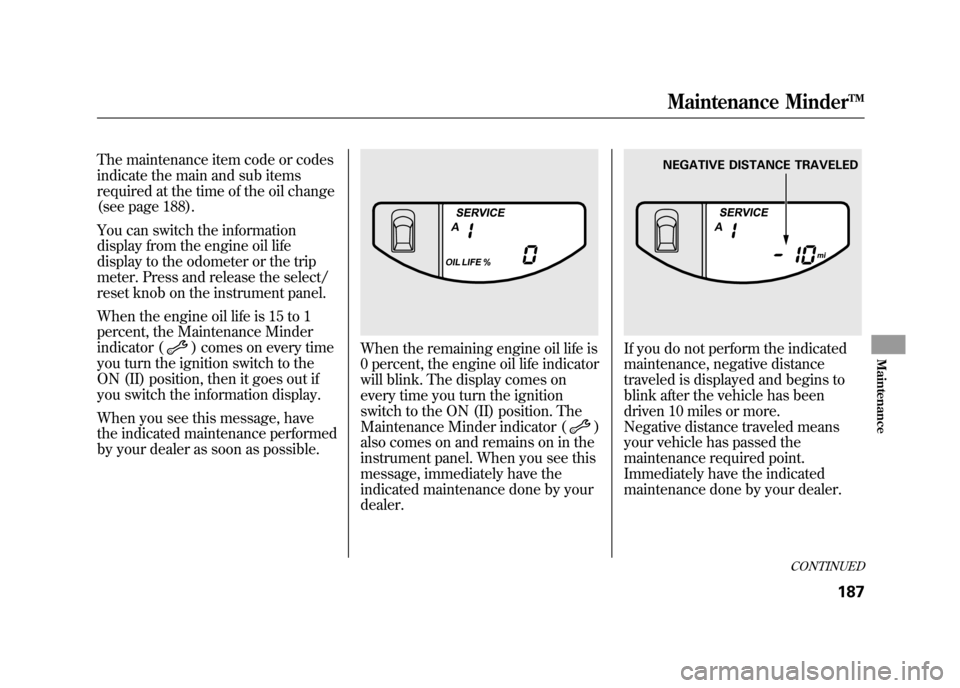
When the remaining engine oil life is
0 percent, the engine oil life indicator
will blink. The display comes on
every time you turn the ignition
switch to the ON (II) position. The
Maintenance Minder indicator (
)
also comes on and remains on in the
instrument panel. When you see this
message, immediately have the
indicated maintenance done by your
dealer.
If you do not perform the indicated
maintenance, negative distance
traveled is displayed and begins to
blink after the vehicle has been
driven 10 miles or more.
Negative distance traveled means
your vehicle has passed the
maintenance required point.
Immediately have the indicated
maintenance done by your dealer.
NEGATIVE DISTANCE TRAVELED
CONTINUED
Maintenance Minder
TM187
Maintenance
10/08/06 08:34:41 11 ELEMENT MMC North America Owner's Man 50 31SCV680 enu
Page 194 of 286

To change the information display
from the engine oil life display to the
odometer or the trip meter, press and
release the select/reset knob.
When the engine oil life is 0 percent
or negative distance traveled, the
Maintenance Minder indicator (
)
remains on even if you change the
information display.
Immediately have the service
performed, and make sure to reset
the display as described as follows. Maintenance Main Items and Sub
Items
All maintenance items displayed on
the information display are in code.
For an explanation of these
maintenance codes, see page 191.Resetting the Engine Oil Life
Display
Your dealer will reset the display
after completing the required
maintenance service. You will see
‘‘
OIL LIFE 100% ’’on the information
display the next time you turn the
ignition switch to the ON (II)
position.
If maintenance service is done by
someone other than your dealer,
reset the Maintenance Minder as
follows:
1. Turn the ignition switch to the ON (II) position.
2. Press the select/reset knob repeatedly until the engine oil life
is displayed.
MAINTENANCE MAIN ITEM
MAINTENANCE SUB ITEM(S)
Maintenance Minder
TM
18810/08/06 08:34:41 11 ELEMENT MMC North America Owner's Man 50 31SCV680 enu
Page 195 of 286

3. Press the select/reset knob forabout 10 seconds. The engine oil
life and the maintenance item
code(s) will blink.
4. Press the select/reset knob foranother 5 seconds. The
maintenance item code(s) will
disappear, and the engine oil life
will reset to ‘‘100. ’’ Important Maintenance
Precautions
If you have the required service done
but do not reset the display, or reset
the display without doing the service,
the system will not show the proper
maintenance intervals. This can lead
to serious mechanical problems
because you will no longer have an
accurate record of when
maintenance is needed.
Your authorized Honda dealer knows
your vehicle best and can provide
competent, efficient service.
CONTINUED
Maintenance Minder
TM189
Maintenance
10/08/06 08:34:41 11 ELEMENT MMC North America Owner's Man 50 31SCV680 enu