Page 63 of 434

The lef t or right turn signal indicator
blinks when you signal a lane change
or turn. If an indicator does not blink
or blinks rapidly, it usually means
one of the turn signal bulbs is
burned out (see pages and ).
Replace the bulb as soon as possible,
since other drivers cannot see that
you are signaling.
When you press the hazard warning
button, both turn signal indicators
and all turn signals on the outside of
the vehicle f lash.This indicator reminds you that the
exterior lights are on. It comes on
when the light switch is in either the
or position. If you turn the
ignition switch to the ACCESSORY
(I) or the LOCK (0) position without
turning of f the light switch, this
indicator will remain on. A reminder
chime will also sound when you open
the driver’s door.
This indicator will also come on
when the light switch is in AUTO
and the lights turn on automatically. The appropriate light comes on in
this indicator if the tailgate or any
door is not closed tightly.
All the lights in the indicator come
on f or a f ew seconds when you turn
the ignition switch to the ON (II)
position.
347 349
EX-L models
Instrument Panel Indicators
Turn Signal and Hazard Warning
Indicators
L ights On Indicator Door and Tailgate Open Indicator
60
TAILGATE OPEN INDICATORDOOR OPEN INDICATORS
10/08/27 14:21:40 31TP6610_065
2011 Accord Crosstour
Page 65 of 434

This indicator comes on f or a f ew
seconds when you turn the ignition
switch to the ON (II) position. It
remindsyouthatitistimetotake
your vehicle in f or scheduled
maintenance. The maintenance main
items and sub items will be displayed
in the inf ormation display. See pagef or more inf ormation on the
Maintenance Minder .
This indicator goes of f when your
dealer resets it after completing the
required maintenance service.
This indicator comes on when you
turn on the cruise control system by
pressing the CRUISE button (see
page ).
This indicator comes on when you
set the cruise control. See page
f or inf ormation on operating the
cruise control. This indicator comes on brief ly when
you turn the ignition switch to the
ON (II) position. It will then go of f if
you have inserted a properly coded
ignition key. If it is not a properly
coded key, the indicator will blink,
and the engine’s f uel system will be
disabled (see page ).
This indicator comes on when the
washer f luid level is low. Add washer
fluidwhenyouseethisindicator
(see page ).
This indicator comes on when you
turn on the f og lights. For more
inf ormation, see page . 249
249
73325
78
339
Canadian models only
Immobilizer System
Indicator
Maintenance Minder
Indicator
Cruise Control Indicator Washer Level Indicator
Cruise Control Main
Indicator
Fog L ight Indicator
Instrument Panel Indicators
62
TM
10/08/27 14:22:01 31TP6610_067
2011 Accord Crosstour
Page 68 of 434

�¶�¶�µ
�µ�µ�µ�µ �µ�µ�µ The trip meter shows the number of
miles (U.S.) or kilometers (Canada)
driven since you last reset it.
There are two trip meters: Trip A
and Trip B. Switch between these
displays by pressing the select/reset
knob repeatedly.
Each trip meter works independently,
so you can keep track of two
dif f erent distances.
When you turn the ignition switch to
the ON (II) position, your last
selection is displayed.
To reset a trip meter, display it, and
then press and hold the select/reset
knob until the number resets to ‘‘0.0’’.
This indicator displays the outside
temperature in Fahrenheit (U.S.
models) or Celsius (Canadian
models). To see the outside
temperature, press and release the
select/reset knob until the
temperature is displayed.
The temperature sensor is in the
f ront bumper. Theref ore, the
temperature reading can be af f ected
by heat ref lection f rom the road
surf ace, engine heat, and the
exhaust f rom surrounding traf f ic.
This can cause an incorrect
temperature reading when your
speed is under 19 mph (30 km/h).
The sensor delays the display update
until it reaches the correct outside
temperature. This may take several
minutes.
If the outside temperature is
incorrectly displayed, you can adjust it up to 5°F in U.S. models ( 3°C
in Canadian models) warmer or
cooler.
The temperature must be
stabilized bef ore doing this
procedure.
Select the outside temperature
display, then press and hold the
select/reset knob f or 10 seconds.
The f ollowing sequence will appear
for1secondeach:0,1,2,3,4,5, 5, 4, 3, 2, 1, 0 (U.S.) or 0, 1, 2,
3, 3, 2, 1, 0 (Canada).
When the temperature reaches the
desired value, release the select/
reset knob. You should see the new
outside temperature displayed.
In certain weather conditions,
temperature readings near f reezing
(32°F, 0°C) could mean that ice is
f orming on the road surf ace.
Gauges
Outside Temperature Indicator Trip Meter
Inst rument s and Cont rols
65
NOTE:
10/08/27 14:22:23 31TP6610_070
2011 Accord Crosstour
Page 74 of 434

�µEven with the automatic lighting
f eature turned on, we recommend
thatyouturnonthelightsmanually
when driving at night or in a dense
f og, or when you enter dark areas
such as long tunnels or parking
f acilities.
Do not leave the light switch in
AUTO if you will not be driving the
vehicle f or an extended period (a
weekormore).Youshouldalsoturn
of f the lights if you plan to leave the
engine idling or of f f or a long time.
The automatic lighting
f eature turns on the headlights and
all other exterior lights, when it
senses low ambient light.
The lights will remain on when you
turn of f the ignition switch. They will
turn of f automatically when you
remove the key and open the driver’s
door. To turn them on again, either
turn the ignition switch to the ON
(II) position or turn the light switch
to the position. To turn on automatic lighting, turn
the light switch to AUTO. The lights
will come on automatically when the
outside light level becomes low (at
dusk, f or example). The lights on
indicator comes on as a reminder.
The lights and indicator will turn of f
automatically when the system
senses high ambient light. The automatic lighting f eature is
controlledbyasensorlocatedontop
of the dashboard. Do not cover this
sensor or spill liquids on it.
EX-L models
AUTO
Turn Signals and Headlights
Inst rument s and Cont rols
71
LIGHT SENSOR
10/08/27 14:23:14 31TP6610_076
2011 Accord Crosstour
Page 75 of 434

This f eature turns of f the headlights,
all other exterior lights, and the
instrument panel lights within 15
seconds after you remove the key
and close the driver’s door.
The automatic lighting of f f eature
activates if you leave the headlight
switch in the ‘‘ ’’ or ‘‘ ’’
position or if the lights are turned on
by setting the switch in the ‘‘AUTO’’
position (if equipped), and you
remove the key, then open and close
the driver’s door.The headlights revert to normal
operation when you turn them on
with the switch. With the headlight switch of f or in
the position, the high beam
headlights and the high beam
indicator come on with reduced
brightness when you turn the
ignition switch to the ON (II)
position and release the parking
brake. They remain on until you turn
the ignition switch of f , even if you
set the parking brake.
If you remove the key f rom the
ignition switch with the headlight
switch on, but do not open the door,
the lights will turn of f af ter 10
minutes.
If you turn the ignition switch to the
LOCK (0) position with the lights
turned on by setting the switch in
the ‘‘AUTO’’ position, but do not
open the door, the lights turn of f
af ter 3 minutes.
The lights will turn on again when
you unlock or open the driver’s door.
If you unlock the door, but do not
open it within 15 seconds, the lights
will go off. With the driver’s door
open, you will hear a lights-on
reminder chime.
EX-L models
Automatic Lighting Of f Feature
Daytime Running Lights
Turn Signals and Headlights
72
10/08/27 14:23:22 31TP6610_077
2011 Accord Crosstour
Page 77 of 434

Push the button between the center
vents to turn on the hazard warning
lights (f our-way f lashers). This
causes all f our outside turn signals
and both turn indicators in the
instrument panel to f lash. Use the
hazard warning lights if you need to
park in a dangerous area near heavy
traf f ic, or if your vehicle is disabled.
The instrument panel will illuminate
with reduced brightness when you
unlock and open the driver’s door.
The brightness will increase slightly
when you insert the key in the
ignitionswitch,thengotonormal
brightness when you turn the
ignition switch to the ON (II)
position.
If you insert the key but do not turn
the ignition switch to the ON (II)
position, the illumination turns of f in
about 10 seconds. If you do not insert the key in the
ignition switch af ter opening the
driver’s door, the illumination turns
of f about 30 seconds af ter you close
the door.
To reduce glare at night, the
instrument panel illumination dims
when you turn the light switch to or . Turning the select/
reset knob to the right until you hear
a beep will cancel the reduced
brightness. The level of brightness is shown on
the inf ormation display while you
adjust it. It goes out about 5 seconds
af ter you f inish adjusting. Hazard Warning Button
Instrument Panel Brightness, Hazard Warning Button
74
BRIGHTNESS LEVEL
U.S. model is shown.
10/08/27 14:23:38 31TP6610_079
2011 Accord Crosstour
Page 85 of 434
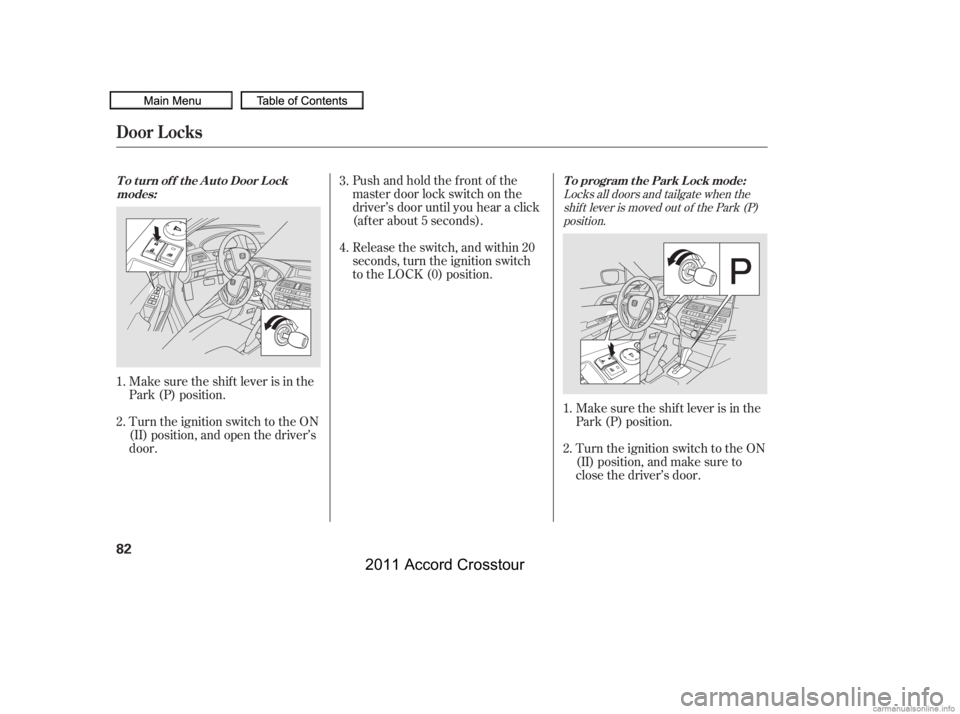
Turn the ignition switch to the ON
(II) position, and open the driver’s
door.Pushandholdthefrontof the
master door lock switch on the
driver’s door until you hear a click
(af ter about 5 seconds).
Turn the ignition switch to the ON
(II) position, and make sure to
close the driver’s door.
Make sure the shif t lever is in the
Park (P) position. Release the switch, and within 20
seconds, turn the ignition switch
to the LOCK (0) position.
Make sure the shif t lever is in the
Park (P) position.
1.
2.
1.
2. 3.
4.
Locks all doors and tailgate when the
shif t lever is moved out of the Park (P)position.
To program the Park Lock mode:
T o t urn of f t he A ut o Door L ock
modes:
Door L ocks
82
10/08/27 14:24:41 31TP6610_087
2011 Accord Crosstour
Page 86 of 434
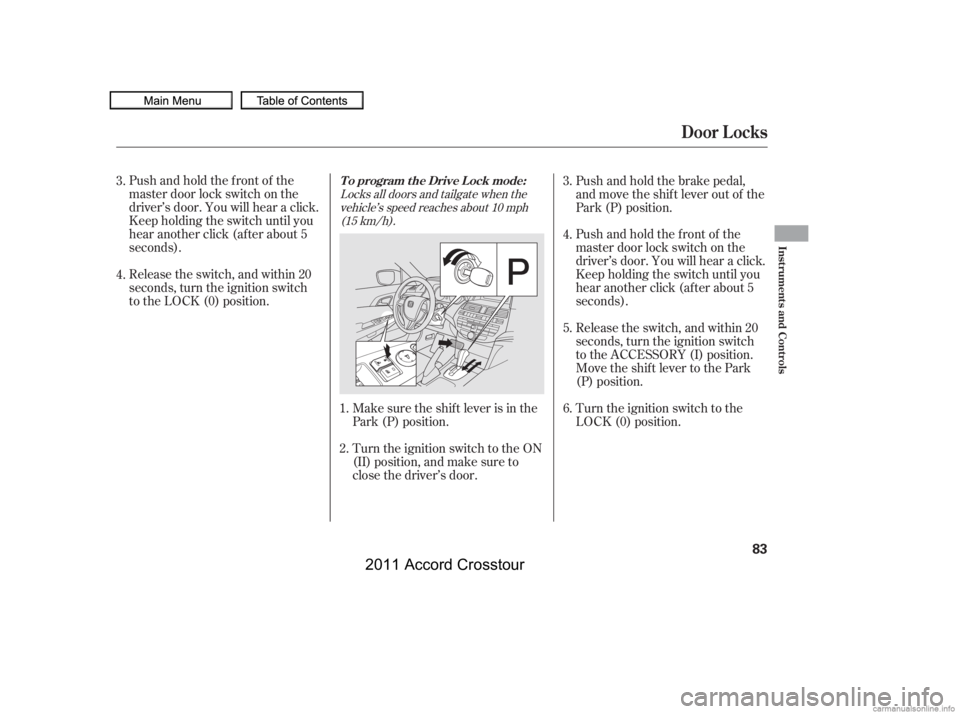
Pushandholdthefrontof the
master door lock switch on the
driver’s door. You will hear a click.
Keep holding the switch until you
hear another click (after about 5
seconds).
Release the switch, and within 20
seconds, turn the ignition switch
to the LOCK (0) position.Turn the ignition switch to the ON
(II) position, and make sure to
close the driver’s door. Make sure the shif t lever is in the
Park (P) position.Push and hold the brake pedal,
and move the shif t lever out of the
Park (P) position.
Pushandholdthefrontof the
master door lock switch on the
driver’s door. You will hear a click.
Keep holding the switch until you
hear another click (after about 5
seconds).
Release the switch, and within 20
seconds, turn the ignition switch
to the ACCESSORY (I) position.
Move the shift lever to the Park
(P) position.
Turn the ignition switch to the
LOCK (0) position.
1.
2. 3.
4.
5.
6.
3.
4.
Locks all doors and tailgate when the
vehicle’s speed reaches about 10 mph(15 km/h).
T o program t he Drive L ock mode:
Door L ocks
Inst rument s and Cont rols
83
10/08/27 14:24:51 31TP6610_088
2011 Accord Crosstour