Page 202 of 445
�µ
Press the AUDIO button to view the
audio control icons, then touch the
AUTO SEL icon. You will see AUTO
SEL f lashing in the display, and the
system goes into scan mode f or
several seconds. It stores the
f requencies of six AM, and twelve
FM stations in the preset buttons. You will see a ‘‘0’’ displayed af ter
pressing a preset button if auto
select cannot f ind a strong station f or
every preset button.
If you do not like the stations auto
select has stored, you can store
other f requencies on the preset
buttons as previously described.
press the
AUTO SEL icon. This restores the
presets you originally set.
For inf ormation on AM/FM radio
f requencies and reception, see page .
If you are
traveling and can no longer receive
your preset stations, you can use the
auto select feature to find stations in
the local area.
250
To turn of f auto select,
Playing the AM/FM Radio (EX-L model with navigation system)
AUTO SELECT
Features
197
Main MenuTable of Contents
Page 205 of 445
Playing the XMRadio (EX-L model wit h navigat ion syst em)
200
TUNE BAR
SCAN BUTTON JOYSTICK
AUDIO BUTTON XM RADIO
BUTTON
POWER/VOLUMEKNOB
PRESET BUTTONS
PRESET CHANNEL
NUMBER XM RADIO ICON MODE ICON
CATEGORY
INDICATOR
AM/FM BUTTON
Main MenuTable of Contents
Page 206 of 445

�µ
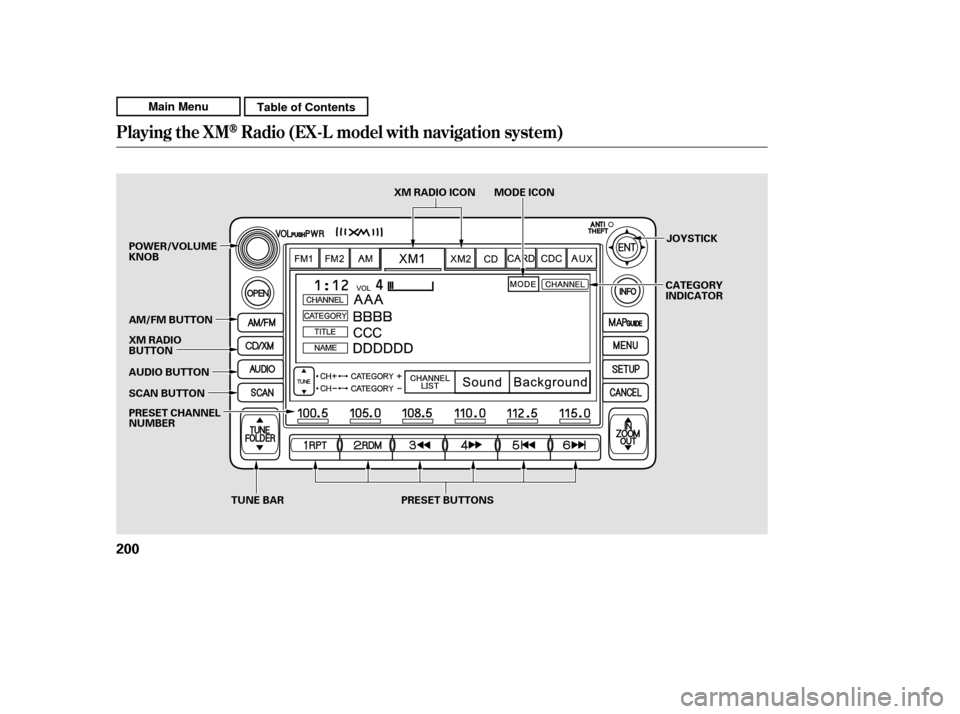
To listen to XM Radio, turn the
ignition switch to the ACCESSORY
(I) or the ON (II) position. Push the
power/volume knob to turn on the
audio system, and press the CD/XM
button. Adjust the volume by turning
the knob. The last channel you
listened to will show in the display. To switch between
channel mode and category mode,
touch the MODE icon. In channel
mode, you can select all of the
available channels. In category mode,
such as Jazz, Rock, Classical, etc.,
you can select all of the channels
within that category. Each time you
touch and release the MODE icon,
the display changes between the
channel mode and the category
mode.
You can also change to the XM
Radio while you are listening to an
FM station, AM station, disc, PC
card, etc., by touching the XM1 or
XM2iconontheaudiodisplay.
You can also operate the radio using
the control buttons on the left side of
the screen. The status bar appears
on the bottom of the screen each
time you press any of the control
buttons. On the navigation screen,
you can also see the audio
inf ormation by touching the AUDIO
INFO icon on the lower part of the
screen.
Your vehicle is capable of receivingXM
Radio anywhere in the United
States and Canada, except Hawaii,
Alaska,andPuertoRico.XMisa
registered trademark of Sirius XM
Radio
,Inc.andXMCANADAis a
registered business name of
Canadian Satellite Radio Inc.
XM Radio receives signals f rom two
satellites to produce clear, high-
quality digital reception. It of f ers
many channels in several categories.
Along with a large selection of
dif f erent types of music, XM Radio
allows you to view channel and
category selections in the display.
Whenyoupressandholdthe
AUDIO button, the display also
shows all XM inf ormation.
CONT INUED
Operating the XM Radio MODE
Playing the XMRadio (EX-L model wit h navigat ion syst em)
Features
201
Main MenuTable of Contents
Page 211 of 445
�µ�´
Playing a Disc (EX-L model with navigat ion system)
206
SCAN BUTTON JOYSTICK
AUDIO BUTTON
POWER/VOLUME KNOB
OPEN BUTTON
CD BUTTON
RANDOM
BUTTON
REPEAT BUTTON REWIND BUTTON FAST FORWARD
BUTTONCD ICON
TUNE BAR SKIP BUTTONSKIP BUTTON
Main MenuTable of Contents
Page 214 of 445

�µ�µ
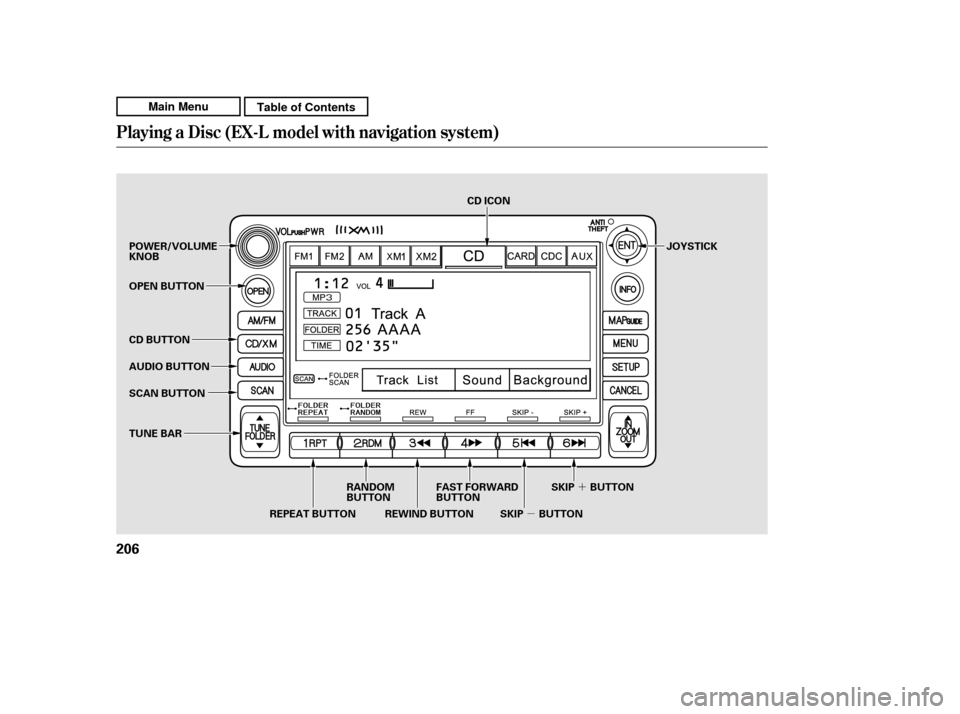
Push the AUDIO button beside the
screen to show the audio display and
operate the disc player.
You can also operate the audio
system without using the control
icons on the audio screen. Press the
CD button. The status bar appears
on the bottom of the screen. On the
navigation screen, you can see the
audio inf ormation whenever you
touch the AUDIO INFO icon on the
lower portion of the screen.
When playing a CD recorded with
text data, the track, album, and artist
name are shown on the audio display.
When playing a disc in MP3 or WMA,
the f older number and name, the f ile
number and name, the artist name,
and the elapsed time are shown. The
system will continuously play a disc
until you change modes. If the disc
was not recorded with text data, it
will not be displayed. You can also select an icon with the
joystick. Move it to left, right, up, or
down to change the highlighting and
scroll through lists. Then press ENT
on the top of the joystick to select
the icon.
Each time you press and
release (preset 6 button), the
player skips f orward to the
beginning of the next track (f ile in
MP3 or WMA mode). Press and
release (preset 5 button), to
skip backward to the beginning of
the current track. Press it again to
skip to the beginning of the previous
track.
You can use the preset buttons while
a disc is playing to select passages
and change tracks (files in MP3 or
WMA mode). Each preset button’s
f unction is shown on the bottom of
the screen.
To move rapidly within
a track/f ile, press and hold (preset 4 button) or
(preset 3 button).
CONT INUED
T o Change or Select T racks/Files
SK IP
FF/REW
Playing a Disc (EX-L model with navigat ion system)
Features
209
PRESET BUTTON’S FUNCTION
PRESET BUTTONS
Main MenuTable of Contents
Page 223 of 445

�µ
�´ �Û
�Ý
To play CDs, the ignition switch
must be in the ACCESSORY (I) or
ON (II) position.
You operate the CD changer with
the same controls used f or the in-
dash disc player or the radio. To
select the CD changer, touch the
CDC icon. The disc and track
numbers are displayed. The system
will continuously play a CD until you
change modes. To select a dif f erent disc, use the
preset buttons (5 or 6). Press and
release the Preset 5 (DISC )
button to select the previous disc or
Preset 6 (DISC ) to select the next
disc in sequence. Pressing the or
side of the TUNE bar also
changes the disc. If you select an
empty position in the CD changer,
the system will try to load the CD in
the next available slot.
You can use the preset buttons while
a disc is playing to select passages
and change tracks. Each preset
buttonfunctionisshownonthe
bottom of the screen.
To Play a CD
CD Changer (EX-L model with navigation system)
218
TUNE
BAR
PRESET BUTTONS
Do not use CDs with adhesive labels.
The label can curl up and cause the CD
to jam in the unit.
Main MenuTable of Contents
Page 229 of 445

The PC card slot is behind the
navigation screen. To use the PC
card player, press the OPEN button
beside the screen. The screen f olds
back, and the PC card slot appears.Insert a PC card straight into the slot.
The drive will read the PC card and
begin to play it.
Return the screen to the upright
position by pressing the CLOSE
button on the edge of the screen
panel.
Push the AUDIO button beside the
screen to show the audio display and
operate the PC card player.
You can also operate the audio
system without using the control
icons on the audio screen. Press any
of the appropriate control buttons.
The status bar appears on the
bottom of the screen. On the
navigation screen, you can see the
audio inf ormation whenever you
touch the AUDIO INFO icon on the
screen.
Depending on the sof tware the f iles
were made with, it may not be
possible to play some f iles, or display
some text data.
In WMA f ormat, DRM (digital rights
management) f iles cannot be played.
If the system finds a DRM file, it
skips that f ile and plays the next
available f older or f ile.
Loading a PC Card
Playing a PC card (EX-L model wit h navigat ion system)
224
PC CARD SLOT
Main MenuTable of Contents
Page 232 of 445
To go back to the previous screen,
presstheCANCELbuttononthe
rightsideofthescreen.Toexitthe
play mode screens, press the AUDIO
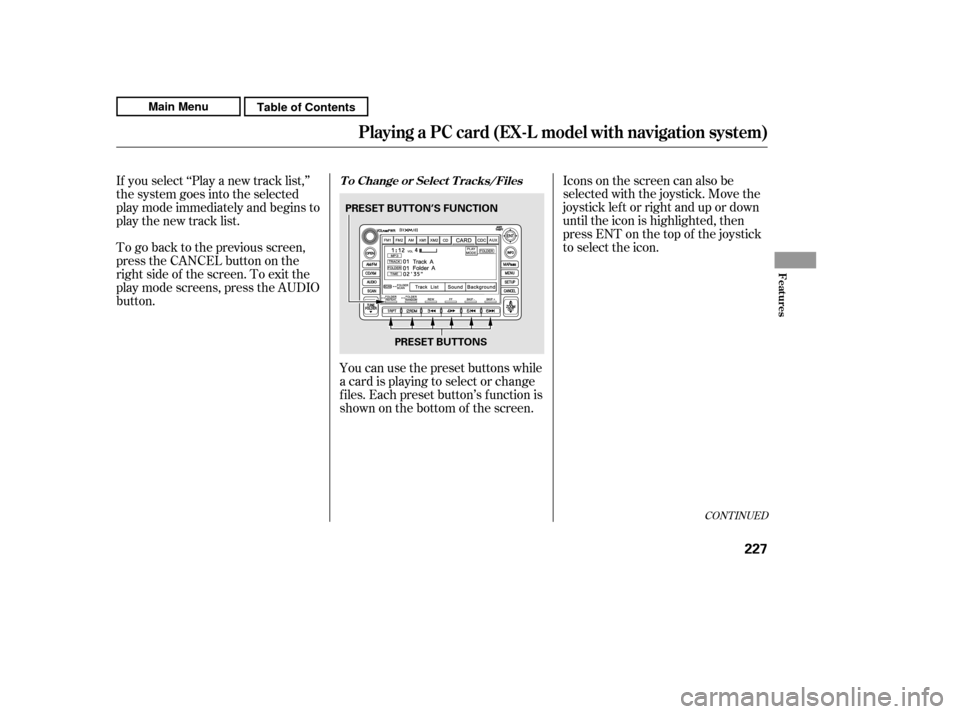
button.You can use the preset buttons while
a card is playing to select or change
f iles. Each preset button’s f unction is
shownonthebottomof thescreen.Iconsonthescreencanalsobe
selected with the joystick. Move the
joystick lef t or right and up or down
until the icon is highlighted, then
press ENT on the top of the joystick
to select the icon.
If you select ‘‘Play a new track list,’’
the system goes into the selected
play mode immediately and begins to
play the new track list.
CONT INUED
T o Change or Select T racks/Files
Playing a PC card (EX-L model wit h navigat ion system)
Features
227
PRESET BUTTON’S FUNCTION
PRESET BUTTONS
Main MenuTable of Contents