Page 79 of 445
�Î �Î�Î
�Î
�Î
�Î
�Î �Î �Î�Î �Î
To use the horn, press the center pad of the steering wheel.
If equipped.
Ref er to the navigation system manual.
1:2:3:
Controls Near the Steering Wheel
74
PARKING BRAKE PEDAL
HORN
REMOTE AUDIO CONTROLS
STEERING WHEEL
ADJUSTMENTS HEATED MIRROR BUTTON
NAVIGATION SYSTEM
VOICE CONTROL BUTTONS
BLUETOOTH HANDSFREELINK SYSTEM
VOICE CONTROL BUTTONS
(P.325)
(P.255) (P.81)
(P.269)
(P.81)
(P.123)
(P.266)
(P.76)
ACCESSORY POWER SOCKET(P.111)
MIRROR CONTROLS (P.115) HEADLIGHTS/
TURN SIGNALS
VEHICLE STABILITY
ASSIST (VSA) SYSTEM
OFF SWITCH
SEAT HEATER SWITCHESREAR WINDOW DEFOGGER BUTTON (P.80)
(P.115)
HAZARD WARNING
BUTTON
PASSENGER AIRBAG
OFF INDICATOR
INSTRUMENT PANEL BRIGHTNESS
(P.79)
WINDSHIELD
WIPERS/WASHERS
(P.75)
(P.33)
CRUISE CONTROL BUTTONS (P.79)
(P.194)
(P.315)
(P.145, 157) CLOCK
(P.259)
AUDIO SYSTEM
AUDIO SYSTEM
SHIFT LEVER1
2
2
3 2 22 2
Main MenuTable of Contents
Page 86 of 445

Push the lever under the steering
column all the way down.
Make any steering wheel adjustment
bef ore you start driving.
To apply the parking brake, push the
pedal down with your f oot. To
release it, push on the pedal again.
The parking brake indicator on the
instrument panel should go out when
the parking brake is f ully released
(see page ). Move the steering wheel up or
down, and in or out, so it points
toward your chest, not toward
your f ace. Make sure you can see
the instrument panel gauges and
indicators.
1. 2.
62
CONT INUED
Parking Brake Steering Wheel A djustment
Parking Brake, Steering Wheel A djustment
Inst rument s and Cont rols
81
PARKING BRAKE PEDAL
Adjusting the steering wheel
position while driving may
cause you to lose control of the
vehicle and be seriously injured
inacrash.
Adjust the steering wheel only
when the vehicle is stopped.
Driving the vehicle with the parking
brake applied can damage the rear
brakes and hubs. A beeper will sound if
the vehicle is driven with the parking
brake on.
Main MenuTable of Contents
Page 87 of 445

Youshouldhavereceivedakey
number tag with your keys. You will
need this key number if you ever
have to get a lost key replaced. Use
only Honda-approved key blanks.
These keys contain electronic
circuits that are activated by the
immobilizer system. They will not
work to start the engine if the
circuits are damaged.Protect the keys f rom direct
sunlight, high temperature, and
high humidity.
Donotdropthekeysorsetheavy
objects on them.
Keep the keys away f rom liquids.
If they get wet, dry them
immediately with a sof t cloth.
Push the lever up to lock the
steering wheel in position.
Make sure you have securely
locked the steering wheel in place
by trying to move it up, down, in,
and out.
The master key fits all the locks on
your vehicle. The valet key works
only in the ignition and the driver’s
door lock. You can keep the glove
boxlockedwhenyouleaveyour
vehicle and the valet key at a parking
f acility.
The valet key does not contain a
battery. Do not try to take it apart.
3. 4. Keys and Locks
Steering Wheel A djustment, K eys and L ocks
82
LEVER
KEY
NUMBERTAG
MASTER KEY
WITH REMOTE
TRANSMITTER VALET
KEY
(Gray)
Main MenuTable of Contents
Page 89 of 445
�µ�µ
�µ
�µ
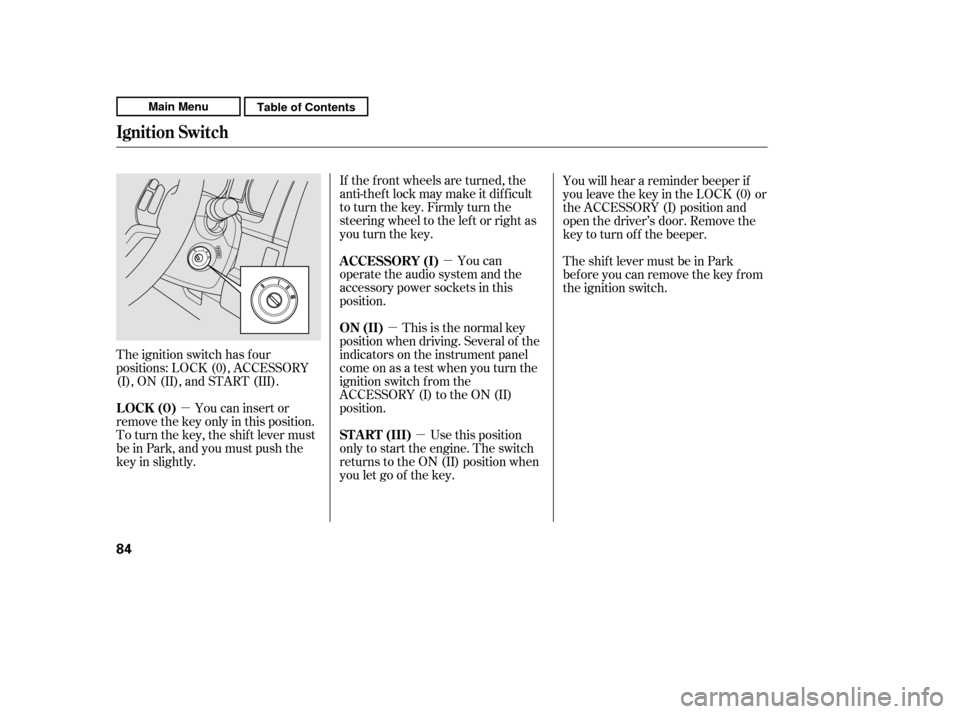
The ignition switch has f our
positions: LOCK (0), ACCESSORY
(I), ON (II), and START (III). If the f ront wheels are turned, the
anti-theft lock may make it difficult
to turn the key. Firmly turn the
steering wheel to the lef t or right as
you turn the key.
This is the normal key
position when driving. Several of the
indicators on the instrument panel
come on as a test when you turn the
ignition switch f rom the
ACCESSORY (I) to the ON (II)
position. You can
operate the audio system and the
accessory power sockets in this
position.
Use this position
only to start the engine. The switch
returns to the ON (II) position when
you let go of the key. You will hear a reminder beeper if
you leave the key in the LOCK (0) or
the ACCESSORY (I) position and
open the driver’s door. Remove the
key to turn of f the beeper.
TheshiftlevermustbeinPark
bef ore you can remove the key f rom
the ignition switch.
You can insert or
remove the key only in this position.
To turn the key, the shift lever must
be in Park, and you must push the
key in slightly. ON (II)
A CCESSORY (I)
ST A RT (III)
LOCK (0)
Ignition Switch
84
Main MenuTable of Contents
Page 147 of 445
Theclimatecontrolsystemhastwo
sensors: a sunlight sensor on top of
the dashboard, and a temperature
sensor next to the steering column.
Do not cover the sensors or spill any
liquidonthem.
Sunlight and T emperature
Sensors
Climat e Cont rol Sensors
142
SUNLIGHT SENSOR
TEMPERATURE SENSOR
Main MenuTable of Contents
Page 179 of 445

�µ�Î�Î
This f unction
samples the f irst track of each disc
in the in-dash disc changer in the
order they are stored. To activate
disc scan, press the SCAN button
repeatedly until you see D-SCAN in
the display. The system will then
play the f irst track/f ile of the f irst
disc f or approximately 10 seconds.
Af ter playing the f irst track/f ile of
the last disc, the system plays
normally. To remove the disc currently in play,
press the eject button. When a disc is
removed f rom a slot, the system
automatically begins the load
sequence so you can load another
disc in that position. If you do not
remove the disc f rom the changer
within 10 seconds, the disc will
reload into the slot. Then the system
returns to the previous mode (AM,
FM, or XM Radio ).
To play the radio when a disc is
playing, press the AM, FM, or XM
button (EX-L). Press the AUX or
CD/AUX button to switch to an
appropriate audio unit (if it is
connected to the USB adapter cable
or the auxiliary input jack). Press the
CD or CD/AUX button again to
switch back to playing a disc.
You can also press the MODE
buttononthesteeringwheelto
change modes.
If you turn the system of f while a
disc is playing, either with the
( ) button or by turning of f the
ignition switch, the disc will stay in
the drive. When you turn the system
back on, the disc will begin playing
where it lef t of f .
:OnEX-Lmodel
Playing Discs (EX and EX-L models wit hout navigat ion syst em)
DISC-SCA N
Removing Discs f rom the In-dash
Disc Changer
To Stop Playing a Disc
174
Main MenuTable of Contents
Page 187 of 445

�Î
�Î
To play the radio when an iPod is
playing, press the FM, AM or XM
button. If a disc is in the audio unit,
press the CD/AUX or CD button to
play the disc.
You can disconnect the iPod at any
time when you see the ‘‘OK to
disconnect’’ message in the iPod
display. Always make sure you see
the ‘‘OK to disconnect’’ message in
the iPod display bef ore you
disconnect it. Make sure to f ollow
the iPod’s instructions on how to
disconnect the dock connector f rom
the USB adapter cable.
The displayed message may
vary on models or versions. On
some models, there is no
message to disconnect.
If you reconnect the same iPod, the
system may begin playing where it
lef t of f , depending on what mode the
iPod is in when it is reconnected.
When you disconnect the iPod while
it is playing, the display shows ‘‘USB
NO DATA.’’ If you see an error message in the
display, see page .
You can also press the MODE
buttononthesteeringwheelto
change modes. : 183
Playing an iPod(Canadian EX model and EX-L model without navigation system)
T o Stop Playing Your iPod
iPod Error MessagesDisconnect ing an iPod
182
Main MenuTable of Contents
Page 196 of 445

�µ�µThis feature samples all
f iles in the current f older in the
order they are stored. To activate
the scan feature, press the SCAN
button. You will see ‘‘SCAN’’ in the
display. You will get a 10 second
sampling of each f ile in the f older.
Press and hold the SCAN button to
get out of the scan mode and play
the last f ile sampled. This feature
samples the f irst f ile in each f older in
the order they are stored. To
activate the folder scan feature,
press the SCAN button repeatedly.
You will see ‘‘F-SCAN’’ in the display.
You will get a 10 second sampling of
the f irst f ile in each f older. Press and
hold the SCAN button to get out of
the f older scan mode and play the
last f ile sampled.
Each time you press and release the
SCAN button, the mode changes
f rom f ile scan to f older scan, then to
normal play. To play the radio when a USB flash
memory device is playing, press the
FM,AMorXMbutton.If adiscisin
the audio unit, press the CD/AUX or
CD button to play the disc.
You can also press the MODE
buttononthesteeringwheelto
change modes.
CONT INUED
Playing a USB Flash Memory Device (Canadian EX model and EX-L model w
ithout navigation system)
SCA N FOL DER SCA N T o Stop Playing a USB Flash
Memory Device
Features
191
Main MenuTable of Contents

