Page 183 of 445

iPods compatible with your audio
system using the USB adapter cable
are:
This audio system can play the audio
f iles on the iPod
with the same
controls used f or the in-dash disc
changer. To play an iPod, connect it
to the USB adapter cable in the
upper glove box by using your dock
connector, then press the CD/AUX
or AUX button. The ignition switch
must be in the ACCESSORY (I) or
ON (II) position. The iPod will also
be recharged with the ignition switch
in these positions.
The audio system reads and plays
playable sound f iles on the iPod. The
system cannot operate an iPod as a
mass storage device. The system will
only play songs stored on the iPod
with iTunes.
iPod and iTunes are registered
trademarks owned by Apple Inc. Some devices cannot be powered
or charged via the USB adapter. If
this is the case, use the accessory
adapter to supply power to your
device.
Do not use an extension cable
between the USB adapter cable
equipped with your vehicle and
your dock connector.
DonotkeeptheiPodinthe
vehicle. Direct sunlight and high
heat will damage it.
Do not connect your iPod using ahub.
UseonlycompatibleiPodswiththe
latest sof tware. iPods that are not
compatible will not work in this audio
unit.
We recommend backing up your
data bef ore playing it.
Model
iPod classic
(80/160 G)
iPod classic
(120 G)
iPod with video
(iPod 5th
generation)
iPod nano
iPod nano
2nd generation
iPod nano
3rd generation
iPod nano
4th generation
iPod nano
5th generation
iPod touch
iPod touch
2nd generation Sof tware
Ver. 1.1.2 or more
Ver. 2.0.1 or more
Ver. 1.3.0 or more
Ver. 1.3.1 or more
Ver. 1.1.3 or more
Ver. 1.1.3 or more
Ver. 1.0.3 or more
Ver. 1.0.1 or more
Ver. 1.1.5 or more
Ver. 2.2.1 or more
To Play an iPod
Playing an iPod(Canadian EX model and EX-L model without navigation system)
178
NOTE:
Main MenuTable of Contents
Page 187 of 445

�Î
�Î
To play the radio when an iPod is
playing, press the FM, AM or XM
button. If a disc is in the audio unit,
press the CD/AUX or CD button to
play the disc.
You can disconnect the iPod at any
time when you see the ‘‘OK to
disconnect’’ message in the iPod
display. Always make sure you see
the ‘‘OK to disconnect’’ message in
the iPod display bef ore you
disconnect it. Make sure to f ollow
the iPod’s instructions on how to
disconnect the dock connector f rom
the USB adapter cable.
The displayed message may
vary on models or versions. On
some models, there is no
message to disconnect.
If you reconnect the same iPod, the
system may begin playing where it
lef t of f , depending on what mode the
iPod is in when it is reconnected.
When you disconnect the iPod while
it is playing, the display shows ‘‘USB
NO DATA.’’ If you see an error message in the
display, see page .
You can also press the MODE
buttononthesteeringwheelto
change modes. : 183
Playing an iPod(Canadian EX model and EX-L model without navigation system)
T o Stop Playing Your iPod
iPod Error MessagesDisconnect ing an iPod
182
Main MenuTable of Contents
Page 189 of 445
�´�´
�µ �µ
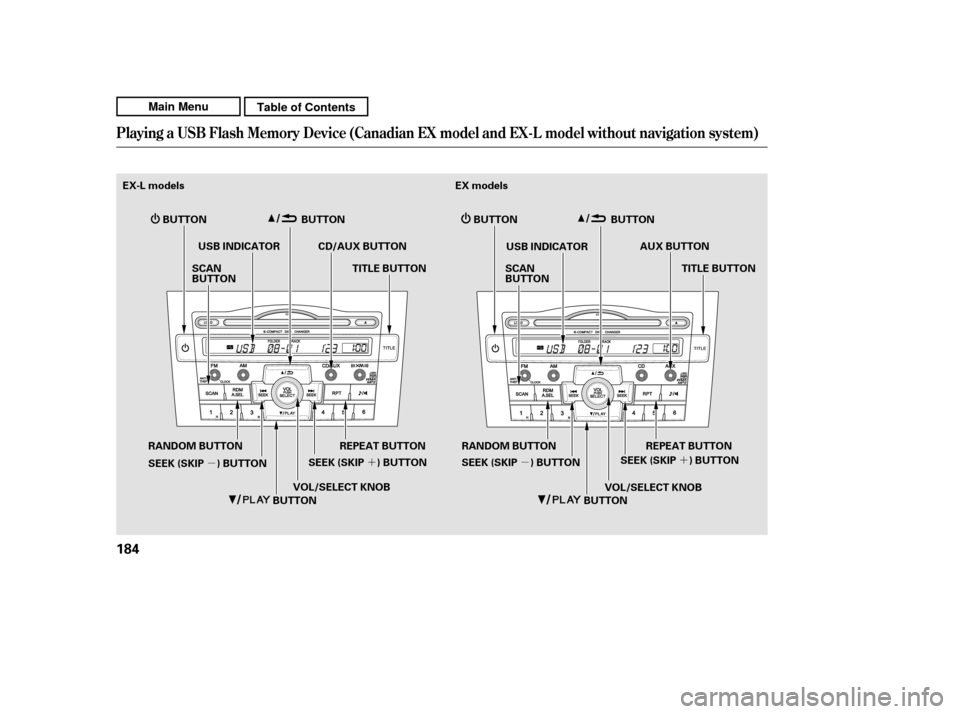
Playing a USB Flash Memory Device (Canadian EX model and EX-L model w
ithout navigation system)
184
BUTTON
USB INDICATOR
BUTTON
BUTTON
EX-L models
BUTTON
REPEAT BUTTON
CD/AUX BUTTON
TITLE BUTTON
USB INDICATOR EX models
TITLE BUTTON
REPEAT BUTTON
SCAN
BUTTON
SCAN
BUTTONAUX BUTTON
SEEK (SKIP ) BUTTON SEEK (SKIP ) BUTTON
BUTTON
BUTTON VOL/SELECT KNOB
VOL/SELECT KNOB
SEEK (SKIP ) BUTTON
RANDOM BUTTON
RANDOM BUTTON
SEEK (SKIP ) BUTTON
Main MenuTable of Contents
Page 190 of 445

�Î
�Î
CONT INUED
This audio system can operate the
audio f iles on a USB f lash memory
device with the same controls used
f or the in-dash disc changer. To play
a USB f lash memory device, connect
it to the USB adapter cable in the
upper glove box, then press the CD/
AUX or AUX button.
The audio system reads and plays
the audio f iles on the USB f lash
memory device in MP3, WMA or
AAC f ormats. Depending on the
f ormat, the display shows MP3,
WMA or AAC when a USB flash
memory device is playing. The USB
f lash memory device limit is up to
700 f olders or up to 65535 f iles. Only AAC f ormat f iles recorded
with iTunes are playable on this
audio unit. The recommended USB f lash
memory devices are 256 MB or
higher, and f ormatted with the FAT
f ile system. Some digital audio
players may be compatible as well.
Some USB f lash memory devices
(such as devices with security lock-
out f eatures, etc.) will not work in
this audio unit.
Depending on the type and
number of f iles, it may take some
time bef ore they begin to play.
We recommend backing up your
data bef ore playing a USB f lash
memory device.
Do not keep a USB f lash memory
device in the vehicle. Direct
sunlight and high heat will damage
it.
Do not use a device such as a card
reader or hard drive as the device
or your f iles may be damaged.
Do not connect your USB f lash
memory device using a hub.
Do not use an extension cable to
the USB adapter cable equipped
with your vehicle.
:
To Play a USB Flash Memory
Device
Playing a USB Flash Memory Device (Canadian EX model and EX-L model w
ithout navigation system)
Features
185
NOTE:
Main MenuTable of Contents
Page 196 of 445

�µ�µThis feature samples all
f iles in the current f older in the
order they are stored. To activate
the scan feature, press the SCAN
button. You will see ‘‘SCAN’’ in the
display. You will get a 10 second
sampling of each f ile in the f older.
Press and hold the SCAN button to
get out of the scan mode and play
the last f ile sampled. This feature
samples the f irst f ile in each f older in
the order they are stored. To
activate the folder scan feature,
press the SCAN button repeatedly.
You will see ‘‘F-SCAN’’ in the display.
You will get a 10 second sampling of
the f irst f ile in each f older. Press and
hold the SCAN button to get out of
the f older scan mode and play the
last f ile sampled.
Each time you press and release the
SCAN button, the mode changes
f rom f ile scan to f older scan, then to
normal play. To play the radio when a USB flash
memory device is playing, press the
FM,AMorXMbutton.If adiscisin
the audio unit, press the CD/AUX or
CD button to play the disc.
You can also press the MODE
buttononthesteeringwheelto
change modes.
CONT INUED
Playing a USB Flash Memory Device (Canadian EX model and EX-L model w
ithout navigation system)
SCA N FOL DER SCA N T o Stop Playing a USB Flash
Memory Device
Features
191
Main MenuTable of Contents
Page 242 of 445
CONT INUED
Open the upper glove box.
Push the release button to release
the USB adapter cable.
Connect your dock connector to
the iPod correctly and securely.Install the dock connector to the
USB adapter cable securely.If the audio system still does not
recognize the iPod, the iPod may
need to be reset. Follow the
instructions that came with your
iPod, or you can f ind reset
instructions online at
The current f ile number and total of
the selected playable f iles are
displayed on the screen. It also
shows the artist, album and track
(f ile) names on the screen.
You can select the AUX mode by
using the navigation system voice
control buttons, but cannot operate
theplaymodefunctions.
1. 2. 3. 4.
www.apple.com/
itunes/
Playing an iPod(EX-L model with navigation system)
Connect ing an iPod
Voice Cont rol Syst em
Features
237
DOCK CONNECTOR
USB ADAPTER CABLE
USB CONNECTOR
RELEASE BUTTON
Main MenuTable of Contents
Page 249 of 445

You can select the AUX mode by
using the navigation system voice
control buttons, but cannot operate
theplaymodefunctions.
Depending on the sof tware the
f iles were made with, it may not be
possibletoplaysomefiles,or
displaysometextdata.
Some devices cannot be powered
or charged via the USB adapter. If
this is the case, use the accessory
adapter to supply power to your
device.
Depending on the type of
encoding and writing sof tware
used, there may be cases where
character inf ormation does not
display properly. The order of f iles in USB playback
maybedifferentfromtheorderof
f iles displayed in PC or other
devices etc. Files are played in the
orderstoredinUSBflashmemory
device.
Some versions of MP3, WMA, or
AAC f ormat may not be supported. If
an unsupported f ile is f ound, the
audio unit displays UNSUPPORTED,
then skips to the next f ile.
In WMA or AAC format, DRM
(digital rights management) f iles
cannot be played. If the system f inds
a DRM f ile, the audio unit displays
UNPLAYABLE FILE, and then skips
to the next file.
Playing a USB Flash Memory Device (EX-L model with navigat ion system)
Voice Cont rol Syst em
244
Combining a low sampling f requency
with a low bitrate may result in
extremely degraded sound quality.
Main MenuTable of Contents
Page 262 of 445
Your vehicle has the auxiliary input
jack on the f ront panel, on the center
table, or in the console compartment,
depending on models. The system
will accept auxiliary input f rom
standard audio accessories using a
1/8 inch (3.5 mm) stereo miniplug.When a compatible audio unit is
connected to the jack, press the AUX
or CD/AUX button (AUX icon on
models with navigation system) to
select it.
Playing an Opt ional A udio Unit
Features
257
LX model
U.S. EX model is shown.
EX-L model is shown.
Main MenuTable of Contents