Page 222 of 445
To install a CD into the magazine,
push the button while pulling out
on the tab.Store all six trays in the magazine,
and reinstall the magazine in the
CD changer as shown.
PutaCDonthetraywiththe
printed surf ace f acing up as shown.
Reinstall the tray in the magazine.
Repeat this procedure to open the
other f ive trays.
Make sure to slide the CD
changer cover closed until it clicks.
To remove CDs f rom the CD
changer, ref er to the loading
procedure.
3. 4. 5.
6. 7.
CD Changer (EX-L model with navigation system)
Features
217
Main MenuTable of Contents
Page 224 of 445

�µ�µ �µ
�µ �µ
�µ �µ �µ
Push the button
(preset 6) to play the next track on
the disc. Push the button
(preset5)oncetoreplaythetrackin
play; press it twice to replay the
previous track.
To move more rapidly
within a track, press and hold the
(preset 4) or (preset 3)
button.
To
continuously replay a track, press
and release the RPT button (preset
1). You will see TRACK REPEAT in
the display. Press the RPT button
again to turn it off.
To continuously
replay the current CD, press and
hold the RPT button (preset 1) until
you see the DISC REPEAT in the
display. Press it again to turn it of f . Press and release the RDM button
(preset 2) to play the tracks in
random order. You will see TRACK
RANDOM in the display. Press the
RDM button again to return to
normal play.
To play all
tracks in each CD in random order,
press and hold the RDM button
(preset 2) until you see DISC
RANDOM in the display. Press the
RDM button again to return to
normal play.
The SCAN
f unction samples all the tracks on
the selected disc in the order they
are recorded. To activate it, press
and release the SCAN button. You
will see TRACK SCAN in the display,
and you will get a 10 second
sampling of each track on the
selected CD. Press the SCAN button
again to get out of scan mode. Press and hold the
SCAN button to get a 10 second
samplingof thefirstsongof each
disc in the CD changer. You will see
DISC SCAN in the display. Press and
hold the button again to turn it off.
SK IP
FF/REW
REPEAT (Track Repeat)
DISC REPEAT RANDOM (Track Random)
DISC RANDOM
SCA N (T rack Scan)
DISC SCAN
CD Changer (EX-L model with navigation system)
Features
219
Main MenuTable of Contents
Page 228 of 445

You operate the PC card player with
the same controls used f or the radio
and the disc player. To load or play a
card, the ignition switch must be in
the ACCESSORY (I) or ON (II)
position.
The PC card player reads and plays
cards in MP3 or WMA f ormats.
Depending on the f ormat, the screen
will indicate ‘‘MP3’’ or ‘‘WMA’’ when
a card is playing. The card limit of
the player is 255 f olders and 999
tracks. If the card has a complex
structure, it takes some time f or the
system to begin playing it.When you insert a PC card into
the slot, make sure you put it in
straight. If you cannot insert it,
remove it, and insert again.
Do not keep PC cards in the
vehicle. Direct sunlight and high
heat will damage them.
To avoid damaging the card
reader, do not insert hard disc
drive cards into the PC card slot.
You cannot close the screen
(move it to the upright position)
until the PC card is inserted all the
way into its slot or removed.
Never insert f oreign objects into
the PC card slot.
Based on PCMCIA 2.1/JEIDA 4.2,
the recommended PC cards f or the
PC card reader are:
CompactFlash
Flash ATA
SD memory card
Always use the recommended
memory card with the appropriate
adapter (if an adapter is needed).
Some memory cards will not work in
this unit.
CONT INUED
To Play a PC Card
Playing a PC card (EX-L model wit h navigat ion system)
Features
223
NOTE:
Main MenuTable of Contents
Page 233 of 445

�µ�µ �µ
�Û �Ý�µ�µ
�µ
�µ
Each time you press and
release (preset 6 button), the
player skips f orward to the
beginning of the next f ile. Press and
release (preset 5 button), to
skip backward to the beginning of
the current f ile. Press it again to skip
to the beginning of the previous file.
To move rapidly within
a f ile, press and hold (preset 4
button) or (preset 3 button).
To
select a dif f erent f older, press either
side of the TUNE bar to move to the
beginning of the next f older. Press
the side of the TUNE bar to skip
the next f older, and press the side
to move to the beginning of the
current f older. Press it again to skip
to the beginning of the previous
f older. To continuously replay
a f ile, press and release the RPT
button (preset 1). You will see
TRACK REPEAT in the display.
Press the RPT button again to turn it
off. This feature
plays the f iles within a f older in
random order. To activate random
play, press and release the RDM
button (preset 2 button). You will see
TRACK RANDOM in the display.
Press the RDM button again to
return to normal play.
This f eature, when
activated, plays all files in each
f older/artist/album in random order,
rather than in the order they are
recorded or listed. To activate each
random play, push and hold the
RDM button (preset 2) f or 2 seconds.
You will see FOLDER RANDOM,
ARTIST RANDOM or ALBUM
RANDOM in the display.
This f eature, when
activated, replays all the files on the
selected f older/artist/album in the
order they are recorded or listed. To
activate each repeat mode, press and
hold the RPT button (preset 1
button) f or 2 seconds. You will see
FOLDER REPEAT, ARTIST
REPEAT or ALBUM REPEAT in the
display. The system continuously
replays the current f older/artist/
album. Press and hold the RPT
button again to turn it off. Pressing
the RDM button, or selecting a
dif f erent f older/artist/album with
the TUNE bar also turns off the
repeat feature.
SK IP
FF/REW
FOLDER SELECTION
T RA CK REPEA T (FIL E
REPEAT)
TRACK RANDOM (Random
within a f older)
FOLDER/ARTIST/ALBUM
RANDOM
FOLDER/ARTIST/ALBUM
REPEAT
Playing a PC card (EX-L model wit h navigat ion system)
228
Main MenuTable of Contents
Page 234 of 445

�µ�µ
The system plays the f irst f ile in the
f older f or about 10 seconds. If you do
nothing, the system plays the first
f ile in each f older, in order, f or 10
seconds each. Af ter playing the f irst
f ile of the last f older/artist/album,
the system returns to normal play.
The system then selects and plays
f iles randomly. This continues until
you deactivate each random play by
pressing the RDM button again.
The SCAN f unction
samples all the f iles on the PC card
in the order they are recorded. To
activate the scan feature, press and
release the SCAN button. You will
seeTRACKSCANinthedisplay.
You will get a 10 second sampling of
each f ile on the PC card. Press the
SCAN button again to get out of scan
mode and play the last f ile sampled.
Pressing either of the SKIP buttons
(preset 5 button or 6 button) also
turns off the scan feature. This f eature, when
activated, samples the first file in
each f older/artist/album on the PC
card in order. To activate each scan
f eature, press and hold the SCAN
button. You will see FOLDER SCAN,
ARTIST SCAN or ALBUM SCAN in
the display.
Pressing either of the SKIP buttons
(preset 5 button or 6 button),
selecting a dif f erent f older/artist/
album with the TUNE bar, or
pressing the SCAN button, also turns
off the scan feature. You can also select a f ile directly
from the folder and track lists on the
audio display. Press the AUDIO
button to show the audio display,
then touch the Track List icon. The
f older list menu appears on the
display.
CONT INUED
SCAN
FOLDER/ARTIST/ALBUM
SCAN
Playing a PC card (EX-L model wit h navigat ion system)
Using a T rack L ist
Features
229
TRACK LIST ICON
Main MenuTable of Contents
Page 242 of 445
CONT INUED
Open the upper glove box.
Push the release button to release
the USB adapter cable.
Connect your dock connector to
the iPod correctly and securely.Install the dock connector to the
USB adapter cable securely.If the audio system still does not
recognize the iPod, the iPod may
need to be reset. Follow the
instructions that came with your
iPod, or you can f ind reset
instructions online at
The current f ile number and total of
the selected playable f iles are
displayed on the screen. It also
shows the artist, album and track
(f ile) names on the screen.
You can select the AUX mode by
using the navigation system voice
control buttons, but cannot operate
theplaymodefunctions.
1. 2. 3. 4.
www.apple.com/
itunes/
Playing an iPod(EX-L model with navigation system)
Connect ing an iPod
Voice Cont rol Syst em
Features
237
DOCK CONNECTOR
USB ADAPTER CABLE
USB CONNECTOR
RELEASE BUTTON
Main MenuTable of Contents
Page 243 of 445

�µ�µ
Use the SKIP button while an iPod is
playing to change f iles.
Each time you press and
release (preset 6 button), the
player skips f orward to the
beginning of the next f ile. Press and
release (preset 5 button), to
skip backward to the beginning of
the current f ile. Press it again to skip
to the beginning of the previous file.
To move rapidly within
a f ile, press and hold (preset 4
button) or (preset 3 button). You can also select a file from any
list on the iPod menu: playlists,
artists, albums and songs. Press the
AUDIO button to display the screen,
then touch the iPod MENU icon.
Select the desired mode by touching
the appropriate icon, or move the
joystick, then press ENT.If you select ‘‘ALL’’ on either the
artists or albums list, all available
f iles on the selected list are played.
PresstheAUDIObuttontogoback
to the normal audio playing display.
Pressing the CANCEL button goes
back to the previous screen, and
pressing the MAP button cancels the
audio control display on the screen.
Playing an iPod(EX-L model with navigation system)
T o Change or Select Files T o Select a File f rom iPod Menu
SK IP
FF/REW
238
Main MenuTable of Contents
Page 244 of 445
�Û�Ý�µ
�µ
CONT INUED
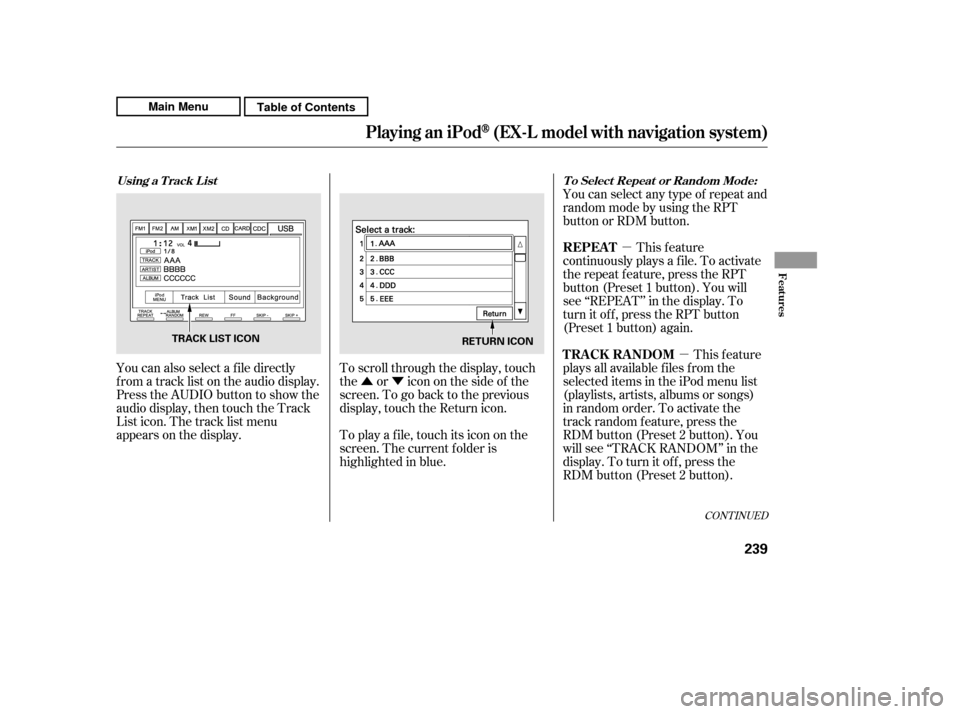
You can also select a f ile directly
f rom a track list on the audio display.
Press the AUDIO button to show the
audio display, then touch the Track
List icon. The track list menu
appears on the display. To scroll through the display, touch
the or icononthesideof the
screen.Togobacktotheprevious
display, touch the Return icon.
To play a f ile, touch its icon on the
screen. The current f older is
highlighted in blue.You can select any type of repeat and
random mode by using the RPT
button or RDM button.
This feature
continuously plays a f ile. To activate
the repeat f eature, press the RPT
button (Preset 1 button). You will
see ‘‘REPEAT’’ in the display. To
turn it off, press the RPT button
(Preset 1 button) again.
This feature
plays all available f iles f rom the
selected items in the iPod menu list
(playlists, artists, albums or songs)
in random order. To activate the
track random feature, press the
RDM button (Preset 2 button). You
will see ‘‘TRACK RANDOM’’ in the
display. To turn it of f , press the
RDM button (Preset 2 button).
Using a T rack L ist T o Select Repeat or Random Mode:
REPEAT
TRACK RANDOM
Playing an iPod(EX-L model with navigation system)
Features
239
TRACK LIST ICON
RETURN ICON
Main MenuTable of Contents

