Page 111 of 390
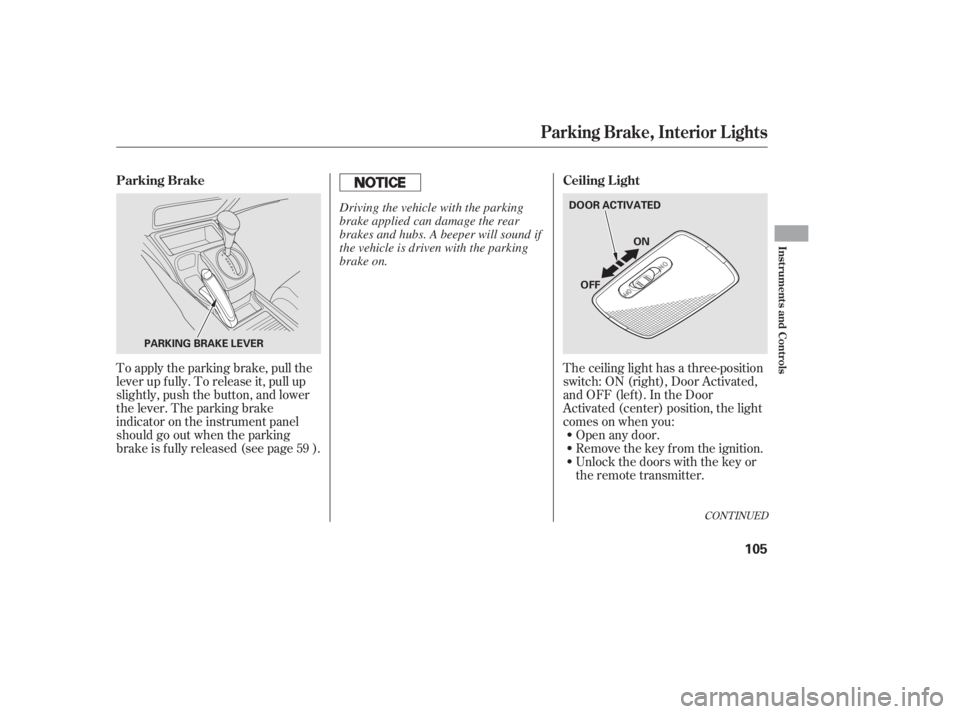
The ceiling light has a three-position
switch:ON(right),DoorActivated,
andOFF(left).IntheDoor
Activated (center) position, the light
comesonwhenyou:Open any door.
Unlock the doors with the key or
the remote transmitter. Remove the key from the ignition.
To apply the parking brake, pull the
lever up f ully. To release it, pull up
slightly, push the button, and lower
the lever. The parking brake
indicator on the instrument panel
should go out when the parking
brake is f ully released (see page ).
59
CONT INUED
Parking Brake, Interior L ights
Ceiling L ight
Parking Brake
Inst rument s and Cont rols
105
PARKING BRAKE LEVER DOOR ACTIVATED
ON
OFF
Driving the vehicle with the parking
brake applied can damage the rear
brakes and hubs. A beeper will sound if
the vehicle is driven with the parking
brake on.
10/06/23 14:06:45 31SNA650_110
Page 112 of 390
After all doors are closed tightly, the
light(s) dims slightly, then f ades out
in about 30 seconds.
If you do not open any door af ter you
unlock the driver’s door or remove
the key from the ignition switch, the
light(s) f ades out in about 30
seconds.
If you leave any door open without
the key in the ignition switch, the
ceiling light(s) will go of f af ter 3
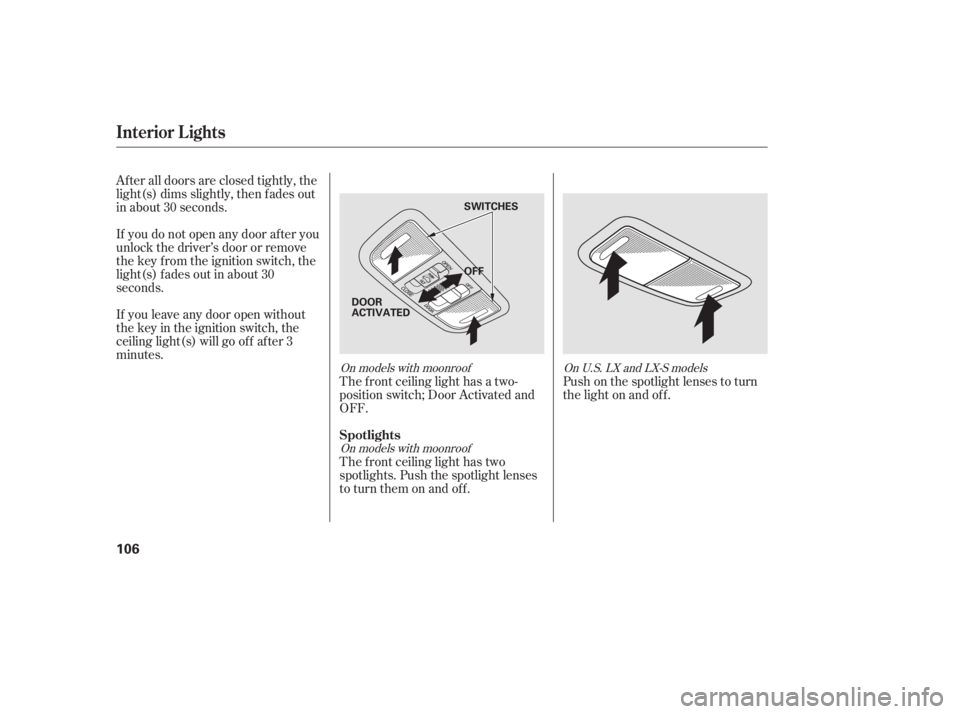
minutes.The f ront ceiling light has a two-
position switch; Door Activated and
OFF.
The f ront ceiling light has two
spotlights. Push the spotlight lenses
to turn them on and off.Push on the spotlight lenses to turn
the light on and of f .
On models with moonroof
On models with moonroof OnU.S.LXandLX-Smodels
Interior Lights
Spotlights
106
OFF SWITCHES
DOOR
ACTIVATED
10/06/23 14:06:55 31SNA650_111
Page 186 of 390
In album mode, the album name is
also displayed on the right side of
each selectable icon. Select the
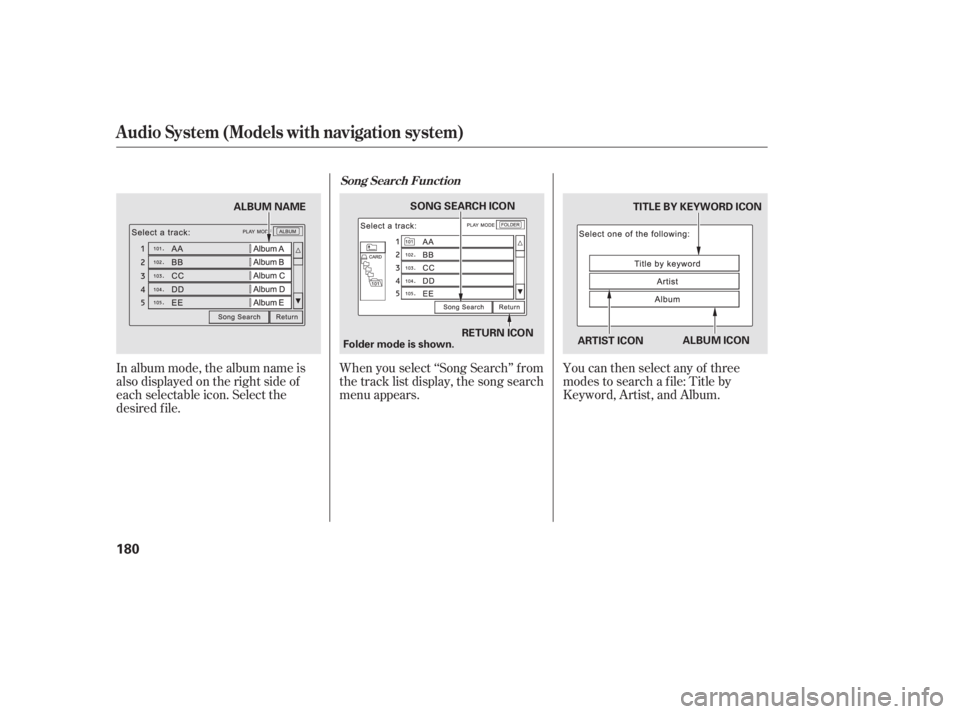
desired f ile.When you select ‘‘Song Search’’ f rom
the track list display, the song search
menu appears.
You can then select any of three
modes to search a f ile: Title by
Keyword, Artist, and Album.
Song Search Funct ion
Audio System (Models with navigation system)
180
ARTIST ICONTITLE BY KEYWORD ICON
RETURN ICON
SONG SEARCH ICON
Folder mode is shown. ALBUM ICON
ALBUM NAME
10/06/23 14:18:50 31SNA650_185
Page 187 of 390
�Û�Ý
Searching f or a Song Title by KeywordSearching f or a Song by Artist Name
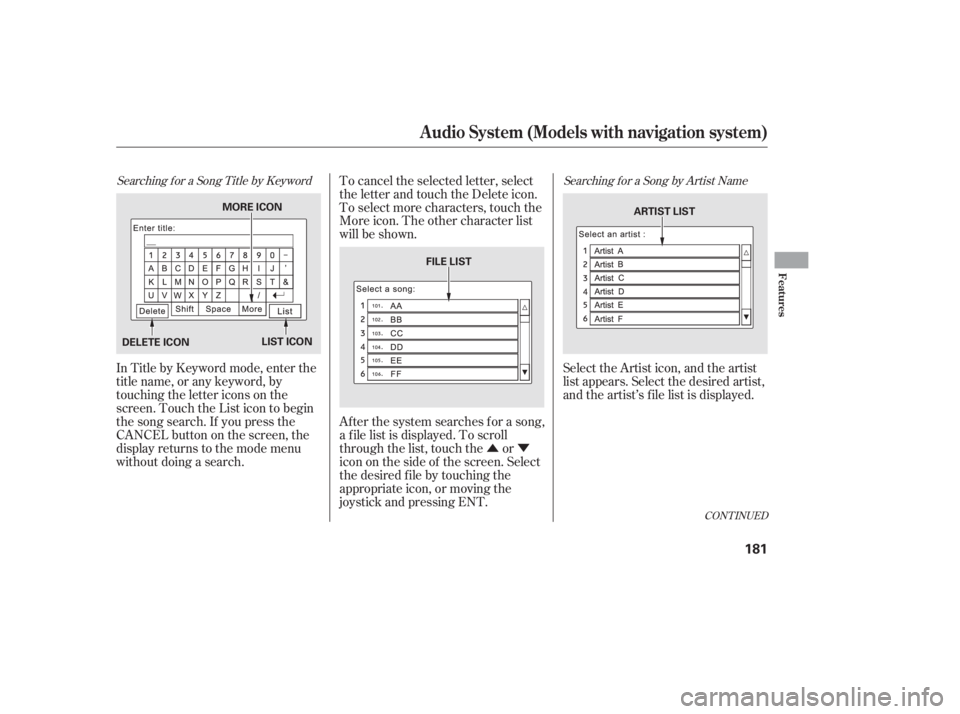
In Title by Keyword mode, enter the
title name, or any keyword, by
touching the letter icons on the
screen. Touch the List icon to begin
the song search. If you press the
CANCELbuttononthescreen,the
display returns to the mode menu
without doing a search.To cancel the selected letter, select
the letter and touch the Delete icon.
To select more characters, touch the
More icon. The other character list
will be shown.
Af ter the system searches f or a song,
a f ile list is displayed. To scroll
through the list, touch the or
icon on the side of the screen. Select
the desired f ile by touching the
appropriate icon, or moving the
joystick and pressing ENT.
Select the Artist icon, and the artist
list appears. Select the desired artist,
and the artist’s f ile list is displayed.
CONT INUED
Audio System (Models with navigation system)
Features
181
DELETE ICON
LIST ICON ARTIST LIST
FILE LIST
MORE ICON
10/06/23 14:19:00 31SNA650_186
Page 214 of 390

The security system automatically
sets 15 seconds after you lock the
doors, hood, and trunk. For the
system to activate, you must lock the
doors f rom the outside with the key,
driver’s lock tab, door lock master
switch, or remote transmitter. The
security system indicator on the
instrument panel starts blinking
immediately to show you the system
is setting itself .With the system set, you can still
open the trunk with the master key
or the remote transmitter without
triggering the alarm. The alarm will
sound if the trunk lock is f orced, or
the trunk is opened with the trunk
release handle.
The security system will not set if
the hood, trunk, or any door is not
f ully closed. If the system will not set,
check the door and trunk open
indicators on the instrument panel
(see page ) to see if the doors and
trunk are f ully closed. Since it is not
part of the monitor display, manually
check the hood.
Do not attempt to alter this system
or add other devices to it.
To see if the system is set
af ter you exit the vehicle, press the
LOCK button on the remote
transmitter within 5 seconds. If the
system is set, the horn will beep
once.
The security system helps to protect
your vehicle and valuables f rom thef t.
The horn sounds and a combination
of headlights (low beam), parking
lights, side marker lights, and
taillights f lash if someone attempts
to break into your vehicle or remove
the radio. This alarm continues f or 2
minutes, then it stops. To reset an
activated system before the 2
minutes have elapsed, unlock the
driver’s door with the key or the
remote transmitter. Once the security system is set,
opening any door (without using the
key or the remote transmitter), the
hood, or the trunk will cause the
alarm to activate. It will also activate
if the audio unit is removed f rom the
dashboard or the wiring is cut. 61
If equipped
Security System
208
NOTE:
Except Si
Si
SECURITY SYSTEM INDICATOR
10/06/23 14:23:28 31SNA650_213
Page 223 of 390
�Î
�Î
CONT INUED
BluetoothHandsFreeL ink
Features
217
‘‘Change Language’’‘‘Hands Free Help’’
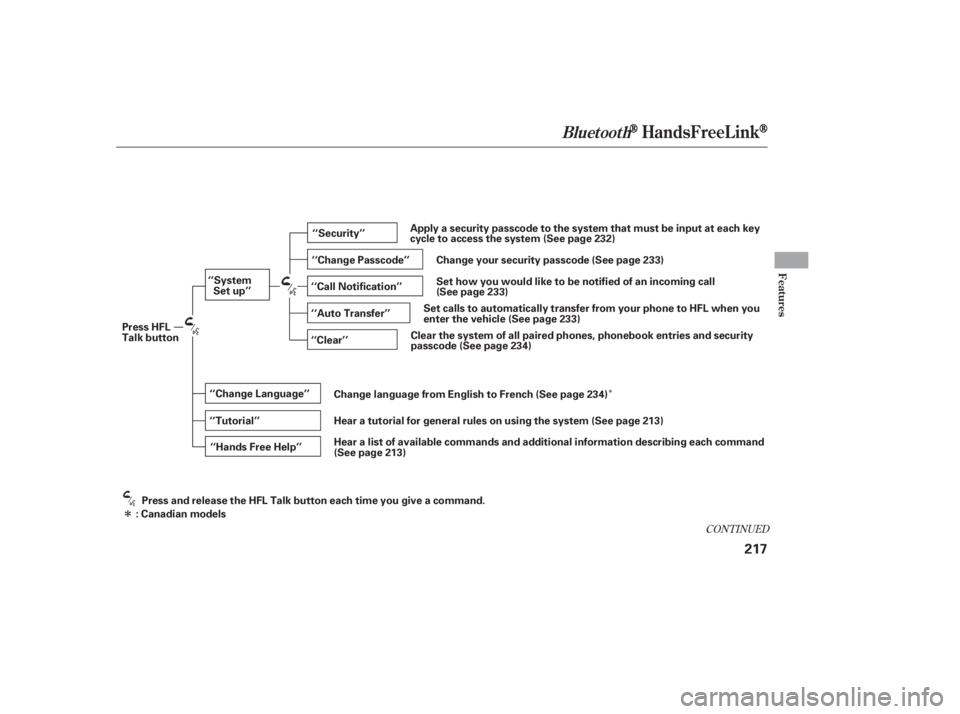
‘‘System
Set up’’
‘‘Tutorial’’ ‘‘Clear’’
‘‘Auto Transfer’’ ‘‘Call Notification’’ ‘‘Security’’
‘‘Change Passcode’’
Press HFL
Talk button
Press and release the HFL Talk button each time you give a command.
: Canadian models Hear a list of available commands and additional information describing each commandApply a security passcode to the system that must be input at each key
cycle to access the system (See page 232)
Change your security passcode (See page 233)
Set how you would like to be notified of an incoming call
(See page 233)
(See page 233)
Set calls to automatically transfer from your phone to HFL when you
enter the vehicle
Clear the system of all paired phones, phonebook entries and security
passcode (See page 234)
Change language from English to French (See page 234)
Hear a tutorial for general rules on using the system (See page 213)
(See page 213)
10/06/23 14:24:57 31SNA650_222
Page 227 of 390
CONT INUED
Bluetooth is the wireless technology
that links your phone to HFL. HFL
uses a Class 2 Bluetooth, which
means the maximum range between
yourphoneandvehicleis30feet(10
meters).
During a call, HFL allows you to talk
up to 30 minutes af ter you remove
the key from the ignition switch.
However, this may weaken the
vehicle’s battery. You can make calls using a name in
the HFL phonebook or any phone
number. You can also redial the last
number called.Press and release the HFL Talk
button bef ore a command.
Say ‘‘ ’’ or ‘‘ .’’
Follow the HFL prompts and say
thenamestoredintheHFL
phonebook that you want to call.
Follow the HFL prompts to
conf irm the name and make the
call. Press and release the HFL Talk
button bef ore a command.
Say ‘‘ ’’ or ‘‘ .’’
Follow the HFL prompts and say
the phone number you want to dial.
Follow the HFL prompts to
conf irm the number and say
‘‘ ’’ or ‘‘ .’’
Once connected, you will hear the
person you called through the audio
speakers. 1.
2.
3.
1.
2.
3.
BluetoothHandsFreeL ink
Making a Call
Call Dial Call Dial
Call DialTomakeacallusinganameintheHFL phonebook: T o make a call using a phone
number:
Features
221
10/06/23 14:25:55 31SNA650_226
Page 229 of 390
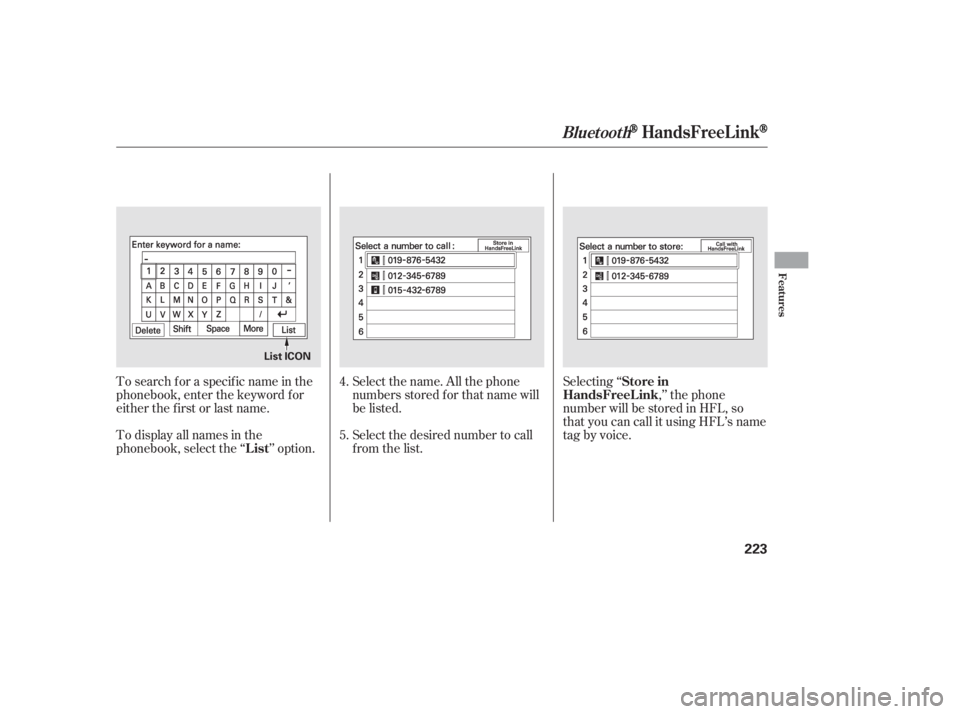
Select the name. All the phone
numbers stored f or that name will
be listed.
To search f or a specif ic name in the
phonebook, enter the keyword f or
either the f irst or last name.
To display all names in the
phonebook, select the ‘‘ ’’ option.
Select the desired number to call
from the list.Selecting ‘‘
,’’ the phone
number will be stored in HFL, so
that you can call it using HFL’s name
tag by voice.
4.
5.
BluetoothHandsFreeL ink
List Store in
HandsFreeL ink
Features
223
List ICON
10/06/23 14:26:15 31SNA650_228