Page 236 of 400
BluetoothHandsFreeL ink
232
‘‘Hands Free Help’’
‘‘System
Set up’’
‘‘Tutorial’’ ‘‘Clear’’
‘‘Auto Transfer’’
‘‘Call Notification’’ ‘‘Security’’
‘‘Change Passcode’’
Press HFL
Talk button
Press and release the HFL Talk button each time you give a command. Set how you would like to be notified of an incoming call
Set calls to automatically transfer from your phone to HFL when you
enter the vehicle
Hear a list of available commands and additional information describing each comma nd
(See page 247)
Apply a security passcode to the system that must be input at each key
cycle to access the system
Change your security passcode
Clear the system of all paired phones, phonebook entries and security
passcode
Hear a tutorial for general rules on using the system (See page 248)
(See page 248) (See page 248)
(See page 249)
(See page 228)
(See page 228)
Main Menu
Page 237 of 400

To use HFL, you need to pair your
Bluetooth-compatible cell phone to
the system.This command group is available f or
paired cell phones.
You cannot pair your phone while
the vehicle is moving.
Your phone must be in discovery
or search mode to pair. Ref er to
your phone’s manual.
Up to six phones can be paired.
Your phone’s battery may drain
f aster when it is paired to HFL.
If af ter three minutes your phone
is not ready to pair or a phone is
not f ound, the system will time out
andreturntoidle. Press and release the HFL Talk
button. If you are pairing a phone
f or the f irst time, HFL will give
you inf ormation about the pairing
process. If it is not the f irst phone
you are pairing, say ‘‘
’’ and say ‘‘ .’’
Follow the HFL prompts and put
your phone in discovery or search
mode. HFL will give you a 4-digit
pairing code and begin searching
foryourphone.
When your phone f inds a
Bluetooth device, select HFL f rom
the options and enter the 4-digit
code f rom the previous step.
Follow the HFL prompts and
name the newly paired phone.
1.
2. 3. 4.
CONT INUED
Phone Setup Phone
setup Pair
Phone pairing tips T o pair a cell phone:
BluetoothHandsFreeL ink
Features
233
Main Menu
Page 238 of 400
Say ‘‘ .’’
Say‘‘ ’’aftertheprompts.
If there is more than one phone
paired to the system, HFL will ask
you which phone’s name you want
to change. Follow the HFL
prompts and rename the phone.
Press and release the HFL Talk
button bef ore a command.
Press and release the HFL Talk
button bef ore a command.
Say ‘‘ .’’
Say‘‘ ’’aftertheprompts.
HFL will ask you which phone you
want to delete. Follow the HFL
prompts to continue with the
deletion. Press and release the HFL Talk
button bef ore a command.
HFL will read out all the paired
phone’s names.
Say‘‘ ’’aftertheprompts.
Say ‘‘ .’’
1. 2.3.
3.
1.2.
1.2.3.
Phone setupEdit
Phone setup
Delete
List
Phone setup
To hear the names of all paired
phones:
T o rename a paired phone: T o delet e a paired phone:
BluetoothHandsFreeL ink
234
Main Menu
Page 239 of 400

Press and release the HFL Talk
button bef ore a command.Say ‘‘ .’’
Say‘‘ ’’aftertheprompts.
HFL will tell you which phone is
linked to the system. Press and release the HFL Talk
button bef ore a command.
Say ‘‘ .’’ Say ‘‘ .’’
Press and release the HFL Talk
button bef ore a command.
Say ‘‘ ’’ af ter the
prompts.
HFL disconnects the linked phone
and searches for another paired
phone.
Once another phone is f ound, it is
linked to the system. HFL will
inf orm you which phone is now
linked.
If no other phones are f ound or
paired, HFL will inf orm you that the
original phone is linked again. Say ‘‘ ’’ af ter the
prompts.
If you want HFL to create a
random code each time you pair a
phone, say ‘‘ .’’ If you want
to choose your own 4-digit code to
be used each time, say ‘‘ ’’
and f ollow the HFL prompts.
1. 2.3.
1.2. 3.1. 2. 3.
4.
T o hear which paired phone is current ly linked: To change f rom the currently linked
phone t o anot her paired phone: T o change t he pairing code set t ing:
Phone setup
StatusPhone setup
Phone setup
Next phone Set pairing code
Random Fixed
BluetoothHandsFreeL ink
Features
235
Main Menu
Page 240 of 400

You can make calls using any phone
number or a name in the HFL
phonebook. You can also redial the
last number called.Press and release the HFL Talk
button bef ore a command.
Say ‘‘ ’’ or ‘‘ .’’
Follow the HFL prompts and say
the phone number you want to dial.
Follow the HFL prompts to
conf irm the number and say
‘‘ ’’ or ‘‘ .’’
Once connected, you will hear the
person you called through the audio
speakers. Press and release the HFL Talk
button bef ore a command.
Follow the HFL prompts to
conf irm the name and make the
call.
Follow the HFL prompts and say
thenamestoredintheHFL
phonebook that you want to call.
Say ‘‘ ’’ or ‘‘ .’’
Bluetooth is the wireless technology
that links your phone to HFL. HFL
uses a Class 2 Bluetooth, which
means the maximum range between
yourphoneandvehicleis30feet(10
meters).
During a call, HFL allows you to talk
up to 30 minutes af ter you remove
the key from the ignition switch.
However, this may weaken the
vehicle’s battery. 1. 2. 3.
1. 2. 3.
Making a Call
Call Dial
Call Dial Call Dial
T o make a call using a phone
number: Tomakeacallusinganameinthe
HFL phonebook:
BluetoothHandsFreeL ink
236
Main Menu
Page 241 of 400
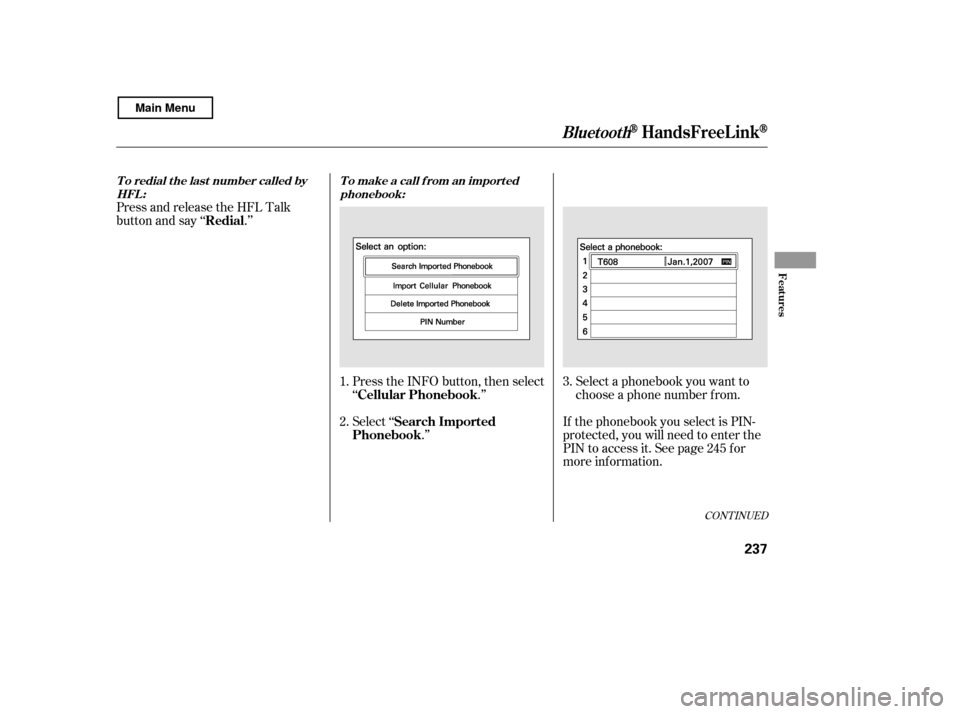
Select a phonebook you want to
choose a phone number f rom.
If the phonebook you select is PIN-
protected, you will need to enter the
PIN to access it. See page f or
more inf ormation.
Press and release the HFL Talk
button and say ‘‘ .’’
Press the INFO button, then select
‘‘ .’’
Select ‘‘.’’
1. 2.
3.
245
CONT INUED
To redial the last number called byHFL : T o make a call f rom an import ed
phonebook:
Redial
Cellular PhonebookSearch Imported
Phonebook
BluetoothHandsFreeL ink
Features
237
Main Menu
Page 242 of 400
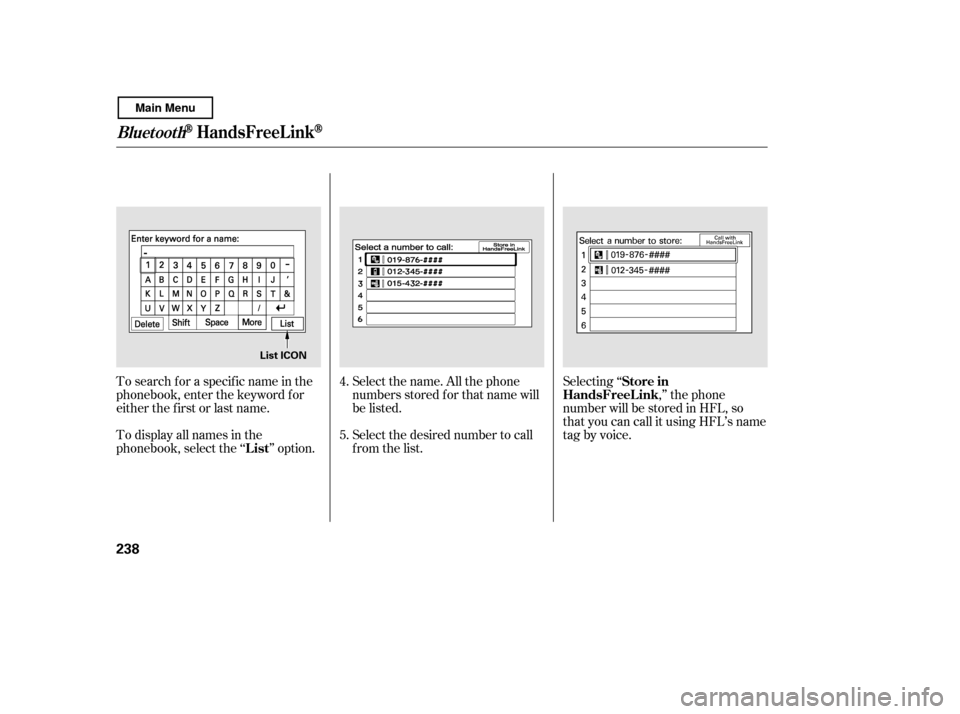
Select the name. All the phone
numbers stored f or that name will
be listed.
To search f or a specif ic name in the
phonebook, enter the keyword f or
either the f irst or last name.
To display all names in the
phonebook, select the ‘‘ ’’ option.
Select the desired number to call
from the list.Selecting ‘‘
,’’ the phone
number will be stored in HFL, so
that you can call it using HFL’s name
tag by voice.
4. 5.
List Store in
HandsFreeL ink
BluetoothHandsFreeL ink
238
List ICON
Main Menu
Page 243 of 400
When you receive a call, an incoming
call notif ication (if activated) will
play and interrupt the audio system
if it is on.
Press the HFL Talk button to answer
the call, or the HFL Back button to
hang up.If your phone has Call Waiting, press
and release the HFL Talk button to
put the original call on hold and
answer the incoming call.
To return to the original call, press
the HFL Talk button again. If you
don’t want to answer the incoming
call, disregard it and continue with
your original call. If you want to hang
up the original call and answer the
new call, press the HFL Back button.
Press and release the HFL Talk
button and say ‘‘ .’’
You can transfer a call from HFL to
your phone, or f rom your phone to
HFL.
Receiving a Call
T ransf erring a Call
Transf er
Call Wait ing
BluetoothHandsFreeL ink
Features
239
Main Menu