Page 140 of 454
Playing the FM/AM Radio (LX, LX-P, and U.S. SE models)
Features
137
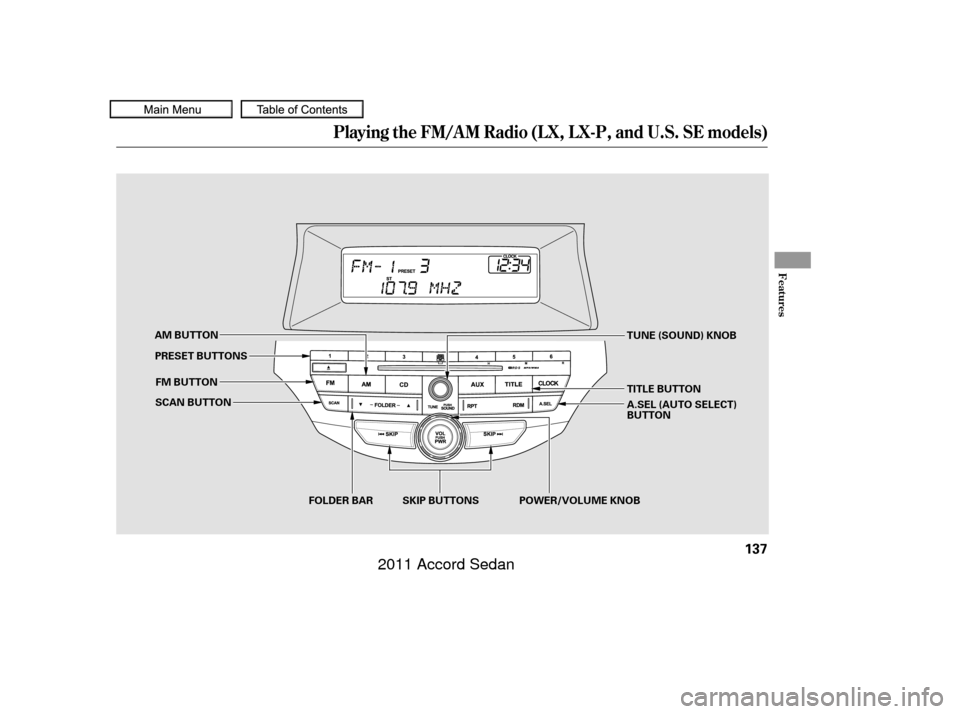
SCAN BUTTONFOLDER BAR
FM BUTTON
AM BUTTON
TUNE (SOUND) KNOB
SKIP BUTTONS
PRESET BUTTONS
TITLE BUTTON
A.SEL (AUTO SELECT)
BUTTON
POWER/VOLUME KNOB
10/06/18 16:00:09 31TA5630_142
2011 Accord Sedan
Page 141 of 454
�µ
�µ �µ
The ignition switch must be in the
ACCESSORY (I) or ON (II) position.
Turn the system on by pushing the
power/volume knob or the AM or
FM button. Adjust the volume by
turning the power/volume knob.
The band and f requency that the
radio was last tuned to is displayed.
To change bands, press the AM or
FM button. On the FM band, ST will
be displayed if the station is broad-
castinginstereo.Stereo
reproduction on AM is not available.
On the AM band, AM noise
reduction turns on automatically. You can use any of f ive methods to
f ind radio stations on the selected
band: tune, skip, scan, the preset
buttons, and auto select.
On the FM band, you can also use
the f eatures provided by the radio
data system (RDS). For more
information on the RDS, see
.
Use the TUNE knob to
tune the radio to a desired f requency.
Turn the knob to the right to tune to
a higher f requency, and turn it to the
lef t to tune to a lower f requency.
The skip f unction searches
up and down f rom the current
f requency to f ind a station with a
strong signal. To activate it, press
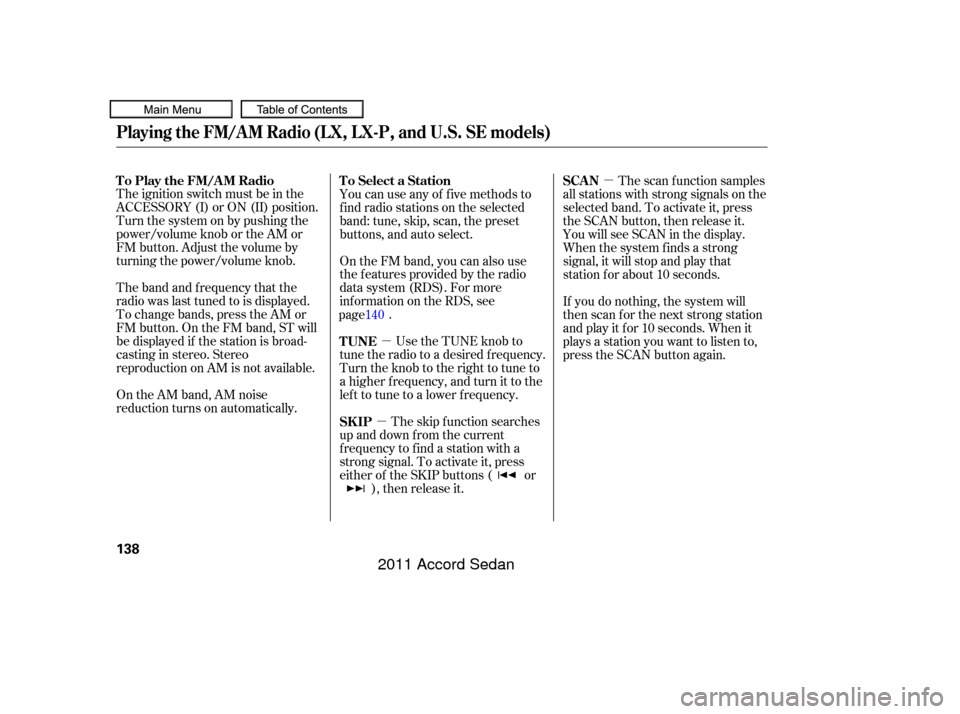
either of the SKIP buttons ( or ), then release it. The scan f unction samples
all stations with strong signals on the
selected band. To activate it, press
the SCAN button, then release it.
You will see SCAN in the display.
When the system finds a strong
signal, it will stop and play that
station f or about 10 seconds.
If you do nothing, the system will
then scan f or the next strong station
and play it f or 10 seconds. When it
plays a station you want to listen to,
press the SCAN button again.
To Select a Station
To Play the FM/AM Radio
TUNE
SK IPSCAN
Playing the FM/AM Radio (LX, LX-P, and U.S. SE models)
138
10/06/18 16:00:18 31TA5630_143
page 140
2011 Accord Sedan
Page 142 of 454
�µ�µ �µ
If you do not like the stations auto
select has stored, you can store
other f requencies on the preset
buttons as previously described.
Each preset button can
store one f requency on AM and two
f requencies on FM.
Press the A. SEL button. You will see
A. SEL f lashing in the display, and
the system goes into scan mode f or
several seconds. It stores the
f requencies of six AM, and twelve
FM stations in the preset buttons.
You will see a ‘‘0’’ displayed af ter
pressing a preset button if auto
select cannot f ind a strong station f or
every preset button. ,pressthe
A. SEL (auto select) button.
For inf ormation on FM/AM radio
frequencies and reception, see .
Select the desired band, AM or
FM. FM1 and FM2 let you store
six stations each.
Usethetune,skip,scan,orRDS
function to tune the radio to a
desired station.
Pick a preset button (1 6), and
hold it until you hear a beep.
Repeat steps 1 through 3 to store a
total of six stations on AM and
twelve stations on FM. If you are
traveling and can no longer receive
your preset stations, you can use the
auto select feature to find stations in
the local area.
1.
2.
3.
4.
To turn of f auto select
Preset A UT O SEL ECT
Playing the FM/AM Radio (LX, LX-P, and U.S. SE models)
Features
139
10/06/18 16:00:26 31TA5630_144
page 248originally set. This restores the presets you
2011 Accord Sedan
Page 155 of 454
Playing the FM/AM Radio (EX, EX-L , Canadian SE, and V6 models without navigation system)
Without XMRadioWith XMRadio
152
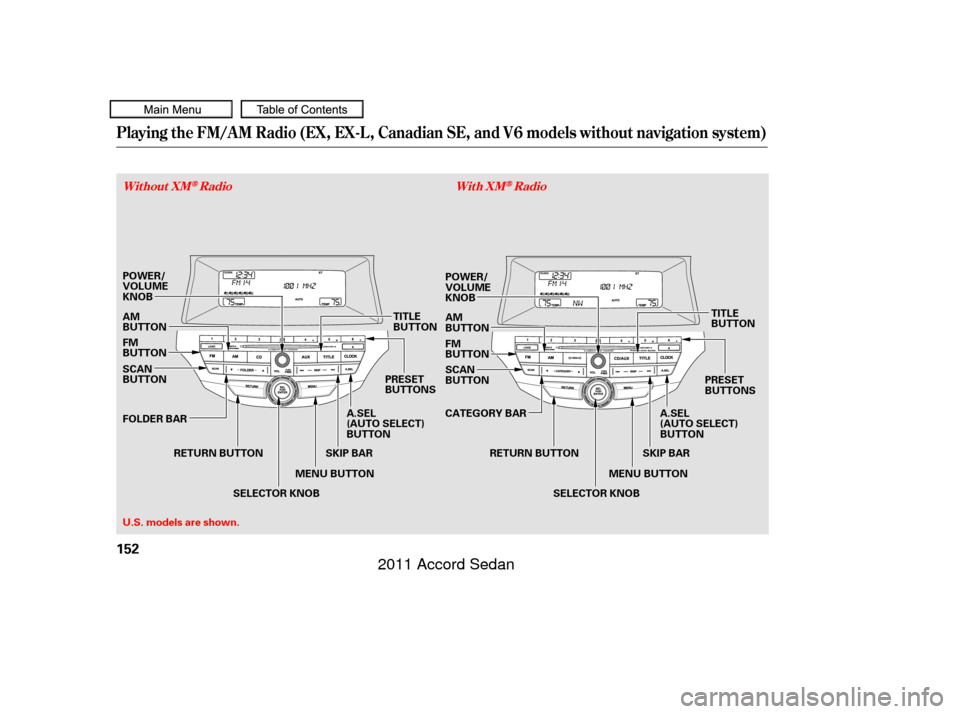
MENU BUTTON
TITLE
BUTTON
MENU BUTTON POWER/
VOLUME
KNOB
AM
BUTTON
U.S. models are shown. RETURN BUTTON
A.SEL
(AUTO SELECT)
BUTTON
SKIP BAR
POWER/
VOLUME
KNOB
SCAN
BUTTON
FOLDER BAR FM
BUTTON AM
BUTTON
SELECTOR KNOB A.SEL
(AUTO SELECT)
BUTTONTITLE
BUTTON
SKIP BAR
SELECTOR KNOB
FM
BUTTON
PRESET
BUTTONS SCAN
BUTTON
CATEGORY BAR PRESET
BUTTONS
RETURN BUTTON
10/06/18 16:02:08 31TA5630_157
2011 Accord Sedan
Page 156 of 454
�µ�µ �µ
The band and f requency that the
radio was last tuned to are displayed.
To change bands, press the AM or
FM button. On the FM band, ST will
be displayed if the station is
broadcasting in stereo. Stereo
reproduction in AM is not available.
On the AM band, AM noise
reduction turns on automatically. The ignition switch must be in the
ACCESSORY (I) or ON (II) position.
Turn the system on by pushing the
power/volume knob or the AM or
FM button. Adjust the volume by
turning the power/volume knob. You can use any of f ive methods to
f ind radio stations on the selected
band: tune, skip, scan, the preset
buttons, and auto select.
The skip f unction searches
up and down f rom the current
f requency to f ind a station with a
strong signal. To activate it, press
and hold the or side of the
SKIP bar until you hear a beep, then
release it. On the FM band, you can also use
the f eatures provided by the radio
data system (RDS). For more
inf ormation on the RDS, see page .
Use the selector knob to
tune the radio to a desired f requency.
Turn the knob right to tune to a
higher f requency, or lef t to tune to a
lower f requency. The scan f unction samples
all stations with strong signals on the
selected band. To activate it, press
the SCAN button, then release it.
You will see SCAN in the display.
When the system finds a strong
signal, it will stop and play that
station f or about 10 seconds.
If you do nothing, the system will
scan f or the next strong station and
play it f or 10 seconds. When it plays
a station that you want to listen to,
press the SCAN button again.
CONT INUED
To Select a Station
To Play the Radio
SK IP TUNESCAN
Playing the FM/AM Radio (EX, EX-L , Canadian SE, and V6 models without navigation system)
Features
153
10/06/18 16:02:17 31TA5630_158
page 155
2011 Accord Sedan
Page 157 of 454
�µ�µEach preset button can
store one f requency on AM and two
f requencies on FM. If you are
traveling and can no longer receive
your preset stations, you can use the
auto select feature to find stations in
the local area.
You will see a ‘‘0’’ displayed af ter
pressing a preset button if auto
select cannot f ind a strong station f or
that preset button.
If you do not like the stations auto
select has stored, you can store
other f requencies on the preset
buttons as previously described. ,pressthe
A. SEL (auto select) button.
Press the A. SEL button. ‘‘A-SEL’’
f lashes in the display, and the system
goes into scan mode f or several
seconds. It stores the f requencies of
six AM and twelve FM stations in
the preset buttons. For inf ormation on FM/AM radio
frequencies and reception, see
.
Select the desired band, AM or
FM. FM1 and FM2 let you store
six stations each.
Usethetune,skip,scan,orRDS
function to tune the radio to a
desired station.
Pick a preset button, and hold it
until you hear a beep.
Repeat steps 1 through 3 to store a
total of six stations on AM and
twelve stations on FM.
1.
2.
3.
4.To turn of f auto selectPreset
A UT O SEL ECT
Playing the FM/AM Radio (EX, EX-L , Canadian SE, and V6 models without navigation system)
154
10/06/18 16:02:24 31TA5630_159
page 248This restores the presets you
originally set.
2011 Accord Sedan
Page 165 of 454
�µ�µ
�µ
�µ
�µ
�µ
�µ
�µ
Youcanstoreupto12
preset channels using the six preset
buttons. Each button stores one
channel f rom the XM1 band and one
channel f rom the XM2 band.
To store a channel:
Press the button. Either
XM1 or XM2 will show in the
display.
Use the selector knob, or the
CATEGORYbarorSCANbutton
to tune to a desired channel.
In category mode, only channels
within that category can be selected.
In channel mode, all channels can be
selected. Pick the preset button you want
f or that channel. Press and hold
the button until you hear a beep. Repeat steps 2 and 3 to store the
f irst six channels.
Press the XM button again. The
other XM band will show. Store
the next six channels using steps 2
and 3.
Once a channel is stored, simply
press and release the proper preset
button to tune to it. The encryption
code is being updated. Wait until the
encryption code is f ully updated.
Channels 0 and 1 should still work
normally.
The signal is
currently too weak. Move the vehicle
to an area away from tall buildings,
and with an unobstructed view of the
southern horizon.
The selected channel
number does not exist, or is not part
of your subscription, or this channel
has no artist or title inf ormation at
this time.
There is a problem
with the XM antenna. Please consult
your dealer. The selected
channel has no artist or title
inf ormation at this time.
XM is loading the
audio or program inf ormation.
The channel
currently selected is no longer
broadcasting.
3. 4.
5.
2. 1. Preset
XM Radio Display Messages‘‘UPDA T ING’’
‘‘NO SIGNA L ’’
‘‘----’’
‘‘A NT ENNA ’’ ‘‘NO INFO’’
‘‘L OA DING’’
‘‘OFF A IR’’
Playing the XMRadio (Models with premium audio system)
162
10/06/18 16:03:39 31TA5630_167
2011 Accord Sedan
Page 168 of 454
Playing Discs (EX, EX-L, Canadian SE, and V6 models without navigation system)
Features
Without XMRadioWith XMRadio
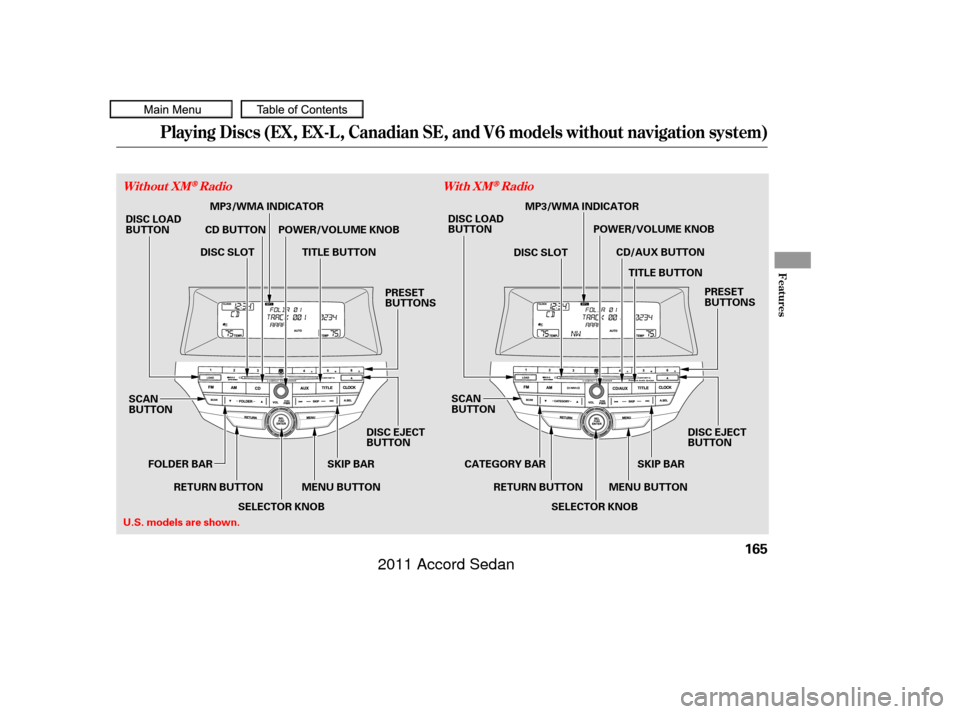
165
SCAN
BUTTON
MENU BUTTON
RETURN BUTTON
DISC LOAD
BUTTON
CD BUTTON
SCAN
BUTTONMENU BUTTONSKIP BAR
POWER/VOLUME KNOB
TITLE BUTTON PRESET
BUTTONS
DISC LOAD
BUTTON
CD/AUX BUTTON
U.S. models are shown. DISC SLOT
PRESET
BUTTONS
POWER/VOLUME KNOB
TITLE BUTTON
CATEGORY BAR
MP3/WMA INDICATOR
MP3/WMA INDICATOR
DISC SLOT
SELECTOR KNOB
FOLDER BAR
DISC EJECT
BUTTON
SKIP BAR
SELECTOR KNOB
RETURN BUTTON DISC EJECT
BUTTON
10/06/18 16:04:03 31TA5630_170
2011 Accord Sedan