Page 180 of 454

This audio system can select and
play the audio f iles on the iPod
with
the same controls used f or the disc
player. To play an iPod, connect it to
the USB adapter cable in the console
compartment by using your dock
connector, then press the CD/AUX
button (AUX button on models
without XM Radio). The ignition
switch must be in the ACCESSORY
(I) or ON (II) position. The iPod will
also be recharged with the ignition
switch in these positions.
The audio system reads and plays
playable sound f iles on the iPod. The
system cannot operate an iPod as a
mass storage device. The system will
only play songs stored on the iPod
with iTunes.
iPod and iTunes are registered
trademarks owned by Apple Inc. iPods compatible with your audio
system using the USB adapter cable
are:
UseonlycompatibleiPodswiththe
latest sof tware. iPods that are not
compatible will not work in this audio
unit.
CONT INUED
Model
iPod classic
(80/160 G)
iPod classic
(120 G)
iPod with video
(iPod 5th
generation)
iPod nano
iPod nano
2nd generation
iPod nano
3rd generation
iPod nano
4th generation
iPod nano
5th generation
iPod touch
iPod touch
2nd generation Sof tware
Ver. 1.1.2 or more
Ver. 2.0.1 or more
Ver. 1.3.0 or more
Ver. 1.3.1 or more
Ver. 1.1.3 or more
Ver. 1.1.3 or more
Ver. 1.0.3 or more
Ver. 1.0.1 or more
Ver. 1.1.5 or more
Ver. 2.2.1 or more
To Play an iPod
Playing an iPod(EX, EX-L and V6 models without navigation system)
Features
177
10/06/18 16:05:30 31TA5630_182
2011 Accord Sedan
Page 186 of 454
�Î
�ÎIf you see an error message in the
display, see page .
The displayed message may
vary on models or versions.
On some models, there is no
message to disconnect.
If you reconnect the same iPod, the
system may begin playing where it
lef t of f , depending on what mode the
iPod is in when it is reconnected.
To play the radio, press the AM, FM,
or button. Press the CD/
AUX button to switch between disc
mode (if a disc is loaded) and the
iPodandAUX.Onmodelswithout
XM Radio, press the CD button to
switch to the disc mode. Pressing
the AUX button switches the audio
mode between the iPod and AUX.
You can also press the MODE
buttononthesteeringwheelto
change modes.
You can disconnect the iPod at any
time when you see the ‘‘OK to
disconnect’’ message in the iPod
display. Always make sure you see
the ‘‘OK to disconnect’’ message in
the iPod display bef ore you
disconnect it. Make sure to f ollow
the iPod’s instructions on how to
disconnect the dock connector f rom
the USB adapter cable.
: 184
Disconnect ing an iPodT o Stop Playing Your iPod
iPodError Messages
Playing an iPod(EX, EX-L and V6 models without navigation system)
Features
183
10/06/18 16:06:17 31TA5630_188
2011 Accord Sedan
Page 188 of 454
Playing a USB Flash Memory Device (EX, EX-L and V6 models without navigation system)
Features
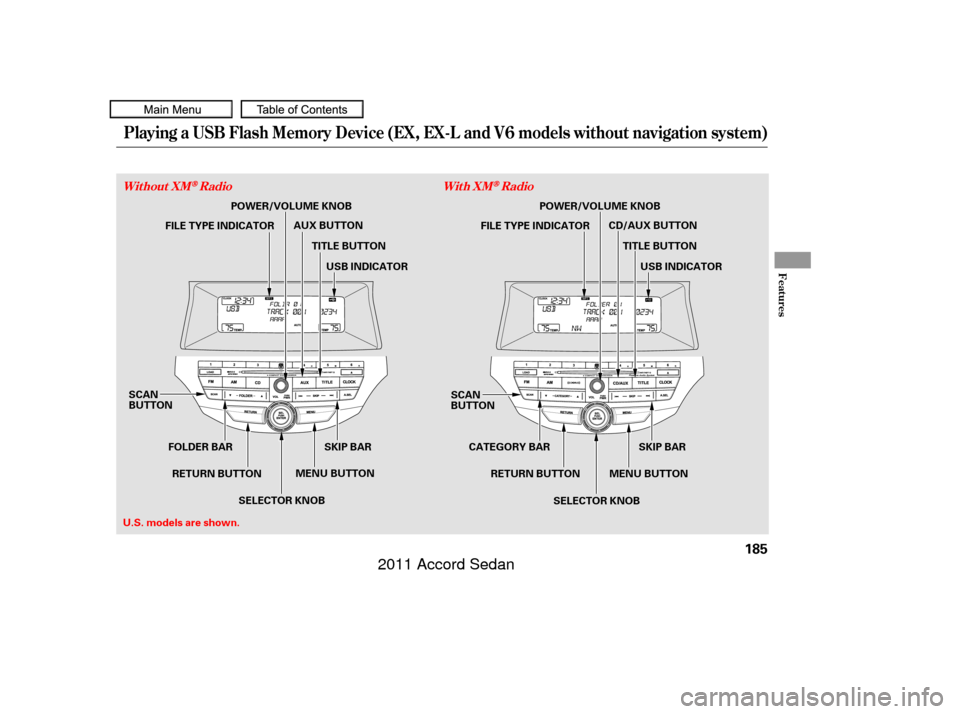
Without XMRadioWith XMRadio
185
SCAN
BUTTON
MENU BUTTONSKIP BAR SCAN
BUTTON
MENU BUTTONSKIP BAR
TITLE BUTTON
U.S. models are shown. POWER/VOLUME KNOB
FILE TYPE INDICATOR AUX BUTTON
FILE TYPE INDICATORPOWER/VOLUME KNOB
USB INDICATOR
TITLE BUTTON CD/AUX BUTTON
USB INDICATOR
SELECTOR KNOB
RETURN BUTTON
CATEGORY BAR
RETURN BUTTON
SELECTOR KNOB
FOLDER BAR
10/06/18 16:06:29 31TA5630_190
2011 Accord Sedan
Page 189 of 454
�Î
�ÎDo not use a device such as a card
reader or hard drive as the device
or your f iles may be damaged.
Do not connect your USB f lash
memory device using a hub.
Do not use an extension cable to
the USB adapter cable equipped
with your vehicle.
Do not keep a USB f lash memory
device in the vehicle. Direct
sunlight and high heat will damage
it.
We recommend backing up your
data bef ore playing a USB f lash
memory device.
Some USB f lash memory devices
(such as devices with security lock-
out f eatures, etc.) will not work in
this audio unit. The recommended USB f lash
memory devices are 256 MB or
higher, and f ormatted with the FAT
f ile system. Some digital audio
players may be compatible as well. Only AAC f ormat f iles recorded
with iTunes are playable on this
audio unit.
The audio system reads and plays
the audio f iles on the USB f lash
memory device in MP3, WMA or
AAC f ormats. Depending on the
f ormat, the display shows MP3,
WMA or AAC when a USB flash
memory device is playing. The USB
f lash memory device limit is up to
700 f olders or up to 65535 f iles. This audio system can select and
play the audio f iles on a USB f lash
memory device with the same
controls used f or the disc player. To
play a USB f lash memory device,
connect it to the USB adapter cable
in the console compartment, then
press the CD/AUX button (AUX
button on models without XM Radio).
The ignition switch must be in the
ACCESSORY (I) or ON (II) position. :
To Play a USB Flash Memory
Device
Playing a USB Flash Memory Device (EX, EX-L and V6 models without navigation system)
186
NOTE:
10/06/18 16:06:37 31TA5630_191
2011 Accord Sedan
Page 192 of 454
�µ�µ
�Û �Ý
Use the SKIP bar while a USB f lash
memory device is playing to select
passages and change f iles.
Each time you press and
releasethe sideof theSKIPbar,
the system skips forward to the
beginning of the next f ile. Press and
releasethe sideof thebarto
skip backward to the beginning of
the current f ile. Press it again to skip
to the beginning of the previous file.
To move rapidly within a f ile, press
andholdeitherside( or )
of the SKIP bar.
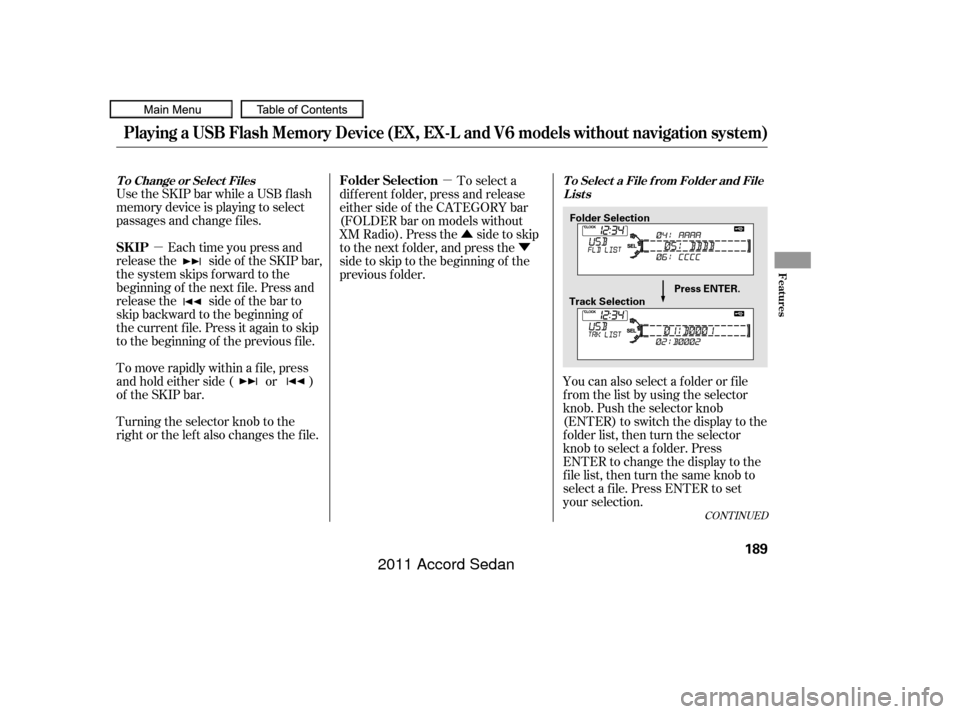
Turning the selector knob to the
right or the lef t also changes the f ile. You can also select a f older or f ile
from the list by using the selector
knob. Push the selector knob
(ENTER)toswitchthedisplaytothe
folder list, then turn the selector
knob to select a f older. Press
ENTER to change the display to the
file list, then turn the same knob to
select a f ile. Press ENTER to set
your selection.
To select a
dif f erent f older, press and release
either side of the CATEGORY bar
(FOLDER bar on models without
XM Radio). Press the side to skip
to the next folder, and press the
side to skip to the beginning of the
previous f older.
CONT INUED
T o Change or Select Files T o Select a File f rom Folder and File
Lists
SK IP Folder Selection
Playing a USB Flash Memory Device (EX, EX-L and V6 models without navigation system)
Features
189
Folder Selection
Track Selection Press ENTER.
10/06/18 16:07:00 31TA5630_194
2011 Accord Sedan
Page 194 of 454
�µ
�µ
�µ �µ
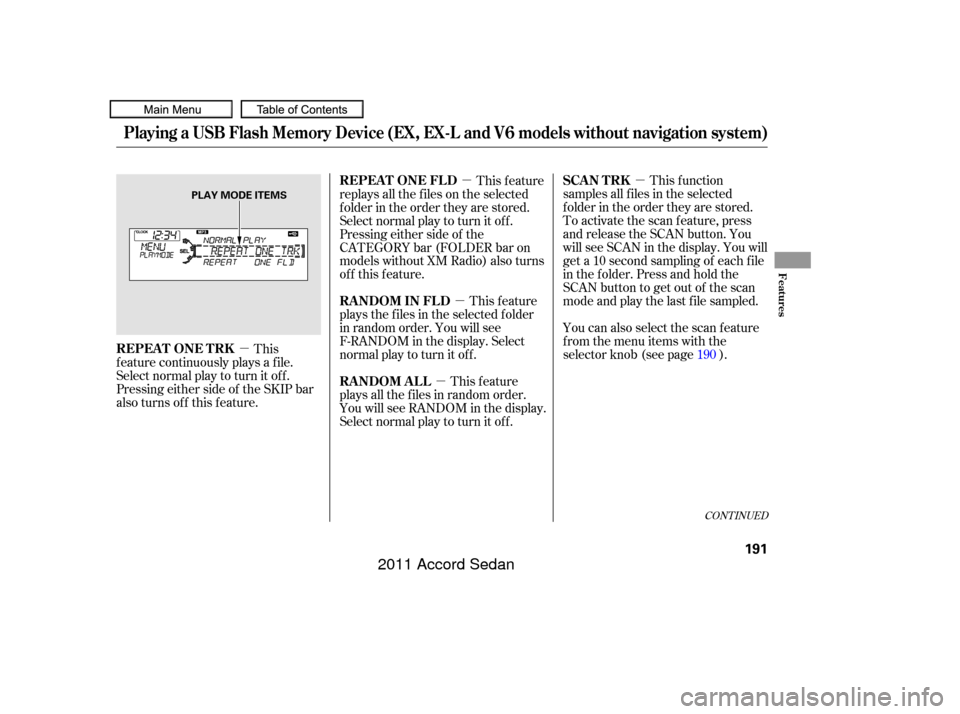
�µ This f unction
samples all f iles in the selected
f older in the order they are stored.
To activate the scan feature, press
and release the SCAN button. You
will see SCAN in the display. You will
get a 10 second sampling of each f ile
in the f older. Press and hold the
SCAN button to get out of the scan
mode and play the last f ile sampled.
You can also select the scan feature
from the menu items with the
selector knob (see page ).
This feature
replays all the f iles on the selected
f older in the order they are stored.
Select normal play to turn it of f .
Pressing either side of the
CATEGORY bar (FOLDER bar on
models without XM Radio) also turns
of f this f eature.
This feature
plays all the f iles in random order.
You will see RANDOM in the display.
Select normal play to turn it of f . This feature
plays the f iles in the selected f older
in random order. You will see
F-RANDOM in the display. Select
normal play to turn it off.
This
f eature continuously plays a f ile.
Select normal play to turn it of f .
Pressing either side of the SKIP bar
also turns off this feature. 190
CONT INUED
SCAN T RK
REPEAT ONE FLD
RANDOM ALL RANDOM IN FLD
REPEAT ONE TRK
Playing a USB Flash Memory Device (EX, EX-L and V6 models without navigation system)
Features
191
PLAY MODE ITEMS
10/06/18 16:07:15 31TA5630_196
2011 Accord Sedan
Page 195 of 454
�µThis f unction
samples the f irst f ile in each f older in
the order they are stored. To
activate the folder scan feature,
press and release the SCAN button
repeatedly. You will see F-SCAN in
the display. You will get a 10 second
sampling of the f irst f ile in each
folder.PressandholdtheSCAN
button to get out of the f older scan
mode and play the last f ile sampled.
You can also select the folder scan
f eature f rom the menu items with
the selector knob (see page ).
Select normal play to turn either
scan f eature of f . Pressing either side
of the CATEGORY (FOLDER) or
SKIP bar also turns of f the f eature. To play the radio, press the FM, AM,
or button. Press the CD/
AUX button to switch between disc
mode (if a disc is loaded) and the
USB and AUX. On models without
XM Radio, press the CD button to
switch to the disc mode. Pressing
the AUX button switches the audio
mode between the USB and AUX.
If you reconnect the same USB f lash
memory device, the system will
begin playing where it lef t of f . You can also press the MODE
buttononthesteeringwheelto
change modes.
You can disconnect the USB f lash
memory device at any time even if
the USB mode is selected on the
audio system. Make sure to follow
the USB f lash memory device’s
instructions when you remove it.
If you see an error message in the
display, see page .
190 193
To Stop Playing a USB Flash
Memory Device
SCAN FL D
USB Flash Memory Device Error
Messages
Playing a USB Flash Memory Device (EX, EX-L and V6 models without navigation system)
Disconnect ing a USB Flash MemoryDevice
192
10/06/18 16:07:23 31TA5630_197
2011 Accord Sedan
Page 198 of 454
Playing the FM/A M Radio (Models with navigation system)
Features
195
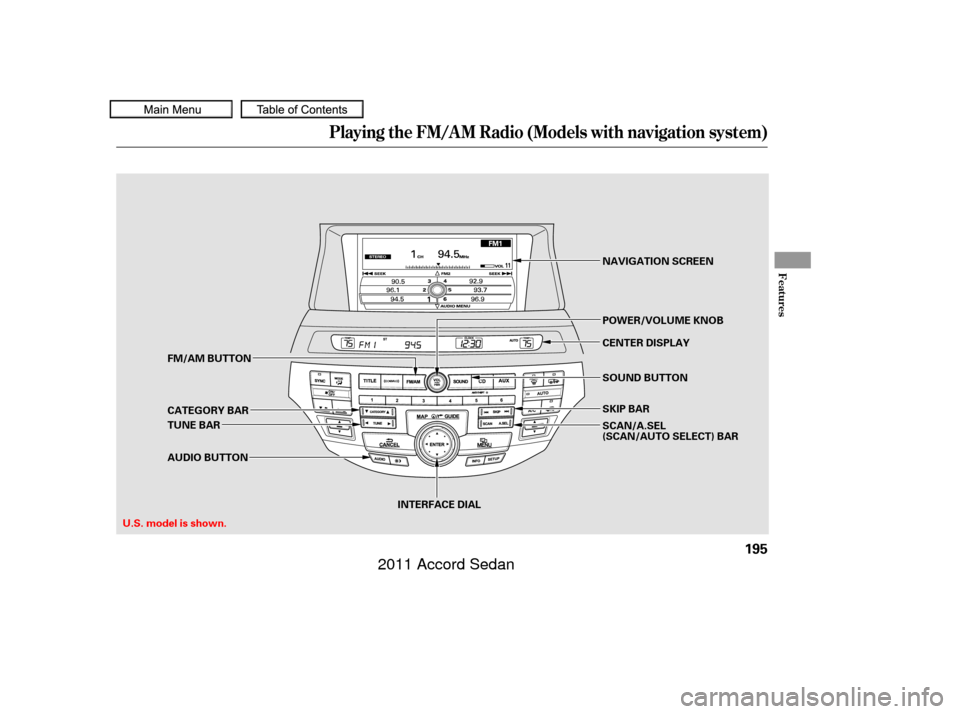
INTERFACE DIALCENTER DISPLAY
SKIP BAR NAVIGATION SCREEN
POWER/VOLUME KNOB
TUNE BAR FM/AM BUTTON
CATEGORY BAR
AUDIO BUTTON SOUND BUTTON
U.S. model is shown. SCAN/A.SEL
(SCAN/AUTO SELECT) BAR
10/06/18 16:07:37 31TA5630_200
2011 Accord Sedan