2011 GMC YUKON wheel
[x] Cancel search: wheelPage 28 of 528
Black plate (22,1)GMC Yukon/Yukon XL Owner Manual - 2011
1-22 In Brief
Satellite Radio
XM is a satellite radio service
based in the 48 contiguous United
States and 10 Canadian provinces.
XM satellite radio has a wide
variety of programming and
commercial-free music, coast to
coast, and in digital-quality sound.
A fee is required to receive the
XM service.
For more information, refer to:
.www.xmradio.com or call
1-800-929-2100 (U.S.)
.www.xmradio.ca or call
1-877-438-9677 (Canada)
See Satellite Radio on page 7‑8.
Portable Audio Devices
This vehicle has an auxiliary input,
located on the audio faceplate,
and a USB port located on the
instrument panel or in the center
console. External devices such
as iPod
®, laptop computers, MP3 players, CD changers, USB
storage device, etc. can be
connected to the auxiliary port using
a 3.5 mm (1/8 in) input jack or the
USB port depending on the audio
system.
See
Auxiliary Devices on page 7‑30
for further information.
Bluetooth®
For vehicles with a Bluetooth
system, it allows users with a
Bluetooth‐enabled cell phone to
make and receive hands-free calls
using the vehicle’ s audio system
and controls.
The Bluetooth‐enabled cell phone
must be paired with the Bluetooth
system before it can be used in the
vehicle. Not all phones will support
all functions. For more information,
visit www.gm.com/bluetooth.
For more information, see Bluetooth
on page 7‑47.
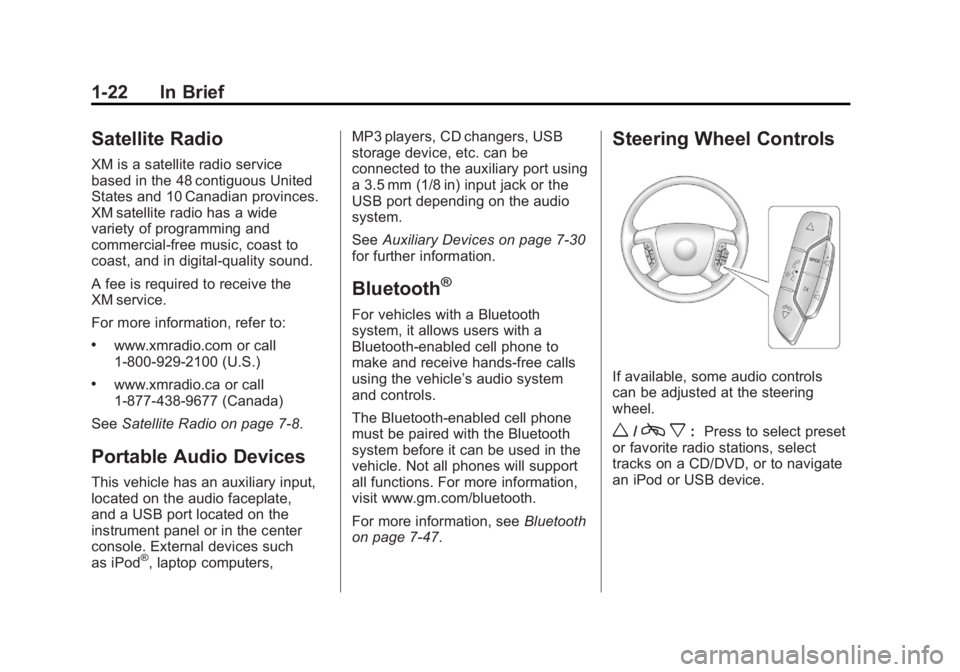
Steering Wheel Controls
If available, some audio controls
can be adjusted at the steering
wheel.
w/c x:Press to select preset
or favorite radio stations, select
tracks on a CD/DVD, or to navigate
an iPod or USB device.
Page 29 of 528

Black plate (23,1)GMC Yukon/Yukon XL Owner Manual - 2011
In Brief 1-23
bg: Press to silence the vehicle
speakers only. Press again to turn
the sound on. Press and hold longer
than two seconds to interact with
OnStar
®or Bluetooth systems,
if equipped.
+
e−e: Press to increase or
decrease volume.
c x:Press to reject an
incoming call, or to end a call.
SRCE: Press to switch between
the radio and CD, and for equipped
vehicles, the DVD, front auxiliary,
and rear auxiliary.
¨: Press to seek the next radio
station, the next track or chapter
while sourced to the CD or DVD
slot, or to select tracks and folders
on an iPod or USB device.
For more information, see Steering
Wheel Controls on page 5‑2.
Cruise Control
The cruise control buttons are
located on the left side of the
steering wheel.
T: Press to turn the system on
or off. The indicator light is on when
cruise control is on and turns off
when cruise control is off. + RES:
Press briefly to make the
vehicle resume to a previously
set speed, or press and hold to
accelerate.
SET −: Press to set the speed and
activate cruise control or make the
vehicle decelerate.
[: Press to disengage cruise
control without erasing the set
speed from memory.
See Cruise Control on page 9‑56.
Navigation System
If the vehicle has a navigation
system, there is a separate
Navigation System Manual that
includes information on the radio,
audio players, and navigation
system.
Page 32 of 528

Black plate (26,1)GMC Yukon/Yukon XL Owner Manual - 2011
1-26 In Brief
To express open or close the
sunroof, press the open or close
switch (A) to the second detent
position and release. To stop the
movement, press the switch again.
To automatically vent or close the
sunroof, press the vent open or
close switch (B).
The sunroof also has a sunshade
that you can pull forward to block
the rays of the sun. The sunshade
must be opened and closed
manually.
SeeSunroof on page 2‑23.Performance and
Maintenance
StabiliTrak®System
If equipped, the vehicle has a
traction control system that limits
wheel spin and the StabiliTrak
system that assists with directional
control of the vehicle in difficult
driving conditions. Both systems
turn on automatically every time the
vehicle is started.
.To turn off traction control,
press and release
5on the
instrument panel.
Filluminates
and the appropriate DIC
message displays. See Ride
Control System Messages on
page 5‑43.
.To turn off both traction control
and StabiliTrak, press and
hold
5untilFilluminates and
the appropriate DIC message
displays. See Ride Control
System Messages on page 5‑43.
.Press and release5again to
turn on both systems.
For more information, see
StabiliTrak
®System on page 9‑52.
Tire Pressure Monitor
This vehicle may have a Tire
Pressure Monitor System (TPMS).
The TPMS warning light alerts you
to a significant loss in pressure of
one of the vehicle's tires. If the
warning light comes on, stop as
soon as possible and inflate the
tires to the recommended pressure
shown on the Tire and Loading
Information label. See Vehicle Load
Limits on page 9‑23. The warning
light will remain on until the tire
pressure is corrected.
Page 36 of 528

Black plate (30,1)GMC Yukon/Yukon XL Owner Manual - 2011
1-30 In Brief
Service involving location
information about your vehicle
can’t work unless GPS signals
are available, unobstructed, and
compatible with the OnStar
hardware. The vehicle has to have
a working electrical system and
adequate battery power for the
OnStar equipment to operate.
OnStar service may not work if the
OnStar equipment isn’t properly
installed or you haven’t maintained
it and your vehicle is in good
working order and in compliance
with all government regulations.
If you try to add, connect, or modify
any equipment or software in your
vehicle, OnStar service may not
work. Other problems OnStar can’t
control may prevent service to you,
such as hills, tall buildings, tunnels,
weather, electrical system design
and architecture of your vehicle,
damage to important parts of your
vehicle in a crash, or wireless phone
network congestion or jamming.See
Radio Frequency Statement on
page 13‑16 for information
regarding Part 15 of the Federal
Communications Commission (FCC)
rules and Industry Canada
Standards RSS-210/220/310.
OnStar Steering Wheel
Controls
This vehicle may have ab g/c xTalk/Mute button
that can be used to interact with
OnStar Hands-Free Calling. See
Steering Wheel Controls on
page 5‑2 for more information.
On some vehicles, the mute button
can be used to dial numbers into
voice mail systems, or to dial phone
extensions. See the OnStar Owner's
Guide for more information.
Your Responsibility
Increase the volume of the radio
if the OnStar Advisor cannot be
heard. If the light next to the OnStar
buttons is red, the system may
not be functioning properly.
Push
Qand request a vehicle
diagnostic check. If the light
appears clear (no light is
appearing), your OnStar
subscription has expired and all
services have been deactivated.
Push
Qto confirm that the OnStar
equipment is active.
OnStar®
If the vehicle is equipped with an
active OnStar system, that system
may also record data in crash or
near crash-like situations. The
OnStar Terms and Conditions
provides information on data
collection and use and is available
in the OnStar Glove Box Kit,
at www.onstar.com (U.S.) or
www.onstar.ca (Canada), or by
pushing
Qand speaking to an
Advisor.
Page 79 of 528

Black plate (19,1)GMC Yukon/Yukon XL Owner Manual - 2011
Seats and Restraints 3-19
Returning the Third Row Seat
from a Tumbled Position
To return the seat to the normal
seating position:
1. Open the liftgate to access thecontrols for the seat.
2. Make sure there is nothing that could become trapped under
the seat.
3. Release the seat from the tumbled position by lifting
lever “2”next to the carrying
handle at the bottom rear of
the seat.
4. Pull the seat down until it latches to the floor. The seatback cannot
be raised to the upright position
unless the seat is latched to the
floor.
5. Raise the seatback to the upright position.
{WARNING
If either seatback is not locked, it
could move forward in a sudden
stop or crash. That could cause
injury to the person sitting there.
Always push and pull on the
seatbacks to be sure they are
locked.
6. Push and pull on the seatback to make sure it is locked.
Removing the Third Row Seat
To remove the seat:
1. Open the liftgate to access thecontrols for the seat.
2. Fold the seatbacks forward using lever “1”and the
instructions listed previously
under “Folding the Seatback.”
The seat cannot be unlatched
from the floor unless the
seatback is folded.
3. Unlatch the seat from the floor by pulling the handle at the rear
of the seat “3 Removal Only”
toward the rear of the vehicle.
4. Roll the seat out of the vehicle. There is a track in the floor to
guide the seat wheels out of the
vehicle.
Page 80 of 528

Black plate (20,1)GMC Yukon/Yukon XL Owner Manual - 2011
3-20 Seats and Restraints
Installing the Third Row Seat
To install the seat:
1. Open the liftgate to access therear of the vehicle.
2. Slide the front outboard seat wheels into the track on the floor
and roll the seat forward. The
front latches should lock into
place. If the latches do not lock,
try tilting the rear of the seat
upward slightly.
3. Lower the rear of the seat and push down on the seat to
engage the rear floor latches.
{WARNING
A seat that is not locked into
place properly can move around
in a collision or sudden stop.
People in the vehicle could be
injured. Be sure to lock the
seat into place properly when
installing it. 4. Push and pull on the seat to
make sure it is locked into place.
The seatback cannot be raised
to the upright position unless the
seat is latched to the floor.
5. Raise the seatback to the upright position.
{WARNING
If either seatback is not locked, it
could move forward in a sudden
stop or crash. That could cause
injury to the person sitting there.
Always push and pull on the
seatbacks to be sure they are
locked.
6. Push and pull on the seatback to make sure it is locked.
{WARNING
A safety belt that is improperly
routed, not properly attached,
or twisted will not provide the
protection needed in a crash. The
person wearing the belt could be
seriously injured. After raising the
rear seatback, always check to
be sure that the safety belts are
properly routed and attached, and
are not twisted.
7. Make sure the safety belts are returned to the original position
over the seatbacks.
Page 82 of 528

Black plate (22,1)GMC Yukon/Yukon XL Owner Manual - 2011
3-22 Seats and Restraints
Why Safety Belts Work
When you ride in or on anything,
you go as fast as it goes.
Take the simplest vehicle. Suppose
it is just a seat on wheels.
Put someone on it.Get it up to speed. Then stop the
vehicle. The rider does not stop.
Page 99 of 528
Black plate (39,1)GMC Yukon/Yukon XL Owner Manual - 2011
Seats and Restraints 3-39
Airbag System
The vehicle has the following
airbags:
.A frontal airbag for the driver.
.A frontal airbag for the right front
passenger.
.A roof-rail airbag for the driver
and passenger directly behind
the driver.
.A roof-rail airbag for the right
front passenger and the person
seated directly behind that
passenger.
The vehicle may have the following
airbags:
.A seat‐mounted side impact
airbag for the driver.
.A seat‐mounted side impact
airbag for the right front
passenger.
.If the vehicle has a third row
seat, it will have a third row
roof-rail airbag. All of the airbags in the vehicle will
have the word AIRBAG embossed
in the trim or on an attached label
near the deployment opening.
For frontal airbags, the word
AIRBAG will appear on the middle
part of the steering wheel for the
driver and on the instrument panel
for the right front passenger.
With seat‐mounted side impact
airbags, the word AIRBAG will
appear on the side of the seatback
closest to the door.
With roof-rail airbags, the word
AIRBAG will appear along the
headliner or trim.
Airbags are designed to supplement
the protection provided by safety
belts. Even though today's airbags
are also designed to help reduce
the risk of injury from the force of an
inflating bag, all airbags must inflate
very quickly to do their job.
Here are the most important things
to know about the airbag system:
{WARNING
You can be severely injured or
killed in a crash if you are not
wearing your safety belt
—even if
you have airbags. Airbags are
designed to work with safety
belts, but do not replace them.
Also, airbags are not designed to
deploy in every crash. In some
crashes safety belts are your only
restraint. See When Should an
Airbag Inflate? on page 3‑43.
Wearing your safety belt during a
crash helps reduce your chance
of hitting things inside the vehicle
or being ejected from it. Airbags
are “supplemental restraints” to
the safety belts. Everyone in your
vehicle should wear a safety belt
properly —whether or not there is
an airbag for that person.