2011 GMC TERRAIN seats
[x] Cancel search: seatsPage 114 of 426

Black plate (60,1)GMC Terrain Owner Manual - 2011
3-60 Seats and Restraints
6. To tighten the belt, push downon the child restraint, pull the
shoulder portion of the belt to
tighten the lap portion of the belt,
and feed the shoulder belt back
into the retractor. When installing
a forward-facing child restraint,
it may be helpful to use your
knee to push down on the child
restraint as you tighten the belt. Try to pull the belt out of the
retractor to make sure the
retractor is locked. If the
retractor is not locked, repeat
Steps 5 and 6.
If the vehicle does not have a
rear seat and the child restraint
has a top tether, follow the
child restraint manufacturer's
instructions regarding the use
of the top tether. See
Lower
Anchors and Tethers for
Children (LATCH System) on
page 3‑49 for more information.
7. Before placing a child in the child restraint, make sure it is
securely held in place. To check,
grasp the child restraint at the
safety belt path and attempt to
move it side to side and back
and forth. When the child
restraint is properly installed,
there should be no more than
2.5 cm (1 in) of movement. If the airbags are off, the off
indicator in the passenger airbag
status indicator will come on and
stay on when the vehicle is started.
If a child restraint has been installed
and the on indicator is lit, see
“If
the On Indicator is Lit for a Child
Restraint” underPassenger Sensing
System on page 3‑33 for more
information.
To remove the child restraint,
unbuckle the vehicle safety belt and
let it return to the stowed position.
Page 148 of 426

Black plate (30,1)GMC Terrain Owner Manual - 2011
5-30 Instruments and Controls
Vehicle
Personalization
The audio system controls are
used to access the personalization
menus for customizing vehicle
features.
CONFIG (Configuration):Press
to access the Configuration
Settings Menu.
MENU/SEL Knob: Press the
center of this knob to enter the
menus and select menu items.
Turn the knob to scroll through the
menus.
}BACK: Press to exit or move
backwards in a menu.
Entering the Personalization
Menus
1. Turn the infotainment system on and press the CONFIG button
to access the Configuration
Settings menu.
2. Turn the MENU/SEL knob to highlight Vehicle Settings. 3. Press the center of the MENU/
SEL knob to select the Vehicle
Settings menu.
The following list of menu items will
be available:
.Climate and Air Quality
.Comfort and Convenience
.Collision/Detection Systems
.Languages
.Lighting
.Power Door Locks
.Remote Lock/Unlock/Start
.Return to Factory Settings
Turn the MENU/SEL knob to
highlight the menu. Press the knob
to select it. Each of the menus is
detailed in the following information.
All of the menus may not be
available. Only those tied to the
features on your vehicle will be
shown.
Climate and Air Quality
Select the Climate and Air Quality
menu and the following will be
displayed:
.Auto Fan Speed
.Air Conditioning Mode
.Remote Start Auto Heat Seats
Auto Fan Speed
This selection is available on
vehicles with the Automatic Climate
Control System. Choose from the
following blower speed settings:
High: Increased speed.
Low: Reduced speed.
Normal: Moderate speed.
Press the MENU/SEL knob when
Auto Fan Speed is highlighted.
Turn the knob to highlight “High,”
“Normal,” or“Low.” Press the knob
to confirm the selection and go back
to the last menu.
Page 149 of 426

Black plate (31,1)GMC Terrain Owner Manual - 2011
Instruments and Controls 5-31
Air Conditioning Mode
This will allow you to select whether
or not the air conditioning comes
on automatically the next time the
vehicle is started.“On”means that
the air conditioning will be on at
start up, regardless of whether it
was on or off the last time the
vehicle was turned off. “Off”means
the air conditioning will be off at
the next start up, regardless of
whether it was on or off the last
time the vehicle was turned off.
“Last Setting” means that when
the vehicle is started, the air
conditioning will resume whichever
setting it was at the last time the
vehicle was turned off.
Press the MENU/SEL knob
when Air Conditioning Mode is
highlighted. Turn the knob to
highlight “On,” “Off,” or“Last
Setting.” Press the knob to confirm
the selection and go back to the
last menu. Remote Start Auto Heat Seats
When on, this feature will turn the
heated seats on when using remote
start on cold days.
Press the MENU/SEL knob when
“Remote Start Auto Heat Seats”
is
highlighted to toggle between “On”
or “Off.” Press
}BACK to confirm
the selection and go back to the
last menu.
Comfort and Convenience
Select the Comfort and
Convenience menu and the
following will be displayed:
.Easy Exit Driver Seat
.Chime Volume
.Reverse Tilt Mirror
Easy Exit Driver Seat
When on, this feature will move the
driver seat rearward upon turning
the ignition off and the driver door
opening. This may be performed to
make it easier to exit the vehicle.
See the “Easy Exit Driver Seat” information under
Power Seat
Adjustment on page 3‑3 for more
information.
This allows you to turn the easy exit
seat feature on or off.
Press the MENU/SEL knob
when “Easy Exit Driver Seat” is
highlighted. Turn the knob to
select “On”or“Off.” Press the knob
to confirm and go back to the
last menu.
Chime Volume
This allows the selection of the
chime volume level.
Press the MENU/SEL knob when
“Chime Volume” is highlighted.
Turn the knob to select “Normal”or
“High.” Press the knob to confirm
and go back to the last menu.
Reverse Tilt Mirror
When on, both the driver and
passenger mirrors will tilt
downward when vehicle is shifted
to R (Reverse) to improve visibility
of the ground near the rear wheels.
Page 157 of 426

Black plate (5,1)GMC Terrain Owner Manual - 2011
Lighting 6-5
1(Door):The lamps come on
automatically when a door is
opened.
+(On): Turns the dome lamps on.
The dome lamps can also be turned
on and off by pressing the buttons
next to the lamps.
Reading Lamps
The reading lamps are located on
the overhead console. These lamps
come on automatically when any
door is opened.
For manual operation, press the
button next to each lamp to turn it
on or off.
Lighting Features
Entry Lighting
The dome lamp, cargo lamp, and
foot lamp inside the vehicle come
on when any door is opened, if the
dome lamp is in the door position.
In addition, these lamps come on
when the Remote Keyless Entry
(RKE) unlock button is pressed.
They stay on for 20 seconds or until
a door is opened. After the door is
opened and then closed, the light
remains on for 20 seconds, or until
the ignition is turned to ON/RUN.
Battery Load
Management
The vehicle has Electric Power
Management (EPM) that estimates
the battery's temperature and state
of charge. It then adjusts the voltage
for best performance and extended
life of the battery. When the battery's state of charge
is low, the voltage is raised slightly
to quickly bring the charge back up.
When the state of charge is high,
the voltage is lowered slightly to
prevent overcharging. If the vehicle
has a voltmeter gauge or a voltage
display on the Driver Information
Center (DIC), you may see the
voltage move up or down. This is
normal. If there is a problem, an
alert will be displayed.
The battery can be discharged at
idle if the electrical loads are very
high. This is true for all vehicles.
This is because the generator
(alternator) may not be spinning
fast enough at idle to produce all
of the power needed for very high
electrical loads.
A high electrical load occurs when
several of the following are on,
such as: headlamps, high beams,
fog lamps, rear window defogger,
climate control fan at high speed,
heated seats, engine cooling fans,
trailer loads, and loads plugged into
accessory power outlets.
Page 195 of 426
Black plate (37,1)GMC Terrain Owner Manual - 2011
Infotainment System 7-37
Audio Output
Audio from the DVD player or
auxiliary inputs can be heard
through the following:
.Wireless Headphones
.Vehicle Speakers
The RSE system transmits the
audio signal to the wireless
headphones if an audio signal is
available. See “Headphones” earlier
in this section for more information.
The front seat passengers are able
to listen to playback from the A/V
jacks through the vehicle speakers
by selecting Rear A/V as the source
on the radio.
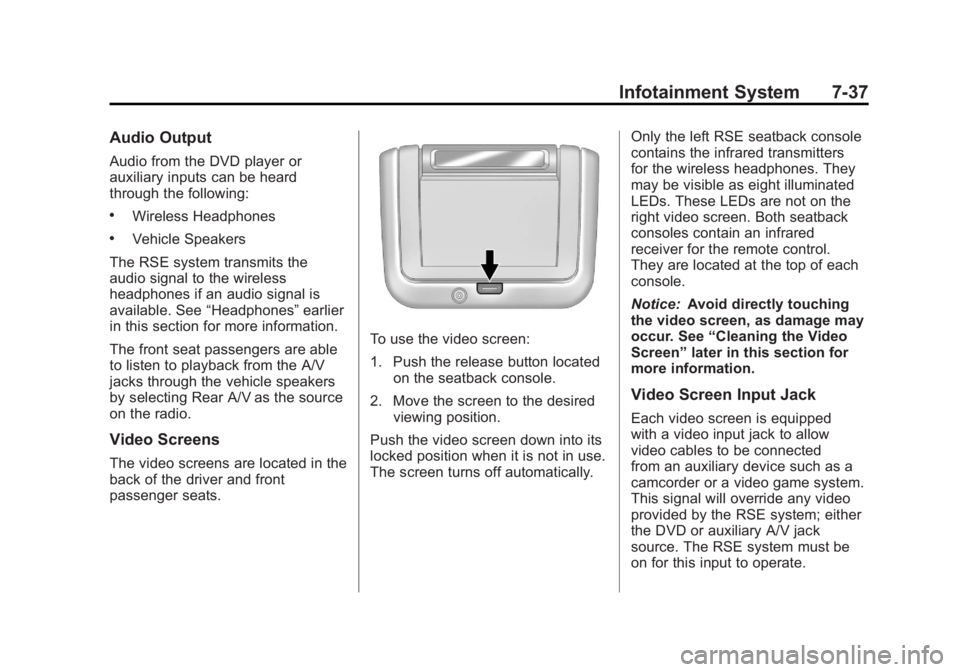
Video Screens
The video screens are located in the
back of the driver and front
passenger seats.
To use the video screen:
1. Push the release button located on the seatback console.
2. Move the screen to the desired viewing position.
Push the video screen down into its
locked position when it is not in use.
The screen turns off automatically. Only the left RSE seatback console
contains the infrared transmitters
for the wireless headphones. They
may be visible as eight illuminated
LEDs. These LEDs are not on the
right video screen. Both seatback
consoles contain an infrared
receiver for the remote control.
They are located at the top of each
console.
Notice:
Avoid directly touching
the video screen, as damage may
occur. See “Cleaning the Video
Screen” later in this section for
more information.
Video Screen Input Jack
Each video screen is equipped
with a video input jack to allow
video cables to be connected
from an auxiliary device such as a
camcorder or a video game system.
This signal will override any video
provided by the RSE system; either
the DVD or auxiliary A/V jack
source. The RSE system must be
on for this input to operate.
Page 223 of 426

Black plate (3,1)GMC Terrain Owner Manual - 2011
Climate Controls 8-3
Automatic Climate Control System
The vehicle's heating, cooling, defrosting, and ventilation can be controlled
with this system.
A. Fan Control
B. AUTO (Automatic Operation)
C. Air Delivery Mode Controls
D. Defrost
E. Recirculation
F. Temperature ControlG. Power
H. Driver and Passenger Heated
Seats
I. Rear Window Defogger
J. Air Conditioning Automatic Operation
The system automatically controls
the fan speed, air delivery, air
conditioning, and recirculation to
heat or cool the vehicle to the
selected temperature.
When the AUTO indicator light is
on, the system is in full automatic
operation.
To place the system in
automatic mode:
1. Press AUTO.
2. Set the temperature. Allow the
system time to stabilize. Then
adjust the temperature as
needed.
Manual Operation
O(Power): Press to turn the
climate control system on or off.
A(Fan Control): Turn to
increase or decrease the fan
speed. Adjusting the fan speed
while in automatic mode places
the fan under manual control.
Page 225 of 426

Black plate (5,1)GMC Terrain Owner Manual - 2011
Climate Controls 8-5
Notice:Do not use a razor blade
or sharp object to clear the inside
rear window. Do not adhere
anything to the defogger grid
lines in the rear glass. These
actions may damage the rear
defogger. Repairs would not be
covered by your warranty.
L/M(Driver and Passenger
Heated Seats): For vehicles with
heated seats, see Heated Front
Seats on page 3‑8.
Remote Start Climate Control
Operation: For vehicles with the
remote vehicle start feature, the
climate control system may run
when the vehicle is started remotely. The system uses the driver's
previous settings to heat or cool
the inside of the vehicle. The front
heated seats will turn on if it is cold
outside. The heated seat indicator
lights do not come on during a
remote start. See
Remote Vehicle
Start on page 2‑5.Sensors
The solar sensor, located on top
of the instrument panel near the
windshield, monitors the solar heat.
The climate control system
uses the information to adjust
the temperature, fan speed,
recirculation, and air delivery mode.
Do not cover the solar sensor or the
system will not work properly.
Air Vents
Use the air outlets, located in the
center and on the side of the
instrument panel, to direct the
airflow. Use the thumbwheels
located near the center air outlets,
to open or close off the airflow.
Operation Tips
.Clear away any ice, snow,
or leaves from air inlets at the
base of the windshield that could
block the flow of air into the
vehicle.
.Keep the path under the front
seats clear of objects to help
circulate the air inside of the
vehicle more effectively.
.Use of non‐GM approved hood
deflectors can adversely affect
the performance of the system.
Check with your dealer before
adding equipment to the outside
of the vehicle.
Page 252 of 426

Black plate (26,1)GMC Terrain Owner Manual - 2011
9-26 Driving and Operating
If you put things inside
your vehicle–like suitcases,
tools, packages, or anything
else –they will go as fast as the
vehicle goes. If you have to stop
or turn quickly, or if there is a
crash, they will keep going.
{WARNING
Things inside the vehicle can
strike and injure people in a
sudden stop or turn, or in a
crash.
.Put things in the cargo
area of the vehicle. In the
cargo area, put them as
far forward as possible.
Try to spread the weight
evenly.
(Continued)
WARNING (Continued)
.Never stack heavier
things, like suitcases,
inside the vehicle so that
some of them are above
the tops of the seats.
.Do not leave an
unsecured child restraint
in the vehicle.
.Secure loose items in the
vehicle.
.Do not leave a seat folded
down unless needed.
Starting and
Operating
New Vehicle Break-In
Notice: The vehicle does not
need an elaborate break-in. But it
will perform better in the long run
if you follow these guidelines:
.Do not drive at any one
constant speed, fast or slow,
for the first 805 km (500 mi).
Do not make full-throttle
starts. Avoid downshifting to
brake or slow the vehicle.
.During the first 1 000 km
(600 mi), avoid using more
than moderate acceleration
in lower gears and avoid
vehicle speeds above
110 km/h (68 mph).
.Between the first 1 000 km
(600 mi) and 5 000 km
(3,000 mi), heavy
acceleration in lower
gears can be used.