2011 GMC SAVANA PASSENGER warning
[x] Cancel search: warningPage 161 of 414

Black plate (39,1)GMC Savana Owner Manual - 2011
Instruments and Controls 5-39
shown on the Tire Loading
Information label. SeeTires on
page 10‑50, Vehicle Load Limits on
page 9‑12, and Tire Pressure on
page 10‑57. The DIC also shows
the tire pressure values. See Driver
Information Center (DIC) on
page 5‑27.
SERVICE TIRE MONITOR
SYSTEM
If the vehicle has the Tire Pressure
Monitor System (TPMS), this
message displays if a part on the
system is not working properly. The
tire pressure light also flashes and
then remains on during the same
ignition cycle. See Tire Pressure
Light on page 5‑25. Several
conditions may cause this message
to appear. See Tire Pressure
Monitor Operation on page 10‑59 for
more information. If the warning
comes on and stays on, there may
be a problem with the TPMS. See
your dealer.
TIRE LEARNING ACTIVE
If the vehicle has the Tire Pressure
Monitor System (TPMS), this
message displays when the system
is re-learning the tire positions on
the vehicle. See Driver Information
Center (DIC) on page 5‑27 for more
information. The tire positions must
be re-learned after rotating the tires
or after replacing a tire or sensor.
See Tire Inspection on page 10‑63,
Tire Rotation on page 10‑63, Tire
Pressure Monitor Operation on
page 10‑59, and Tire Pressure on
page 10‑57 for more information.
Transmission Messages
SERVICE TRANSMISSION
This message displays when there
is a problem with the transmission.
See your dealer for service.
TRANSMISSION HOT IDLE
ENGINE
Notice:If you drive the vehicle
while the transmission fluid is
overheating and the transmission
temperature warning is displayed
on the instrument panel cluster
and/or DIC, you can damage the
transmission. This could lead to
costly repairs that would not be
covered by the warranty. Do not
drive the vehicle with overheated
transmission fluid or while the
transmission temperature
warning is displayed.
This message displays along with a
chime if the transmission fluid in the
vehicle gets hot. Driving with the
transmission fluid temperature high
can cause damage to the vehicle.
Stop the vehicle and let it idle to
allow the transmission to cool. This
message clears and the chime
stops when the fluid temperature
reaches a safe level.
Page 169 of 414
Black plate (1,1)GMC Savana Owner Manual - 2011
Lighting 6-1
Lighting
Exterior Lighting
Exterior Lamp Controls . . . . . . . . 6-1
Exterior Lamps OffReminder . . . . . . . . . . . . . . . . . . . . 6-2
Headlamp High/Low-Beam Changer . . . . . . . . . . . . . . . . . . . . . 6-2
Flash-to-Pass . . . . . . . . . . . . . . . . . 6-3
Daytime Running Lamps (DRL) . . . . . . . . . . . . . . . . 6-3
Automatic Headlamp System . . . . . . . . . . . . . . . . . . . . . . 6-3
Hazard Warning Flashers . . . . . 6-4
Turn and Lane-Change Signals . . . . . . . . . . . . . . . . . . . . . . 6-5
Interior Lighting
Instrument Panel IlluminationControl . . . . . . . . . . . . . . . . . . . . . . 6-5
Dome Lamps . . . . . . . . . . . . . . . . . 6-6
Reading Lamps . . . . . . . . . . . . . . . 6-6
Lighting Features
Entry/Exit Lighting . . . . . . . . . . . . . 6-7
Battery Load Management . . . . 6-7
Battery Power Protection . . . . . . 6-7
Exterior Lighting
Exterior Lamp Controls
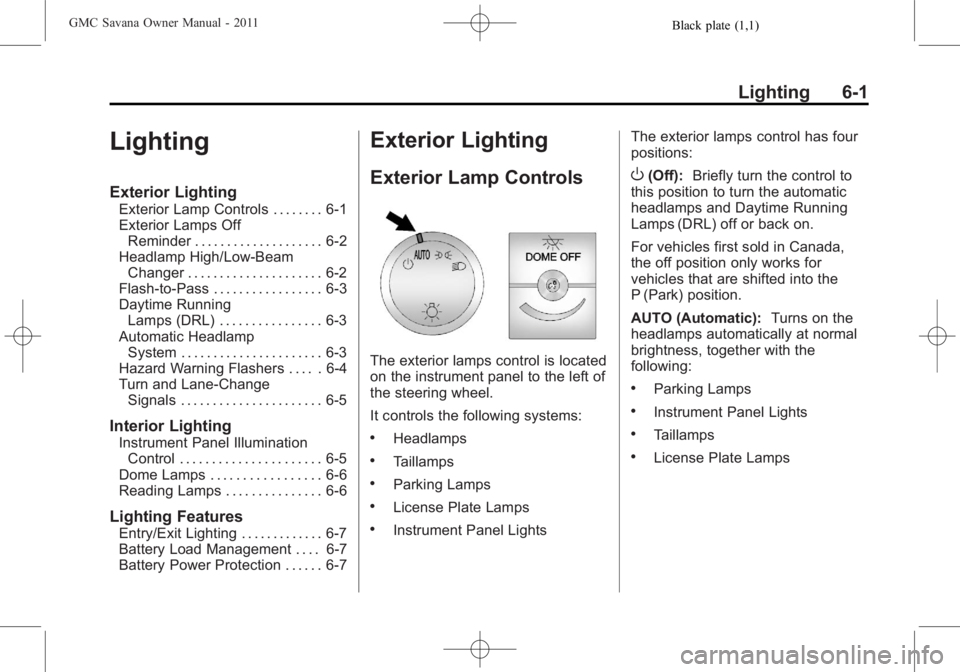
The exterior lamps control is located
on the instrument panel to the left of
the steering wheel.
It controls the following systems:
.Headlamps
.Taillamps
.Parking Lamps
.License Plate Lamps
.Instrument Panel Lights The exterior lamps control has four
positions:
O(Off):
Briefly turn the control to
this position to turn the automatic
headlamps and Daytime Running
Lamps (DRL) off or back on.
For vehicles first sold in Canada,
the off position only works for
vehicles that are shifted into the
P (Park) position.
AUTO (Automatic): Turns on the
headlamps automatically at normal
brightness, together with the
following:
.Parking Lamps
.Instrument Panel Lights
.Taillamps
.License Plate Lamps
Page 170 of 414
Black plate (2,1)GMC Savana Owner Manual - 2011
6-2 Lighting
;(Parking Lamps):Turns on the
parking lamps together with the
following:
.Instrument Panel Lights
.Taillamps
.License Plate Lamps
2(Headlamps): Turns on the
headlamps together with the
following lamps listed below.
.Parking Lamps
.Instrument Panel Lights
.Taillamps
.License Plate Lamps
If the headlamps are turned on
while the vehicle is on, the
headlamps turn off automatically
10 minutes after the ignition is
turned off. If the headlamps are
turned on while the vehicle is off,
the headlamps will continue to stay
on. To prevent the battery from
being drained, turn the control to the
Oposition. A warning chime sounds if the driver
door is opened while the ignition
switch is off and the headlamps
are on.
To change the headlamps from low
beam to high beam, push the turn
signal/multifunction lever toward the
instrument panel.
Exterior Lamps Off
Reminder
If a door is open, a reminder chime
sounds when the headlamps or
parking lamps are manually turned
on and the key is out of the ignition.
To turn off the chime, turn the
headlamp switch to
Oor AUTO and
then back on, or close and re‐open
the door. In the auto mode, the
headlamps turn off once the ignition
is in LOCK/OFF or may remain on
until the headlamp delay ends,
if enabled in the Driver Information
Center (DIC). See “Exit Lighting”
under Vehicle Personalization on
page 5‑40.
Headlamp High/
Low-Beam Changer
2 3
(Headlamp High/Low‐Beam
Changer): Pull the turn signal lever
all the way toward you to change
the headlamps from low to high
beam. Then release it.
This instrument panel cluster light
comes on when the high beam
headlamps are on.
Page 172 of 414

Black plate (4,1)GMC Savana Owner Manual - 2011
6-4 Lighting
The vehicle has a light sensor
located on the top of the instrument
panel. Do not cover the sensor or
the system will come on whenever
the ignition is on.
The system may also turn on the
headlamps when driving through a
parking garage or tunnel.
There is a delay in the transition
between the daytime and nighttime
operation of the Daytime Running
Lamps (DRL) and the automatic
headlamp systems so that driving
under bridges or bright overhead
street lights does not affect the
system. The DRL and automatic
headlamp system is only affectedwhen the light sensor sees a
change in lighting lasting longer
than the delay.
If the vehicle is started in a dark
garage, the automatic headlamp
system comes on immediately.
Once the vehicle leaves the garage,
it takes approximately 30 seconds
for the automatic headlamp system
to change to DRL if it is light
outside. During that delay, the
instrument panel cluster may not be
as bright as usual. Make sure the
instrument panel brightness control
is in the full bright position. See
Instrument Panel Illumination
Control on page 6‑5.
Hazard Warning Flashers
|(Hazard Warning Flashers):
Press this button located on top of
the steering column, to make the
front and rear turn signal lamps
flash on and off. This warns others
that you are having trouble. Press
again to turn the flashers off.
When the hazard warning flashers
are on, the vehicle's turn signals will
not work.
Page 177 of 414
Black plate (1,1)GMC Savana Owner Manual - 2011
Infotainment System 7-1
Infotainment
System
Introduction
Infotainment . . . . . . . . . . . . . . . . . . . 7-1
Theft-Deterrent Feature . . . . . . . 7-2
Operation . . . . . . . . . . . . . . . . . . . . . 7-3
Radio
AM-FM Radio . . . . . . . . . . . . . . . . . 7-7
Satellite Radio . . . . . . . . . . . . . . . . 7-9
Radio Reception . . . . . . . . . . . . . 7-11
Fixed Mast Antenna(Multi-Band) . . . . . . . . . . . . . . . . 7-12
Fixed Mast Antenna (Care) . . . . . . . . . . . . . 7-12
Audio Players
CD Player . . . . . . . . . . . . . . . . . . . 7-12
Auxiliary Devices . . . . . . . . . . . . 7-18
Phone
Bluetooth . . . . . . . . . . . . . . . . . . . . 7-23
Introduction
Infotainment
If the vehicle came without a radio,
the wiring provisions for a radio and
an antenna were installed at the
assembly plant, so that if you want,
a radio can be installed at the
dealer.
Determine which radio the vehicle
has and read the following pages to
become familiar with its features.
{WARNING
Taking your eyes off the road for
extended periods could cause a
crash resulting in injury or death
to you or others. Do not give
extended attention to
entertainment tasks while driving.
This system provides access to
many audio and non audio listings.
Page 200 of 414
Black plate (24,1)GMC Savana Owner Manual - 2011
7-24 Infotainment System
.See“Storing and Deleting Phone
Numbers” in this section for
more information.
{WARNING
When using a cell phone, it can
be distracting to look too long or
too often at the screen of the
phone or the infotainment
(navigation) system. Taking your
eyes off the road too long or too
often could cause a crash
resulting in injury or death. Focus
your attention on driving.
A Bluetooth system can use a
Bluetooth‐capable cell phone with a
Hands‐Free Profile to make and
receive phone calls. The system
can be used while the key is in the
ON/RUN or ACC/ACCESSORY
position. The range of the Bluetooth
system can be up to 9.1 m (30 ft).
Not all phones support all functions,
and not all phones are guaranteed
to work with the in-vehicle Bluetooth system. See www.gm.com/bluetooth
for more information on compatible
phones.
Voice Recognition
The Bluetooth system uses voice
recognition to interpret voice
commands to dial phone numbers
and name tags.
For additional information, say
“Help”
while you are in a voice
recognition menu.
Noise: Keep interior noise levels to
a minimum. The system may not
recognize voice commands if there
is too much background noise.
When to Speak: A short tone
sounds after the system responds
indicating when it is waiting for a
voice command. Wait until the tone
and then speak.
How to Speak: Speak clearly in a
calm and natural voice.
Audio System
When using the in‐vehicle Bluetooth
system, sound comes through the
vehicle's front audio system
speakers and overrides the audio
system. Use the audio system
volume knob, during a call, to
change the volume level. The
adjusted volume level remains in
memory for later calls. To prevent
missed calls, a minimum volume
level is used if the volume is turned
down too low.
Bluetooth Controls
Use the buttons located on the
steering wheel to operate the
in‐vehicle Bluetooth system. See
Steering Wheel Controls on
page 5‑2 for more information.
b/g(Push To Talk): Press to
answer incoming calls, confirm
system information, and start
speech recognition.
c/x(Phone On Hook): Press
to end a call, reject a call, or cancel
an operation.
Page 214 of 414
Black plate (2,1)GMC Savana Owner Manual - 2011
9-2 Driving and Operating
Driving Information
Defensive Driving
Defensive driving means“always
expect the unexpected.” The first
step in driving defensively is to wear
the safety belt. See Safety Belts on
page 3‑9.
{WARNING
Assume that other road users
(pedestrians, bicyclists, and other
drivers) are going to be careless
and make mistakes. Anticipate
what they might do and be ready.
In addition:
.Allow enough following
distance between you and
the driver in front of you.
.Focus on the task of driving.
Driver distraction can cause
collisions resulting in injury or
possible death. These simple
defensive driving techniques
could save your life.
Drunk Driving
{WARNING
Drinking and then driving is very
dangerous. Your reflexes,
perceptions, attentiveness, and
judgment can be affected by even
a small amount of alcohol. You
can have a serious —or even
fatal —collision if you drive after
drinking.
Do not drink and drive or ride with
a driver who has been drinking.
Ride home in a cab; or if you are
with a group, designate a driver
who will not drink.
Death and injury associated with
drinking and driving is a global
tragedy.
Alcohol affects four things that
anyone needs to drive a vehicle:
judgment, muscular coordination,
vision, and attentiveness.
Page 215 of 414
Black plate (3,1)GMC Savana Owner Manual - 2011
Driving and Operating 9-3
Police records show that
almost 40 percent of all motor
vehicle-related deaths involve
alcohol. In most cases, these
deaths are the result of someone
who was drinking and driving.
In recent years, more than
17,000 annual motor vehicle-related
deaths have been associated with
the use of alcohol, with about
250,000 people injured.
For persons under 21, it is against
the law in every U.S. state to drink
alcohol. There are good medical,
psychological, and developmental
reasons for these laws.
The obvious way to eliminate the
leading highway safety problem is
for people never to drink alcohol
and then drive.Medical research shows that
alcohol in a person's system can
make crash injuries worse,
especially injuries to the brain,
spinal cord, or heart. This means
that when anyone who has been
drinking
—driver or passenger —is
in a crash, that person's chance of
being killed or permanently disabled
is higher than if the person had not
been drinking.
Control of a Vehicle
The following three systems
help to control the vehicle while
driving —brakes, steering, and
accelerator. At times, as when
driving on snow or ice, it is easy to
ask more of those control systems
than the tires and road can provide.
Meaning, you can lose control of the
vehicle.
Adding non‐dealer accessories can
affect vehicle performance. See
Accessories and Modifications on
page 10‑3.
Braking
See Brake System Warning Light on
page 5‑23.
Braking action involves perception
time and reaction time. Deciding to
push the brake pedal is perception
time. Actually doing it is
reaction time.
Average reaction time is about
three‐fourths of a second. But that is
only an average. It might be less
with one driver and as long as
two or three seconds or more with
another. Age, physical condition,
alertness, coordination, and
eyesight all play a part. So do
alcohol, drugs, and frustration. But
even in three‐fourths of a second, a
vehicle moving at 100 km/h
(60 mph) travels 20 m (66 ft). That
could be a lot of distance in an
emergency, so keeping enough
space between the vehicle and
others is important.