2011 GMC ACADIA child restraint
[x] Cancel search: child restraintPage 1 of 478

Black plate (1,1)GMC Acadia/Acadia Denali Owner Manual - 2011
2011 GMC Acadia/Acadia Denali Owner ManualM
In Brief. . . . . . . . . . . . . . . . . . . . . . . . 1-1
Instrument Panel . . . . . . . . . . . . . . 1-2
Initial Drive Information . . . . . . . . 1-4
Vehicle Features . . . . . . . . . . . . . 1-16
Performance and Maintenance . . . . . . . . . . . . . . . . 1-20
Keys, Doors and Windows . . . 2-1
Keys and Locks . . . . . . . . . . . . . . . 2-2
Doors . . . . . . . . . . . . . . . . . . . . . . . . 2-10
Vehicle Security . . . . . . . . . . . . . . 2-13
Exterior Mirrors . . . . . . . . . . . . . . . 2-16
Interior Mirrors . . . . . . . . . . . . . . . . 2-19
Windows . . . . . . . . . . . . . . . . . . . . . 2-20
Roof . . . . . . . . . . . . . . . . . . . . . . . . . . 2-22
Seats and Restraints . . . . . . . . . 3-1
Head Restraints . . . . . . . . . . . . . . . 3-2
Front Seats . . . . . . . . . . . . . . . . . . . . 3-3
Rear Seats . . . . . . . . . . . . . . . . . . . 3-10
Safety Belts . . . . . . . . . . . . . . . . . . 3-16
Airbag System . . . . . . . . . . . . . . . . 3-33
Child Restraints . . . . . . . . . . . . . . 3-48 Storage
. . . . . . . . . . . . . . . . . . . . . . . 4-1
Storage Compartments . . . . . . . . 4-1
Additional Storage Features . . . 4-3
Roof Rack System . . . . . . . . . . . . . 4-5
Instruments and Controls . . . . 5-1
Controls . . . . . . . . . . . . . . . . . . . . . . . 5-2
Warning Lights, Gauges, and
Indicators . . . . . . . . . . . . . . . . . . . 5-11
Information Displays . . . . . . . . . . 5-25
Vehicle Messages . . . . . . . . . . . . 5-37
Vehicle Personalization . . . . . . . 5-47
Universal Remote System . . . . 5-55
Lighting . . . . . . . . . . . . . . . . . . . . . . . 6-1
Exterior Lighting . . . . . . . . . . . . . . . 6-1
Interior Lighting . . . . . . . . . . . . . . . . 6-5
Lighting Features . . . . . . . . . . . . . . 6-6
Infotainment System . . . . . . . . . 7-1
Introduction . . . . . . . . . . . . . . . . . . . . 7-1
Radio . . . . . . . . . . . . . . . . . . . . . . . . . . 7-7
Audio Players . . . . . . . . . . . . . . . . 7-14
Rear Seat Infotainment . . . . . . . 7-39
Phone . . . . . . . . . . . . . . . . . . . . . . . . 7-50 Climate Controls
. . . . . . . . . . . . . 8-1
Climate Control Systems . . . . . . 8-1
Air Vents . . . . . . . . . . . . . . . . . . . . . 8-12
Maintenance . . . . . . . . . . . . . . . . . 8-13
Driving and Operating . . . . . . . . 9-1
Driving Information . . . . . . . . . . . . . 9-2
Starting and Operating . . . . . . . 9-17
Engine Exhaust . . . . . . . . . . . . . . 9-24
Automatic Transmission . . . . . . 9-25
Drive Systems . . . . . . . . . . . . . . . . 9-28
Brakes . . . . . . . . . . . . . . . . . . . . . . . 9-29
Ride Control Systems . . . . . . . . 9-31
Cruise Control . . . . . . . . . . . . . . . . 9-33
Object Detection Systems . . . . 9-35
Fuel . . . . . . . . . . . . . . . . . . . . . . . . . . 9-42
Towing . . . . . . . . . . . . . . . . . . . . . . . 9-46
Conversions and Add-Ons . . . 9-56
Vehicle Care . . . . . . . . . . . . . . . . . 10-1
General Information . . . . . . . . . . 10-2
Vehicle Checks . . . . . . . . . . . . . . . 10-4
Headlamp Aiming . . . . . . . . . . . 10-30
Bulb Replacement . . . . . . . . . . 10-30
Electrical System . . . . . . . . . . . . 10-31
Page 5 of 478

Black plate (5,1)GMC Acadia/Acadia Denali Owner Manual - 2011
Introduction v
Vehicle Symbol Chart
Here are some additional symbols
that may be found on the vehicle
and what they mean. For more
information on the symbol, refer
to the Index.
9:Airbag Readiness Light
#:Air Conditioning
!:Antilock Brake System (ABS)
%:Audio Steering Wheel Controls
or OnStar®
$: Brake System Warning Light
":Charging System
I:Cruise Control
B: Engine Coolant Temperature
O:Exterior Lamps
#:Fog Lamps
.: Fuel Gauge
+:Fuses
3: Headlamp High/Low-Beam
Changer
j: LATCH System Child
Restraints
*: Malfunction Indicator Lamp
::Oil Pressure
g:Outside Power Foldaway
Mirrors
}: Power
/:Remote Vehicle Start
>:Safety Belt Reminders
7:Tire Pressure Monitor
_: Tow/Haul Mode
d:Traction Control/StabiliTrak
M:Windshield Washer Fluid
Page 57 of 478

Black plate (1,1)GMC Acadia/Acadia Denali Owner Manual - 2011
Seats and Restraints 3-1
Seats and
Restraints
Head Restraints
Head Restraints . . . . . . . . . . . . . . . 3-2
Front Seats
Seat Adjustment . . . . . . . . . . . . . . 3-3
Power Seat Adjustment . . . . . . . 3-4
Lumbar Adjustment . . . . . . . . . . . 3-6
Reclining Seatbacks . . . . . . . . . . 3-7
Heated and Ventilated FrontSeats . . . . . . . . . . . . . . . . . . . . . . . . 3-9
Rear Seats
Rear Seats . . . . . . . . . . . . . . . . . . 3-10
Third Row Seats . . . . . . . . . . . . . 3-13
Safety Belts
Safety Belts . . . . . . . . . . . . . . . . . . 3-16
How to Wear Safety BeltsProperly . . . . . . . . . . . . . . . . . . . . 3-19
Lap-Shoulder Belt . . . . . . . . . . . 3-25 Safety Belt Use During
Pregnancy . . . . . . . . . . . . . . . . . . 3-30
Safety Belt Extender . . . . . . . . . 3-31
Safety System Check . . . . . . . . 3-31
Safety Belt Care . . . . . . . . . . . . . 3-32
Replacing Safety Belt System Parts After a Crash . . . . . . . . . 3-32
Airbag System
Airbag System . . . . . . . . . . . . . . . 3-33
Where Are the Airbags? . . . . . 3-35
When Should an AirbagInflate? . . . . . . . . . . . . . . . . . . . . . 3-36
What Makes an Airbag Inflate? . . . . . . . . . . . . . . . . . . . . . 3-38
How Does an Airbag Restrain? . . . . . . . . . . . . . . . . . . . 3-38
What Will You See After an Airbag Inflates? . . . . . . . . . . . . 3-39
Passenger Sensing System . . . . . . . . . . . . . . . . . . . . . 3-41
Servicing the Airbag-Equipped Vehicle . . . . . . . . . . . . . . . . . . . . . 3-45 Adding Equipment to the
Airbag-Equipped Vehicle . . . 3-46
Airbag System Check . . . . . . . . 3-47
Replacing Airbag System Parts After a Crash . . . . . . . . . 3-48
Child Restraints
Older Children . . . . . . . . . . . . . . . 3-48
Infants and Young
Children . . . . . . . . . . . . . . . . . . . . 3-51
Child Restraint Systems . . . . . 3-53
Where to Put the Restraint . . . 3-55
Lower Anchors and Tethers for Children
(LATCH System) . . . . . . . . . . . 3-57
Replacing LATCH System Parts After a Crash . . . . . . . . . 3-64
Securing Child Restraints (Rear Seat) . . . . . . . . . . . . . . . . . 3-65
Securing Child Restraints (Right Front
Passenger Seat) . . . . . . . . . . . 3-67
Page 75 of 478
Black plate (19,1)GMC Acadia/Acadia Denali Owner Manual - 2011
Seats and Restraints 3-19
Questions and Answers About
Safety Belts
Q: Will I be trapped in the vehicleafter a crash if I am wearing a
safety belt?
A: You could be—whether you
are wearing a safety belt or
not. But your chance of being
conscious during and after an
accident, so you canunbuckle
and get out, is muchgreater if
you are belted. And you can
unbuckle a safety belt, even if
you are upside down.
Q: If my vehicle has airbags, why should I have to wear safety
belts?
A: Airbags are supplemental
systems only; so they work
with safety belts —not instead
of them. Whether or not an
airbag is provided, all occupants
still have to buckle up to get the
most protection. That is true not
only in frontal collisions, but
especially in side and other
collisions. Q: If I am a good driver, and I
never drive far from home,
why should I wear safety
belts?
A: You may be an excellent driver,
but if you are in a crash —even
one that is not your fault —you
and your passenger(s) can be
hurt. Being a good driver does
not protect you from things
beyond your control, such
as bad drivers.
Most accidents occur within
40 km (25 mi) of home.
And the greatest number of
serious injuries and deaths
occur at speeds of less than
65 km/h (40 mph).
Safety belts are for everyone.
How to Wear Safety Belts
Properly
This section is only for people of
adult size.
Be aware that there are special
things to know about safety belts
and children. And there are different
rules for smaller children and
infants. If a child will be riding in
the vehicle, see Older Children on
page 3‑48 orInfants and Young
Children on page 3‑51. Follow
those rules for everyone's
protection.
It is very important for all occupants
to buckle up. Statistics show that
unbelted people are hurt more often
in crashes than those who are
wearing safety belts.
Page 82 of 478
Black plate (26,1)GMC Acadia/Acadia Denali Owner Manual - 2011
3-26 Seats and Restraints
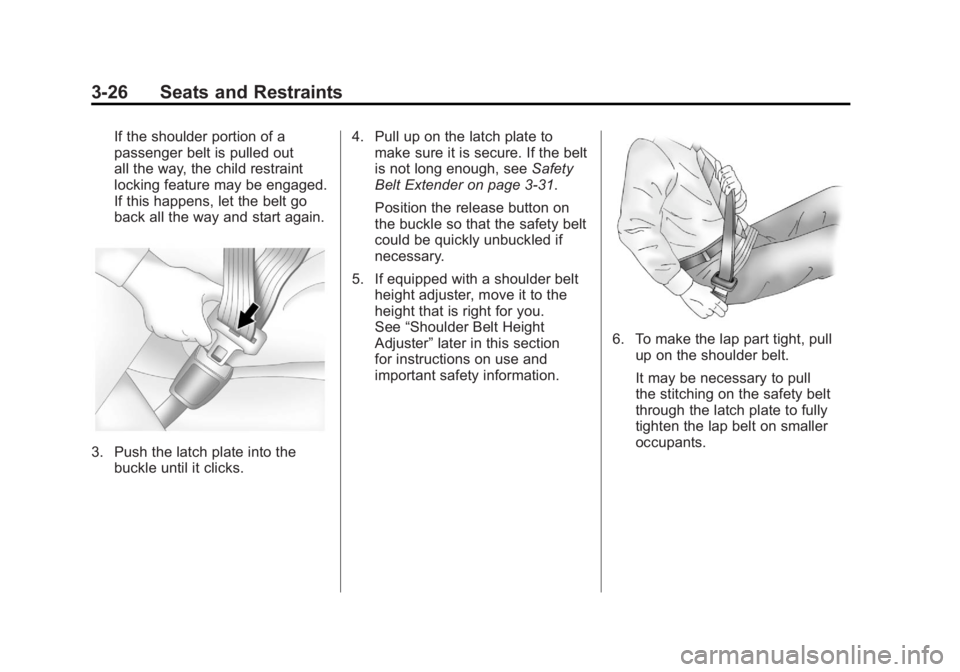
If the shoulder portion of a
passenger belt is pulled out
all the way, the child restraint
locking feature may be engaged.
If this happens, let the belt go
back all the way and start again.
3. Push the latch plate into thebuckle until it clicks. 4. Pull up on the latch plate to
make sure it is secure. If the belt
is not long enough, see Safety
Belt Extender on page 3‑31.
Position the release button on
the buckle so that the safety belt
could be quickly unbuckled if
necessary.
5. If equipped with a shoulder belt height adjuster, move it to the
height that is right for you.
See “Shoulder Belt Height
Adjuster” later in this section
for instructions on use and
important safety information.
6. To make the lap part tight, pull up on the shoulder belt.
It may be necessary to pull
the stitching on the safety belt
through the latch plate to fully
tighten the lap belt on smaller
occupants.
Page 84 of 478

Black plate (28,1)GMC Acadia/Acadia Denali Owner Manual - 2011
3-28 Seats and Restraints
Safety Belt Pretensioners
This vehicle has safety belt
pretensioners for the front outboard
occupants. Although the safety
belt pretensioners cannot be seen,
they are part of the safety belt
assembly. They can help tighten
the safety belts during the early
stages of a moderate to severe
frontal, near frontal, or rear crash
if the threshold conditions for
pretensioner activation are met.
And, for vehicles with side impact
airbags, safety belt pretensioners
can help tighten the safety belts in
a side crash or a rollover event.
Pretensioners work only once.
If the pretensioners activate in a
crash, they will need to be replaced,
and probably other new parts for
the vehicle's safety belt system.
SeeReplacing Safety Belt System
Parts After a Crash on page 3‑32.
Rear Safety Belt Comfort
Guides
This vehicle may have rear shoulder
belt comfort guides. If not, they
are available through your dealer.
The guides may provide added
safety belt comfort for older children
who have outgrown booster seats
and for some adults. When installed
and properly adjusted, the comfort
guide positions the shoulder belt
away from the neck and head. Here is how to install a comfort
guide to the safety belt:
Outboard Positions
1. For the outboard positions, remove the guide from its
storage clip on the interior body.
For the third row center position,
locate the comfort guide which
is located in a storage pocket,
at the top of the seat, under
the headrest on the driver's
side of the vehicle.
Page 87 of 478

Black plate (31,1)GMC Acadia/Acadia Denali Owner Manual - 2011
Seats and Restraints 3-31
A pregnant woman should wear
a lap-shoulder belt, and the lap
portion should be worn as low
as possible, below the rounding,
throughout the pregnancy.
The best way to protect the fetus is
to protect the mother. When a safety
belt is worn properly, it is more likely
that the fetus will not be hurt in a
crash. For pregnant women, as for
anyone, the key to making safety
belts effective is wearing them
properly.
Safety Belt Extender
If the vehicle's safety belt will fasten
around you, you should use it.
But if a safety belt is not long
enough, your dealer will order you
an extender. When you go in to
order it, take the heaviest coat you
will wear, so the extender will be
long enough for you. To help avoid
personal injury, do not let someone
else use it, and use it only for the
seat it is made to fit. The extender
has been designed for adults.
Never use it for securing child seats.
To wear it, attach it to the regular
safety belt. For more information,
see the instruction sheet that
comes with the extender.
Safety System Check
Now and then, check that the safety
belt reminder light, safety belts,
buckles, latch plates, retractors,
and anchorages are working
properly. Look for any other loose
or damaged safety belt system parts
that might keep a safety belt system
from doing its job. See your dealer
to have it repaired. Torn or frayed
safety belts may not protect you in
a crash. They can rip apart under
impact forces. If a belt is torn or
frayed, get a new one right away.
Make sure the safety belt reminder
light is working. SeeSafety Belt
Reminders on page 5‑15 for more
information.
Keep safety belts clean and dry.
See Safety Belt Care on page 3‑32.
Page 90 of 478

Black plate (34,1)GMC Acadia/Acadia Denali Owner Manual - 2011
3-34 Seats and Restraints
{WARNING
Airbags inflate with great force,
faster than the blink of an eye.
Anyone who is up against, or
very close to, any airbag when it
inflates can be seriously injured
or killed. Do not sit unnecessarily
close to any airbag, as you would
be if you were sitting on the edge
of the seat or leaning forward.
Safety belts help keep you in
position before and during a
crash. Always wear a safety belt,
even with airbags. The driver
should sit as far back as possible
while still maintaining control of
the vehicle.
Occupants should not lean on or
sleep against the door or side
windows in seating positions with
seat-mounted side impact airbags
and/or roof-rail airbags.
{WARNING
Children who are up against,
or very close to, any airbag
when it inflates can be seriously
injured or killed. Airbags plus
lap-shoulder belts offer protection
for adults and older children, but
not for young children and infants.
Neither the vehicle's safety belt
system nor its airbag system
is designed for them. Young
children and infants need the
protection that a child restraint
system can provide. Always
secure children properly in
the vehicle. To read how, see
Older Children on page 3‑48or
Infants and Young Children on
page 3‑51.
There is an airbag readiness light
on the instrument panel cluster,
which shows the airbag symbol.
The system checks the airbag
electrical system for malfunctions.
The light tells you if there is an
electrical problem. See Airbag
Readiness Light on page 5‑15
for more information.