2011 GMC ACADIA ECU
[x] Cancel search: ECUPage 212 of 478
Black plate (12,1)GMC Acadia/Acadia Denali Owner Manual - 2011
7-12 Infotainment System
No Information:No text or
informational messages are
available at this time on this
channel. The system is working
properly.
No Subscription Please Renew:
XM subscription needs to be
reactivated. Contact XM at
www.xmradio.com or call
1-800-929-2100 in the U.S.
and www.xmradio.ca or call
1-877-438-9677 in Canada.
CAT Not Found: There are no
channels available for the selected
category. The system is working
properly.
XM Theftlocked: The XM receiver
in the vehicle could have previously
been in another vehicle. For security
purposes, XM receivers cannot be
swapped between vehicles. If this
message is received after having
the vehicle serviced, check with
your dealer. XM Radio ID:
If tuned to channel 0,
this message alternates with the
XM™ Radio 8 digit radio ID label.
This label is needed to activate the
service.
Unknown: If this message is
received when tuned to channel 0,
there could be a receiver fault.
Consult with your dealer.
Check XM Receivr: If this
message does not clear within a
short period of time, the receiver
could have a fault. Consult with
your dealer.
XM Not Available: If this message
does not clear within a short period
of time, the receiver could have a
fault. Consult with your dealer.Radio Reception
Frequency interference and static
can occur during normal radio
reception if items such as cell phone
chargers, vehicle convenience
accessories, and external electronic
devices are plugged into the
accessory power outlet. If there is
interference or static, unplug the
item from the accessory power
outlet.
FM
FM signals only reach about 16 to
65 km (10 to 40 mi). Although the
radio has a built-in electronic circuit
that automatically works to reduce
interference, some static can occur,
especially around tall buildings or
hills, causing the sound to fade in
and out.
Page 289 of 478

Black plate (17,1)GMC Acadia/Acadia Denali Owner Manual - 2011
Driving and Operating 9-17
WARNING (Continued)
.Never stack heavier
things, like suitcases,
inside the vehicle so that
some of them are above
the tops of the seats.
.Do not leave an
unsecured child restraint
in the vehicle.
.When you carry something
inside the vehicle, secure
it whenever you can.
.Do not leave a seat folded
down unless you need to.
Starting and
Operating
New Vehicle Break-In
Notice:The vehicle does not
need an elaborate break-in. But it
will perform better in the long run
if you follow these guidelines:
.If you have all-wheel drive,
keep your speed at 88 km/h
(55 mph) or less for the first
805 km (500 miles).
.Do not drive at any one
constant speed, fast or
slow, for the first 805 km
(500 miles). Do not make
full-throttle starts. Avoid
downshifting to brake or
slow the vehicle.
.Avoid making hard stops for
the first 322 km (200 miles)
or so. During this time the
new brake linings are not
yet broken in. Hard stops
with new linings can mean
premature wear and earlier
replacement. Follow this
breaking-in guideline every
time you get new brake
linings.
.Do not tow a trailer during
break-in. See Driving
Characteristics and Towing
Tips on page 9‑47 for the
trailer towing capabilities
of your vehicle and more
information.
Following break‐in, engine speed
and load can be gradually
increased.
Page 320 of 478

Black plate (48,1)GMC Acadia/Acadia Denali Owner Manual - 2011
9-48 Driving and Operating
Pulling a Trailer
Here are some important points:
.There are many laws, including
speed limit restrictions that apply
to trailering. Check for legal
requirements.
.Consider using sway control.
SeeTowing Equipment on
page 9‑54.
.Do not tow a trailer at all during
the first 800 km (500 miles)
the new vehicle is driven.
The engine, axle or other
parts could be damaged.
.During the first 800 km
(500 miles) that a trailer is
towed, do not drive over 80 km/h
(50 mph) and do not make starts
at full throttle. This reduces wear
on the vehicle.
.The vehicle can tow in
D (Drive). Use a lower gear if
the transmission shifts too often.
See “Tow/Haul Mode” later in
this section.
.Obey speed limit restrictions
when towing a trailer.
.The vehicle is designed
primarily as a passenger and
load carrying vehicle. If a trailer
is towed, the vehicle will require
more frequent maintenance due
to the additional load.
Driving with a Trailer
Towing a trailer requires experience.
Get familiar with handling and
braking with the added trailer
weight. The vehicle is now longer
and not as responsive as the
vehicle is by itself.
Check all trailer hitch parts
and attachments, safety chains,
electrical connectors, lamps, tires
and mirror adjustments. If the trailer
has electric brakes, start the vehicle
and trailer moving and then apply
the trailer brake controller by hand
to be sure the brakes are working.
During the trip, check regularly to be
sure that the load is secure, and the
lamps and trailer brakes are working
properly.
Page 347 of 478

Black plate (19,1)GMC Acadia/Acadia Denali Owner Manual - 2011
Vehicle Care 10-19
5. Fill the coolant recovery tank tothe FULL COLD mark.
6. Reinstall the cap on the coolant recovery tank but leave the
radiator pressure cap off.
7. Start the engine and let it run until the upper radiator hose
feels warm. Any time during
this procedure, watch out for
the engine cooling fans. 8. If the coolant level inside the
radiator filler neck is low, add
more of the proper DEX-COOL
coolant mixture through the filler
neck until the level is back up to
the base of the filler neck.
9. Replace the pressure cap. Be sure to secure it tightly.
At any time during this
procedure if coolant begins
to flow out of the filler neck,
reinstall the pressure cap.
Notice: If the pressure cap is not
tightly installed, coolant loss and
possible engine damage may
occur. Be sure the cap is properly
and tightly secured.
Engine Overheating
The vehicle has several indicators
to warn of engine overheating.
There is an engine coolant
temperature gauge on the
instrument panel cluster.
See Engine Coolant Temperature
Gauge on page 5‑14.
The vehicle may also display
an ENGINE OVERHEATED
IDLE ENGINE and ENGINE
OVERHEATED STOP ENGINE
message in the Driver Information
Center (DIC). See Engine Cooling
System Messages on page 5‑39.
You may decide not to lift the hood
when this warning appears, but
instead get service help right away.
See Roadside Assistance Program
(U.S. and Canada) on page 13‑8
or Roadside Assistance Program
(Mexico) on page 13‑10.
Page 381 of 478
Black plate (53,1)GMC Acadia/Acadia Denali Owner Manual - 2011
Vehicle Care 10-53
Lightly coat the center of the
wheel hub with wheel bearing
grease after a wheel change or
tire rotation to prevent corrosion
or rust build-up. Do not get
grease on the flat wheel
mounting surface or on the
wheel nuts or bolts.
Make sure the spare tire, if
the vehicle has one, is stored
securely. Push, pull, and then
try to rotate or turn the tire.
If it moves, tighten the cable.
SeeTire Changing on
page 10‑71.When It Is Time for New
Tires
Factors such as maintenance,
temperatures, driving speeds,
vehicle loading, and road conditions
affect the wear rate of the tires.
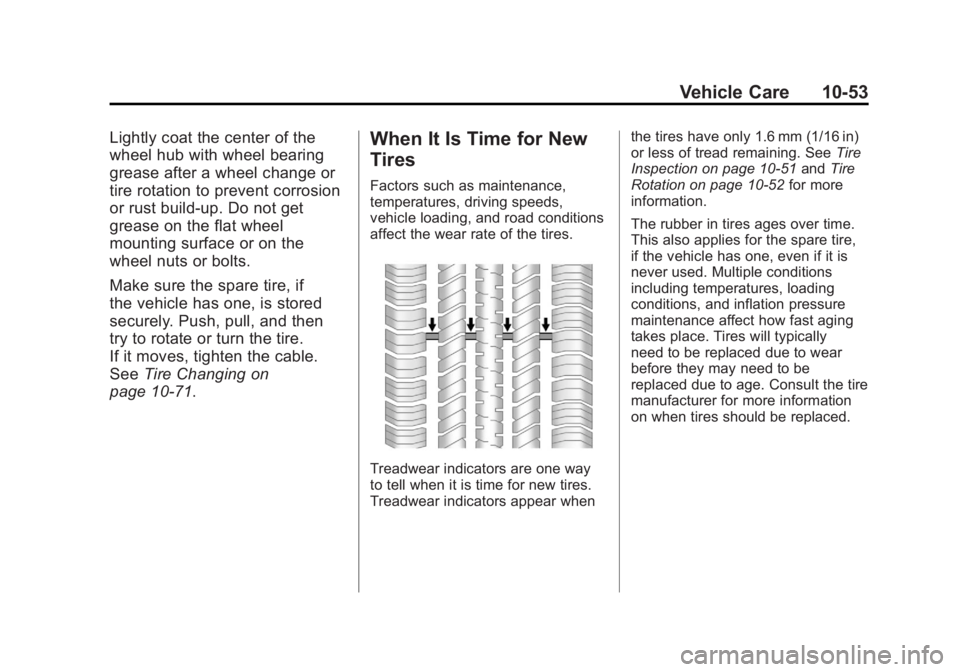
Treadwear indicators are one way
to tell when it is time for new tires.
Treadwear indicators appear when the tires have only 1.6 mm (1/16 in)
or less of tread remaining. See
Tire
Inspection on page 10‑51 andTire
Rotation on page 10‑52 for more
information.
The rubber in tires ages over time.
This also applies for the spare tire,
if the vehicle has one, even if it is
never used. Multiple conditions
including temperatures, loading
conditions, and inflation pressure
maintenance affect how fast aging
takes place. Tires will typically
need to be replaced due to wear
before they may need to be
replaced due to age. Consult the tire
manufacturer for more information
on when tires should be replaced.
Page 402 of 478

Black plate (74,1)GMC Acadia/Acadia Denali Owner Manual - 2011
10-74 Vehicle Care
Removing the Flat Tire and
Installing the Spare Tire
1. Do a safety check beforeproceeding. See If a Tire Goes
Flat on page 10‑61 for more
information.
2. If the vehicle has a wheel cover, loosen the plastic nut caps with
the wheel wrench. They will
not come off. Then, using the
flat end of the wheel wrench,
pry along the edge of the cover
until it comes off. Be careful; the
edges may be sharp. Do not try
to remove the cover with your
bare hands.
Store the wheel cover securely
in the rear of the vehicle until
you have the flat tire repaired
or replaced.
If the vehicle has aluminum
wheels, remove the wheel nut
caps using the wheel wrench.
3. Loosen the wheel nuts —but do
not remove them —using the
lug wrench. For wheels with a
wheel lock key, use the wheel
lock key between the lock nut
and lug wrench. The key is
supplied in the front passenger
door pocket.
Notice: If this vehicle has wheel
locks and an impact wrench is
used to remove the wheel nuts,
the lock nut or wheel lock key
could be damaged. Do not use
an impact wrench to remove the
wheel nuts if this vehicle has
wheel locks.
4. To identify the appropriate
jacking location, find the
triangle (A) about 12 inches
(30.5 cm) from the front tire
or (B) about 10.5 inches (27 cm)
from the rear tire.
The triangle is located near each
wheel on the vehicle's exterior.
Page 406 of 478
Black plate (78,1)GMC Acadia/Acadia Denali Owner Manual - 2011
10-78 Vehicle Care
3. Slide the cable retainer throughthe center of the wheel and start
to raise the compact spare tire.
Make sure the retainer is fully
seated across the underside of
the wheel.
4. When the compact spare tire is almost in the stored position,
turn the tire so the valve is
toward the rear of the vehicle.
This position helps when
checking the air pressure
in the compact spare tire.
5. Raise the tire fully against the underside of the vehicle.
Continue turning the lug wrench
until you feel more than two
clicks. This indicates that the
compact spare tire is secure and
the cable is tight. The spare tire
hoist cannot be overtightened.
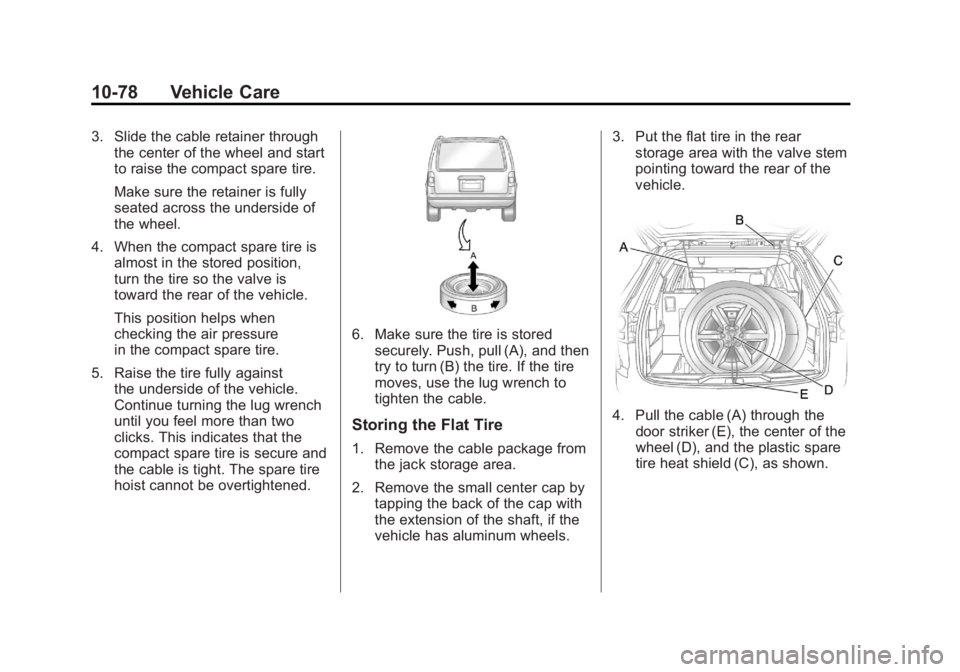
6. Make sure the tire is storedsecurely. Push, pull (A), and then
try to turn (B) the tire. If the tire
moves, use the lug wrench to
tighten the cable.
Storing the Flat Tire
1. Remove the cable package fromthe jack storage area.
2. Remove the small center cap by tapping the back of the cap with
the extension of the shaft, if the
vehicle has aluminum wheels. 3. Put the flat tire in the rear
storage area with the valve stem
pointing toward the rear of the
vehicle.
4. Pull the cable (A) through the
door striker (E), the center of the
wheel (D), and the plastic spare
tire heat shield (C), as shown.
Page 407 of 478
Black plate (79,1)GMC Acadia/Acadia Denali Owner Manual - 2011
Vehicle Care 10-79
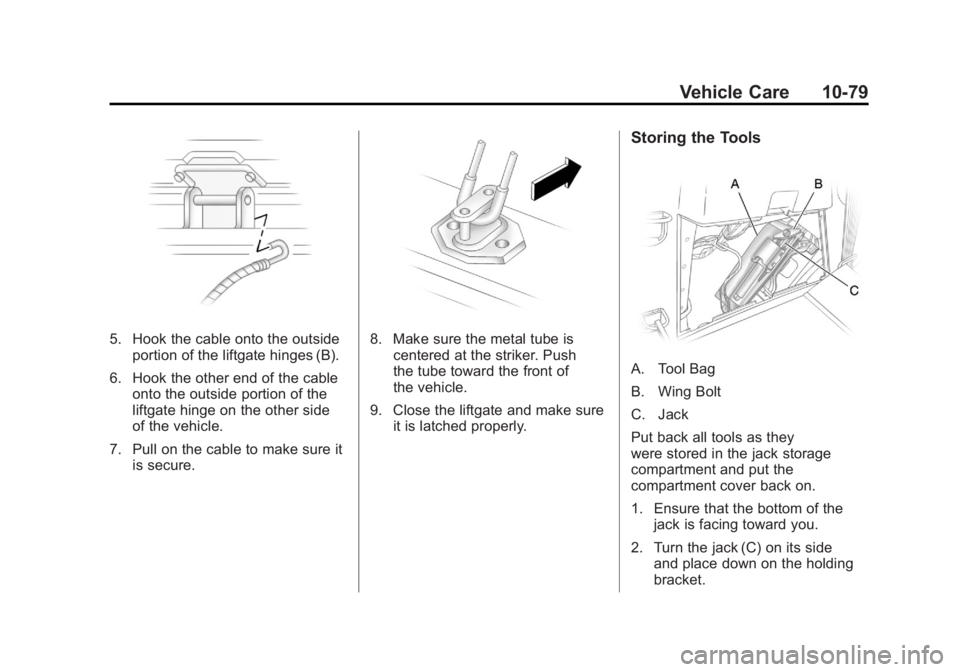
5. Hook the cable onto the outsideportion of the liftgate hinges (B).
6. Hook the other end of the cable onto the outside portion of the
liftgate hinge on the other side
of the vehicle.
7. Pull on the cable to make sure it is secure.8. Make sure the metal tube iscentered at the striker. Push
the tube toward the front of
the vehicle.
9. Close the liftgate and make sure it is latched properly.
Storing the Tools
A. Tool Bag
B. Wing Bolt
C. Jack
Put back all tools as they
were stored in the jack storage
compartment and put the
compartment cover back on.
1. Ensure that the bottom of thejack is facing toward you.
2. Turn the jack (C) on its side and place down on the holding
bracket.