2011 GMC ACADIA warning
[x] Cancel search: warningPage 405 of 478
Black plate (77,1)GMC Acadia/Acadia Denali Owner Manual - 2011
Vehicle Care 10-77
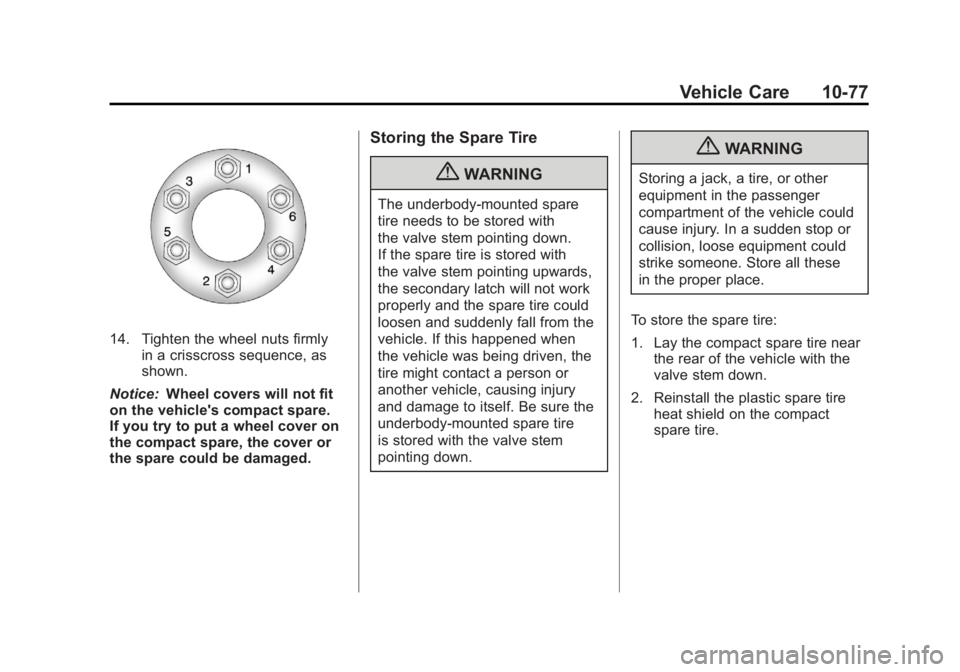
14. Tighten the wheel nuts firmlyin a crisscross sequence, as
shown.
Notice: Wheel covers will not fit
on the vehicle's compact spare.
If you try to put a wheel cover on
the compact spare, the cover or
the spare could be damaged.
Storing the Spare Tire
{WARNING
The underbody-mounted spare
tire needs to be stored with
the valve stem pointing down.
If the spare tire is stored with
the valve stem pointing upwards,
the secondary latch will not work
properly and the spare tire could
loosen and suddenly fall from the
vehicle. If this happened when
the vehicle was being driven, the
tire might contact a person or
another vehicle, causing injury
and damage to itself. Be sure the
underbody-mounted spare tire
is stored with the valve stem
pointing down.
{WARNING
Storing a jack, a tire, or other
equipment in the passenger
compartment of the vehicle could
cause injury. In a sudden stop or
collision, loose equipment could
strike someone. Store all these
in the proper place.
To store the spare tire:
1. Lay the compact spare tire near the rear of the vehicle with the
valve stem down.
2. Reinstall the plastic spare tire heat shield on the compact
spare tire.
Page 408 of 478
Black plate (80,1)GMC Acadia/Acadia Denali Owner Manual - 2011
10-80 Vehicle Care
3. Reinstall the wing bolt (B) byturning clockwise.
4. To replace the cover, line up the tab at the front of the cover with
the notch in the cover opening.
Push the cover in place and
make sure that the rear clips are
in the slots and push the cover
closed.
Store the center cap or the plastic
bolt‐on wheel covers until a full
size tire is put back on the vehicle.
When you replace the compact
spare with a full‐size tire, reinstall
the bolt‐on wheel covers or the
center cap. Hand‐tighten them
over the wheel nuts, using the
lug wrench.Secondary Latch System
This vehicle has an underbody
mounted tire hoist assembly that
has a secondary latch system.
It is designed to stop the compact
spare tire from suddenly falling off
the vehicle if the cable holding the
spare tire is damaged. For the
secondary latch to work, the tire
must be stowed with the valve stem
pointing down. See Tire Changing
on page 10‑71 for instructions on
storing the spare tire correctly.
{WARNING
Before beginning this procedure
read all the instructions. Failure
to read and follow the instructions
could damage the hoist assembly
and you and others could get
hurt. Read and follow the
instructions listed next. To release the spare tire from the
secondary latch:
{WARNING
Someone standing too close
during the procedure could be
injured by the jack. If the spare
tire does not slide off the jack
completely, make sure no one is
behind you or on either side of
you as you pull the jack out from
under the spare.
1. If the cable is not visible, start this procedure at Step 3.
Page 410 of 478
Black plate (82,1)GMC Acadia/Acadia Denali Owner Manual - 2011
10-82 Vehicle Care
Have the hoist shaft assembly
inspected as soon as you can.
You will not be able to store a spare
tire using the hoist assembly until it
has been repaired or replaced.
Compact Spare Tire
{WARNING
Driving with more than one
compact spare tire at a time
could result in loss of braking
and handling. This could lead
to a crash and you or others
could be injured. Use only one
compact spare tire at a time.
The compact spare tire, if the
vehicle has one, was fully inflated
when the vehicle was new, however,
it can lose air after a time. Check
the inflation pressure regularly.
It should be 60 psi (420 kPa). After installing the compact
spare on the vehicle, stop as
soon as possible and make sure
the spare tire is correctly inflated.
The compact spare is made to
perform well at speeds up to
65 mph (105 km/h) for distances up
to 3,000 miles (5 000 km), so you
can finish your trip and have the
full-size tire repaired or replaced
at your convenience. Of course,
it is best to replace the spare with
a full-size tire as soon as possible.
The spare tire will last longer and be
in good shape in case it is needed
again.
Notice:
When the compact
spare is installed, do not take
the vehicle through an automatic
car wash with guide rails. The
compact spare can get caught on
the rails which can damage the
tire, wheel and other parts of the
vehicle. Do not use the compact spare on
other vehicles.
And do not mix the compact spare
tire or wheel with other wheels or
tires. They will not fit. Keep the
spare tire and its wheel together.
The All-Wheel Drive (AWD) system
will be automatically disabled
when you use the compact spare.
To restore the AWD and prevent
excessive wear on the clutch in
your AWD, replace the compact
spare tire with a full-size tire as
soon as possible.
Notice:
Tire chains will not fit the
compact spare. Using them can
damage the vehicle and can
damage the chains too. Do not
use tire chains on the compact
spare.
Page 411 of 478
Black plate (83,1)GMC Acadia/Acadia Denali Owner Manual - 2011
Vehicle Care 10-83
Jump Starting
For more information about the
vehicle battery, seeBattery on
page 10‑26.
If the vehicle's battery has run
down, you may want to use another
vehicle and some jumper cables to
start your vehicle. Be sure to use
the following steps to do it safely.
{WARNING
Batteries can hurt you. They can
be dangerous because:
.They contain acid that can
burn you.
.They contain gas that can
explode or ignite.
.They contain enough
electricity to burn you.
If you do not follow these steps
exactly, some or all of these
things can hurt you. Notice:
Ignoring these steps
could result in costly damage
to the vehicle that would not be
covered by the warranty.
Trying to start the vehicle by
pushing or pulling it will not
work, and it could damage the
vehicle.
1. Check the other vehicle. It must
have a 12‐volt battery with a
negative ground system.
Notice: Only use a vehicle
that has a 12-volt system with
a negative ground for jump
starting. If the other vehicle does
not have a 12-volt system with a
negative ground, both vehicles
can be damaged. 2. Get the vehicles close enough
so the jumper cables can reach,
but be sure the vehicles are
not touching each other. If they
are, it could cause a ground
connection you do not want.
You would not be able to start
your vehicle, and the bad
grounding could damage
the electrical systems.
To avoid the possibility of the
vehicles rolling, set the parking
brake firmly on both vehicles
involved in the jump start
procedure. Put an automatic
transmission in P (Park) or
a manual transmission in
Neutral before setting the
parking brake. If one of the
vehicles is a four-wheel-drive
vehicle, be sure the transfer
case is not in Neutral.
Page 412 of 478

Black plate (84,1)GMC Acadia/Acadia Denali Owner Manual - 2011
10-84 Vehicle Care
Notice:If the radio or other
accessories are left on during
the jump starting procedure, they
could be damaged. The repairs
would not be covered by the
warranty. Always turn off the
radio and other accessories
when jump starting the vehicle.
3. Turn off the ignition on both
vehicles. Unplug unnecessary
accessories plugged into the
cigarette lighter or the accessory
power outlets. Turn off the radio
and all lamps that are not
needed. This will avoid sparks
and help save both batteries.
And it could save the radio!
4. Open the hoods and locate the positive (+) and negative (−)
terminal locations on the
other vehicle. Your vehicle
has a remote positive (+) and
a remote negative (−) jump
starting terminal. See Engine
Compartment Overview on
page 10‑6 for more information
on the terminal locations.{WARNING
Using a match near a battery
can cause battery gas to explode.
People have been hurt doing this,
and some have been blinded.
Use a flashlight if you need
more light.
Be sure the batteries have
enough water. You do not need
to add water to the ACDelco
®
battery (or batteries) installed in
your new vehicle. But if a battery
has filler caps, be sure the right
amount of fluid is there. If it is low,
add water to take care of that
first. If you do not, explosive
gas could be present.
Battery fluid contains acid that
can burn you. Do not get it on
you. If you accidentally get it in
your eyes or on your skin, flush
the place with water and get
medical help immediately.
{WARNING
Fans or other moving engine
parts can injure you badly. Keep
your hands away from moving
parts once the engine is running.
5. Check that the jumper cables do not have loose or missing
insulation. If they do, you could
get a shock. The vehicles could
be damaged too.
Before you connect the cables,
here are some basic things you
should know. Positive (+) will go
to positive (+) or to a remote
positive (+) terminal if the vehicle
has one. Negative (−) will go to a
heavy, unpainted metal engine
part or to a remote negative (−)
terminal if the vehicle has one.
Page 426 of 478
Black plate (98,1)GMC Acadia/Acadia Denali Owner Manual - 2011
10-98 Vehicle Care
Care of Safety Belts
Keep belts clean and dry.
{WARNING
Do not bleach or dye safety belts.
It may severely weaken them.
In a crash, they might not be able
to provide adequate protection.
Clean safety belts only with mild
soap and lukewarm water.
Floor Mats
{WARNING
If a floor mat is the wrong size
or is not properly installed, it can
interfere with the accelerator
pedal and/or brake pedal.
Interference with the pedals can
cause unintended acceleration
and/or increased stopping
distance which can cause a crash
and injury. Make sure the floor
mat does not interfere with the
accelerator or brake pedal.Use the following guidelines for
proper floor mat usage.
.The original equipment floor
mats were designed for your
vehicle. If the floor mats need
replacing, it is recommended
that GM certified floor mats be
purchased. Non-GM floor mats
may not fit properly and may
interfere with the accelerator or
brake pedal. Always check that
the floor mats do not interfere
with the pedals.
.Use the floor mat with the
correct side up. Do not turn
it over.
.Do not place anything on top of
the driver side floor mat.
.Use only a single floor mat on
the driver side.
.Do not place one floor mat on
top of another.
Page 430 of 478

Black plate (2,1)GMC Acadia/Acadia Denali Owner Manual - 2011
11-2 Service and Maintenance
{WARNING
Performing maintenance work
can be dangerous. Some jobs
can cause serious injury. Perform
maintenance work only if you
have the required know-how and
the proper tools and equipment.
If in doubt, see your dealer to
have a qualified technician do
the work. SeeDoing Your Own
Service Work on page 10‑4.
At your dealer, you can be
certain that you will receive the
highest level of service available.
Your dealer has specially trained
service technicians, uses genuine
replacement parts, as well as,
up‐to‐date tools and equipment
to ensure fast and accurate
diagnostics. The proper replacement parts,
fluids, and lubricants to use are
listed in
Recommended Fluids
and Lubricants on page 11‑7 and
Maintenance Replacement Parts on
page 11‑9. We recommend the use
of genuine parts from your dealer.
Rotation of New Tires
To maintain ride, handling, and
performance of the vehicle, it is
important that the first rotation
service for new tires be performed.
Tires should be rotated every
12 000 km/7,500 miles. See Tire
Rotation on page 10‑52.
Scheduled
Maintenance
When the Change Engine Oil
Soon Message Displays
Change engine oil and filter.
See Engine Oil on page 10‑8.
An Emission Control Service.
When the CHANGE ENGINE
OIL SOON message displays,
service is required for the vehicle
as soon as possible, within the next
1 000 km/600 miles. If driving under
the best conditions, the engine oil
life system might not indicate the
need for vehicle service for more
than a year. The engine oil and filter
must be changed at least once a
year and the oil life system must
be reset. Your dealer has trained
service technicians who will perform
this work and reset the system.
Page 465 of 478

Black plate (1,1)GMC Acadia/Acadia Denali Owner Manual - 2011
INDEX i-1
A
Accessories andModifications . . . . . . . . . . . . . . . . . 10-3
Accessory Power . . . . . . . . . . . . . . 9-21
Add-On Electrical Equipment . . . . . . . . . . . . . . . . . . . 9-56
Adjustments
Lumbar, Front Seats . . . . . . . . . . . 3-6
Air Cleaner/Filter, Engine . . . . . 10-13
Air Filter, Passenger Compartment . . . . . . . . . . . . . . . . 8-13
Air Vents . . . . . . . . . . . . . . . . . . . . . . 8-12
Airbag System Check . . . . . . . . . . . . . . . . . . . . . . . . 3-47
How Does an AirbagRestrain? . . . . . . . . . . . . . . . . . . . 3-38
Passenger Sensing System . . . . . . . . . . . . . . . . . . . . . . 3-41
What Makes an Airbag Inflate? . . . . . . . . . . . . . . . . . . . . . . 3-38
What Will You See After an Airbag Inflates? . . . . . . . . . . 3-39
When Should an Airbag Inflate? . . . . . . . . . . . . . . . . . . . . . . 3-36
Where Are the Airbags? . . . . . . 3-35 Airbags
Adding Equipment to the
Vehicle . . . . . . . . . . . . . . . . . . . . . . 3-46
Passenger Status Indicator . . . 5-16
Readiness Light . . . . . . . . . . . . . . 5-15
Servicing Airbag-Equipped Vehicles . . . . . . . . . . . . . . . . . . . . . 3-45
System Check . . . . . . . . . . . . . . . . 3-33
Alarm System Anti-Theft . . . . . . . . . . . . . . . . . . . . . 2-13
All-Wheel Drive . . . . . . . . . 10-27, 9-28
AM-FM Radio . . . . . . . . . . . . . . . . . . . 7-7
Antenna
Multi-Band . . . . . . . . . . . . . . . . . . . . 7-13
Anti-Theft Alarm System . . . . . . . . . . . . . . . . 2-13
Alarm System Messages . . . . . 5-43
Antilock Brake System (ABS) . . . . . . . . . . . . . . . . 9-29
Warning Light . . . . . . . . . . . . . . . . . 5-21
Appearance Care
Exterior . . . . . . . . . . . . . . . . . . . . . 10-90
Interior . . . . . . . . . . . . . . . . . . . . . . 10-95 Armrest Storage . . . . . . . . . . . . . . . . 4-1
Assistance Program,
Roadside . . . . . . . . . . . . . . 13-8, 13-10
Audio Controller, Rear (RAC) . . . . . . . . . . . . . . . . . . 7-50
Audio Players . . . . . . . . . . . . . . . . . 7-14 CD . . . . . . . . . . . . . . . . . . . . . . . . . . . 7-14
CD/DVD . . . . . . . . . . . . . . . . . . . . . . 7-16
MP3 . . . . . . . . . . . . . . . . . . . . 7-24, 7-30
Audio System Radio Reception . . . . . . . . . . . . . . 7-12
Rear Seat (RSA) . . . . . . . . . . . . . 7-48
Theft-Deterrent Feature . . . . . . . . 7-2
Automatic Dimming Mirrors . . . . . . . . . . . . . . 2-18
Door Locks . . . . . . . . . . . . . . . . . . . . 2-9
Automatic Transmission . . . . . . . 9-25 Fluid . . . . . . . . . . . . . . . . . . . . . . . . 10-13
Manual Mode . . . . . . . . . . . . . . . . . 9-27
Shift Lock ControlFunction Check . . . . . . . . . . . 10-28
Auxiliary Devices . . . . . . . . . . . . . . 7-37