Page 49 of 406
Radio Display Condition Action Required
ACQUIRING Radio requires more
than two seconds to
produce audio for
the selected
channel.No action required. This
message should disappear
shortly.
SAT FAULT Internal module or
system failure
present.If this message does not clear
within a short period of time,
or with an ignition key cycle,
your receiver may have a fault.
See your authorized dealer for
service.
INVALID CHNL Channel no longer
available.This previously available
channel is no longer available.
Tune to another channel. If
the channel was one of your
presets, you may choose
another channel for that
preset button.
UNSUBSCRIBED Subscription not
available for this
channel.Contact SIRIUS�at
1–888–539–7474 to subscribe
to the channel or tune to
another channel.
NO TEXT Artist information
not available.Artist information not available
at this time on this channel.
The system is working
properly.
NO TEXT Song title
information not
available.Song title information not
available at this time on this
channel. The system is
working properly.
NO TEXT Category
information not
available.Category information not
available at this time on this
channel. The system is
working properly.
Entertainment Systems
49
2011 Taurus(500)
Owners Guide, 1st Printing
USA(fus)
Page 67 of 406

PANEL DIMMER CONTROL
Use to adjust the brightness of the
instrument panel and all applicable
lit components in the vehicle during
headlamp and parking lamp
operation.
•Tapthetoporbottomofthe
control to brighten/dim all interior
lit components incrementally, or
•Press and hold at the first position the top or bottom of the control
until the desired lighting level is reached.
•Press and hold the top of the control to the full on position to activate
the “dome on” feature. This will turn on the interior courtesy lights.
The lights will remain on until the bottom of the control is pressed.
Note:If the battery is disconnected, discharged, or a new battery is
installed, the dimmer control requires re-calibration. Press the dimmer
control from the full dim position to the full on position to reset. This
will ensure that your displays are visible under all lighting conditions.
AIMING THE HEADLAMPS
The headlamps on your vehicle are properly aimed at the assembly plant.
If your vehicle has been in an accident, the alignment of your headlamps
should be checked by your authorized dealer.
Vertical aim adjustment
1. Park the vehicle directly in front of a wall or screen on a level surface,
approximately 25 feet (7.6 meters) away.
•(1) 8 feet (2.4 meters)
•(2) Center height of lamp to
ground
•(3) 25 feet (7.6 meters)
•(4) Horizontal reference line
2. Measure the height of the
headlamp bulb center from the
ground and mark an 8 foot
(2.4 meter) horizontal reference line
on the vertical wall or screen at this
height (a piece of masking tape works well). The center of the lamp is
marked bya3mmcircleontheheadlamp lens.
Lights
67
2011 Taurus(500)
Owners Guide, 1st Printing
USA(fus)
Page 80 of 406
Compass zone adjustment
1. Determine which magnetic zone
you are in for your geographic
location by referring to the zone
map.
2. Turn ignition to the on position.
3. Press and hold the 7 and 9 radio
preset buttons together for
approximately five seconds until
ZONE XX appears in the CID.
4. Press and release the 7 and 9
radio preset buttons together,
repeatedly until ZONE XX changes
to the correct zone (1–15) in the
CID.
5. The direction will display after
the buttons are released. The zone
is now updated.
Compass calibration adjustment
Perform compass calibration in an open area free from steel structures
and high voltage lines. For optimum calibration, turn off all electrical
accessories (heater/air conditioning, wipers, etc.) and make sure all
vehicle doors are shut.
1. Start the vehicle.
1 2 3
4
5
6 7 8 9 101112 13 14 15
Driver Controls
80
2011 Taurus(500)
Owners Guide, 1st Printing
USA(fus)
Page 81 of 406
2. To calibrate, press and hold the 7
and 9 radio preset buttons together
for approximately 10 seconds until
CAL appears. Release the buttons.
3. Slowly drive the vehicle in a
circle (less than 3 mph [5 km/h])
until the CAL display changes to the
direction value (N, S, E, W, etc.). It
may take up to five circles to
complete calibration.
4. The compass is now calibrated.
CENTER CONSOLE
Your vehicle may be equipped with a variety of console features.Note:
The appearance and features of the center console may be different than
show based on your vehicle’s option level. These include:
•Cupholders
•Utility compartment with audio
input jack, USB port and power
point
•Pen holder
WARNING:Use only soft cups in the cupholder. Hard objects
can injure you in a collision.
Driver Controls
81
2011 Taurus(500)
Owners Guide, 1st Printing
USA(fus)
Page 91 of 406
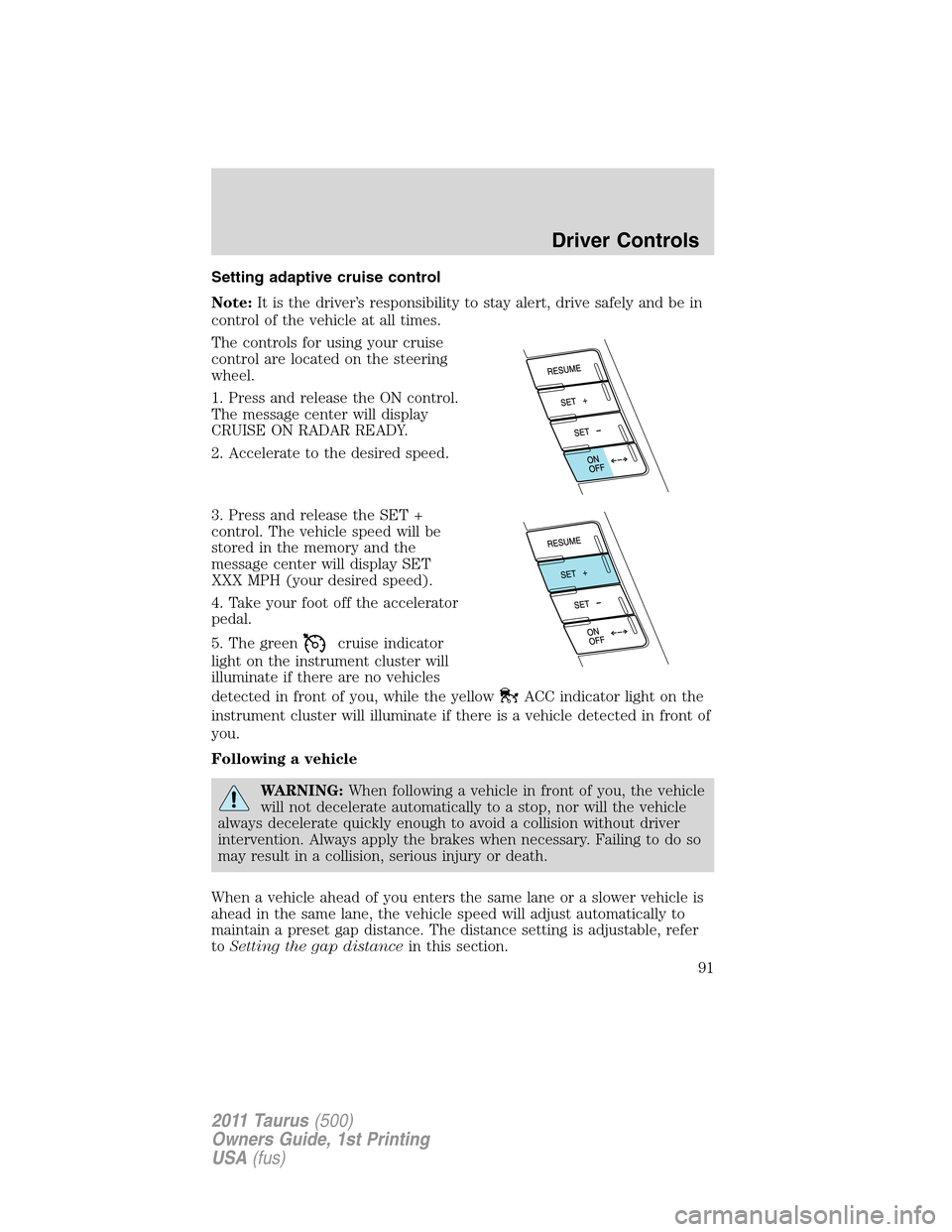
Setting adaptive cruise control
Note:It is the driver’s responsibility to stay alert, drive safely and be in
control of the vehicle at all times.
The controls for using your cruise
control are located on the steering
wheel.
1. Press and release the ON control.
The message center will display
CRUISE ON RADAR READY.
2. Accelerate to the desired speed.
3. Press and release the SET +
control. The vehicle speed will be
stored in the memory and the
message center will display SET
XXX MPH (your desired speed).
4. Take your foot off the accelerator
pedal.
5. The green
cruise indicator
light on the instrument cluster will
illuminate if there are no vehicles
detected in front of you, while the yellow
ACC indicator light on the
instrument cluster will illuminate if there is a vehicle detected in front of
you.
Following a vehicle
WARNING:When following a vehicle in front of you, the vehicle
will not decelerate automatically to a stop, nor will the vehicle
always decelerate quickly enough to avoid a collision without driver
intervention. Always apply the brakes when necessary. Failing to do so
may result in a collision, serious injury or death.
When a vehicle ahead of you enters the same lane or a slower vehicle is
ahead in the same lane, the vehicle speed will adjust automatically to
maintain a preset gap distance. The distance setting is adjustable, refer
toSetting the gap distancein this section.
Driver Controls
91
2011 Taurus(500)
Owners Guide, 1st Printing
USA(fus)
Page 92 of 406

The yellowACC indicator light
in the instrument cluster will be
illuminated and the message center
will temporarily display a preset
GAP <--->.
The vehicle will maintain a constant distance between the vehicle ahead
until:
•The vehicle in front of you accelerates to a speed above the set speed.
•The vehicle in front of you moves out of your lane or out of view.
•The vehicle speed falls below 18 mph (30 km/h).
•A new gap distance is set.
The vehicle brakes will be automatically applied to slow the vehicle to
maintain a safe distance between the vehicle in front. The maximum
braking which is applied by the ACC system is limited and can be
overridden by the driver applying the brakes.
If the ACC system predicts that its
maximum braking level will not be
sufficient, an audible warning will
sound while the ACC continues to
brake. This is accompanied by the
heads-up display; a red warning bar
illuminating on the windshield. The driver should takeimmediate
action.
Note:The brakes may emit a sound when they are being modulated by
the adaptive cruise control system.
WARNING:Adaptive cruise control only warns of vehicles
detected by the radar sensor. In some cases there may be no
warning or the warning may be delayed. The driver should always
apply the brakes when necessary. Failing to do so may result in a
collision, serious injury or death.
Driver Controls
92
2011 Taurus(500)
Owners Guide, 1st Printing
USA(fus)
Page 98 of 406
WARNING:Do not use tires sizes other than those
recommended because this can affect the normal operation of
ACC. Failing to do so may result in a loss of vehicle control, which
could result in serious injury.
STEERING WHEEL CONTROLS (IF EQUIPPED)
Radio control features
VOL + (Volume):Press to increase
the volume.
VOL – (Volume):Press to decrease
the volume.
(Seek):Press to select
the previous/next radio station
preset, CD track or satellite radio
channel (if equipped) depending on
which media mode you are in.
MEDIA:Press repeatedly to scroll
through available audio modes.
Navigation system hands-free
control features (if equipped)
Press and hold
control briefly
until the voice
icon appears on
the navigation display to use the
voice command feature.
Press
to complete a voice
command.
For further information on the
navigation system, refer to theNavigation Systemsupplement.
Driver Controls
98
2011 Taurus(500)
Owners Guide, 1st Printing
USA(fus)
Page 109 of 406
“administrator key” or admin key. The admin key can be used to create a
MyKey™, program optional MyKey™ settings, and clear the MyKey™
feature. When the MyKey™ feature is enabled the user can use system
check in the message center to see how many MyKeys™ and admin keys
are programmed to the vehicle, and see the total distance the vehicle has
been driven with the MyKey™ active.
MyKey™ restricted features
Standard settings – these settings cannot be changed
•Belt-Minder cannot be disabled. The audio system will be muted
whenever Belt-Minder�is activated until the safety belts are buckled.
Refer to theSeating and Safety Restraintschapter for a detailed
description of Belt-Minder�operation.
•Low fuel warnings are displayed in the message center followed by a
chime when the distance to empty value reaches 75 miles (120 km).
•The following systems, if equipped, cannot be turned off: reverse
sensing system, Blind Spot Information System (BLIS�) with cross
traffic alert and collision warning system.
Optional settings – these settings can be changed
•Vehicle speed is limited to 80 mph (130 km/h). Visual warnings are
displayed followed by a chime when the vehicle speed has reached
80 mph (130 km/h).
•Visual warnings are displayed followed by a chime when a preselected
vehicle speed of 45, 55 or 65 mph (75, 90, or 105 km/h) is exceeded.
•The maximum volume of the audio system is limited to 45%. MYKEY
VOLUME LIMITED will be displayed in the audio system display when
attempting to exceed the limited volume.
•The AdvanceTrac�system cannot be turned off. When this optional
setting is on, the MyKey™ user will not be able to deactivate the
system.Note:It may be beneficial to deactivate the AdvanceTrac�
system if the vehicle is stuck in snow, mud or sand.
Create a MyKey™
To program MyKey™ on one of the keys programmed to the vehicle,
insert the key that you want to make a MyKey™ into the ignition. For
vehicles equipped with push button start, put the intelligent access key
in the backup slot; see theDrivingchapter for the location of the
backup slot. Turn the ignition on. Use the message center buttons to do
the following:
1. Press SETUP until PRESS RESET TO CREATE MYKEY is displayed.
Locks and Security
109
2011 Taurus(500)
Owners Guide, 1st Printing
USA(fus)