Page 46 of 348
Radio Display Condition Action Required
NO TEXT Song title information
not available.Song title information
not available at this
time on this channel.
The system is working
properly.
NO TEXT Category information
not available.Category information
not available at this
time on this channel.
The system is working
properly.
NO SIGNAL Loss of signal from
the SIRIUS�satellite
or SIRIUS�tower to
the vehicle antenna.You are in a location
that is blocking the
SIRIUS�signal (i.e.,
tunnel, under an
overpass, dense foliage,
etc). The system is
working properly. When
you move into an open
area, the signal should
return.
UPDATING Update of channel
programming in
progress.No action required. The
process could take up
to three minutes.
CALL SIRIUS�
1–888–539–7474Satellite service has
been deactivated by
SIRIUS�satellite
radio.Call SIRIUS�at
1–888–539–7474 to
re-activate or resolve
subscription issues.
Entertainment Systems
46
2011 05+ Mustang(197)
Owners Guide, 1st Printing
USA(fus)
Page 72 of 348
Compass zone adjustment
1. Determine which magnetic zone
you are in for your geographic
location by referring to the zone
map.
2. Turn ignition to the on position.
3. Press and hold the 7 and 9 radio
preset buttons together for
approximately five seconds until
ZONE XX appears in the CID.
4. Press and release the 7 and 9
radio preset buttons together,
repeatedly until ZONE XX changes
to the correct zone (1–15) in the
CID.
5. The direction will display after
the buttons are released. The zone
is now updated.
Compass calibration adjustment
Perform compass calibration in an open area free from steel structures
and high voltage lines. For optimum calibration, turn off all electrical
accessories (heater/air conditioning, wipers, etc.) and make sure all
vehicle doors are shut.
1. Start the vehicle.
1 2 3
4
5
6 7 8 9 101112 13 14 15
Driver Controls
72
2011 05+ Mustang(197)
Owners Guide, 1st Printing
USA(fus)
Page 73 of 348
2. To calibrate, press and hold the 7
and 9 radio preset buttons together
for approximately 10 seconds until
CAL appears. Release the buttons.
3. Slowly drive the vehicle in a
circle (less than 3 mph [5 km/h])
until the CAL display changes to the
direction value (N, S, E, W, etc.). It
may take up to five circles to
complete calibration.
4. The compass is now calibrated.
CENTER CONSOLE
Your vehicle is equipped with a
variety of console features. These
include:
•Dual cupholders in front of
console (pull door open to
access)
•Lockable storage bin (use ignition
key to lock/unlock the console bin
and press the latch to open the
console)
•Auxiliary power point
•Coin holder slots
•Audio input jack
•USB port (if equipped)
WARNING:Use only soft cups in the cupholder. Hard objects
can injure you in a collision.
Driver Controls
73
2011 05+ Mustang(197)
Owners Guide, 1st Printing
USA(fus)
Page 77 of 348

3. Turn the ignition key to the off position, then turn back to the on
position.
4. Pull and hold the rear window switch up and hold for three seconds,
the rear windows will begin to start moving up.
Accessory delay
With accessory delay, the window switches, convertible top (if equipped)
and radio may be used for up to 10 minutes after the ignition switch is
turned to the off position or until either front door is opened.
INTERIOR MIRROR
The interior rear view mirror has two pivot points on the support arm
which lets you adjust the mirror up or down and from side to side.
WARNING:Do not adjust the mirror while the vehicle is in
motion.
Automatic dimming interior rear view mirror (if equipped)
The interior rear view mirror has an auto-dimming function. The
electronic day/night mirror will change from the normal (high reflective)
state to the non-glare (darkened) state when bright lights (glare) reach
the mirror. When the mirror detects bright light from behind the vehicle,
it will automatically adjust (darken) to minimize glare.
The mirror will automatically return to the normal state whenever the
vehicle is placed in R (Reverse) to ensure a bright clear view when
backing up.
Do not block the sensors on the front and back of the interior
rear view mirror since this may impair proper mirror
performance.
Note:A rear center passenger and/or raised rear center headrest (if
equipped) may also block the light from reaching the sensor.
Do not clean the housing or glass of any mirror with harsh
abrasives, fuel or other petroleum-based cleaning products.
Note:If equipped with a rearview camera system, a video image will
display in the mirror or the navigation system display (if equipped) when
the vehicle is put in R (Reverse). As you shift into any other gear from R
(Reverse), the image will remain for a few seconds and then turn off.
Refer toRearview camera systemin theDrivingchapter.
Driver Controls
77
2011 05+ Mustang(197)
Owners Guide, 1st Printing
USA(fus)
Page 80 of 348
Reducing speed while using speed control
To reduce the set speed:
•Press and hold SET (–) until you get to the desired speed, then
release. You can also use SET (–) to operate the tap-down function.
Press and release SET (–) to decrease the vehicle set speed in 1 mph
(1.6 km/h) increments.
•Press the brake pedal until the desired vehicle speed is reached then
press and release SET (+).
Turning off speed control
To turn off the speed control, press OFF or turn off the ignition.
Note:When you turn off the speed control or the ignition, your speed
control set speed memory is erased.
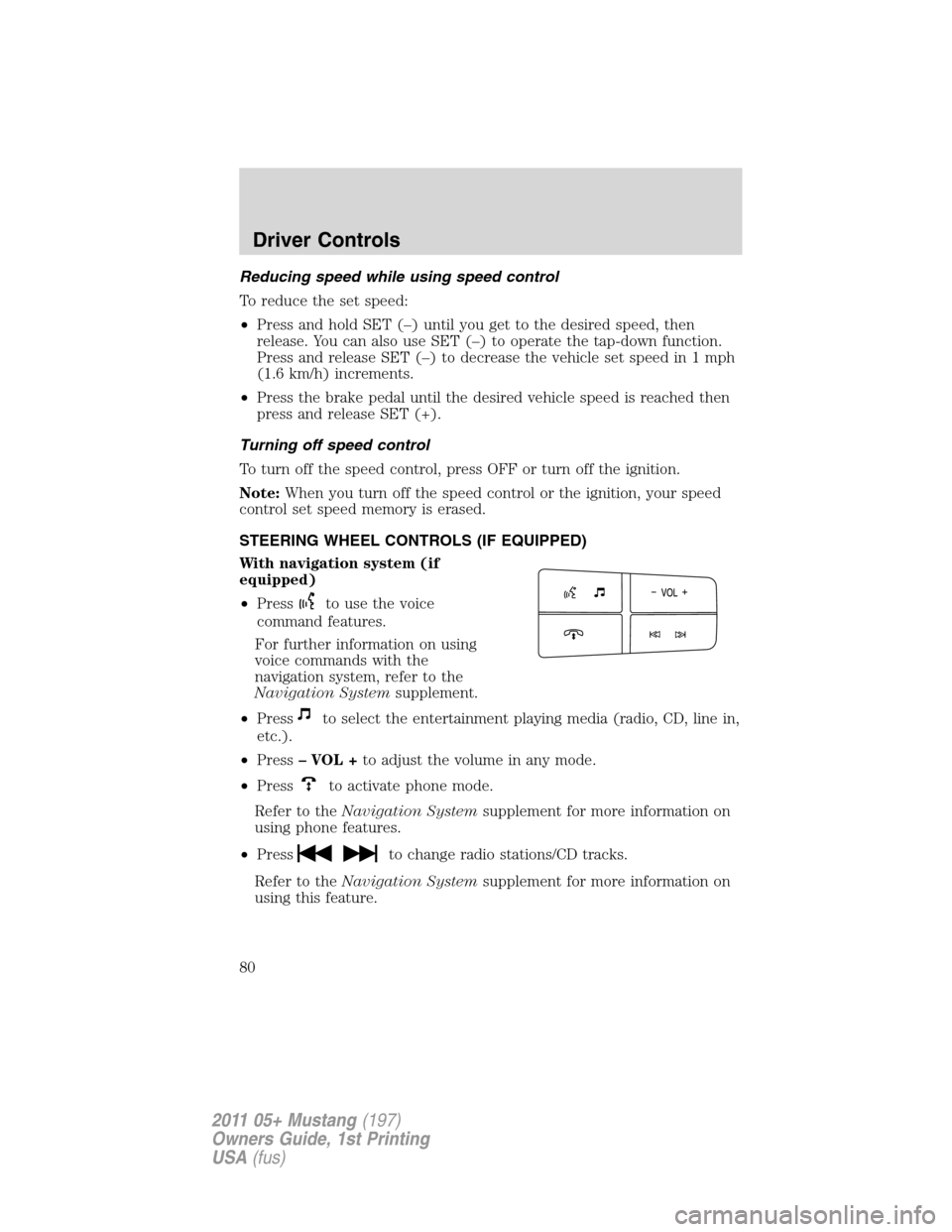
STEERING WHEEL CONTROLS (IF EQUIPPED)
With navigation system (if
equipped)
•Press
to use the voice
command features.
For further information on using
voice commands with the
navigation system, refer to the
Navigation Systemsupplement.
•Press
to select the entertainment playing media (radio, CD, line in,
etc.).
•Press– VOL +to adjust the volume in any mode.
•Press
to activate phone mode.
Refer to theNavigation Systemsupplement for more information on
using phone features.
•Press
to change radio stations/CD tracks.
Refer to theNavigation Systemsupplement for more information on
using this feature.
Driver Controls
80
2011 05+ Mustang(197)
Owners Guide, 1st Printing
USA(fus)
Page 81 of 348

With SYNC�system (if
equipped)
•Press
to use the voice
command features.
For further information on using
voice commands with the SYNC�
system, refer to theSYNC�
supplement.
•Press
to select the entertainment playing media (radio, CD, line in,
etc.).
•Press– VOL +to adjust the volume in any mode.
•Press
to activate phone mode.
Refer to theSYNC�supplement for more information on using phone
features.
•PressOKto confirm selections various audio and SYNC�selections.
For further information on the SYNC�system, refer to theSYNC�
supplement.
•Press
to change radio stations/CD tracks.
UNIVERSAL GARAGE DOOR OPENER (IF EQUIPPED)
Your vehicle may be equipped with a universal garage door opener which
can be used to replace the common hand-held transmitter.
Car2U�Home Automation System (if equipped)
The Car2U�Home Automation
System is a universal transmitter
located in the driver’s visor that
includes two primary features – a
garage door opener and a platform
for remote activation of devices
within the home. The Car2U�
system’s garage door opener
function replaces the common
hand-held garage door opener with a three-button transmitter that is
integrated into the interior of your vehicle. After being programmed for
garage doors, the Car2U�system transmitter can be programmed to
operate security devices and home lighting systems.
Driver Controls
81
2011 05+ Mustang(197)
Owners Guide, 1st Printing
USA(fus)
Page 105 of 348

REMOTE ENTRY SYSTEM
The integrated keyhead transmitter (IKT) complies with part 15 of the
FCC rules and with RSS-210 of Industry Canada. Operation is subject to
the following two conditions: (1) This device may not cause harmful
interference, and (2) This device must accept any interference received,
including interference that may cause undesired operation.
Changes or modifications not expressly approved by the party
responsible for compliance could void the user’s authority to
operate the equipment.
The typical operating range for your IKT is approximately 33 feet
(10 meters). A decrease in operating range could be caused by:
•weather conditions,
•nearby radio towers,
•structures around the vehicle, or
•other vehicles parked next to your vehicle.
The IKT allows you to:
•remotely unlock the vehicle
doors.
•remotely lock all the vehicle
doors.
•remotely open the trunk.
•activate the personal alarm.
•arm and disarm the active
anti-theft system.
•operate the illuminated entry
feature.
The remote entry lock/unlock feature operates in any ignition position
except while the key is held in the start position. The panic feature
operates with the key in the off position.
Locks and Security
105
2011 05+ Mustang(197)
Owners Guide, 1st Printing
USA(fus)
Page 202 of 348

STARTING
Positions of the ignition
1. Off — locks the automatic
transmission gearshift lever and
allows key removal.
Note:The ignition key cannot be
removed from the ignition unless
the gearshift lever is securely
latched in P (Park).
2. Accessory — allows the electrical
accessories such as the radio to
operate while the engine is not
running.
3. On — all electrical circuits operational. Warning lights illuminated. Key
position when driving.
4. Start — cranks the engine. Release the key as soon as the engine
starts.
Preparing to start your vehicle
Engine starting is controlled by the powertrain control system.
This system meets all Canadian interference-causing equipment standard
requirements regulating the impulse electrical field strength of radio
noise.
When starting a fuel-injected engine, don’t press the accelerator before
or during starting. Only use the accelerator when you have difficulty
starting the engine. For more information on starting the vehicle, refer to
Starting the enginein this chapter.
WARNING:Extended idling at high engine speeds can produce
very high temperatures in the engine and exhaust system,
creating the risk of fire or other damage.
WARNING:Do not park, idle, or drive your vehicle in dry grass
or other dry ground cover. The emission system heats up the
engine compartment and exhaust system, which can start a fire.
Driving
202
2011 05+ Mustang(197)
Owners Guide, 1st Printing
USA(fus)


