Page 63 of 418

4. Press/to chose from Sharpness, Brightness, Contrast, Gamma
(Color), Hue, Saturation and Luma-Delay.
General setup — screen exit
To exit the setup screen:
1. Press
/to ’highlight’ the
“X” icon. (A disc will appear
beneath the icon signifying it is the
current selection.)
2. Press ENTER on the remote
control.
Parental control for the DVD system
Your family entertainment system (FES) allows you to have control over
the rear seat controls in a few different ways. The DVD system is
automatically activated when the vehicle ignition is on, which allows the
rear seat passengers to use the DVD system.
There are two levels of control of the FES buttons. The states are FULL
(enabled), or LOCKED (disabled). To change the level of control, press
the memory preset controls 3 and 5 simultaneously on the front audio
controls. The control level will cycle each time the buttons are pressed
simultaneously. The three states are described as:
FULL(enabled): The FES has control over the primary (speaker) and
secondary (headphone) audio sources.
LOCKED(disabled): The FES buttons are locked and all FES button
presses are ignored by the radio and the FES except for load.
When the DVD system is ON, you can then press the memory preset
controls 2 and 4 simultaneously to toggle between Single Play and Dual
Play. In Single Play mode, all speakers listen to the same media. In Dual
Play mode, rear seat passengers can use the infrared wireless, or wired
(not included) headphones to listen to a different playing media than the
front seat passengers.
Entertainment Systems
63
2011 Flex(471)
Owners Guide, 1st Printing
USA(fus)
Page 79 of 418
AUXILIARY CLIMATE CONTROL
1.
Fan speed:Turn to select the desired fan speed.
2.
:Distributes air through the rear vents.
3.
:Distributes air through the rear vents and rear-seat floor vents.
4.
:Distributes air through the rear floor vents.
5.Temperature selection:Turn to select air temperature for comfort.
6.
Rear Passenger side heated seat control (if equipped):Press
to heat the seat. Refer toRear seatsin theSeating and Safety
Restraintschapter for more information.
7.REAR LOCK:Illuminates when the rear (auxiliary) climate system is
being controlled by the front controls. The rear (auxiliary) climate
controls will not work when this is lit.
8.
Rear driver side heated seat control (if equipped):Press to
heat the seat. Refer toRear seatsin theSeating and Safety Restraints
chapter for more information.
Climate Controls
79
2011 Flex(471)
Owners Guide, 1st Printing
USA(fus)
Page 81 of 418

HEADLAMP CONTROL
Turns the lamps off.
Turns on the parking lamps,
instrument panel lamps, license
plate lamps and tail lamps.
Turns the low beam headlamps
on.
Autolamp control (if equipped)
The autolamp system provides light
sensitive automatic on/off control of
the exterior lights normally
controlled by the headlamp control.
•To turn autolamps on, rotate the
control clockwise to
.
•To turn autolamps off, rotate the
control counterclockwise to
.
The autolamp system also keeps the
lights on for a predetermined
amount of time after the ignition switch is turned to off. You can change
the amount of time the lamps stay on by using the programming
procedure that follows:
Note:If the vehicle is equipped with autolamps it will have the
headlamps on with windshield wipersfeature. If the windshield wipers
are turned on for a brief period of time, the exterior lamps will turn on
with the headlamp control in the Autolamp position.
Autolamps - programmable exit delay
Programmable exit delay allows the length of the autolamp exit delay to
be changed.
To program the auto lamp exit time delay:
1. Start with the ignition off and the headlamp control in the autolamp
position.
2. Turn the headlamp control to off.
Lights
81
2011 Flex(471)
Owners Guide, 1st Printing
USA(fus)
Page 84 of 418
Note:If the battery is disconnected, discharged, or a new battery is
installed, the dimmer switch requires re-calibration. Rotate the dimmer
switch from the full dim position to the full dome/on position to reset.
This will ensure that your displays are visible under all lighting
conditions.
AIMING THE HEADLAMPS
The headlamps on your vehicle are properly aimed at the assembly plant.
If your vehicle has been in an accident, the alignment of your headlamps
should be checked by your authorized dealer.
Vertical aim adjustment
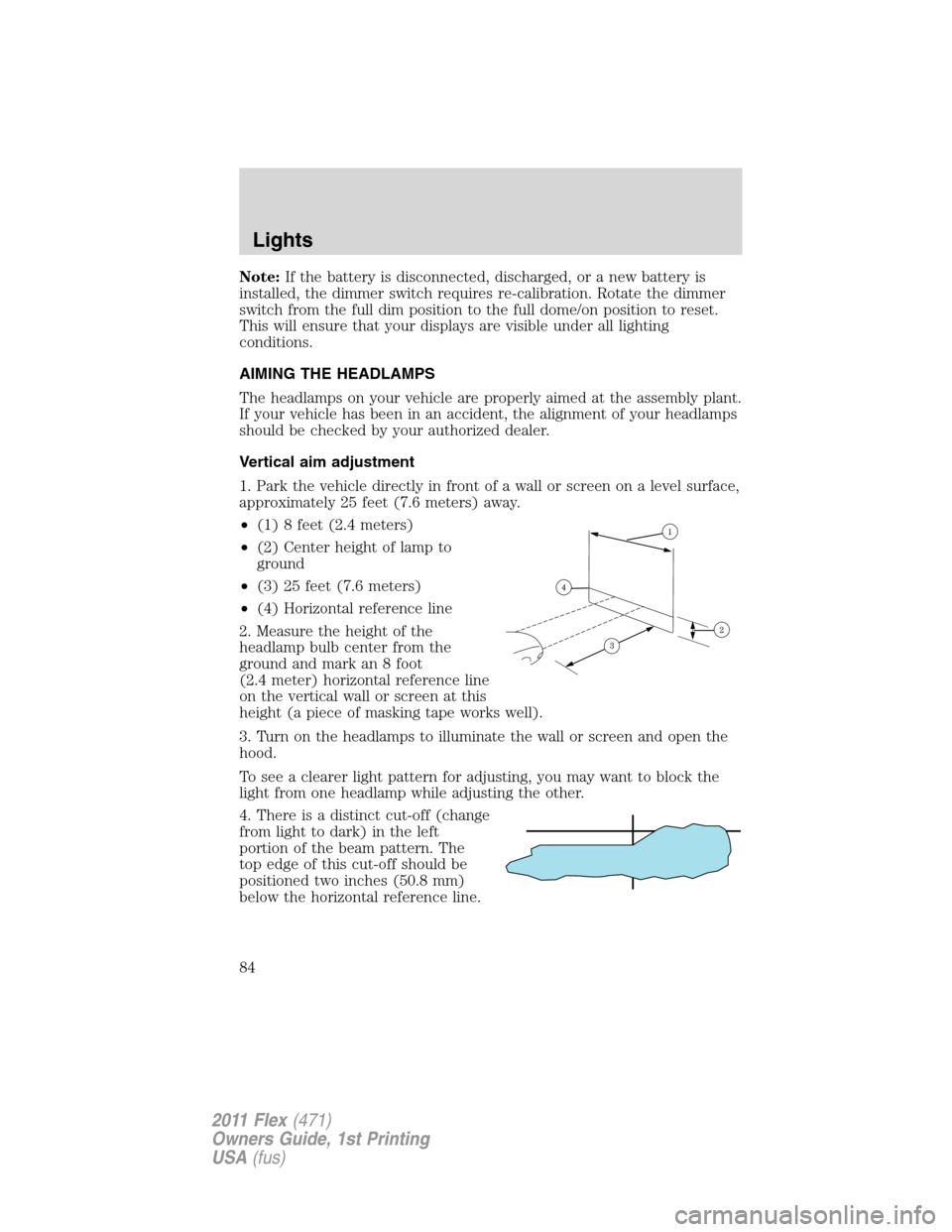
1. Park the vehicle directly in front of a wall or screen on a level surface,
approximately 25 feet (7.6 meters) away.
•(1) 8 feet (2.4 meters)
•(2) Center height of lamp to
ground
•(3) 25 feet (7.6 meters)
•(4) Horizontal reference line
2. Measure the height of the
headlamp bulb center from the
ground and mark an 8 foot
(2.4 meter) horizontal reference line
on the vertical wall or screen at this
height (a piece of masking tape works well).
3. Turn on the headlamps to illuminate the wall or screen and open the
hood.
To see a clearer light pattern for adjusting, you may want to block the
light from one headlamp while adjusting the other.
4. There is a distinct cut-off (change
from light to dark) in the left
portion of the beam pattern. The
top edge of this cut-off should be
positioned two inches (50.8 mm)
below the horizontal reference line.
Lights
84
2011 Flex(471)
Owners Guide, 1st Printing
USA(fus)
Page 85 of 418
5. Locate the vertical adjuster on
each headlamp. Using a Phillips #2
screwdriver, turn the adjuster either
clockwise (to adjust down) or
counterclockwise (to adjust up).
The horizontal edge of the brighter
light should touch the horizontal
reference line.
6. Close the hood and turn off the lamps.
HORIZONTAL AIM IS NOT REQUIRED FOR THIS VEHICLE AND IS
NON-ADJUSTABLE.
TURN SIGNAL CONTROL
•Push down to activate the left
turn signal.
•Push up to activate the right turn
signal.
INTERIOR LAMPS
Dome lamps and map lamps
The map lamps are located on the
overhead console. Press the controls
on either side of each map lamp to
turn on the lamps.
12
Lights
85
2011 Flex(471)
Owners Guide, 1st Printing
USA(fus)
Page 88 of 418

Function Number of bulbsTrade
number
Fog lamp 2 H11
Map lamp 2 12V6W
Dome/reading lamps 6 578
To replace all instrument panel lights - see your authorized dealer.
*To replace these lamps - see your authorized dealer.
Replacing interior bulbs
Check the operation of all bulbs frequently.
Replacing exterior bulbs
Check the operation of all the bulbs frequently.
Replacing headlamp (high beam/low beam) halogen bulbs
1. Make sure headlamp switch is in the off position, then open the hood.
2. Reach in behind the headlamp assembly to access the bulb sockets
and connectors.
3. Locate the high beam/low beam
headlamp bulb electrical connector
and remove it by squeezing the
locking tab and pulling it straight
out.
4. Remove the bulb socket by
turning it counterclockwise and
pulling it straight out.
WARNING:Handle a halogen headlamp bulb carefully and keep
out of children’s reach. Grasp the bulb only by its plastic base
and do not touch the glass. The oil from your hand could cause the
bulb to break the next time the headlamps are operated.
Install the new bulb(s) in reverse order.
Replacing HID headlamp bulbs (if equipped)
The headlamps on your vehicle use a “high intensity discharge” source.
These lamps operate at a high voltage. When the bulb is burned out, the
bulb and starter capsule assembly must be replaced by your authorized
dealer.
Lights
88
2011 Flex(471)
Owners Guide, 1st Printing
USA(fus)
Page 89 of 418

Replacing front parking lamp/turn signal bulbs
1. Make sure headlamp switch is in the off position, then open the hood.
2. Reach behind the headlamp assembly to access the bulb sockets and
connectors.
3. Remove the bulb socket by
turning it counterclockwise and
pulling it straight out.
4. To remove the bulb, pull it
straight out of the bulb socket.
Install the new bulb(s) in reverse
order.
Replacing rear stop/tail/turn/backup and side marker lamp bulbs
(non LED)
The stop/tail/turn/backup and side marker lamp bulbs are located in the
tail lamp assembly.
Note:Your vehicle may be equipped with a stop/tail/turn and side
marker lamp assemblies containing integral multiple light emitting diodes
(LED). If replacement is required, see your authorized dealer.
•(1)Backup lamp
•(2)Stop/tail/turn signal lamp
•(3)Side marker lamp
•(4)Supplemental taillamp
1. Make sure the headlamp switch is
in the off position and open the
liftgate.
2. Remove the hex screws in the
liftgate opening, then pull the lamp
assembly away from the vehicle. This will disengage two snap
attachments along the side of the vehicle.
3. Remove the bulb socket by rotating it counterclockwise, then pulling it
out of the lamp assembly.
4. Pull the bulb straight from the socket.
Install new bulb(s) in reverse order.
Lights
89
2011 Flex(471)
Owners Guide, 1st Printing
USA(fus)
Page 90 of 418
Replacing license plate lamp bulbs
1. Make sure the headlamp switch is
in the off position.
2. Remove the two screws from the
license plate lamp assembly and pull
it down.
3. Carefully pull the bulb out from
the contacts.
Install new bulb(s) in reverse order.
Replacing fog lamp bulbs
1. Make sure the fog lamp switch is
in the off position.
2. From underneath the vehicle,
partially remove the tire splash
shield by removing four drive screws
from the lower flap.
The splash shield flap can now be
repositioned to allow access to the
front fog lamp bulb and electrical wire harness.
3. Carefully disconnect the wire
harness connector from the bulb by
releasing the two snap clips.
4. Rotate the bulb counterclockwise
to remove from the fog lamp.
Install the new bulb in reverse order.
Lights
90
2011 Flex(471)
Owners Guide, 1st Printing
USA(fus)


