Page 80 of 418

REAR WINDOW DEFROSTERR
The rear defroster control is located on the climate control panel and
works to clear the rear window of fog and thin ice.
The ignition must be on to operate the rear window defroster.
The rear defroster turns off automatically after 10 minutes or when the
ignition is turned off. To manually turn off the defroster before
10 minutes have passed, press the control again.
Do not use razor blades or other sharp objects to clean the inside
of the rear window or to remove decals from the inside of the
rear window. This may cause damage to the heated grid lines and
will not be covered by your warranty.
CABIN AIR FILTER
The cabin air filter element is designed to reduce the concentration of
airborne particles such as dust, spores and pollen in the air being
supplied to the interior of the vehicle. The presence of a particulate filter
element provides the following benefits:
•Improves your driving comfort by reducing particle concentration.
•Improves the interior compartment cleanliness.
•Protects the climate control components from particle deposits.
Note:A cabin air filter must be installed at all times to prevent foreign
objects from entering the system. Running the system without a filter in
place could result in degradation or damage to the system.
The access door for the filter is located behind the glove box. For
replacement intervals regarding the cabin air filter, see thescheduled
maintenance information. For more information regarding your filter,
see your authorized dealer.
Climate Controls
80
2011 Flex(471)
Owners Guide, 1st Printing
USA(fus)
Page 81 of 418

HEADLAMP CONTROL
Turns the lamps off.
Turns on the parking lamps,
instrument panel lamps, license
plate lamps and tail lamps.
Turns the low beam headlamps
on.
Autolamp control (if equipped)
The autolamp system provides light
sensitive automatic on/off control of
the exterior lights normally
controlled by the headlamp control.
•To turn autolamps on, rotate the
control clockwise to
.
•To turn autolamps off, rotate the
control counterclockwise to
.
The autolamp system also keeps the
lights on for a predetermined
amount of time after the ignition switch is turned to off. You can change
the amount of time the lamps stay on by using the programming
procedure that follows:
Note:If the vehicle is equipped with autolamps it will have the
headlamps on with windshield wipersfeature. If the windshield wipers
are turned on for a brief period of time, the exterior lamps will turn on
with the headlamp control in the Autolamp position.
Autolamps - programmable exit delay
Programmable exit delay allows the length of the autolamp exit delay to
be changed.
To program the auto lamp exit time delay:
1. Start with the ignition off and the headlamp control in the autolamp
position.
2. Turn the headlamp control to off.
Lights
81
2011 Flex(471)
Owners Guide, 1st Printing
USA(fus)
Page 82 of 418
3. Turn the ignition on and then back to off.
4. Turn the headlamp control to the autolamp position. The headlamps
will turn on.
5. Wait the desired amount of time for the exit delay you want (up to
three minutes), then turn the headlamps off.
You can also use the message center to program the autolamp exit time
delay. SeeMessage centerin theInstrument Clusterchapter.
Fog lamp control
With the ignition on, the fog lamps
can be turned on when the
headlamp control is pulled toward
you and is in any of the following
positions:
•Parking lamps
•Low beams
•Autolamps (when active)
The fog lamp indicator light will
illuminate when the fog lamps have been turned on. The fog lamps will
not operate when the high beams are active.
High beams
Push the lever toward the
instrument panel to activate. Pull
the lever towards you to deactivate.
12
Lights
82
2011 Flex(471)
Owners Guide, 1st Printing
USA(fus)
Page 83 of 418

Flash-to-pass
Pull and release to activate.
Daytime running lamps (DRL) (if equipped)
Turns the headlamps on with a reduced output.
To activate:
•the ignition must be in the on position,
•the headlamp control is in the off, autolamps or parking lamp position
and
•the transmission must be out of the P (Park) position.
WARNING:Always remember to turn on your headlamps at
dusk or during inclement weather. The Daytime Running Lamp
(DRL) system does not activate the tail lamps and generally may not
provide adequate lighting during these conditions. Failure to activate
your headlamps under these conditions may result in a collision.
PANEL DIMMER CONTROL
Use to adjust the brightness of the
instrument panel and all applicable
switches in the vehicle during
headlamp and parking lamp
operation.
Move the control to the full upright
position, past detent, to turn on the
interior lamps. Move the control
past detent, to turn off the interior
lights. Move the control to the full
downward position to prevent lights
from turning on when the door is opened. The instrument panel/switch
lighting remains lit.
12
Lights
83
2011 Flex(471)
Owners Guide, 1st Printing
USA(fus)
Page 86 of 418

Your vehicle may have reading
lamps within the rear dome lamp(s).
Press the switches on either side of
the dome lamp to turn on the
lamps.
Your vehicle may have second row
lamps located within the grab
handles. Press the lens up to turn
on the lamps.
Ambient lighting (if equipped)
Illuminates footwells and cupholders
with a choice of several colors. The
ambient lighting control switch is
located in the center console
storage area. To activate, press and
release the control to cycle through
the color choices plus the off state.
The lights come on whenever the
ignition is in either the on or accessory position.
Note:The ambient lights will stay on until the ignition is placed in the
off position and either of the front doors are opened or the accessory
delay timer expires.
BULB REPLACEMENT
Lamp assembly condensation
Exterior lamps are vented to accommodate normal changes in pressure.
Condensation can be a natural by-product of this design. When moist air
enters the lamp assembly through the vents, there is a possibility that
condensation can occur when the temperature is cold. When normal
condensation occurs, a thin film of mist can form on the interior of the
lens. The thin mist eventually clears and exits through the vents during
normal operation. Clearing time may take as long as 48 hours under dry
weather conditions.
Lights
86
2011 Flex(471)
Owners Guide, 1st Printing
USA(fus)
Page 95 of 418
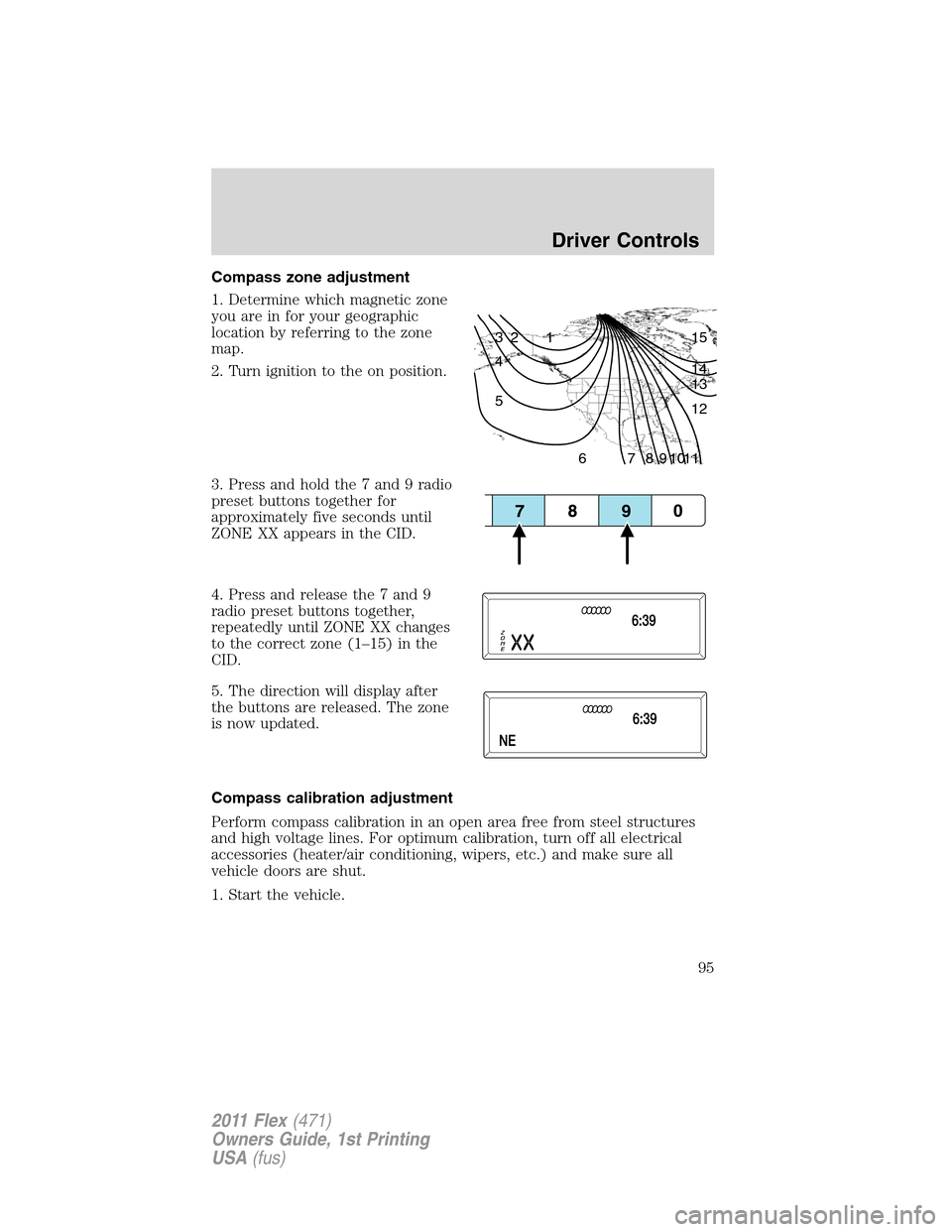
Compass zone adjustment
1. Determine which magnetic zone
you are in for your geographic
location by referring to the zone
map.
2. Turn ignition to the on position.
3. Press and hold the 7 and 9 radio
preset buttons together for
approximately five seconds until
ZONE XX appears in the CID.
4. Press and release the 7 and 9
radio preset buttons together,
repeatedly until ZONE XX changes
to the correct zone (1–15) in the
CID.
5. The direction will display after
the buttons are released. The zone
is now updated.
Compass calibration adjustment
Perform compass calibration in an open area free from steel structures
and high voltage lines. For optimum calibration, turn off all electrical
accessories (heater/air conditioning, wipers, etc.) and make sure all
vehicle doors are shut.
1. Start the vehicle.
1 2 3
4
5
6 7 8 9 101112 13 14 15
Driver Controls
95
2011 Flex(471)
Owners Guide, 1st Printing
USA(fus)
Page 97 of 418

Second row center console features (if equipped)
The second row center console
incorporates the following features:
•Flip forward armrest to provide a
flat load floor
•Utility compartment
•Cupholders
•Refrigerator unit (if equipped) in
the utility compartment. Refer to
Console refrigerator/freezer.
WARNING:Use only soft cups in the cupholder. Hard objects
can injure you in a collision.
Console refrigerator/freezer (if equipped)
Your vehicle may be equipped with a refrigerator/freezer for keeping
items cool/frozen.
The refrigerator/freezer will operate when the vehicle is on or the
ignition is in the accessory mode. Ford recommends only using the
refrigerator/freezer when the vehicle’s engine is running.
If there is a need to use the refrigerator/freezer when the engine is off,
turn the ignition to the accessory mode and limit the time the
refrigerator is running to avoid draining the vehicle’s battery.
To open the refrigerator/freezer, flip
the console lid forward and then lift
off the refrigerator/freezer cover. Be
sure to replace the cover after you
are done using the
refrigerator/freezer. This will help it
maintain a more consistent cooling
temperature.
Driver Controls
97
2011 Flex(471)
Owners Guide, 1st Printing
USA(fus)
Page 100 of 418

The power outlet is not designed for the following electric appliances;
they may not work properly:
•Cathode ray tube type televisions.
•Motor loads, such as vacuum cleaners, electric saws and other electric
power tools, compressor-driven refrigerators, etc.
•Measuring devices, which process precise data, such as medical
equipment, measuring equipment, etc.
•Other appliances requiring an extremely stable power supply:
microcomputer-controlled electric blankets, touch sensor lamps, etc.
WARNING:Do not keep electrical devices plugged in the power
point whenever the device is not in use. Do not use any
extension cord with the 110V AC power point, since it will defeat the
safety protection design provided by the cap and twist tab. Doing so
my cause the power point to overload due to powering multiple
devices that can reach beyond the 150W load limit and could result in
fire or serious injury.
The power point can switch to a fault mode when it is overloaded,
overheated, or shorted. For overloading and shorting conditions, unplug
your device and turn the ignition key off then on. For an overheating
condition, let the system cool off, then turn the ignition key off then on.
The 110V AC power point can provide power whenever the vehicle
ignition is in the run position and the power point green indicator light
located in the top left corner is turned on. Refer to the indicator light
code below for the power point status.
Indicator light code
Green light is on — Power point is ready to supply power
Green light is off — Power point power supply is off. Ignition is not in
RUN position
Green light is blinking — Power point is in fault mode
POWER WINDOWS
WARNING:Do not leave children unattended in the vehicle and
do not let children play with the power windows. They may
seriously injure themselves.
Driver Controls
100
2011 Flex(471)
Owners Guide, 1st Printing
USA(fus)