2011 FORD EXPLORER park assist
[x] Cancel search: park assistPage 290 of 449

P (Park)
This position locks the transmission
and prevents the front wheels from
turning.
To put your vehicle in gear:
•Press the brake pedal
•Move the gearshift lever into the
desired gear
To put your vehicle in P (Park):
•Come to a complete stop
•Move the gearshift lever and securely latch it in P (Park)
WARNING:Always set the parking brake fully and make sure
the gearshift is latched in P (Park). Turn the ignition to the off
position and remove the key whenever you leave your vehicle.
R (Reverse)
With the gearshift lever in R (Reverse), the vehicle will move backward.
Always come to a complete stop before shifting into and out of R
(Reverse).
N (Neutral)
With the gearshift lever in N (Neutral), the vehicle can be started and is
free to roll. Hold the brake pedal down while in this position.
D (Drive) with Overdrive
The normal driving position for the best fuel economy. Transmission
operates in gears one through six.
The automatic transmission shift strategy has the ability to detect hilly
terrain or mountainous areas and will provide a limited amount of grade
assist features automatically. Refer to D (Drive) with Grade assist or
SelectShift for more information.
D (Drive) with Tow on
The tow feature improves transmission operation when towing a trailer
or a heavy load. All transmission gear ranges are available when using
tow.
Tow can be activated by pressing theTOWswitch located on the
instrument panel by the headlamp control. TheTOW/HAULmessage
will illuminate in the instrument cluster.
PRNDL
Driving
289
2011 Explorer(exp)
Owners Guide, 1st Printing
USA(fus)
Page 293 of 449

Recommended shift speeds
Upshift according to the following chart:
Upshifts when accelerating
(recommended for best fuel economy)
Shift from:
1 - 2 15 mph (24 km/h)
2 - 3 25 mph (40 km/h)
3 - 4 40 mph (64 km/h)
4 - 5 45 mph (72 km/h)
5 - 6 50 mph (80 km/h)
The message center display in the instrument cluster will show the
current selected gear you are in.
In order to prevent the engine from running at too low an RPM, which
may cause it to stall, the SST will automatically make some downshifts
even if it has determined that you have not downshifted in time. It will
still allow you to downshift at any time as long as the SST determines
that the engine will not be damaged from over-revving.
Engine damage may occur if excessive engine revving is held
without shifting.
Hill start assist (HSA)
The hill start assist feature makes it easier to pull away when the vehicle
is on a slope without the need to use the parking brake. When the hill
start assist feature is active, the vehicle will remain stationary on the
slope for up to two seconds after you release the brake pedal. During
this time, you have time to move your foot from the brake to the
accelerator pedal and pull away. The brakes are released automatically
once the engine has developed sufficient drive to prevent the vehicle
from rolling down the slope. This is an advantage when pulling away on a
slope; for example from a car park ramp, traffic lights or when reversing
uphill into a parking space.
WARNING:The hill start assist feature does not replace the
parking brake. When you leave the vehicle, always apply the
parking brake and select first or reverse gear.
Driving
292
2011 Explorer(exp)
Owners Guide, 1st Printing
USA(fus)
Page 294 of 449

Using hill start assist
The hill start assist feature is activated automatically when the vehicle is
stopped on a slope greater than five degrees. The hill start assist feature
operates with the vehicle facing downhill if reverse gear is selected. The
hill start assist feature will not operate if the parking brake is activated.
WARNING:You must remain in the vehicle once you have
activated the hill start assist feature.
Activating hill start assist
1. Press the brake pedal to bring the vehicle to a complete standstill.
Keep the brake pedal pressed.
2. If the sensors detect that the vehicle is on a slope, the hill start assist
feature will be activated automatically.
3. When you remove your foot from the brake pedal, the vehicle will
remain on the slope without rolling away for approximately up to two
seconds. This hold time will automatically be extended if you are in the
process of driving off.
4. Drive off in the normal manner. The brakes will be released
automatically.
WARNING:If the engine is revved excessively, or if a
malfunction is detected when the hill start assist feature is
active, the hill start assist feature will be deactivated.
If your vehicle gets stuck in mud or snow
If your vehicle gets stuck in mud or snow, it may be rocked out by
shifting between forward and reverse gears, stopping between shifts in a
steady pattern. Press lightly on the accelerator in each gear.
Do not rock the vehicle if the engine is not at normal operating
temperature or damage to the transmission may occur.
Do not rock the vehicle for more than a minute or damage to the
transmission and tires may occur, or the engine may overheat.
Driving
293
2011 Explorer(exp)
Owners Guide, 1st Printing
USA(fus)
Page 295 of 449

REVERSE SENSING SYSTEM (IF EQUIPPED)
The reverse sensing system (RSS) sounds a tone to warn the driver of
obstacles near the rear bumper when the R (Reverse) gear is selected
and the vehicle is moving at speeds less than 3 mph (5 km/h). The
system is not effective at speeds above 3 mph (5 km/h) and may not
detect certain angular or moving objects.
WARNING:To help avoid personal injury, please read and
understand the limitations of the reverse sensing system as
contained in this section. Reverse sensing is only an aid for some
(generally large and fixed) objects when moving in reverse on a flat
surface at “parking speeds”. Inclement weather may also affect the
function of the RSS; this may include reduced performance or a false
activation.
WARNING:To help avoid personal injury, always use caution
when in R (Reverse) and when using the RSS.
WARNING:This system is not designed to prevent contact with
small or moving objects. The system is designed to provide a
warning to assist the driver in detecting large stationary objects to
avoid damaging the vehicle. The system may not detect smaller
objects, particularly those close to the ground.
WARNING:Certain add-on devices such as large trailer hitches,
bike or surfboard racks and any device that may block the
normal detection zone of the RSS system may create false beeps.
Driving
294
2011 Explorer(exp)
Owners Guide, 1st Printing
USA(fus)
Page 297 of 449

REARVIEW CAMERA SYSTEM (IF EQUIPPED)
The rear video camera system,
located on the liftgate above the
license plate, provides a video image
of the area behind the vehicle. It
adds assistance to the driver while
reversing or reverse parking the
vehicle. To use the rear video
camera system, place the
transmission in R (Reverse). An
image will display on the
touchscreen display. The area
displayed on the screen may vary according to the vehicle orientation
and/or road condition.
The rear video camera includes the following features that will assist the
driver in reverse driving.
Active guidelines (if equipped) and fixed guidelines
The active guidelines show the path of intended motion of the vehicle
while reversing. The fixed guidelines assist a driver with backing into a
parking space or aligning with an object behind the vehicle.
To turn this feature on or off when the vehicle is not in R (Reverse), do
the following on the touchscreen:
1. Select Menu
2. Select Vehicle
3. Select Rear View Camera
The fixed guideline options are ON and OFF. The active guideline
options are ACTIVE + FIXED, FIXED and OFF.
•(1) Rear bumper
•(2) Red zone
•(3) Yellow zone
•(4) Green zone
•(5) Active guidelines (if
equipped)
Active guidelines (5) will only be shown with fixed guidelines (2), (3)
and (4).
Zoom
1
5432
Driving
296
2011 Explorer(exp)
Owners Guide, 1st Printing
USA(fus)
Page 298 of 449

To use active guidelines, turn the steering wheel and point the active
guidelines towards an intended path. If the steering wheel position is
changed while reversing, the vehicle might deviate from the original
intended path.
Active guidelines project the intended path of the vehicle. Fixed
guidelines show the actual direction the vehicle is moving. The fixed and
active guidelines will fade in and out depending on the steering wheel
position. When the steering wheel position is straight, the active
guidelines will not be shown.
Always use caution while backing. Objects in the red zone (2) are closest
to your vehicle and objects in the green zone (4) are further away. Objects
are getting closer to your vehicle as they move from the green zone (4) to
the yellow (3) or red zones (2). Use the side mirrors and rearview mirror
to get better coverage on both sides and rear of the vehicle.
Visual park aid alert (if equipped)
Visual park aid alert allows the driver to see the area that is causing the
reverse sensing system to beep. The visual alerts are red, yellow or green
highlights which appear on top of the video image when an object is
detected by the reverse sensing system. The visual alert will highlight
the closest object detected by the reverse sensing system. The reverse
sensing alert can be disabled and if visual park aid alert is enabled,
highlighted areas will still be displayed.
To turn this feature on or off when the vehicle is not in R (Reverse), do
the following on the touchscreen:
1. Select Menu
2. Select Vehicle
3. Select Rear View Camera
The visual park aid alert options are ON and OFF.
Note:The reverse sensing system is not effective at speeds above 3 mph
(5 km/h) and may not detect certain angular or moving objects.
Manual zoom
The manual zoom feature assists drivers with connecting their vehicle to
a trailer for the purpose of towing. It allows the driver to manually zoom
closer to an object behind the vehicle. The zoomed image keeps the
bumper in the image to provide a reference.
Press
(+) or(-) to manually adjust the zoom levels. You can
choose from OFF, Level 1, Level 2 and Level 3. The selected level will
appear between the buttons (i.e. Level 1). When activating manual zoom
mode, the system always starts from OFF.
Driving
297
2011 Explorer(exp)
Owners Guide, 1st Printing
USA(fus)
Page 304 of 449

Activating/deactivating collision warning system
To turn the warning system and/or chime on or off and set the warning
sensitivity <– –>, refer toMessage centerin theInstrument Cluster
chapter.
Note:If the system cannot be turned off in a MyKey™ equipped vehicle,
refer toMyKey™in theLocks and Securitychapter for more
information.
Note:If collision warnings are perceived as being too frequent or
disturbing then the warning sensitivity can be reduced, though the
manufacturer recommends using the highest sensitivity setting where
possible. Setting lower sensitivity would lead to fewer and later system
warnings. Refer to theMessage centerin theInstrument Cluster
chapter for instructions on reducing the sensitivity.
ACTIVE PARK ASSIST (APA) (IF EQUIPPED)
Active park assist (APA) will detect an available parallel parking space
and automatically steer the vehicle into the space (hands-free) while you
control the accelerator, gearshift and brakes. The system will visually
and/or audibly instruct the driver to park the vehicle.
WARNING:This system is designed to be a supplementary park
aid. It may not work in all conditions and is not intended to
replace the driver’s attention and judgment. The driver is responsible
for avoiding hazards and maintaining a safe distance and speed, even
when the APA is in use.
Conditions in which the system may not work:
•Something passes between the front bumper and the space such as a
pedestrian or cyclist
•The edge of the neighboring parked vehicle is high from the ground
such as a bus, tow truck or flatbed truck
Driving
303
2011 Explorer(exp)
Owners Guide, 1st Printing
USA(fus)
Page 305 of 449
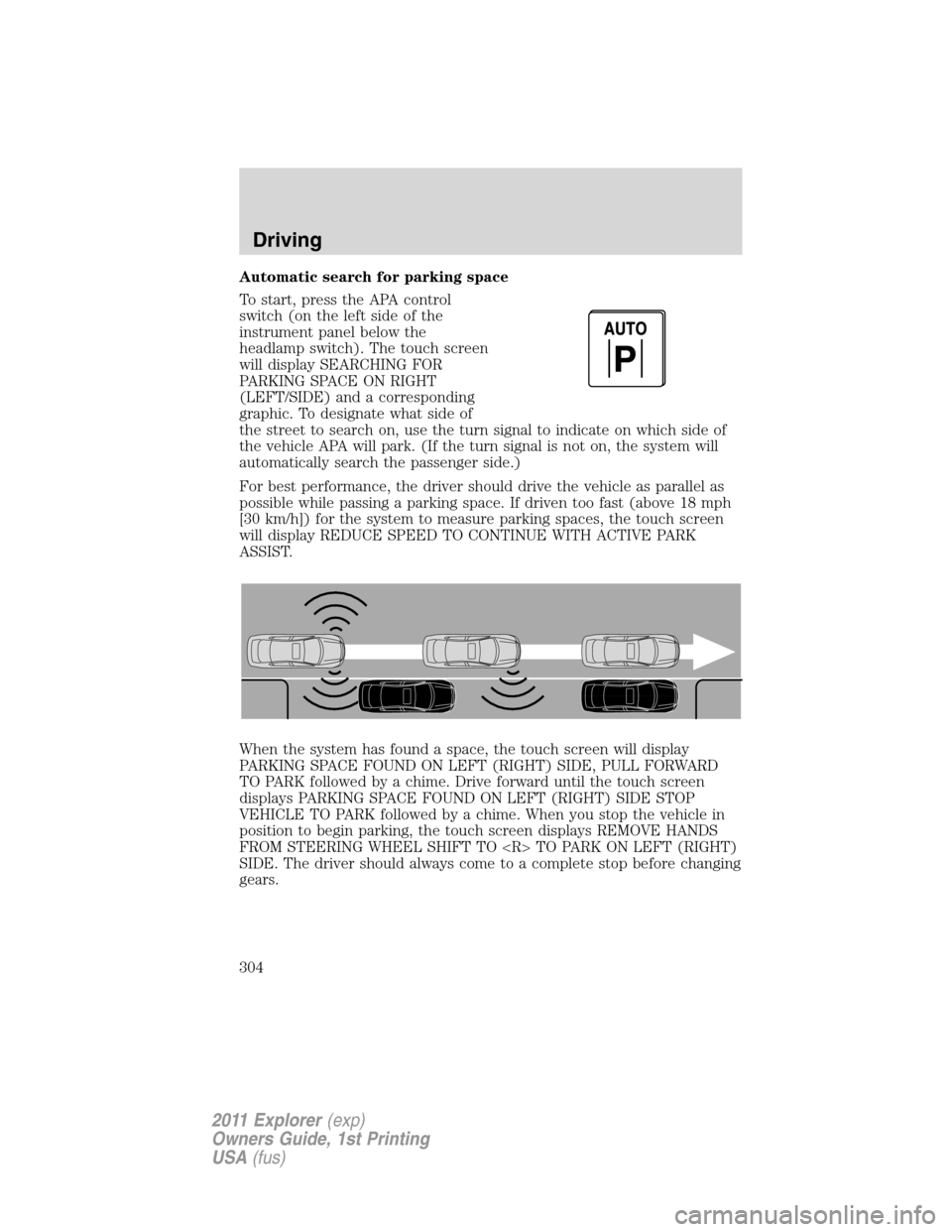
Automatic search for parking space
To start, press the APA control
switch(ontheleftsideofthe
instrument panel below the
headlamp switch). The touch screen
will display SEARCHING FOR
PARKING SPACE ON RIGHT
(LEFT/SIDE) and a corresponding
graphic. To designate what side of
the street to search on, use the turn signal to indicate on which side of
the vehicle APA will park. (If the turn signal is not on, the system will
automatically search the passenger side.)
For best performance, the driver should drive the vehicle as parallel as
possible while passing a parking space. If driven too fast (above 18 mph
[30 km/h]) for the system to measure parking spaces, the touch screen
will display REDUCE SPEED TO CONTINUE WITH ACTIVE PARK
ASSIST.
When the system has found a space, the touch screen will display
PARKING SPACE FOUND ON LEFT (RIGHT) SIDE, PULL FORWARD
TO PARK followed by a chime. Drive forward until the touch screen
displays PARKING SPACE FOUND ON LEFT (RIGHT) SIDE STOP
VEHICLE TO PARK followed by a chime. When you stop the vehicle in
position to begin parking, the touch screen displays REMOVE HANDS
FROM STEERING WHEEL SHIFT TO
SIDE. The driver should always come to a complete stop before changing
gears.
Driving
304
2011 Explorer(exp)
Owners Guide, 1st Printing
USA(fus)