Page 187 of 497
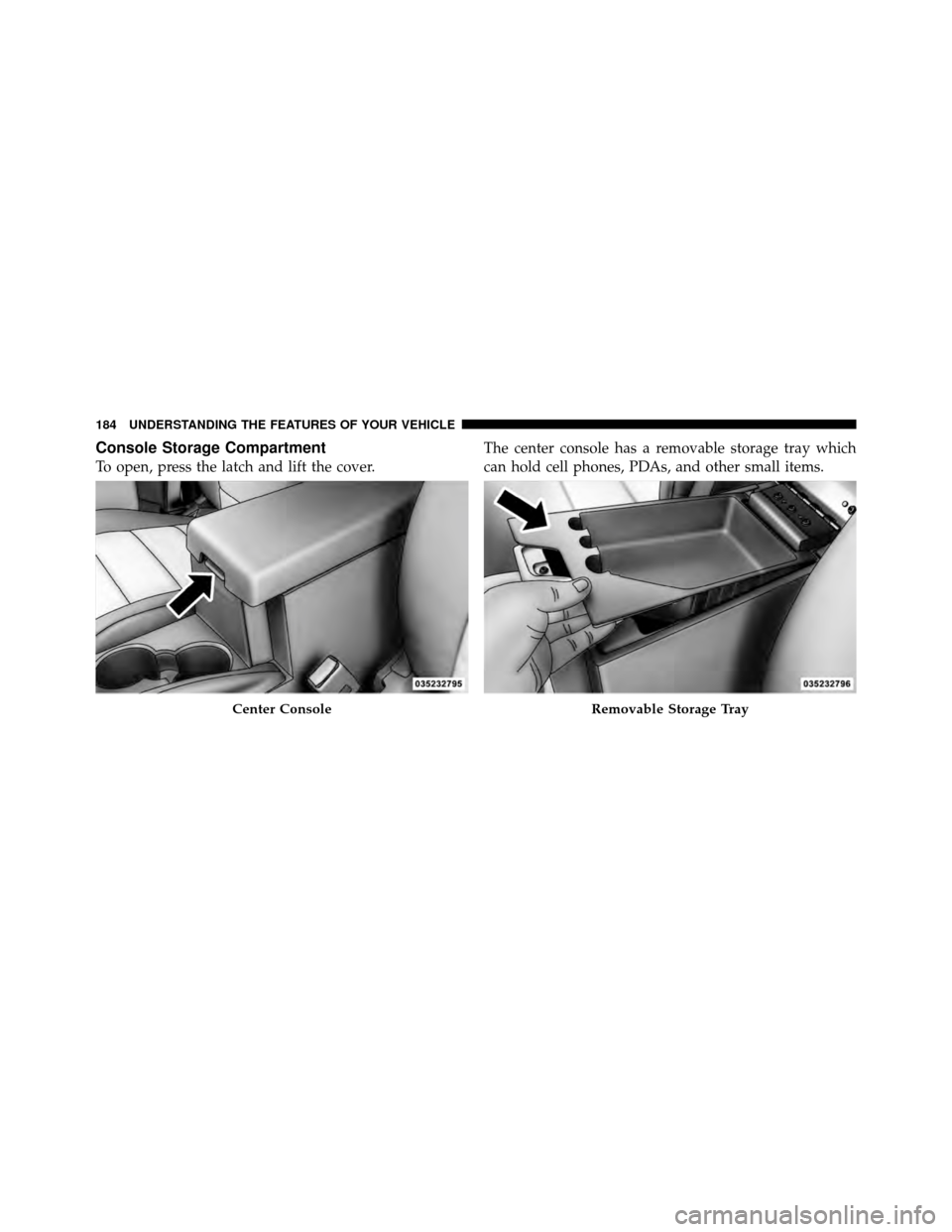
Console Storage Compartment
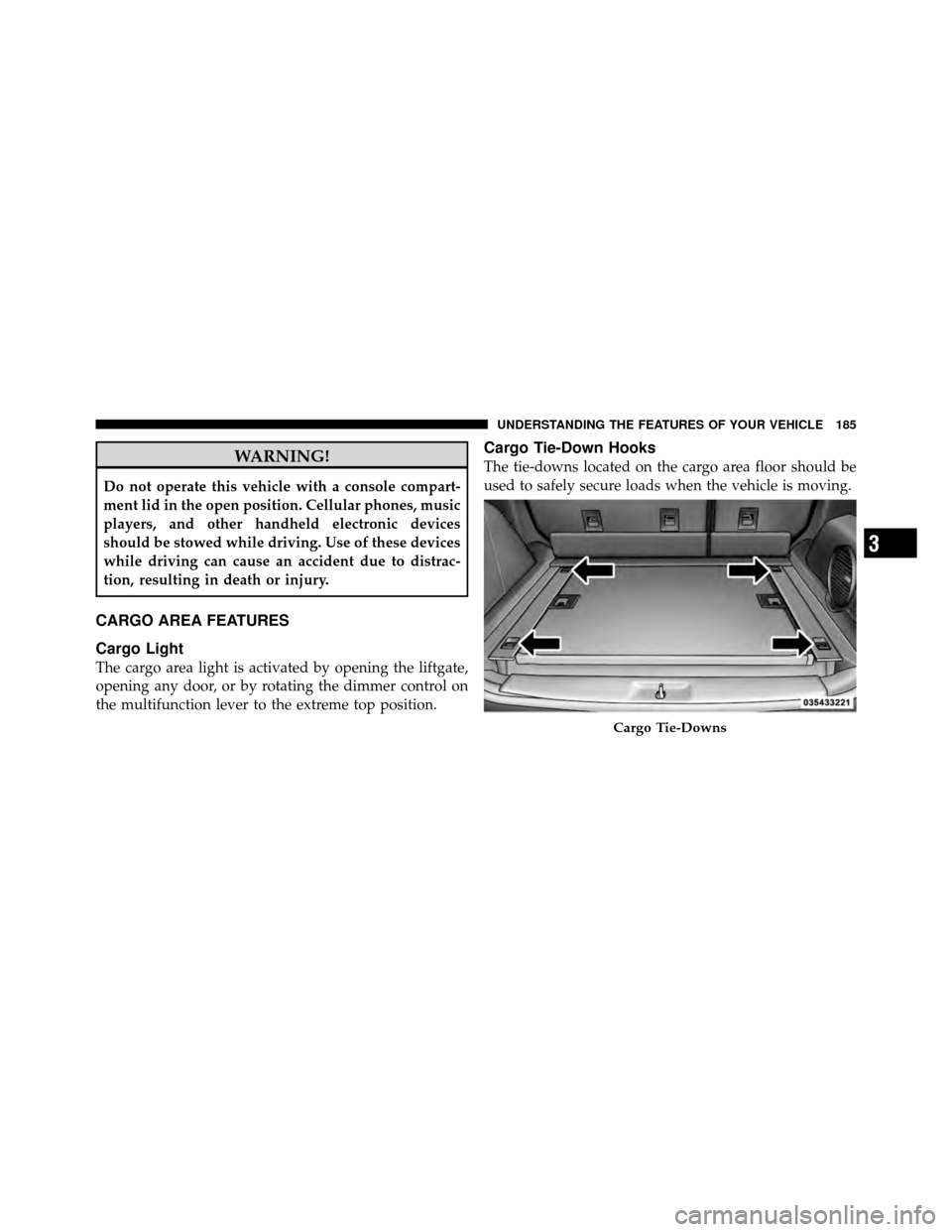
To open, press the latch and lift the cover.The center console has a removable storage tray which
can hold cell phones, PDAs, and other small items.
Center ConsoleRemovable Storage Tray
184 UNDERSTANDING THE FEATURES OF YOUR VEHICLE
Page 188 of 497
WARNING!
Do not operate this vehicle with a console compart-
ment lid in the open position. Cellular phones, music
players, and other handheld electronic devices
should be stowed while driving. Use of these devices
while driving can cause an accident due to distrac-
tion, resulting in death or injury.
CARGO AREA FEATURES
Cargo Light
The cargo area light is activated by opening the liftgate,
opening any door, or by rotating the dimmer control on
the multifunction lever to the extreme top position.
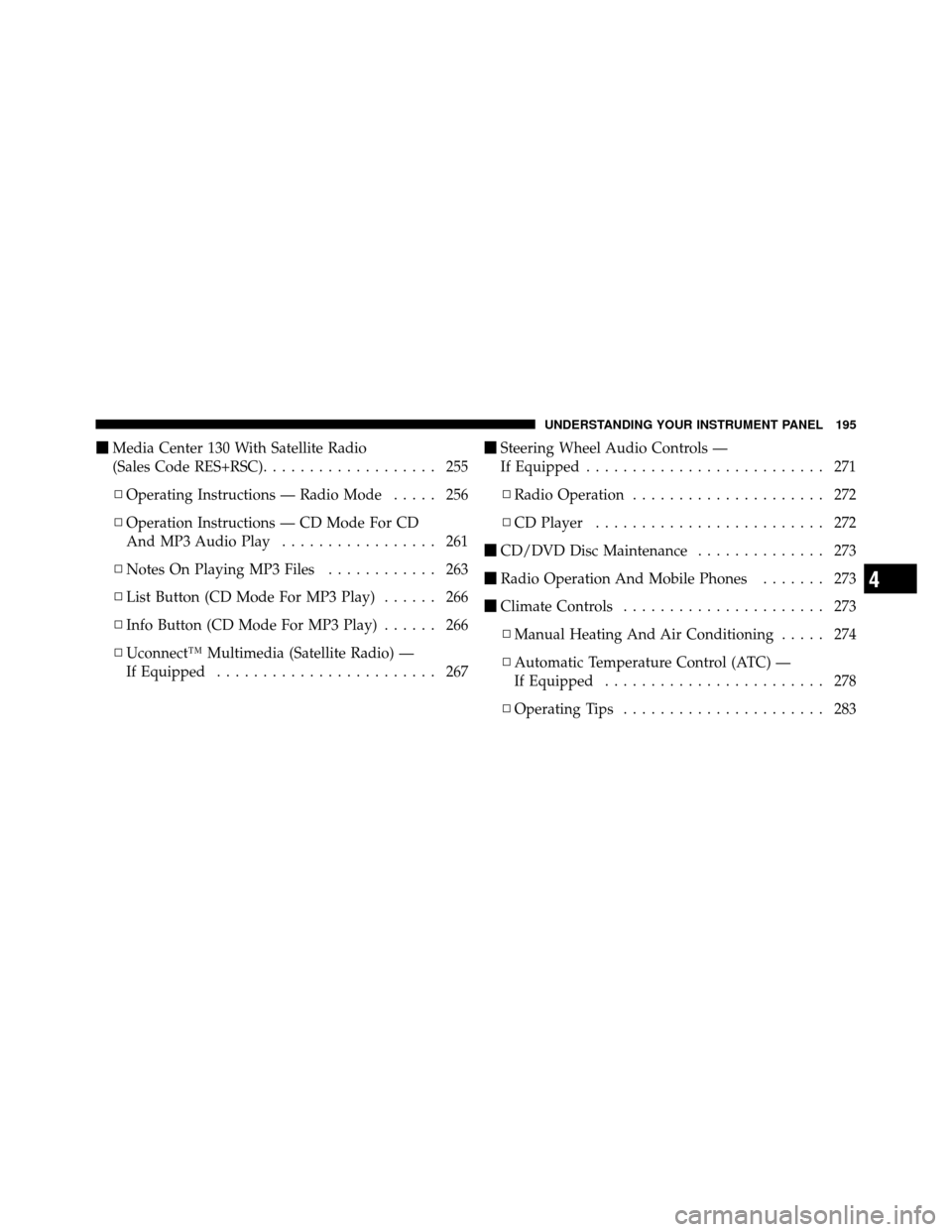
Cargo Tie-Down Hooks
The tie-downs located on the cargo area floor should be
used to safely secure loads when the vehicle is moving.
Cargo Tie-Downs
3
UNDERSTANDING THE FEATURES OF YOUR VEHICLE 185
Page 197 of 497
�Media Center 230 (REQ) — AM/FM Stereo
Radio And 6–Disc CD/DVD Changer
(MP3/WMA AUX Jack) .................. 227
▫ Operating Instructions - Radio Mode ...... 227
▫ Operation Instructions - (Disc Mode For CD
And MP3/WMA Audio Play, DVD-Video) . . . 236
▫ Notes On Playing MP3/WMA Files ....... 238
▫ List Button
(Disc Mode For MP3/WMA Play) ......... 240
▫ Info Button (Disc Mode For MP3/WMA
Play) ............................. 240
▫ Uconnect™ Multimedia
(Satellite Radio) — If Equipped .......... 242�
Media Center 730N/430/430N (RHR/RER/
RBZ/RHB) CD/DVD/HDD/NAV —
If Equipped .......................... 246
▫ Operating Instructions
(Voice Command System) — If Equipped . . . 246
▫ Operating Instructions
(Uconnect™ Phone) — If Equipped ....... 246
� Media Center 130 (Sales Code RES) ......... 247
▫ Operating Instructions — Radio Mode ..... 247
▫ Operation Instructions —
CD Mode For CD And MP3 Audio Play .... 250
▫ Notes On Playing MP3 Files ............ 252
▫ Operation Instructions - Auxiliary Mode .... 255
194 UNDERSTANDING YOUR INSTRUMENT PANEL
Page 198 of 497
�Media Center 130 With Satellite Radio
(Sales Code RES+RSC) ................... 255
▫ Operating Instructions — Radio Mode ..... 256
▫ Operation Instructions — CD Mode For CD
And MP3 Audio Play ................. 261
▫ Notes On Playing MP3 Files ............ 263
▫ List Button (CD Mode For MP3 Play) ...... 266
▫ Info Button (CD Mode For MP3 Play) ...... 266
▫ Uconnect™ Multimedia (Satellite Radio) —
If Equipped ........................ 267 �
Steering Wheel Audio Controls —
If Equipped .......................... 271
▫ Radio Operation ..................... 272
▫ CD Player ......................... 272
� CD/DVD Disc Maintenance .............. 273
� Radio Operation And Mobile Phones ....... 273
� Climate Controls ...................... 273
▫ Manual Heating And Air Conditioning ..... 274
▫ Automatic Temperature Control (ATC) —
If Equipped ........................ 278
▫ Operating Tips ...................... 283
4
UNDERSTANDING YOUR INSTRUMENT PANEL 195
Page 229 of 497

Delay Turning Headlights Off
When this feature is selected, the driver can choose to
have the headlights remain on for 0, 30, 60, or 90 seconds
when exiting the vehicle. To make your selection, press
and release the FUNCTION SELECT button until “0,”
“30,” “60,” or “90” appears.
Turn Headlights On with Remote Key Unlock
When this feature is selected, the headlights will activate
and remain on for up to 90 seconds when the doors are
unlocked with the RKE transmitter. To make your selec-
tion, press and release the FUNCTION SELECT button
until “OFF,” “30 sec.,” “60 sec.,” or “90 sec.” appears.
Delay Power Off to Accessories Until Exit
When this feature is selected, the power window
switches, radio, Uconnect Phone™ (if equipped), DVD
video system (if equipped), power sunroof (if equipped),
and power outlets will remain active for up to 10 minutes
after the ignition switch is turned off. Opening either frontvehicle door will cancel this feature. To make your
selection, press and release the FUNCTION SELECT
button until “Off,” “45 sec,” “5 min,” or “10 min” appears.
Enable/Disable the Rear Park Assist System
The Rear Park Assist system will scan for objects behind
the vehicle when the transmission is in the REVERSE
position and the vehicle speed is less than 11 mph
(18 km/h). The system can be enabled with turned ON or
turned OFF through the EVIC, to make your selection,
press and release the FUNCTION SELECT button. Refer
to “Rear Park Assist System” in “Understanding The
Features Of Your Vehicle” for system function and oper-
ating information.
Display Fuel Saver — If Equipped
The “ECO” message is located in the Compass/
Temperature display; this message can be turned on or
off. To make your selection, press and release the FUNC-
TION SELECT button until “ON” or “OFF” appears.
226 UNDERSTANDING YOUR INSTRUMENT PANEL
Page 231 of 497

Power Switch/Volume Control (Rotary)
Push the ON/VOLUME control knob to turn on the
radio. Press the ON/VOLUME control knob a second
time to turn off the radio.
Electronic Volume Control
The electronic volume control turns continuously (360
degrees) in either direction without stopping. Turning the
ON/VOLUME control knob to the right increases the
volume and to the left decreases it.
When the audio system is turned ON, the sound will be
set at the same volume level as last played.
SEEK Buttons
Press and release the SEEK buttons to search for the next
listenable station in AM/FM mode. Press the right switch
to seek up and the left switch to seek down. The radio
will remain tuned to the new station until you make
another selection. Holding either button will bypass
stations without stopping until you release it.
SCAN Button
Pressing the SCAN button causes the tuner to search for
the next listenable station in AM, FM or Satellite (if
equipped) frequencies, pausing for five seconds at each
listenable station before continuing to the next. To stop
the search, press the SCAN button a second time.
Voice Command Button Uconnect™ Phone —
If Equipped
Press this button to operate the Uconnect™ Phone feature
(if equipped). Refer to “Voice Command in the
Uconnect™ User Manual located on the DVD for further
details.
If your vehicle is not equipped with or this feature is not
available on your vehicle, a “Not Equipped With
Uconnect Phone” message will display on the radio
screen.
228 UNDERSTANDING YOUR INSTRUMENT PANEL
Page 232 of 497

Phone Button Uconnect™ Phone — If Equipped
Press this button to operate the Uconnect™ Phone feature
(if equipped). Refer to “Uconnect™ Phone” in the
Uconnect™ User Manual located on the DVD for further
details.
If your vehicle is not equipped with or this feature is not
available on your vehicle, a “Not Equipped With
Uconnect Phone” message will display on the radio
screen.
TIME Button
Press the TIME button to alternate locations of the time
and frequency display.
Clock Setting Procedure
1. Press and hold the TIME button until the hours blink.
2. Adjust the hours by turning the right side TUNE/
SCROLL control knob.3. After adjusting the hours, press the right side TUNE/
SCROLL control knob to set the minutes. The minutes
will begin to blink.
4. Adjust the minutes using the right side TUNE/
SCROLL control knob. Press the TUNE/SCROLL control
knob to save the time change.
5. To exit, press any button/knob or wait five seconds.
The clock can also be set by pressing the SETUP button
and selecting the “SET HOME CLOCK” entry. Once in
this display follow the above procedure, starting at
step 2.
INFO Button
Press the INFO button for an RDS station (one with call
letters displayed). The radio will return a Radio Text
message broadcast from an FM station (FM mode only).
4
UNDERSTANDING YOUR INSTRUMENT PANEL 229
Page 236 of 497

•Angle – Repeatedly pressing SELECT will change
the viewing angle if supported by the DVD disc (if
equipped).
NOTE:
•The available selections for each of the above entries
varies depending upon the disc.
•These selections can only be made while playing a
DVD.
•VES™ Power - Allows you to turn VES™ ON and
OFF (if equipped).
•VES™ Lock - Locks out rear VES™ remote controls (if
equipped).
•VES™ CH1/CH2 - Allows the user to change the
mode of either the IR1 or IR2 wireless headphones by
pressing the AUDIO/SELECT button (if equipped).
•Set Home Clock - Pressing the SELECT button allows
you to set the clock. Turn the TUNE/SCROLL control
knob to adjust the hours and then press and turn the
TUNE/SCROLL control knob to adjust the minutes.
Press the TUNE/SCROLL control knob again to save
changes.
•Player Defaults - Selecting this item will allow the
user to scroll through the following items and set
defaults according to customer preference.
Menu Language — If Equipped
Selecting this item will allow the user to choose the
default startup DVD menu language (effective only if
language supported by disc). If you want to select a
language not listed, then scroll down and select �other.�
Enter the four-digit country code using the TUNE/
SCROLL control knob to scroll up and down to select the
number and then push to select.4
UNDERSTANDING YOUR INSTRUMENT PANEL 233