Page 119 of 497

The Uconnect™ Phone will then send the corresponding
phone number associated with the phonebook entry, as
tones over the phone.
NOTE:
•You may not hear all of the tones due to mobile phone
network configurations. This is normal.
•Some paging and voice mail systems have system time
out settings that are too short and may not allow the
use of this feature.
Barge In — Overriding Prompts
The “Voice Command” button can be used when you
wish to skip part of a prompt and issue your voice
command immediately. For example, if a prompt is
asking “Would you like to pair a phone, clear a...,” you
could press the
button and say, “Pair a Phone” to
select that option without having to listen to the rest of
the voice prompt.
Turning Confirmation Prompts ON/OFF
Turning confirmation prompts off will stop the system
from confirming your choices (e.g., the Uconnect™
Phone will not repeat a phone number before you dial it).
•Press thebutton to begin.
•After the “Ready” prompt and the following beep, say
one of the following:
“Setup Confirmation Prompts On”
“Setup Confirmation Prompts Off”
Phone And Network Status Indicators
If available on the radio and/or on a premium display
such as the instrument panel cluster, and supported by
your mobile phone, the Uconnect™ Phone will provide
notification to inform you of your phone and network
status when you are attempting to make a phone call
using Uconnect™ Phone. The status is given for network
signal strength, phone battery strength, etc.
116 UNDERSTANDING THE FEATURES OF YOUR VEHICLE
Page 140 of 497
WARNING!
•Adjusting a seat while driving may be dangerous.
Moving a seat while driving could result in loss of
control which could cause a collision and serious
injury or death.
•Seats should be adjusted before fastening the seat
belts and while the vehicle is parked. Serious
injury or death could result from a poorly adjusted
seat belt.
•Do not ride with the seatback reclined so that the
shoulder belt is no longer resting against your
chest. In a collision you could slide under the seat
belt, which could result in serious injury or death.
CAUTION!
Do not place any article under a power seat or
impede its ability to move as it may cause damage to
the seat controls. Seat travel may become limited if
movement is stopped by an obstruction in the seat’s
path.
Heated Seats — If Equipped
On some models, the front driver and passenger seats
may be equipped with heaters in both the seat cushions
and seatbacks.
There are two heated seat switches that allow the driver
and passenger to operate the seats independently. The
controls for each seat are located on a switch bank near
the bottom center of the instrument panel.
3
UNDERSTANDING THE FEATURES OF YOUR VEHICLE 137
Page 152 of 497
WARNING!
Do not ride with the seatback reclined so that the
shoulder belt is no longer resting against your chest.
In a collision you could slide under the seat belt,
which could result in serious injury or death.
TO OPEN AND CLOSE THE HOOD
To open the hood, there are two latches that must be
released.
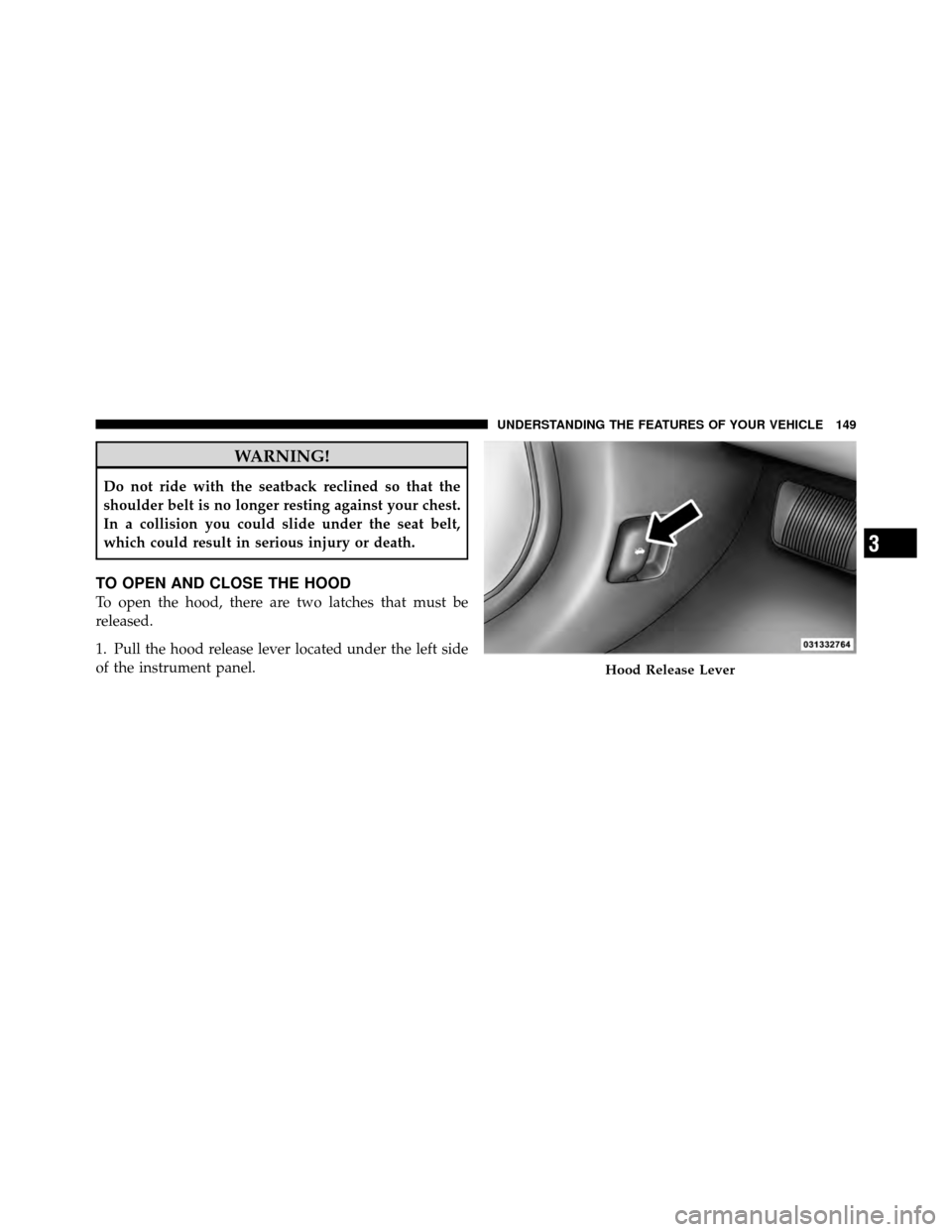
1. Pull the hood release lever located under the left side
of the instrument panel.
Hood Release Lever
3
UNDERSTANDING THE FEATURES OF YOUR VEHICLE 149
Page 154 of 497
LIGHTS
Multifunction Lever
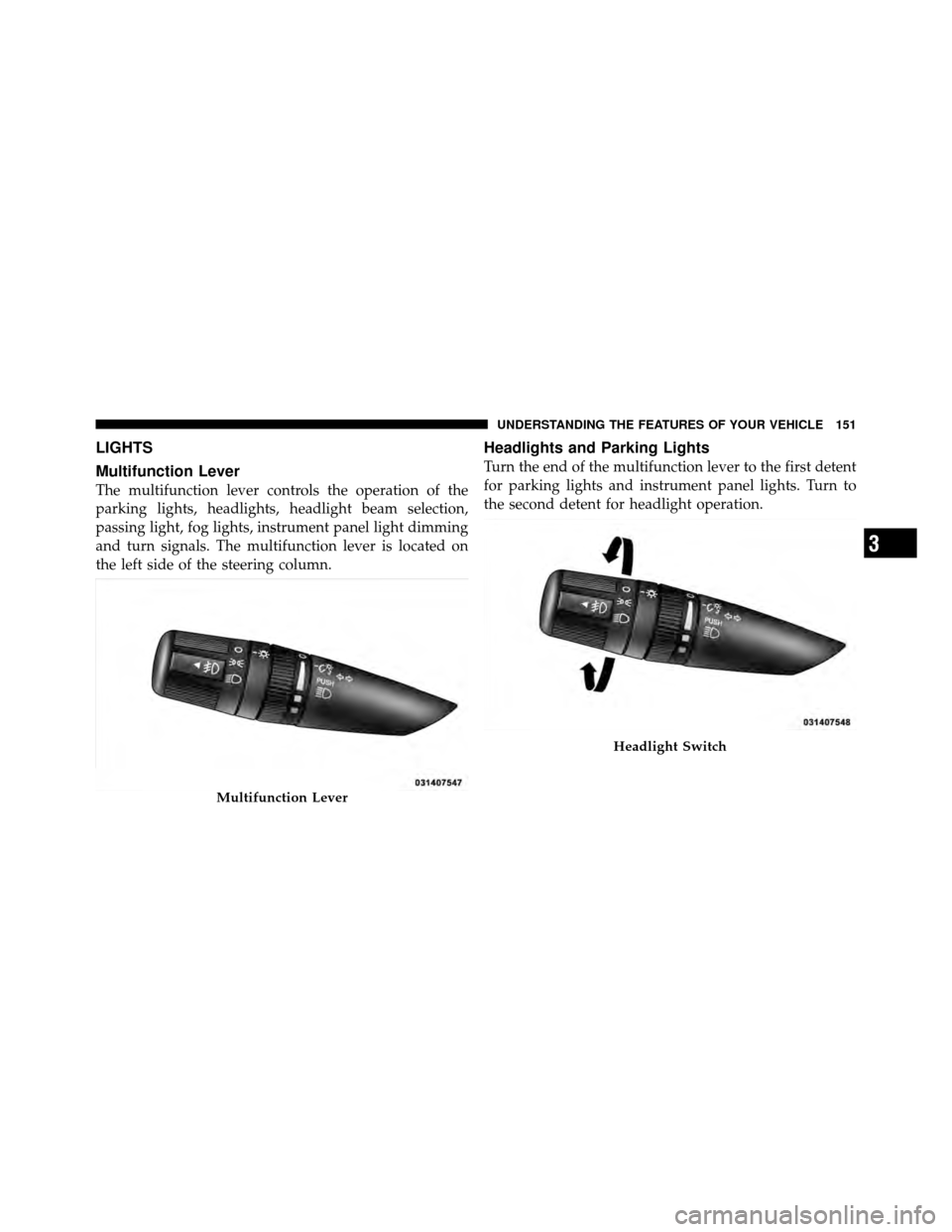
The multifunction lever controls the operation of the
parking lights, headlights, headlight beam selection,
passing light, fog lights, instrument panel light dimming
and turn signals. The multifunction lever is located on
the left side of the steering column.
Headlights and Parking Lights
Turn the end of the multifunction lever to the first detent
for parking lights and instrument panel lights. Turn to
the second detent for headlight operation.
Multifunction Lever
Headlight Switch
3
UNDERSTANDING THE FEATURES OF YOUR VEHICLE 151
Page 155 of 497
To change the brightness of the instrument panel lights,
rotate the center portion of the multifunction lever up or
down.
NOTE:If the driver’s door is left open, and the head-
lights or parking lights are left on, a chime will sound.
Daytime Running Lights — If Equipped
The high beam headlights will turn on as Daytime
Running Lights (DRL) and operate at lower intensity
whenever the ignition is ON, the engine is running, the
headlight switch is off, the parking brake is released and
the shift lever is in any position except PARK.
NOTE: The Daytime Running Lights will turn off
automatically when a turn signal is in operation and turn
on again when the turn signal is not operating.
Lights-On Reminder
If the headlights or parking lights are on after the ignition
is turned OFF, a chime will sound when the driver’s door
is opened.
High/Low Beam Switch
Push the multifunction lever away from you to switch
the headlights to high beams. Pull the lever toward you
to switch the headlights back to low beams.
Flash-to-Pass
You can signal another vehicle with your headlights by
lightly pulling the multifunction lever toward the steer-
ing wheel. This will turn on the high beam headlights
until the lever is released.
Front Fog Lights — If Equipped
The front fog light switch is in the multifunction
lever. To activate the front fog lights, turn on the
parking or low beam headlights and pull out the
end of the lever.
152 UNDERSTANDING THE FEATURES OF YOUR VEHICLE
Page 157 of 497
NOTE:
•If either light remains on and does not flash, or there is
a very fast flash rate, check for a defective outside light
bulb. If an indicator fails to light when the lever is
moved, it would suggest that the indicator bulb is
defective.
•A tone will chime if the turn signals are left on for
more than 1 mile (2 km).
Lane Change Assist
Tap the lever up or down once, without moving beyond
the detent, and the turn signal (right or left) will flash
three times then automatically turn off.
Instrument Panel Dimmer
Rotate the center portion of the lever to the extreme
bottom position to fully dim the instrument panel lights
and prevent the interior lights from illuminating when a
door is opened.
Rotate the center portion of the lever up to increase the
brightness of the instrument panel lights when the park-
ing lights or headlights are on.
Rotate the center portion of the lever upward to the next
detent position to brighten the odometer and radio when
the parking lights or headlights are on.
Rotate the center portion of the lever upward to the last
detent to turn on the interior lighting.
154 UNDERSTANDING THE FEATURES OF YOUR VEHICLE
Page 158 of 497
Interior Lights
The overhead light comes on when a door is opened. It
may also be turned on by rotating the control for the
dimmer switch on the multifunction lever fully upward.
The overhead light will automatically turn off in approxi-
mately 10 minutes if a door is left open or the dimmer
control is left in the dome light position and the key is not
in the ignition. Turn the ignition switch ON to restore the
overhead light operation.
Daytime Brightness Feature
Certain instrument panel components (odometer, radio
display) can be illuminated at full brightness during the
daytime. This can be helpful when driving with your
headlights on during the daytime, such as in a parade or
a funeral procession. To activate this feature, rotate the
left stalk one detent lower than the dome light.
Dimmer Control
3
UNDERSTANDING THE FEATURES OF YOUR VEHICLE 155
Page 169 of 497
Enabling And Disabling ParkSense�
There are times when you may want to disable Park-
Sense�, such as when towing a trailer.
Vehicles Equipped With The Electronic Vehicle
Information Center (EVIC)
You can turn ParkSense�on or off through the EVIC.
Refer to “Electronic Vehicle Information Center (EVIC)/
Personal Settings (Customer-Programmable Features)” in
“Understanding Your Instrument Panel” for further
information.
Vehicles Equipped With ParkSense� Rear Park
Assist Switch
You can turn ParkSense� on or off by pressing
the ParkSense� Rear Park Assist switch located
on the lower switch bank below the climate
controls.
ParkSense� Operation
ParkSense�uses four sensors located in the rear bumper
fascia to scan for obstacles up to 79 in (200 cm) away from
the rear bumper fascia. The warning display located
above the rear window provides both visible and audible
warnings to indicate the range of the object.
ParkSense� LED Display
166 UNDERSTANDING THE FEATURES OF YOUR VEHICLE