Page 227 of 557

successfully accepted the frequency signal. The indica-
tor light will flash slowly and then rapidly when fully
trained.
If you unplugged the device for training, plug it back in
at this time.
Then proceed with Step 4 under “Programming
HomeLink�” earlier in this section.
Using HomeLink�
To operate, press and release the programmed
HomeLink�button. Activation will now occur for the
trained device (i.e., garage door opener, gate operator,
Security system, entry door lock, home/office lighting,
etc.,). The handheld transmitter of the device may also be
used at any time.
Reprogramming A Single HomeLink �Button
To reprogram a channel that has been previously trained,
follow these steps:
1. Turn the ignition switch to the ON/RUN position.
2. Press and hold the desired HomeLink� button until
the indicator light begins to flash after 20 seconds. Do not
release the button.
3. Without releasing the button, proceed with Program-
ming HomeLink� Step 2 and follow all remaining steps.
Security
It is advised to erase all channels before you sell or turn
in your vehicle.
To do this, press and hold the two outside buttons for
20 seconds until the red indicator flashes. Note that all
channels will be erased. Individual channels cannot be
erased.
3
UNDERSTANDING THE FEATURES OF YOUR VEHICLE 225
Page 233 of 557
This power outlet will also operate a conventional cigar
lighter unit.To preserve the heating element, do not
hold the lighter in the heating position. A second 12 Volt (13 Amp) power outlet is located inside
the center console storage area. Power is available with
the ignition switch in the ON/RUN, ACC or LOCK
position.
Front 12 Volt Power Outlet
Center Console 12 Volt Power Outlet
3
UNDERSTANDING THE FEATURES OF YOUR VEHICLE 231
Page 235 of 557
CAUTION!
•Do not exceed the maximum power of 160 Watts
(13 Amps) at 12 Volts. If the 160 Watt (13 Amp)
power rating is exceeded the fuse protecting the
system will need to be replaced.
•The power outlet on the bottom of the center
console shares the fuse with the power outlet on
the back of the console. The combined usage must
not exceed 160 Watts (13 Amps) at 12 Volts.
•Power outlets are designed for accessory plugs
only. Do not insert any other object in the power
outlets as this will damage the outlet and blow the
fuse. Improper use of the power outlet can cause
damage not covered by your New Vehicle Limited
Warranty.
Power Outlet Fuses
1 — F103 20 A Yellow Power Outlet Console Bin & Power Out-
let Console Rear
2 — F102 20 A Yellow Cigar Lighter Instrument Panel & Power
Outlet Left Rear Cargo Area
3
UNDERSTANDING THE FEATURES OF YOUR VEHICLE 233
Page 236 of 557

WARNING!
To avoid serious injury or death:
•Only devices designed for use in this type of
outlet should be inserted into any 12 Volt outlet.
•Do not touch with wet hands.
•Close the lid when not in use and while driving
the vehicle.
•If this outlet is mishandled, it may cause an
electric shock and failure.
CAUTION!
•Many accessories that can be plugged in draw
power from the vehicle’s battery, even when not in
use (i.e., cellular phones, etc.). Eventually, if
plugged in long enough, the vehicle’s battery will
discharge sufficiently to degrade battery life
and/or prevent the engine from starting.
•Accessories that draw higher power (i.e., coolers,
vacuum cleaners, lights, etc.) will degrade the
battery even more quickly. Only use these inter-
mittently and with greater caution.
•After the use of high power draw accessories, or
long periods of the vehicle not being started (with
accessories still plugged in), the vehicle must be
driven a sufficient length of time to allow the
alternator to recharge the vehicle’s battery.(Continued)
234 UNDERSTANDING THE FEATURES OF YOUR VEHICLE
Page 247 of 557
CARGO AREA FEATURES
Rechargeable Flashlight — If Equipped
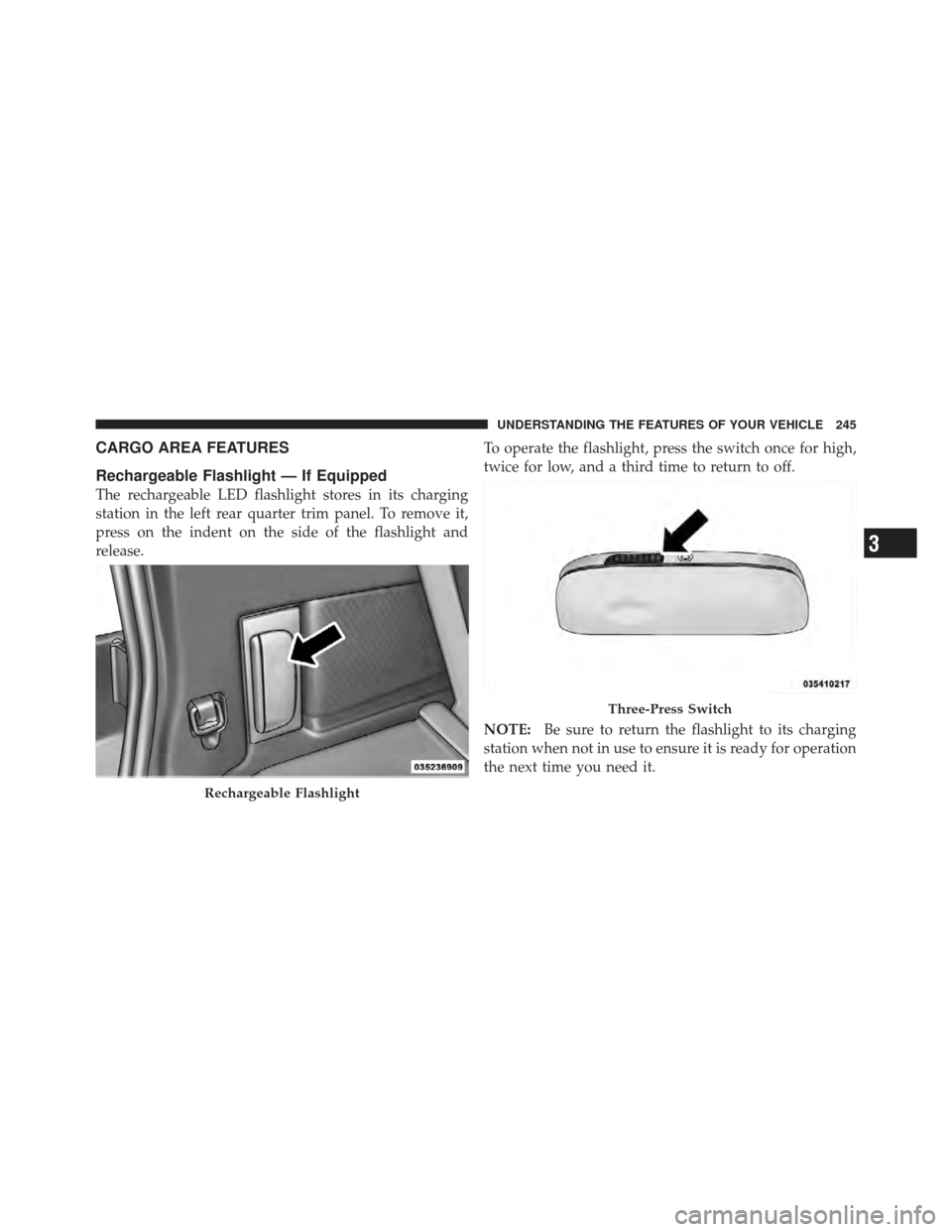
The rechargeable LED flashlight stores in its charging
station in the left rear quarter trim panel. To remove it,
press on the indent on the side of the flashlight and
release.To operate the flashlight, press the switch once for high,
twice for low, and a third time to return to off.
NOTE:
Be sure to return the flashlight to its charging
station when not in use to ensure it is ready for operation
the next time you need it.
Rechargeable Flashlight
Three-Press Switch
3
UNDERSTANDING THE FEATURES OF YOUR VEHICLE 245
Page 257 of 557
UNDERSTANDING YOUR INSTRUMENT PANEL
CONTENTS
�Instrument Panel Features ............... 257
� Instrument Cluster .................... 258
� Instrument Cluster Descriptions ........... 259
� Electronic Vehicle Information Center (EVIC) . . 268
▫ Electronic Vehicle Information Center (EVIC)
Displays ........................... 270
▫ EVIC White Telltale Lights .............. 272
▫ EVIC Amber Telltale Lights ............. 272
▫ EVIC Red Telltale Lights ............... 273 ▫
Oil Change Required .................. 275
▫ Fuel Economy ...................... 276
▫ Vehicle Speed ....................... 278
▫ Trip Info .......................... 278
▫ Vehicle Info
(Customer Information Features) ......... 279
� Uconnect Touch™ Settings ............... 279
▫ Hard-Keys ......................... 280
▫ Soft-Keys .......................... 280
4
Page 259 of 557
INSTRUMENT PANEL FEATURES
1 — Side Window Demist Outlet6 — Switch Bank11 — Engine Start/Stop Button
2 — Air Outlet 7 — Uconnect Touch™ Hard Controls 12 — Hood Release Lever
3 — Instrument Cluster 8 — SD Memory Card Slot13 — Dimmer Controls
4 — Uconnect Touch™ System 9 — Power Outlet14 — Headlight Switch
5 — Glove Compartment 10 — CD/DVD Slot
4
UNDERSTANDING YOUR INSTRUMENT PANEL 257
Page 261 of 557

INSTRUMENT CLUSTER DESCRIPTIONS
1. Tachometer
The red segments indicate the maximum permissible
engine revolutions per minute (RPM x 1000) for each gear
range. Before reaching the red area, ease up on the
accelerator.
2. Air Bag Warning LightThis light will turn on for four to eight seconds
as a bulb check when the ignition switch is first
turned to ON/RUN. If the light is either not on
during starting, stays on, or turns on while
driving, have the system inspected at an authorized
dealer as soon as possible. Refer to “Occupant Restraints”
in “Things To Know Before Starting Your Vehicle” for
further information. 3. Malfunction Indicator Light (MIL)
The Malfunction Indicator Light (MIL) is part of
an onboard diagnostic system, called OBD, that
monitors engine and automatic transmission con-
trol systems. The light will illuminate when the key is in
the ON/RUN position, before engine start. If the bulb
does not come on when turning the key from OFF to
ON/RUN, have the condition checked promptly.
Certain conditions, such as a loose or missing gas cap,
poor fuel quality, etc., may illuminate the MIL after
engine start. The vehicle should be serviced if the light
stays on through several of your typical driving cycles. In
most situations, the vehicle will drive normally and will
not require towing.
4
UNDERSTANDING YOUR INSTRUMENT PANEL 259