Page 180 of 452
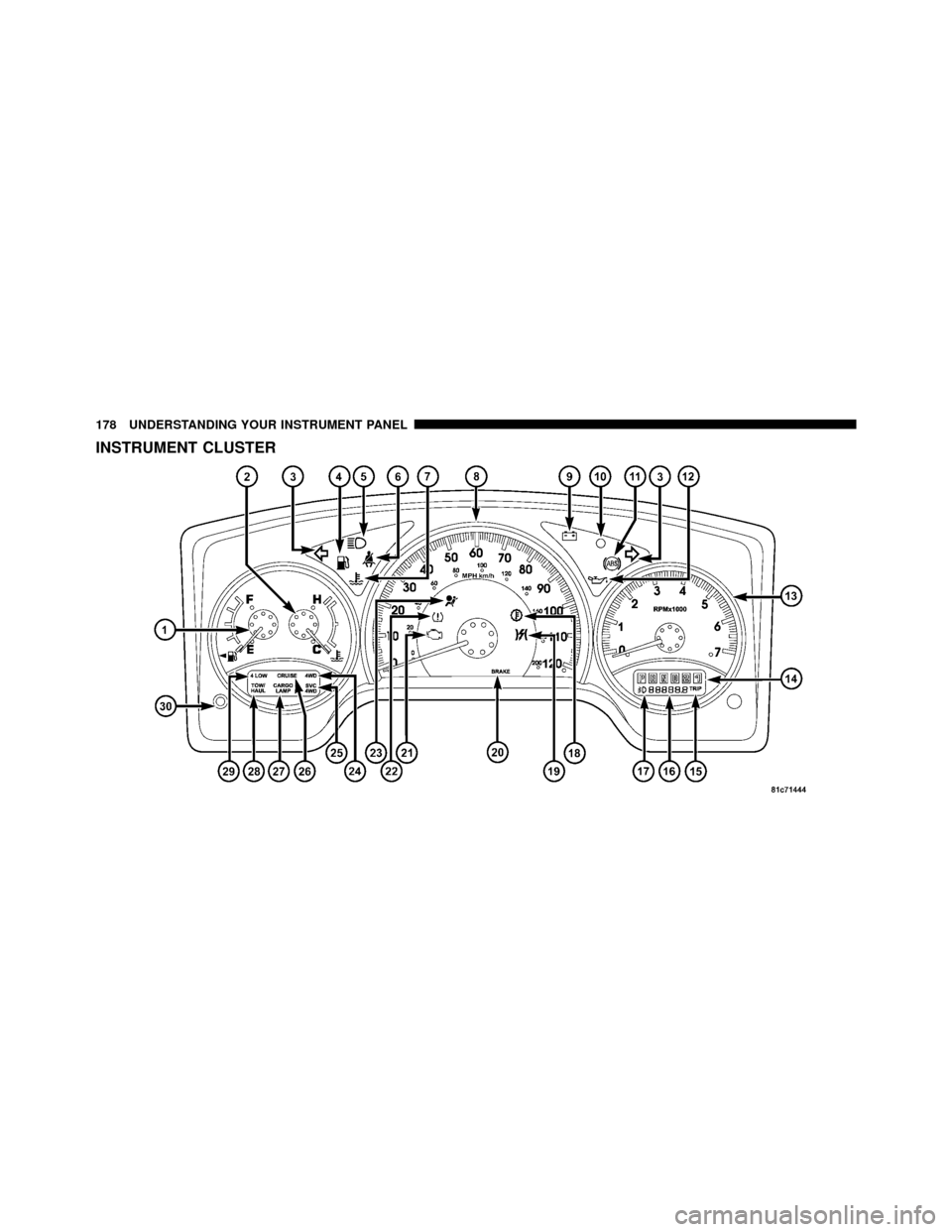
INSTRUMENT CLUSTER
178 UNDERSTANDING YOUR INSTRUMENT PANEL
Page 181 of 452
INSTRUMENT CLUSTER DESCRIPTIONS
1. Fuel Gauge
The fuel gauge shows the level of fuel in the fuel tank
when ignition switch is in the ON/RUN position.
2. Temperature Gauge
The temperature gauge shows engine coolant tempera-
ture. Any reading within the normal range indicates that
the engine cooling system is operating satisfactorily. The
gauge pointer will likely indicate a higher temperature
when driving in hot weather, up mountain grades, or
when towing a trailer. It should not be allowed to exceed
the upper limits of the normal operating range.
CAUTION!
Do not leave your vehicle unattended with the en-
gine running as you would not be able to react to the
temperature gauge if the engine overheats.3. Turn Signal Indicators
When a turn signal is activated, a right-pointing or
left-pointing arrow lights up and flashes to indicate
the direction of the turn. These indicators also indicate
proper operation of the front and rear turn signal lights.
If either indicator flashes at a faster rate than normal,
check for a defective bulb. If either indicator fails to light
up when the lever is moved, check for a defective fuse or
turn signal LED. A single chime is activated when the
left/right turn signal is left on, with the vehicle speed
greater than 15 mph (24 km/h) for more than 1 mile
(1.6 km).
4. Low Fuel Warning Light The low fuel warning light will illuminate when the
fuel gauge reads 1/8 of a tank or less. There is a
pointer on the side of this symbol that indicates the
side that your fuel filler door is located.
4
UNDERSTANDING YOUR INSTRUMENT PANEL 179
Page 184 of 452

If the ABS light remains on or turns on while driving, it
indicates that the Anti-Lock portion of the brake system
is not functioning and that service is required. However,
the conventional brake system will continue to operate
normally if the BRAKE warning light is not on.
If the ABS light is on, the brake system should be serviced
as soon as possible to restore the benefits of Anti-Lock
brakes. If the ABS light does not illuminate when the
ignition switch is turned to the ON/RUN position, have
the light inspected by an authorized dealer.
12. Oil Pressure Warning LightThe Oil Pressure Warning Light illuminates when
the engine oil pressure has become too low. For a
bulb check, this light will come on momentarily when the
ignition is turned to ON/RUN. If the light turns on while
driving, stop the vehicle and shut off the engine as soon
as possible. Immediate service should be obtained. 13. Tachometer
The tachometer gauge measures engine revolutions-per-
minute (RPM x 1000).
14. Shift Lever Indicator
The electronic shift lever indicator is self-contained
within the instrument cluster. It displays the position of
the automatic transmission shift lever, and the relation of
each position to all other positions. The display will place
a box around the selected transmission range (PRND21).
If the PRNDL displays only the characters PRND21 (no
boxes), have the system checked by an authorized dealer.
15. Trip Odometer
The trip odometer shows individual trip mileage. To
switch from odometer to trip odometer, press and release
the trip odometer button.
To reset a trip odometer, display the trip odometer then
push and hold the button until the display resets (ap-
proximately two seconds).
182 UNDERSTANDING YOUR INSTRUMENT PANEL
Page 186 of 452
gASCAP
If the vehicle diagnostic system determines that the fuel
filler cap is loose, improperly installed, or damaged, a
“gASCAP” message will display in the odometer display
area. Tighten the fuel filler cap properly and press the
TRIP ODOMETER button to turn off the message. If the
problem continues, the message will appear the next time
the vehicle is started.
LoW tirE
When the appropriate condition exists, the odometer
display will toggle between LoW and tirE for three
cycles.
noFUSE
If the vehicle diagnostic system determines that the Igni-
tion Off Draw (IOD) fuse is improperly installed, or
damaged, a “noFUSE” message will display in the odom-
eter display area. For further information on fuses and fuse
locations refer to “Fuses” in “Maintaining Your Vehicle”.
CHAngE OIL Message
Your vehicle is equipped with an engine oil change
indicator system. The “CHAngE OIL” message will flash
in the instrument cluster odometer for approximately
12 seconds after a single chime has sounded, to indicate
the next scheduled oil change interval. The engine oil
change indicator system is duty cycle based, which
means the engine oil change interval may fluctuate
dependent upon your personal driving style.
Unless reset, this message will continue to display each
time you turn the ignition switch to the ON/RUN
position. To turn off the message temporarily, press and
release the Trip Odometer button on the instrument
cluster. To reset the oil change indicator system (after
performing the scheduled maintenance), refer to the
following procedure:1. Turn the ignition switch to the ON/RUN position
(do not start the engine).
184 UNDERSTANDING YOUR INSTRUMENT PANEL
Page 255 of 452
Key Ignition Park Interlock
This vehicle is equipped with a Key Ignition Park Inter-
lock which requires the shift lever to be placed in PARK
prior to rotating the key to the LOCK position. The key
can only be removed from the ignition when the ignition
is in the LOCK position and once removed the shift lever
is locked in PARK.
Brake/Transmission Interlock System
This vehicle is equipped with a Brake Transmission Shift
Interlock System (BTSI) that holds the shift lever in the
PARK position when the ignition switch is in the LOCK
position. To move the shift lever out of the PARK
position, the ignition switch must be turned to any other
switch position (ACC, ON, or START) (engine running or
not) and the brake pedal must be pressed.
Automatic Transmission
The electronic PRNDL on the instrument cluster indicates
the transmission gear selected. The shift lever is mounted
on the right side of the steering column. To drive, move
the shift lever from PARK or NEUTRAL to the desired
drive position. Pull the shift lever toward you when
shifting into REVERSE, SECOND, FIRST or PARK, or
when shifting out of PARK.
Gear Ranges
DO NOT race the engine when shifting from PARK or
NEUTRAL position into another gear range.
PARK
This range supplements the parking brake by locking the
transmission. The engine can be started in this range.
Never use PARK while the vehicle is in motion. Apply
the parking brake when leaving the vehicle in this range.
Always apply the parking brake first, then place the shift
lever into the PARK position.
5
STARTING AND OPERATING 253
Page 259 of 452
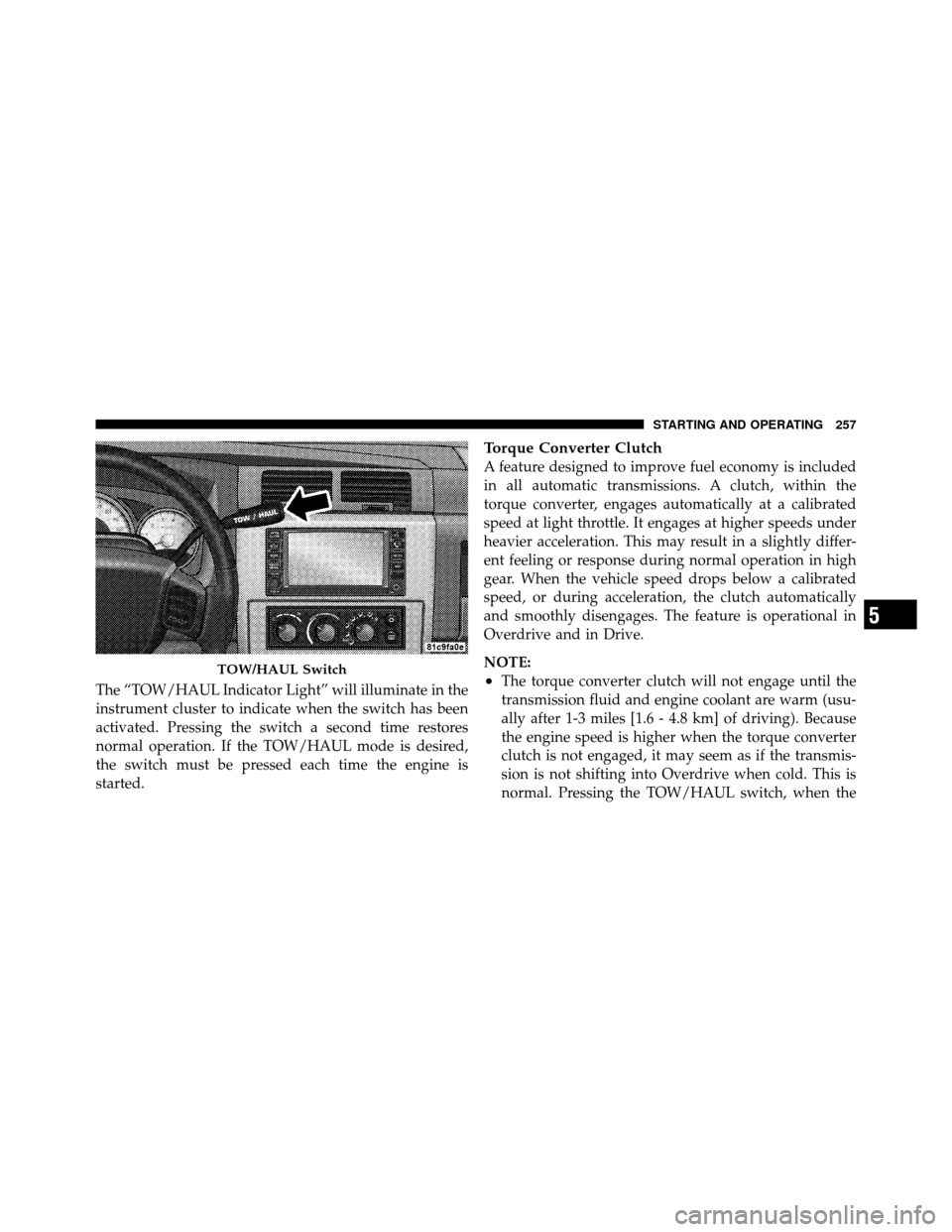
The “TOW/HAUL Indicator Light” will illuminate in the
instrument cluster to indicate when the switch has been
activated. Pressing the switch a second time restores
normal operation. If the TOW/HAUL mode is desired,
the switch must be pressed each time the engine is
started.
Torque Converter Clutch
A feature designed to improve fuel economy is included
in all automatic transmissions. A clutch, within the
torque converter, engages automatically at a calibrated
speed at light throttle. It engages at higher speeds under
heavier acceleration. This may result in a slightly differ-
ent feeling or response during normal operation in high
gear. When the vehicle speed drops below a calibrated
speed, or during acceleration, the clutch automatically
and smoothly disengages. The feature is operational in
Overdrive and in Drive.
NOTE:
•The torque converter clutch will not engage until the
transmission fluid and engine coolant are warm (usu-
ally after 1-3 miles [1.6 - 4.8 km] of driving). Because
the engine speed is higher when the torque converter
clutch is not engaged, it may seem as if the transmis-
sion is not shifting into Overdrive when cold. This is
normal. Pressing the TOW/HAUL switch, when theTOW/HAUL Switch
5
STARTING AND OPERATING 257
Page 261 of 452
The transfer case is designed to be driven in the two-
wheel drive position (2WD) for normal street and high-
way conditions on dry hard-surfaced roads.
When additional traction is required, the transfer case
4WD LOCK and 4WD LOW positions can be used to lock
the front and rear driveshafts together and force the front
and rear wheels to rotate at the same speed. This is
accomplished by turning the transfer case switch to the
desired position - Refer to “Shifting Procedure” for
further information. The 4WD LOCK and 4WD LOW
positions are designed for loose or slippery road surfaces
only. Driving in the 4WD LOCK and 4WD LOW posi-
tions on dry hard-surfaced roads may cause increased
tire wear and damage to the driveline components.
NOTE:The transfer case NEUTRAL position is selected
by pressing the recessed button located on the lower
left-hand corner of the transfer case switch. The transfer case NEUTRAL position is to be used for recreational
towing only. Refer to “Recreational Towing” in “Starting
and Operating” for further information.
Transfer Case Position Indicator Lights
The Transfer Case Position Indicator Lights (4WD and
4LOW) are located on the instrument cluster. If there is
no indicator light on or flashing, the transfer case is in
two-wheel drive (2WD). If the indicator light is on, the
desired position (4WD LOCK and 4WD LOW) has been
obtained.
If one or more shift requirements are not met:
1. An indicator light will flash.
2. The transfer case
will notshift.
NOTE: Before retrying a selection, make certain that all
the necessary requirements for selecting a new transfer
case position have been met. To retry the selection, turn
the transfer case switch back to the current position, wait
5
STARTING AND OPERATING 259
Page 273 of 452
If necessary, add fluid to restore to the proper indicated
level. With a clean cloth, wipe any spilled fluid from all
surfaces. Refer to “Fluids, Lubricants, and Genuine
Parts” in “Maintaining Your Vehicle” for further
information.
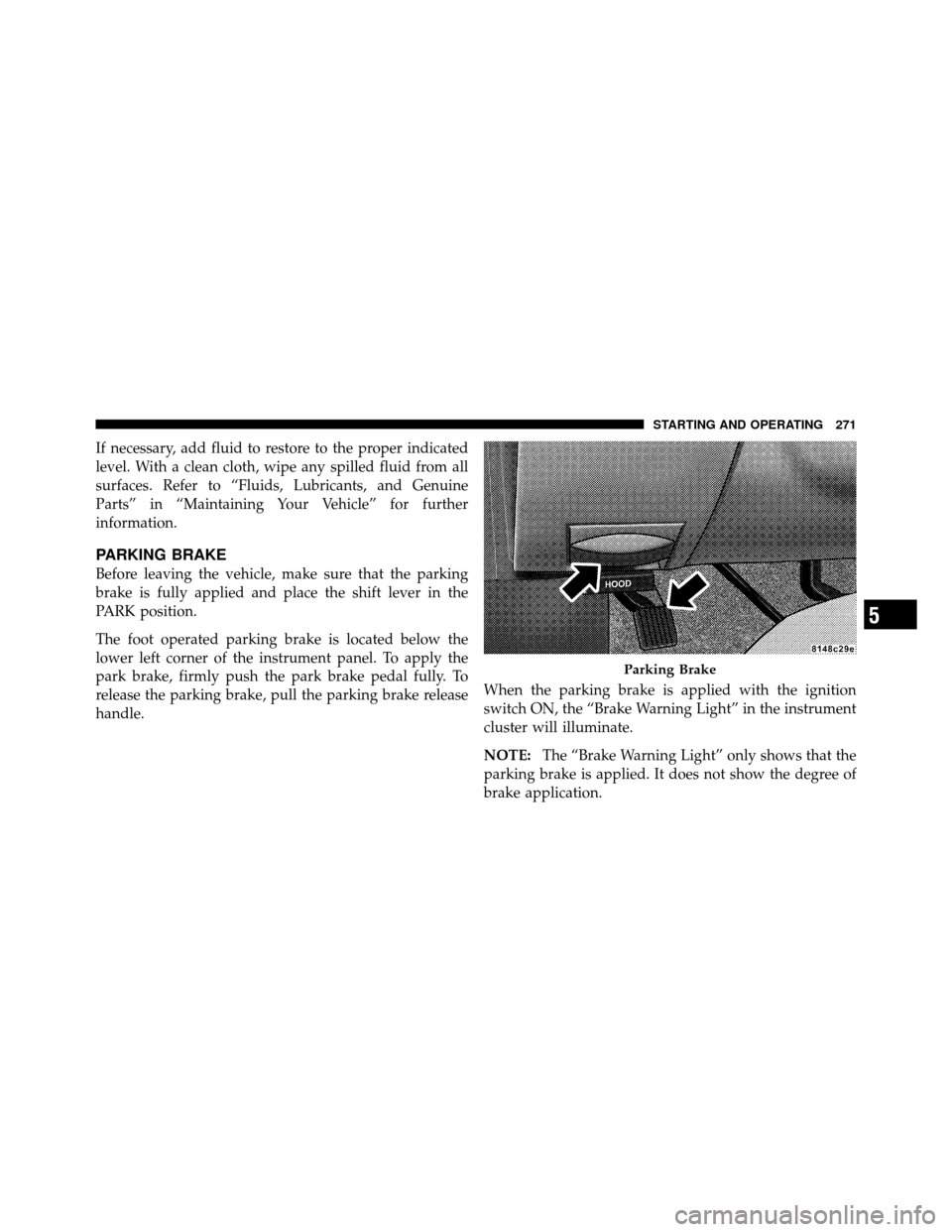
PARKING BRAKE
Before leaving the vehicle, make sure that the parking
brake is fully applied and place the shift lever in the
PARK position.
The foot operated parking brake is located below the
lower left corner of the instrument panel. To apply the
park brake, firmly push the park brake pedal fully. To
release the parking brake, pull the parking brake release
handle.When the parking brake is applied with the ignition
switch ON, the “Brake Warning Light” in the instrument
cluster will illuminate.
NOTE:
The “Brake Warning Light” only shows that the
parking brake is applied. It does not show the degree of
brake application.
Parking Brake
5
STARTING AND OPERATING 271