Page 95 of 566

▫To Set A Desired ACC Speed ............ 216
▫ To Cancel .......................... 217
▫ ToTurnOff ........................ 218
▫ To Resume Speed .................... 218
▫ To Vary The Speed Setting .............. 219
▫ Setting The Following Distance In ACC .... 220
▫ Adaptive Cruise Control (ACC) Menu ..... 221
▫ Display Warnings And Maintenance ....... 223
▫ Precautions While Driving With ACC ...... 226
▫ General Information .................. 230
▫ Normal (Fixed Speed) Cruise
Control Mode ....................... 230
▫ Forward Collision Warning — If Equipped . . 232 �
Parksense� Rear Park Assist — If Equipped . . . 235
▫ Parksense� Sensors................... 236
▫ Parksense� Warning Display ............ 236
▫ Parksense� Display................... 236
▫ Enabling And Disabling Parksense� ....... 239
▫ Service The Parksense� Rear Park Assist
System ............................ 240
▫ Cleaning The Parksense� System......... 240
▫ Parksense� System Usage Precautions ...... 240
� Parkview� Rear Back Up Camera —
If Equipped .......................... 243
▫ Turning Parkview� On Or Off —
With Touch Screen Radio ............... 245
3
UNDERSTANDING THE FEATURES OF YOUR VEHICLE 93
Page 237 of 566

Service FCW Warning
If the system turns off, and the EVIC displays “ACC/
FCW Unavailable Service Radar Sensor”, it indicates
there is an internal system fault. Although the vehicle is
still drivable under normal conditions, have the system
checked by an authorized dealer.
PARKSENSE�REAR PARK ASSIST —
IF EQUIPPED
The ParkSense� Rear Park Assist system provides visual
and audible indications of the distance between the rear
fascia and a detected obstacle when backing up, e.g.
during a parking maneuver. Refer to “ParkSense� System
Usage Precautions” for limitations of this system and
recommendations.
ParkSense� will retain the last system state (enabled or
disabled) from the last ignition cycle when the ignition is
changed to the ON/RUN position.
ParkSense� can be active only when the shift lever is in
REVERSE. If ParkSense� is enabled at this shift lever
position, the system will remain active until the vehicle
speed is increased to approximately 11 mph (18 km/h) or
above. The system will become active again if the vehicle
speed is decreased to speeds less than approximately
10 mph (16 km/h).
ACC/FCW Unavailable Warning
3
UNDERSTANDING THE FEATURES OF YOUR VEHICLE 235
Page 238 of 566

ParkSense�Sensors
The four ParkSense� sensors, located in the rear fascia/
bumper, monitor the area behind the vehicle that is
within the sensors’ field of view. The sensors can detect
obstacles from approximately 12 in (30 cm) up to 79 in
(200 cm) from the rear fascia/bumper in the horizontal
direction, depending on the location, type and orienta-
tion of the obstacle.
ParkSense� Warning Display
The ParkSense� Warning screen will only be displayed if
Sound and Display is selected from the Uconnect Touch™
System. Refer to “Uconnect Touch™ Settings” in “Under-
standing Your Instrument Panel” for further information.
The ParkSense� Warning screen is located within the Elec-
tronic Vehicle Information Center (EVIC). It provides visual
warnings to indicate the distance between the rear fascia/
bumper and the detected obstacle. Refer to “Electronic Vehicle Information Center (EVIC)/Settings” in Under-
standing Your Instrument Panel” for further information.
ParkSense�
Display
When the vehicle is in REVERSE, the warning display
will turn ON indicating the system status.
Rear Park Assist Display
236 UNDERSTANDING THE FEATURES OF YOUR VEHICLE
Page 239 of 566
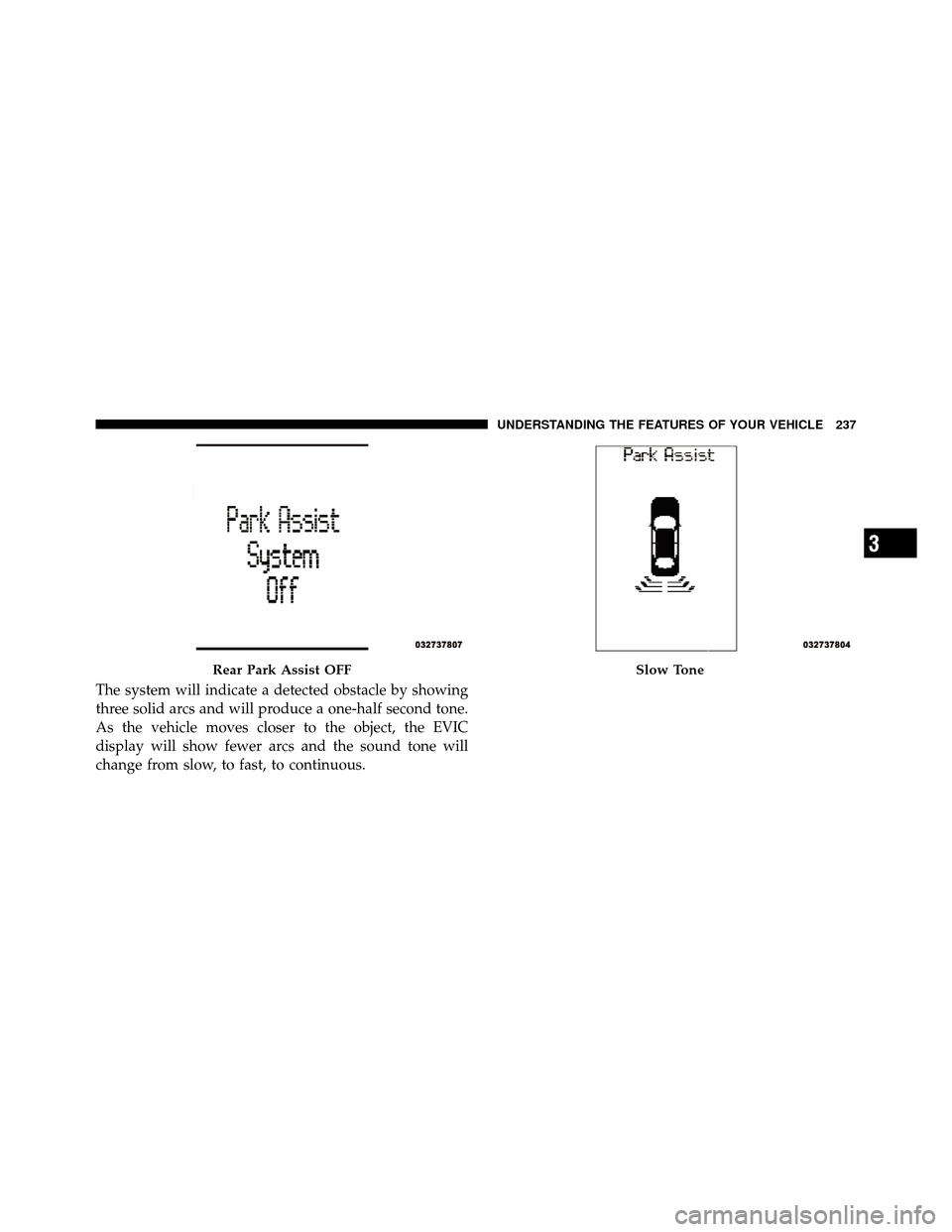
The system will indicate a detected obstacle by showing
three solid arcs and will produce a one-half second tone.
As the vehicle moves closer to the object, the EVIC
display will show fewer arcs and the sound tone will
change from slow, to fast, to continuous.
Rear Park Assist OFFSlow Tone
3
UNDERSTANDING THE FEATURES OF YOUR VEHICLE 237
Page 241 of 566
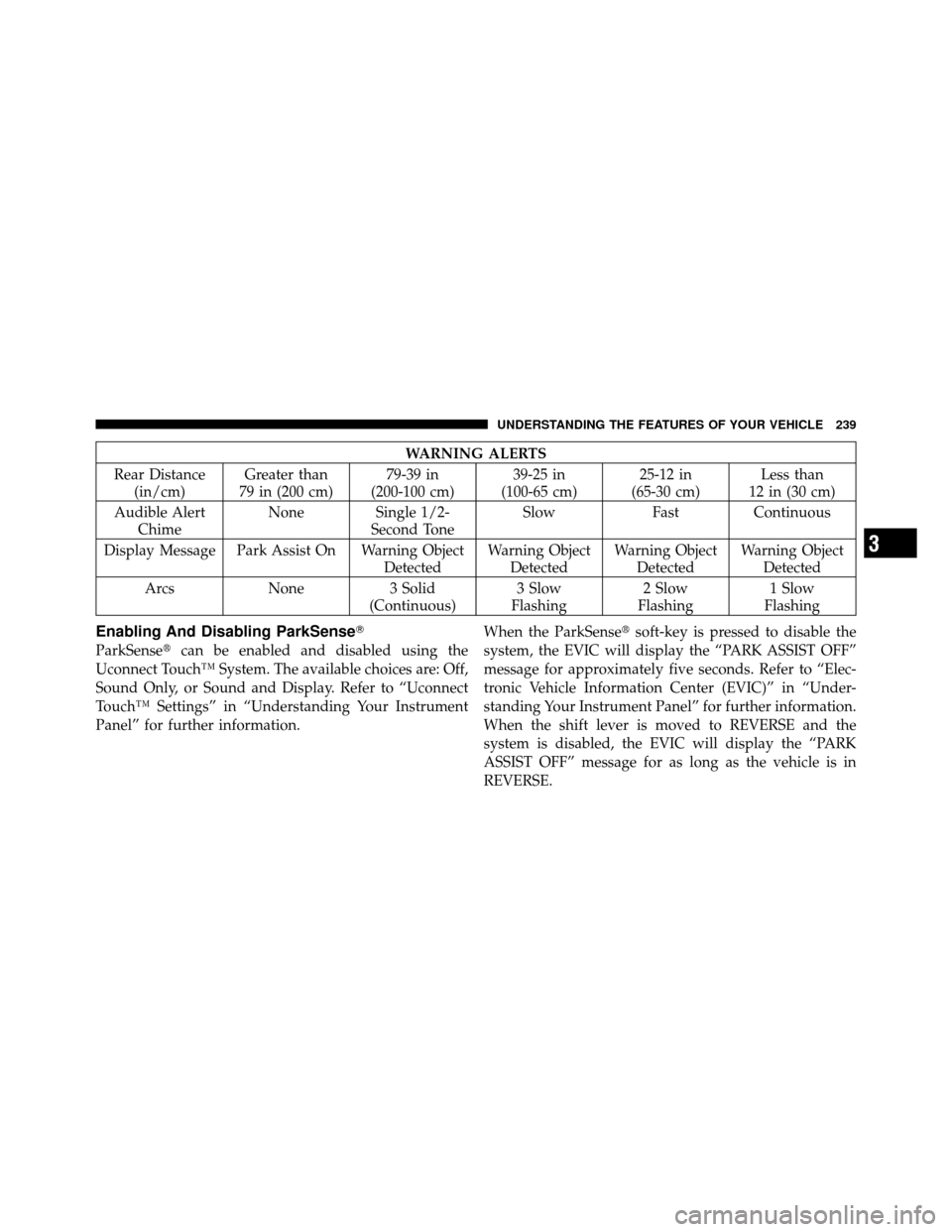
WARNING ALERTS
Rear Distance (in/cm) Greater than
79 in (200 cm) 79-39 in
(200-100 cm) 39-25 in
(100-65 cm) 25-12 in
(65-30 cm) Less than
12 in (30 cm)
Audible Alert Chime None Single 1/2-
Second Tone Slow
FastContinuous
Display Message Park Assist On Warning Object DetectedWarning Object
Detected Warning Object
Detected Warning Object
Detected
Arcs None3 Solid
(Continuous) 3 Slow
Flashing 2 Slow
Flashing 1 Slow
Flashing
Enabling And Disabling ParkSense�
ParkSense� can be enabled and disabled using the
Uconnect Touch™ System. The available choices are: Off,
Sound Only, or Sound and Display. Refer to “Uconnect
Touch™ Settings” in “Understanding Your Instrument
Panel” for further information. When the ParkSense�
soft-key is pressed to disable the
system, the EVIC will display the “PARK ASSIST OFF”
message for approximately five seconds. Refer to “Elec-
tronic Vehicle Information Center (EVIC)” in “Under-
standing Your Instrument Panel” for further information.
When the shift lever is moved to REVERSE and the
system is disabled, the EVIC will display the “PARK
ASSIST OFF” message for as long as the vehicle is in
REVERSE.
3
UNDERSTANDING THE FEATURES OF YOUR VEHICLE 239
Page 242 of 566

The ParkSense�system uses four sensors located in the
rear bumper fascia to scan for obstacles up to 79 in
(200 cm) away from the rear bumper fascia. ParkSense�
provides both visual and audible warnings to indicate
the range of the object.
Service The ParkSense� Rear Park Assist System
When the ParkSense�Rear Park Assist system is mal-
functioning, the Electronic Vehicle Information Center
(EVIC) will actuate a single chime, once per ignition
cycle, and it will display the “CLEAN PARK ASSIST
SENSORS” or the “SERVICE PARK ASSIST SYSTEM”
message. Refer to “Electronic Vehicle Information Center
(EVIC)” in “Understanding Your Instrument Panel” for
further information. When the shift lever is moved to
REVERSE and the system has detected a fault condition,
the EVIC will display the “CLEAN PARK ASSIST SEN-
SORS” or the “SERVICE PARK ASSIST SYSTEM” mes-
sage for as long as the vehicle is in REVERSE. Under this
condition, ParkSense� will not operate. If “CLEAN PARK ASSIST SENSORS” appears in the
EVIC and the rear fascia/bumper is clean and clear of
snow, ice, mud, dirt or other obstruction, see your
authorized dealer.
If “SERVICE PARK ASSIST SYSTEM” appears in the
EVIC, see your authorized dealer.Cleaning The ParkSense�
System
Clean the ParkSense�sensors with water, car wash soap
and a soft cloth. Do not use rough or hard cloths. Do not
scratch or poke the sensors. Otherwise, you could dam-
age the sensors.
ParkSense� System Usage Precautions
NOTE:
•Ensure that the rear bumper is free of snow, ice, mud,
dirt and debris to keep the ParkSense� system operat-
ing properly.
240 UNDERSTANDING THE FEATURES OF YOUR VEHICLE
Page 243 of 566

•Jackhammers, large trucks, and other vibrations could
affect the performance of ParkSense�.
•When you turn ParkSense�off, the EVIC will display
“PARK ASSIST OFF.” Furthermore, once you turn
ParkSense� off, it remains off until you turn it on
again, even if you cycle the ignition key.
•When you move the shift lever to the REVERSE
position and ParkSense� is turned off, the EVIC will
display “PARK ASSIST OFF” message for as long as
the vehicle is in REVERSE.
•Clean the ParkSense� sensors regularly, taking care
not to scratch or damage them. The sensors must not
be covered with ice, snow, slush, mud, dirt or debris.
Failure to do so can result in the system not working
properly. The ParkSense� system might not detect an
obstacle behind the fascia/bumper, or it could provide
a false indication that an obstacle is behind the fascia/
bumper.
•Objects such as bicycle carriers, trailer hitches, etc.,
must not be placed within 12 in (30 cm) from the rear
fascia/bumper while driving the vehicle. Failure to do
so can result in the system misinterpreting a close
object as a sensor problem, causing the “SERVICE
PARK ASSIST SYSTEM” message to be displayed in
the EVIC.
CAUTION!
•ParkSense� is only a parking aid and it is unable
to recognize every obstacle, including small ob-
stacles. Parking curbs might be temporarily de-
tected or not detected at all. Obstacles located
above or below the sensors will not be detected
when they are in close proximity.
(Continued)
3
UNDERSTANDING THE FEATURES OF YOUR VEHICLE 241
Page 244 of 566

CAUTION! (Continued)
•The vehicle must be driven slowly when using
ParkSense�in order to be able to stop in time
when an obstacle is detected. It is recommended
that the driver looks over his/her shoulder when
using ParkSense�.
WARNING!
•Drivers must be careful when backing up even
when using the ParkSense� Rear Park Assist sys-
tem. Always check carefully behind your vehicle,
look behind you, and be sure to check for pedes-
trians, animals, other vehicles, obstructions, and
blind spots before backing up. You are responsible
for safety and must continue to pay attention to
your surroundings. Failure to do so can result in
serious injury or death.
(Continued)
WARNING! (Continued)
•Before using the ParkSense�Rear Park Assist
system, it is strongly recommended that the ball
mount and hitch ball assembly is disconnected
from the vehicle when the vehicle is not used for
towing. Failure to do so can result in injury or
damage to vehicles or obstacles because the hitch
ball will be much closer to the obstacle than the
rear fascia when the warning display turns on the
single flashing arc and sounds the continuous
tone. Also, the sensors could detect the ball mount
and hitch ball assembly, depending on its size and
shape, giving a false indication that an obstacle is
behind the vehicle.
242 UNDERSTANDING THE FEATURES OF YOUR VEHICLE