Page 166 of 566
If no command is spoken the system will say one of two
responses:
•I didn’t understand
•I didn’t get that, etc.,
If a command is not spoken a second time, the system
will respond with an error and give some direction as
what can be said based on the context you are in. After
three consecutive failures of a spoken command the VR
session with end.
Pressing the Uconnect™ Voice Command
button
while the system is speaking is known as “barging in.”
The system will be interrupted, and after the beep, you
can say a command. This will become helpful once you
start to learn the options.
NOTE: At any time, you can say the words “Cancel” or
“Help”. These commands are universal and can be used from any
menu. All other commands can be used depending upon
the active application.
When using this system, you should speak clearly and at
a normal speaking volume.
The system will best recognize your speech if the win-
dows are closed, and the heater/air conditioning fan is
set to low.
At any point, if the system does not recognize one of your
commands, you will be prompted to repeat it.
To hear available commands, press the Uconnect™ Voice
Command
button and say “Help”. You will hear
available commands for the screen displayed.
164 UNDERSTANDING THE FEATURES OF YOUR VEHICLE
Page 176 of 566
Heated Seats — If Equipped
On some models, the front and rear seats may be
equipped with heaters in both the seat cushions and
seatbacks.
The front driver and passenger heated seats are operated
using the Uconnect Touch™ System.
WARNING!
•Persons who are unable to feel pain to the skin
because of advanced age, chronic illness, diabetes,
spinal cord injury, medication, alcohol use, ex-
haustion or other physical condition must exercise
care when using the seat heater. It may cause burns
even at low temperatures, especially if used for
long periods of time.(Continued)
WARNING! (Continued)
•Do not place anything on the seat that insulates
against heat, such as a blanket or cushion. This
may cause the seat heater to overheat. Sitting in a
seat that has been overheated could cause serious
burns due to the increased surface temperature of
the seat.
Front Heated Seat Operation — Vehicles Equipped
With Uconnect Touch™ 4.3:
Press the CLIMATE hard-key (located next to the Uconnect
Touch™ display) to enter the climate control screen.
Press the “Driver” or “Pass” seat soft-key (lo-
cated on the Uconnect Touch™ display) once to
select HI-level heating. Press the soft-key a
second time to select LO-level heating. Press
the soft-key a third time to shut the heating elements
OFF.
174 UNDERSTANDING THE FEATURES OF YOUR VEHICLE
Page 177 of 566
Front Heated Seat Operations — Vehicles
Equipped With Uconnect Touch™ 8.4 and 8.4 Nav:
Press the “Controls” soft-key located on the Uconnect
Touch™ display.Press the “Driver” or “Passenger” seat soft-key
once to select HI-level heating. Press the soft-
key a second time to select LO-level heating.
Press the soft-key a third time to shut the
heating elements OFF.
NOTE: Once a heat setting is selected, heat will be felt
within two to five minutes.
When the HI-level setting is selected, the heater will
provide a boosted heat level during the first four minutes
of operation. Then, the heat output will drop to the
normal HI-level. If the HI-level setting is selected, the system will automatically switch to LO-level after a
maximum of 60 minutes of continuous operation. At that
time, the display will change from HI to LO, indicating
the change. The LO-level setting will turn OFF automati-
cally after a maximum of 45 minutes.
Vehicle Equipped With Remote Start
On models that are equipped with remote start, the
driver ’s heated seat can be programmed to come on
during a remote start. Refer to “Remote Starting System
— If Equipped” in “Things To Know Before Starting Your
Vehicle” for further information.
Rear Heated Seats
On some models, the two outboard seats are equipped
with heated seats. The heated seat switches for these
seats are located on the rear of the center console.
3
UNDERSTANDING THE FEATURES OF YOUR VEHICLE 175
Page 178 of 566
There are two heated seat switches that allow the rear
passengers to operate the seats independently. You can
choose from HI, LO or OFF heat settings. Amber indica-
tor lights in each switch indicate the level of heat in use.
Two indicator lights will illuminate for HI, one for LO
and none for OFF.Press the switch once to select HI-level heating.
Press the switch a second time to select LO-
level heating. Press the switch a third time to
shut the heating elements OFF.
NOTE:
•Once a heat setting is selected, heat will be felt within
two to five minutes.
•The engine must be running for the heated seats to
operate. When the HI-level setting is selected, the heater will
provide a boosted heat level during the first four minutes
of operation. Then, the heat output will drop to the
normal HI-level. If the HI-level setting is selected, the
system will automatically switch to LO-level after a
maximum of 60 minutes of continuous operation. At that
time, the number of illuminated LEDs changes from two
to one, indicating the change. The LO-level setting will
turn OFF automatically after a maximum of 45 minutes.
Manual Seats — If Equipped
Forward Or Rearward Adjustment
The adjusting bar is at the front of the seat, near the floor.
Pull the bar upward to move the seat forward or rear-
ward. Release the bar once the seat is in the position
desired. Using body pressure, move forward and rear-
ward on the seat to be sure that the seat adjusters have
latched.
176 UNDERSTANDING THE FEATURES OF YOUR VEHICLE
Page 207 of 566
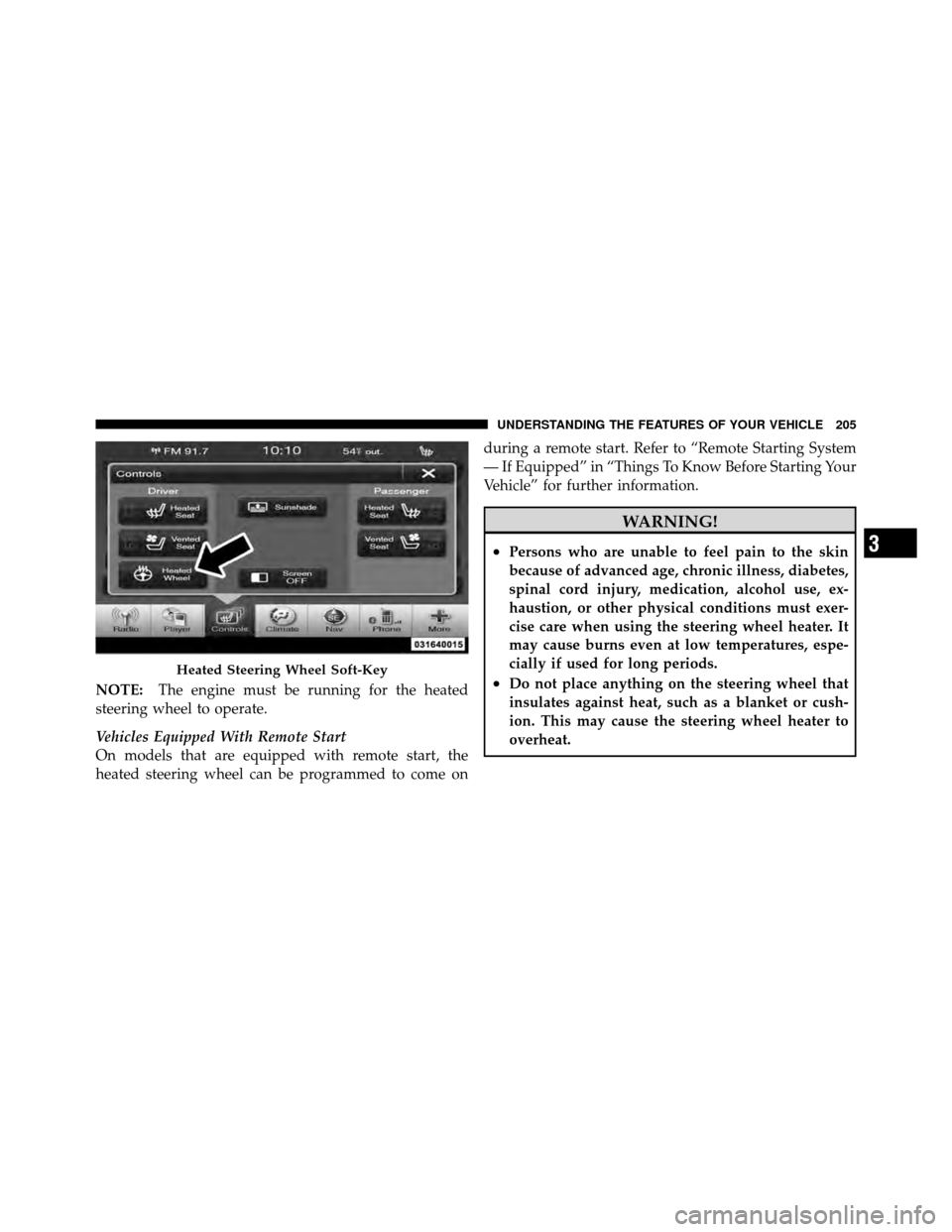
NOTE:The engine must be running for the heated
steering wheel to operate.
Vehicles Equipped With Remote Start
On models that are equipped with remote start, the
heated steering wheel can be programmed to come on during a remote start. Refer to “Remote Starting System
— If Equipped” in “Things To Know Before Starting Your
Vehicle” for further information.
WARNING!
•Persons who are unable to feel pain to the skin
because of advanced age, chronic illness, diabetes,
spinal cord injury, medication, alcohol use, ex-
haustion, or other physical conditions must exer-
cise care when using the steering wheel heater. It
may cause burns even at low temperatures, espe-
cially if used for long periods.
•Do not place anything on the steering wheel that
insulates against heat, such as a blanket or cush-
ion. This may cause the steering wheel heater to
overheat.Heated Steering Wheel Soft-Key
3
UNDERSTANDING THE FEATURES OF YOUR VEHICLE 205
Page 345 of 566
STARTING AND OPERATING
CONTENTS
�Starting Procedures .................... 348
▫ Automatic Transmission ............... 348
▫ Keyless Enter-N-Go ................... 349
▫ Normal Starting ..................... 349
▫ Extreme Cold Weather
(Below –20°F Or �29°C)............... 350
▫ If Engine Fails To Start ................ 351
▫ After Starting ....................... 351
� Engine Block Heater — If Equipped ........ 352�
Automatic Transmission ................. 352
▫ General Information .................. 353
▫ Brake/Transmission Shift Interlock System . . 355
▫ Five-Speed Automatic Transmission ....... 355
▫ Gear Ranges ........................ 356
� AutoStick� .......................... 359
▫ Operation ......................... 359
� All-Wheel Drive (AWD) — If Equipped ...... 360
5
Page 352 of 566
display a “Vehicle Not In Park” message and the engine
will remain running. Never leave a vehicle out of the
PARK position, or it could roll.
NOTE:If the ignition switch is left in the ACC or RUN
(engine not running) position and the transmission is in
PARK, the system will automatically time out after
30 minutes of inactivity and the ignition will switch to the
OFF position.
ENGINE START/STOP Button Functions – With
Driver ’s Foot OFF The Brake Pedal (In PARK Or
NEUTRAL Position)
The ENGINE START/STOP button operates similar to an
ignition switch. It has four positions, OFF, ACC, RUN
and START. To change the ignition switch positions
without starting the vehicle and use the accessories
follow these steps.
•Starting with the ignition switch in the OFF position:
•Press the ENGINE START/STOP button once to
change the ignition switch to the ACC position (EVIC
displays “ACC”),
•Press the ENGINE START/STOP button a second time
to change the ignition switch to the RUN position
(EVIC displays “RUN”),
•Press the ENGINE START/STOP button a third time
to return the ignition switch to the OFF position (EVIC
displays “OFF”).
Extreme Cold Weather (Below –20°F Or �29°C)
To ensure reliable starting at these temperatures, use of
an externally powered electric engine block heater (avail-
able from your authorized dealer) is recommended.
350 STARTING AND OPERATING
Page 354 of 566
ENGINE BLOCK HEATER — IF EQUIPPED
The engine block heater warms the engine, and permits
quicker starts in cold weather. Connect the cord to a
standard 110-115 Volt AC electrical outlet with a
grounded, three-wire extension cord.
The engine block heater cord is routed under the hood on
the driver side of the vehicle. It has a removable cap that
is located on the driver side of the Integrated Power
Module.
The engine block heater must be plugged in at least one
hour to have an adequate warming effect on the engine.
WARNING!
Remember to disconnect the engine block heater
cord before driving. Damage to the 110-115 Volt
electrical cord could cause electrocution.
AUTOMATIC TRANSMISSION
CAUTION!
Damage to the transmission may occur if the follow-
ing precautions are not observed:
•Shift into PARK only after the vehicle has come to
a complete stop.
•Shift into or out of REVERSE only after the
vehicle has come to a complete stop and the engine
is at idle speed.
•Do not shift from REVERSE, PARK, or NEUTRAL
into any forward gear when the engine is above
idle speed.
•Before shifting into any gear, make sure your foot
is firmly on the brake pedal.
352 STARTING AND OPERATING