Page 237 of 566

Service FCW Warning
If the system turns off, and the EVIC displays “ACC/
FCW Unavailable Service Radar Sensor”, it indicates
there is an internal system fault. Although the vehicle is
still drivable under normal conditions, have the system
checked by an authorized dealer.
PARKSENSE�REAR PARK ASSIST —
IF EQUIPPED
The ParkSense� Rear Park Assist system provides visual
and audible indications of the distance between the rear
fascia and a detected obstacle when backing up, e.g.
during a parking maneuver. Refer to “ParkSense� System
Usage Precautions” for limitations of this system and
recommendations.
ParkSense� will retain the last system state (enabled or
disabled) from the last ignition cycle when the ignition is
changed to the ON/RUN position.
ParkSense� can be active only when the shift lever is in
REVERSE. If ParkSense� is enabled at this shift lever
position, the system will remain active until the vehicle
speed is increased to approximately 11 mph (18 km/h) or
above. The system will become active again if the vehicle
speed is decreased to speeds less than approximately
10 mph (16 km/h).
ACC/FCW Unavailable Warning
3
UNDERSTANDING THE FEATURES OF YOUR VEHICLE 235
Page 242 of 566

The ParkSense�system uses four sensors located in the
rear bumper fascia to scan for obstacles up to 79 in
(200 cm) away from the rear bumper fascia. ParkSense�
provides both visual and audible warnings to indicate
the range of the object.
Service The ParkSense� Rear Park Assist System
When the ParkSense�Rear Park Assist system is mal-
functioning, the Electronic Vehicle Information Center
(EVIC) will actuate a single chime, once per ignition
cycle, and it will display the “CLEAN PARK ASSIST
SENSORS” or the “SERVICE PARK ASSIST SYSTEM”
message. Refer to “Electronic Vehicle Information Center
(EVIC)” in “Understanding Your Instrument Panel” for
further information. When the shift lever is moved to
REVERSE and the system has detected a fault condition,
the EVIC will display the “CLEAN PARK ASSIST SEN-
SORS” or the “SERVICE PARK ASSIST SYSTEM” mes-
sage for as long as the vehicle is in REVERSE. Under this
condition, ParkSense� will not operate. If “CLEAN PARK ASSIST SENSORS” appears in the
EVIC and the rear fascia/bumper is clean and clear of
snow, ice, mud, dirt or other obstruction, see your
authorized dealer.
If “SERVICE PARK ASSIST SYSTEM” appears in the
EVIC, see your authorized dealer.Cleaning The ParkSense�
System
Clean the ParkSense�sensors with water, car wash soap
and a soft cloth. Do not use rough or hard cloths. Do not
scratch or poke the sensors. Otherwise, you could dam-
age the sensors.
ParkSense� System Usage Precautions
NOTE:
•Ensure that the rear bumper is free of snow, ice, mud,
dirt and debris to keep the ParkSense� system operat-
ing properly.
240 UNDERSTANDING THE FEATURES OF YOUR VEHICLE
Page 243 of 566

•Jackhammers, large trucks, and other vibrations could
affect the performance of ParkSense�.
•When you turn ParkSense�off, the EVIC will display
“PARK ASSIST OFF.” Furthermore, once you turn
ParkSense� off, it remains off until you turn it on
again, even if you cycle the ignition key.
•When you move the shift lever to the REVERSE
position and ParkSense� is turned off, the EVIC will
display “PARK ASSIST OFF” message for as long as
the vehicle is in REVERSE.
•Clean the ParkSense� sensors regularly, taking care
not to scratch or damage them. The sensors must not
be covered with ice, snow, slush, mud, dirt or debris.
Failure to do so can result in the system not working
properly. The ParkSense� system might not detect an
obstacle behind the fascia/bumper, or it could provide
a false indication that an obstacle is behind the fascia/
bumper.
•Objects such as bicycle carriers, trailer hitches, etc.,
must not be placed within 12 in (30 cm) from the rear
fascia/bumper while driving the vehicle. Failure to do
so can result in the system misinterpreting a close
object as a sensor problem, causing the “SERVICE
PARK ASSIST SYSTEM” message to be displayed in
the EVIC.
CAUTION!
•ParkSense� is only a parking aid and it is unable
to recognize every obstacle, including small ob-
stacles. Parking curbs might be temporarily de-
tected or not detected at all. Obstacles located
above or below the sensors will not be detected
when they are in close proximity.
(Continued)
3
UNDERSTANDING THE FEATURES OF YOUR VEHICLE 241
Page 250 of 566
WARNING!
•Your motorized door or gate will open and close
while you are training the Universal Transceiver.
Do not train the transceiver if people, pets, or
other objects are in the path of the door or gate.
•Do not run your vehicle in the garage while
training the transceiver. Exhaust gas from your
vehicle contains Carbon Monoxide (CO) which is
odorless and colorless. Carbon Monoxide is poi-
sonous when inhaled and cause you and others to
be severely injured or killed.
NOTE:
Only use this transceiver with a garage door
opener that has a “stop and reverse” feature as required
by federal safety standards. This includes most garage
door opener models manufactured after 1982. Do not use
a garage door opener without these safety features. Call
toll-free 1–800–355–3515 or, on the Internet at
www.HomeLink.com for safety information or assistance.
Programming HomeLink�
Before You Begin
If you have not trained any of the HomeLink� buttons,
erase all channels before you begin training.
To do this, press and hold the two outside buttons for up
to 20 seconds. The EVIC will display “CLEARING
CHANNELS.” Release the buttons when the EVIC mes-
sage states “CHANNELS CLEARED.”
It is recommended that a new battery be placed in the
handheld transmitter of the device that is being copied to
HomeLink� for more efficient training and accurate
transmission of the radio-frequency signal.
Your vehicle should be parked outside of the garage
while training.
1. Place the ignition in the RUN position.
248 UNDERSTANDING THE FEATURES OF YOUR VEHICLE
Page 254 of 566
Reprogramming A Single HomeLink�Button
To reprogram a channel that has been previously trained,
follow these steps:
1. Place the ignition in the RUN position.
2. Press and hold the desired HomeLink� button for
20 seconds until the EVIC display states “CHANNEL #
TRAINING.” Do not release the button.
3. Without releasing the button, proceed with Program-
ming HomeLink� Step 2 and follow all remaining steps.
Security
It is advised to erase all channels before you sell or turn
in your vehicle.
To do this, press and hold the two outside buttons for
20 seconds until the EVIC message states “CHANNELS
CLEARED.” Note that all channels will be erased. Indi-
vidual channels cannot be erased. The HomeLink�
Universal Transceiver is disabled when
the Vehicle Security Alarm is active.
Troubleshooting Tips
If you are having trouble programming HomeLink �, here
are some of the most common solutions:
•Replace the battery in the original transmitter.
•Press the LEARN button on the garage door opener to
complete the training for rolling code.
•Did you unplug the device for training, and remember
to plug it back in?
If you are having any problems or require assistance,
please call toll-free 1–800–355–3515 or, on the Internet at
www.HomeLink.com for information or assistance.
252 UNDERSTANDING THE FEATURES OF YOUR VEHICLE
Page 256 of 566
WARNING!
•Never leave children in a vehicle with the key in
the ignition switch. Occupants, particularly unat-
tended children, can become entrapped by the
power sunroof while operating the power sunroof
switch. Such entrapment may result in serious
injury or death.
•In a collision, there is a greater risk of being
thrown from a vehicle with an open sunroof. You
could also be seriously injured or killed. Always
fasten your seat belt properly and make sure all
passengers are also properly secured.
•Do not allow small children to operate the sun-
roof. Never allow your fingers, other body parts, or
any object, to project through the sunroof opening.
Injury may result.
Opening Sunroof — Express
Press the switch rearward and release it within one-half
second and the sunroof will open automatically from any
position. The sunroof will open fully and stop automati-
cally. This is called “Express Open”. During Express
Open operation, any movement of the sunroof switch
will stop the sunroof.
Opening Sunroof — Manual Mode
To open the sunroof, press and hold the switch rearward
to full open. Any release of the switch will stop the
movement and the sunroof will remain in a partially
opened condition until the switch is pushed and held
rearward again.
254 UNDERSTANDING THE FEATURES OF YOUR VEHICLE
Page 258 of 566
Wind Buffeting
Wind buffeting can be described as the perception of
pressure on the ears or a helicopter-type sound in the
ears. Your vehicle may exhibit wind buffeting with the
windows down, or the sunroof (if equipped) is in certain
open or partially open positions. This is a normal occur-
rence and can be minimized. If the buffeting occurs with
the rear windows open, then open the front and rear
windows together to minimize the buffeting. If the
buffeting occurs with the sunroof open, then adjust the
sunroof opening to minimize the buffeting or open any
window.
Sunroof Maintenance
Use only a non-abrasive cleaner and a soft cloth to clean
the glass panel.
Ignition Off Operation
For vehicles not equipped with the Electronic Vehicle
Information Center (EVIC), the power sunroof switch
will remain active for 45 seconds after the ignition switch
is turned to the LOCK position. Opening either front
door will cancel this feature.
NOTE:
•For vehicles equipped with the EVIC, the power
sunroof switch will remain active for up to approxi-
mately ten minutes after the ignition switch is turned
to the LOCK position. Opening either front door will
cancel this feature.
•The Ignition Off time is programmable using the
Uconnect Touch™ System. Refer to “Uconnect
Touch™ Settings” in “Understanding Your Instrument
Panel” for further information.
256 UNDERSTANDING THE FEATURES OF YOUR VEHICLE
Page 260 of 566
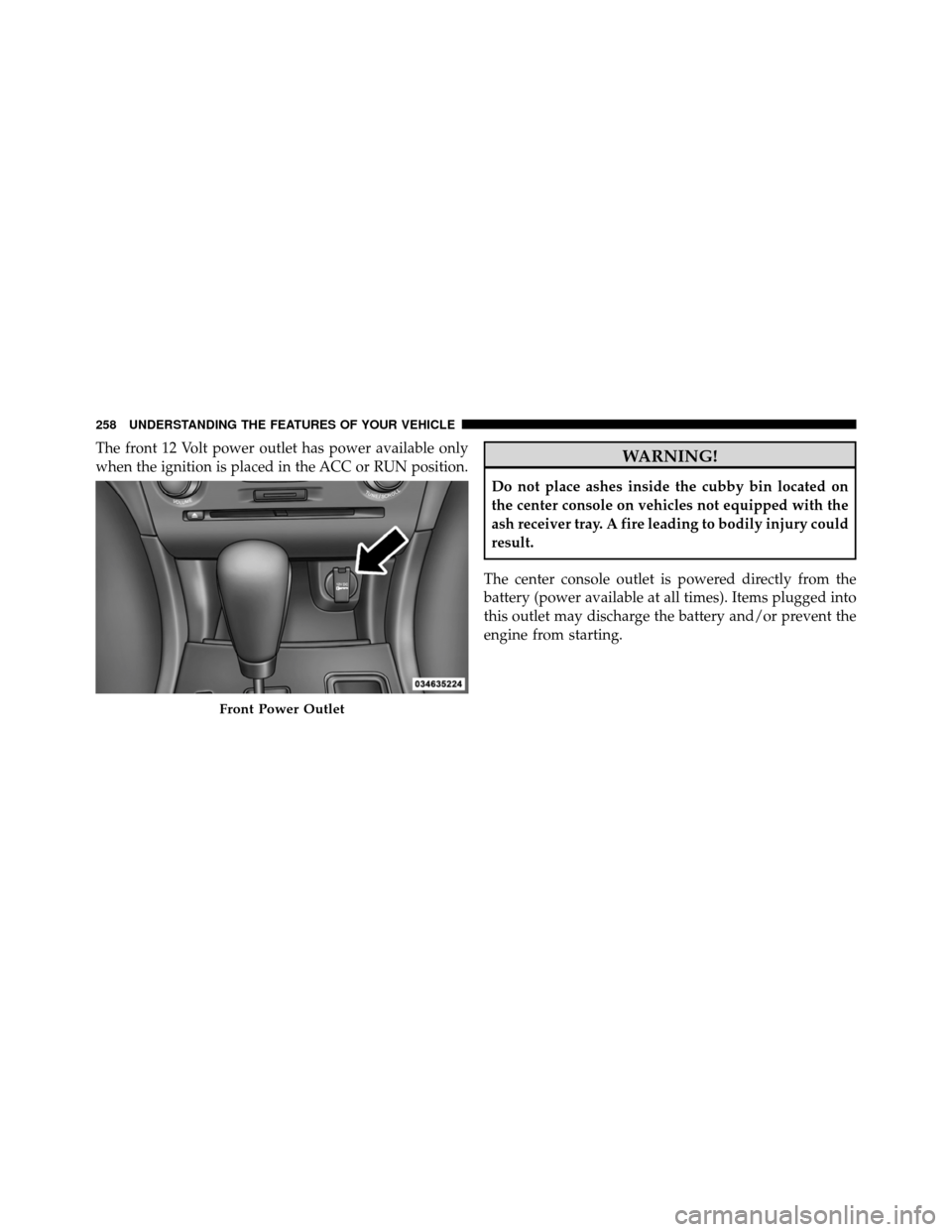
The front 12 Volt power outlet has power available only
when the ignition is placed in the ACC or RUN position.WARNING!
Do not place ashes inside the cubby bin located on
the center console on vehicles not equipped with the
ash receiver tray. A fire leading to bodily injury could
result.
The center console outlet is powered directly from the
battery (power available at all times). Items plugged into
this outlet may discharge the battery and/or prevent the
engine from starting.
Front Power Outlet
258 UNDERSTANDING THE FEATURES OF YOUR VEHICLE