Page 332 of 566
CLIMATE CONTROLS
The air conditioning and heating system is designed to
make you comfortable in all types of weather. This
system can be operated through either the Automatic
Climate Controls on the instrument panel or through the
Uconnect Touch™ system display.
When the Uconnect Touch™ system is in different modes
(Radio, Player, Settings, More, etc.) the driver and pas-
senger temperature settings will be indicated at the top of
the display.
General Overview
Hard-Keys
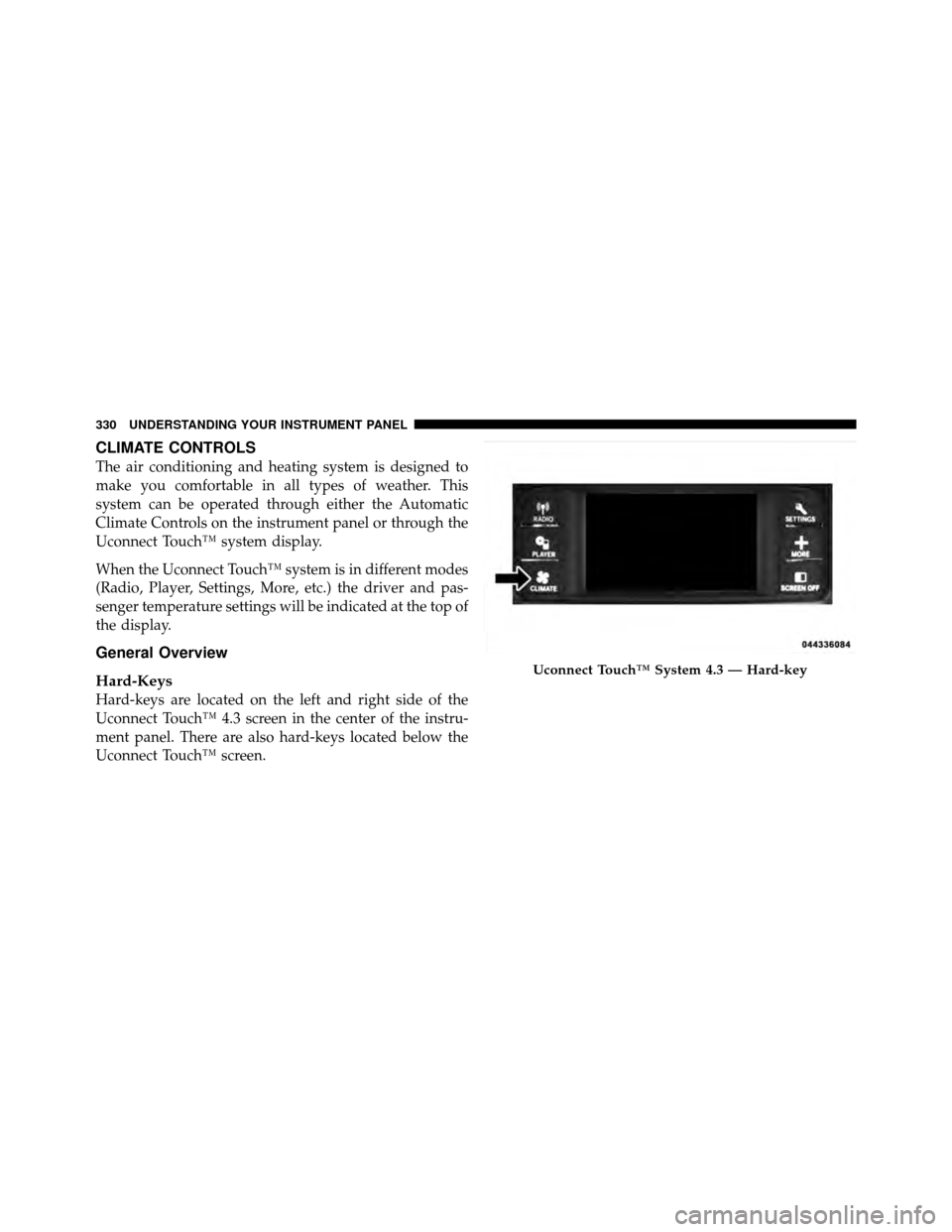
Hard-keys are located on the left and right side of the
Uconnect Touch™ 4.3 screen in the center of the instru-
ment panel. There are also hard-keys located below the
Uconnect Touch™ screen.
Uconnect Touch™ System 4.3 — Hard-key
330 UNDERSTANDING YOUR INSTRUMENT PANEL
Page 340 of 566
Automatic Temperature Control (ATC)
ATC Hard-keys are located in the center of the instru-
ment panel.
Soft-keys are accessible on the Uconnect Touch™ system
screen.
Automatic Operation
1. Press the AUTO hard-key or soft-key button (9) on the
Automatic Temperature Control (ATC) Panel.
2. Next, adjust the temperature you would like the
system to maintain by adjusting the driver and passenger
temperature hard or soft control buttons (6, 7, 10, 11).
Once the desired temperature is displayed, the system
will achieve and automatically maintain that comfort
level.3. When the system is set up for your comfort level, it is
not necessary to change the settings. You will experience
the greatest efficiency by simply allowing the system to
function automatically.
NOTE:
•It is not necessary to move the temperature settings for
cold or hot vehicles. The system automatically adjusts
the temperature, mode and blower speed to provide
comfort as quickly as possible.
•The temperature can be displayed in U.S. or Metric
units by selecting the US/M customer-programmable
feature. Refer to the “Uconnect Touch™ System Set-
tings” in this section of the manual.
To provide you with maximum comfort in the Automatic
mode, during cold start-ups the blower fan will remain
on low until the engine warms up. The blower will
increase in speed and transition into Auto mode.
338 UNDERSTANDING YOUR INSTRUMENT PANEL
Page 352 of 566
display a “Vehicle Not In Park” message and the engine
will remain running. Never leave a vehicle out of the
PARK position, or it could roll.
NOTE:If the ignition switch is left in the ACC or RUN
(engine not running) position and the transmission is in
PARK, the system will automatically time out after
30 minutes of inactivity and the ignition will switch to the
OFF position.
ENGINE START/STOP Button Functions – With
Driver ’s Foot OFF The Brake Pedal (In PARK Or
NEUTRAL Position)
The ENGINE START/STOP button operates similar to an
ignition switch. It has four positions, OFF, ACC, RUN
and START. To change the ignition switch positions
without starting the vehicle and use the accessories
follow these steps.
•Starting with the ignition switch in the OFF position:
•Press the ENGINE START/STOP button once to
change the ignition switch to the ACC position (EVIC
displays “ACC”),
•Press the ENGINE START/STOP button a second time
to change the ignition switch to the RUN position
(EVIC displays “RUN”),
•Press the ENGINE START/STOP button a third time
to return the ignition switch to the OFF position (EVIC
displays “OFF”).
Extreme Cold Weather (Below –20°F Or �29°C)
To ensure reliable starting at these temperatures, use of
an externally powered electric engine block heater (avail-
able from your authorized dealer) is recommended.
350 STARTING AND OPERATING
Page 358 of 566
Gear Ranges
PARK
This range supplements the parking brake by locking the
transmission. The engine can be started in this range.
Never use PARK while the vehicle is in motion. Apply
the parking brake when leaving the vehicle in this range.
When parking on a flat surface, place the shift lever in the
PARK position first, and then apply the parking brake.
When parking on a hill, it is important to set the parking
brake before placing the shift lever in PARK, otherwise
the load on the transmission locking mechanism may
make it difficult to move the shift lever out of PARK. As
an added precaution, turn the front wheels toward the
curb on a downhill grade and away from the curb on an
uphill grade.
WARNING!
Never use the PARK position as a substitute for the
parking brake. Always apply parking brake fully
when parked to guard against vehicle movement and
possible injury or damage.
The following indicators should be used to ensure that
you have engaged the shift lever in the PARK position:
•When shifting into PARK, move the shift lever all the
way forward and left until it stops and is fully seated.
•Look at the shift indicator display on the instrument
panel to ensure it is in the PARK position.
356 STARTING AND OPERATING
Page 361 of 566
6. Move the shift lever to the desired range. If the
problem is no longer detected, the transmission will
return to normal operation.
If the transmission cannot be reset, see your authorized
dealer.
NOTE:Even if the transmission can be reset, we recom-
mend that you visit your authorized dealer at your
earliest possible convenience. Your authorized dealer has
diagnostic equipment to determine if the problem could
recur.
Have the transmission checked at your authorized dealer
as soon as possible.
AUTOSTICK�
AutoStick� is a driver-interactive transmission feature
that offers manual gear shifting to provide you with more
control of the vehicle. AutoStick� allows you to maximize
engine braking, eliminate undesirable upshifts and downshifts, and improve overall vehicle performance.
This system can also provide you with more control
during passing, city driving, cold slippery conditions,
mountain driving, trailer towing, and many other situa-
tions.
Operation
When the shift lever is in the DRIVE position, the
transmission will operate automatically, shifting between
the five available gears. To engage AutoStick�, simply
move the shift lever to the right or left (D+/D-) while in
the DRIVE position. When AutoStick�
is active, the
current transmission gear is displayed in the instrument
cluster. In AutoStick� mode, the transmission will only
shift up and down when right or left (+/-) is manually
selected by the driver, or as described below. It will
remain in the selected gear until another upshift or
downshift is chosen.
5
STARTING AND OPERATING 359
Page 362 of 566
Fully pressing the accelerator pedal while in AutoStick�
mode will downshift the transmission as needed for
maximum acceleration (3.6L Models Only).
The transmission will automatically downshift as the
vehicle slows to a stop (to prevent engine lugging) and
will display the current gear. Tapping the shift lever to
the D+ position (at a stop) will allow starting in second
gear. After a stop, the driver should manually upshift
(D+) the transmission as the vehicle is accelerated.
To disengage AutoStick�mode, hold the shift lever to the
right (D+) for a few seconds. You can shift in or out of the
AutoStick� mode at any time without taking your foot off
the accelerator pedal.WARNING!
Do not downshift for additional engine braking on a
slippery surface. The drive wheels could lose their
grip and the vehicle could skid, causing a collision or
personal injury.
ALL-WHEEL DRIVE (AWD) — IF EQUIPPED
This vehicle is equipped with an active on-demand
All-Wheel Drive (AWD) system which makes available
optimum traction for a wide variety of road surface and
driving conditions. The system minimizes wheel slip by
automatically redirecting torque to the front and rear
wheels as necessary.
To maximize fuel economy, your AWD vehicle automati-
cally defaults to rear-wheel drive (RWD) when road and
environmental conditions are such that wheel slip is
unlikely to occur. When specific road and environmental
conditions require increased levels of road traction, the
360 STARTING AND OPERATING
Page 363 of 566
vehicle automatically shifts into AWD mode. Automatic
AWD operation could be activated by outside tempera-
ture, wheel slip, or other predetermined conditions (there
may be a slight delay for AWD engagement after a wheel
slip condition occurs). AWD can also be manually se-
lected by moving the shift lever into the AutoStick�mode
(+/-) or activating the windshield wipers for an extended
period of time. Drive mode, RWD or AWD, is displayed
momentarily in the Electronic Vehicle Information Center
(EVIC) in the gage area of the vehicle display when the
transmission is first shifted into gear, and if the drive
mode changes during vehicle operation.
NOTE: If the “SERVICE AWD SYSTEM” warning mes-
sage appears after engine start up, or during driving, it
means that the AWD system is not functioning properly
and that service is required. Refer to “Electronic Vehicle
Information Center (EVIC)” in “Understanding Your
Instrument Panel” for further information.CAUTION!
All wheels must have the same size and type tires.
Unequal tire sizes must not be used. Unequal tire
size may cause failure of the front differential and/or
the transfer case.
DRIVING ON SLIPPERY SURFACES
Acceleration
Rapid acceleration on snow covered, wet, or other slip-
pery surfaces may cause the driving wheels to pull
erratically to the right or left. This phenomenon occurs
when there is a difference in the surface traction under
the rear (driving) wheels.5
STARTING AND OPERATING 361
Page 367 of 566
POWER STEERING
Your vehicle is equipped with an electro-hydraulic power
steering system that will give you good vehicle response
and increased ease of maneuverability in tight spaces.
The system will vary its assist to provide light efforts
while parking and good feel while driving. If the electro-
hydraulic power steering system experiences a fault that
prevents it from providing power steering assist, then the
system will provide mechanical steering capability.
CAUTION!
Extreme steering maneuvers may cause the electri-
cally driven pump to reduce or stop power steering
assistance in order to prevent damage to the system.
Normal operation will resume once the system is
allowed to cool.If the “SERVICE POWER STEERING SYSTEM”
message and a flashing icon are displayed on
the EVIC screen, it indicates that the vehicle
needs to be taken to the dealer for service. It is
likely the vehicle has lost power steering assistance. Refer
to “Electronic Vehicle Information (EVIC)” in “Under-
standing Your Instrument Panel” for further information.
If the “POWER STEERING SYSTEM OVER TEMP” mes-
sage and an icon are displayed on the EVIC screen, it
indicates that extreme steering maneuvers may have
occurred, which caused an over temperature condition in
the power steering system. You will lose power steering
assistance momentarily until the over temperature con-
dition no longer exists. Once driving conditions are safe,
then pull over and let vehicle idle for a few moments
until the light turns off. Refer to “Electronic Vehicle
Information (EVIC)” in “Understanding Your Instrument
Panel” for further information.
5
STARTING AND OPERATING 365