Page 156 of 490
WARNING!
•Your motorized door or gate will open and close
while you are training the Universal Transceiver.
Do not train the transceiver if people, pets, or
other objects are in the path of the door or gate.
•Do not run your vehicle in the garage while
training the transceiver. Exhaust gas from your
vehicle contains Carbon Monoxide (CO) which is
odorless and colorless. Carbon Monoxide is poi-
sonous when inhaled and cause you and others to
be severely injured or killed.
NOTE:
Only use this transceiver with a garage door
opener that has a “stop and reverse” feature as required
by federal safety standards. This includes most garage
door opener models manufactured after 1982. Do not use
a garage door opener without these safety features. Call
toll-free 1–800–355–3515 or, on the Internet at
www.HomeLink.com for safety information or assistance.
Programming HomeLink�
Before You Begin
If you have not trained any of the HomeLink� buttons,
erase all channels before you begin training.
To do this, press and hold the two outside buttons for up
to 20 seconds. The EVIC will display “CLEARING
CHANNELS.” Release the buttons when the EVIC mes-
sage states “CHANNELS CLEARED.”
It is recommended that a new battery be placed in the
handheld transmitter of the device that is being copied to
HomeLink� for more efficient training and accurate
transmission of the radio-frequency signal.
Your vehicle should be parked outside of the garage
while training.
1. Place the ignition in the RUN position.
154 UNDERSTANDING THE FEATURES OF YOUR VEHICLE
Page 159 of 490
Gate Operator/Canadian Programming
Canadian radio-frequency laws require transmitter sig-
nals to “time-out” (or quit) after several seconds of
transmission – which may not be long enough for
HomeLink�to pick up the signal during programming.
Similar to this Canadian law, some U.S. gate operators are
designed to “time-out” in the same manner.
It may be helpful to unplug the device during the cycling
process to prevent possible overheating of the garage
door or gate motor.
If you are having difficulties programming a garage door
opener or a gate operator, replace “Programming
HomeLink” Step 3 with the following:
3. Continue to press and hold the HomeLink� button,
while you press and release (“cycle”), your handheld
transmitter every two seconds until HomeLink� has
successfully accepted the frequency signal. The EVIC
display will change from “CHANNEL # TRAINING” to
“CHANNEL # TRAINED.” If you unplugged the device for training, plug it back in
at this time.
Then proceed with Step 4 under “Programming
HomeLink�” earlier in this section.
Using HomeLink�
To operate, press and release the programmed
HomeLink�
button. Activation will now occur for the
trained device (i.e., garage door opener, gate operator,
security system, entry door lock, home/office lighting,
etc.,). The handheld transmitter of the device may also be
used at any time.
Reprogramming A Single HomeLink� Button
To reprogram a channel that has been previously trained,
follow these steps:
1. Place the ignition in the RUN position.
3
UNDERSTANDING THE FEATURES OF YOUR VEHICLE 157
Page 174 of 490
�Media Center 730N/430/430N (RHR/RER/
RBZ/RHB) CD/DVD/HDD/NAV —
If Equipped .......................... 203
▫ Operating Instructions (Voice Command
System) — If Equipped ................ 203
▫ Operating Instructions (Uconnect™ Phone)
— If Equipped ...................... 203
� Media Center 130 (Sales Code RES) ......... 204
▫ Operating Instructions — Radio Mode ..... 204
▫ Operation Instructions — CD Mode For CD
And MP3 Audio Play ................. 207
▫ Notes On Playing MP3 Files ............ 209
▫ Operation Instructions - Auxiliary Mode .... 212�
Media Center 130 With Satellite Radio
(Sales Code RES+RSC) ................... 212
▫ Operating Instructions — Radio Mode ..... 213
▫ Operation Instructions — CD Mode For CD
And MP3 Audio Play ................. 218
▫ Notes On Playing MP3 Files ............ 220
▫ List Button (CD Mode For MP3 Play) ...... 223
▫ Info Button (CD Mode For MP3 Play) ...... 223
▫ Uconnect™ Multimedia (Satellite Radio) —
If Equipped ........................ 224
� iPod�/USB/MP3 Control — If Equipped ..... 228
▫ Connecting The iPod� Or External USB
Device ............................ 228
▫ Using This Feature ................... 229
172 UNDERSTANDING YOUR INSTRUMENT PANEL
Page 175 of 490
▫Controlling The iPod� Or External USB
Device Using Radio Buttons ............. 230
▫ Play Mode ......................... 230
▫ List Or Browse Mode ................. 231
▫ Bluetooth Streaming Audio (BTSA) ........ 233
� Kicker� High Performance Sound System With
Driver-Selectable Surround (DSS) –
If Equipped .......................... 234
� Steering Wheel Audio Controls —
If Equipped .......................... 236
▫ Radio Operation ..................... 236 ▫
CD Player ......................... 237
� CD/DVD Disc Maintenance .............. 237
� Radio Operation And Mobile Phones ....... 238
� Climate Controls ...................... 238
▫ Automatic Temperature Control (ATC) ..... 238
▫ Automatic Operation .................. 239
▫ Blower Control ...................... 240
▫ Manual Operation .................... 240
▫ Operating Tips ...................... 244
4
UNDERSTANDING YOUR INSTRUMENT PANEL 173
Page 176 of 490
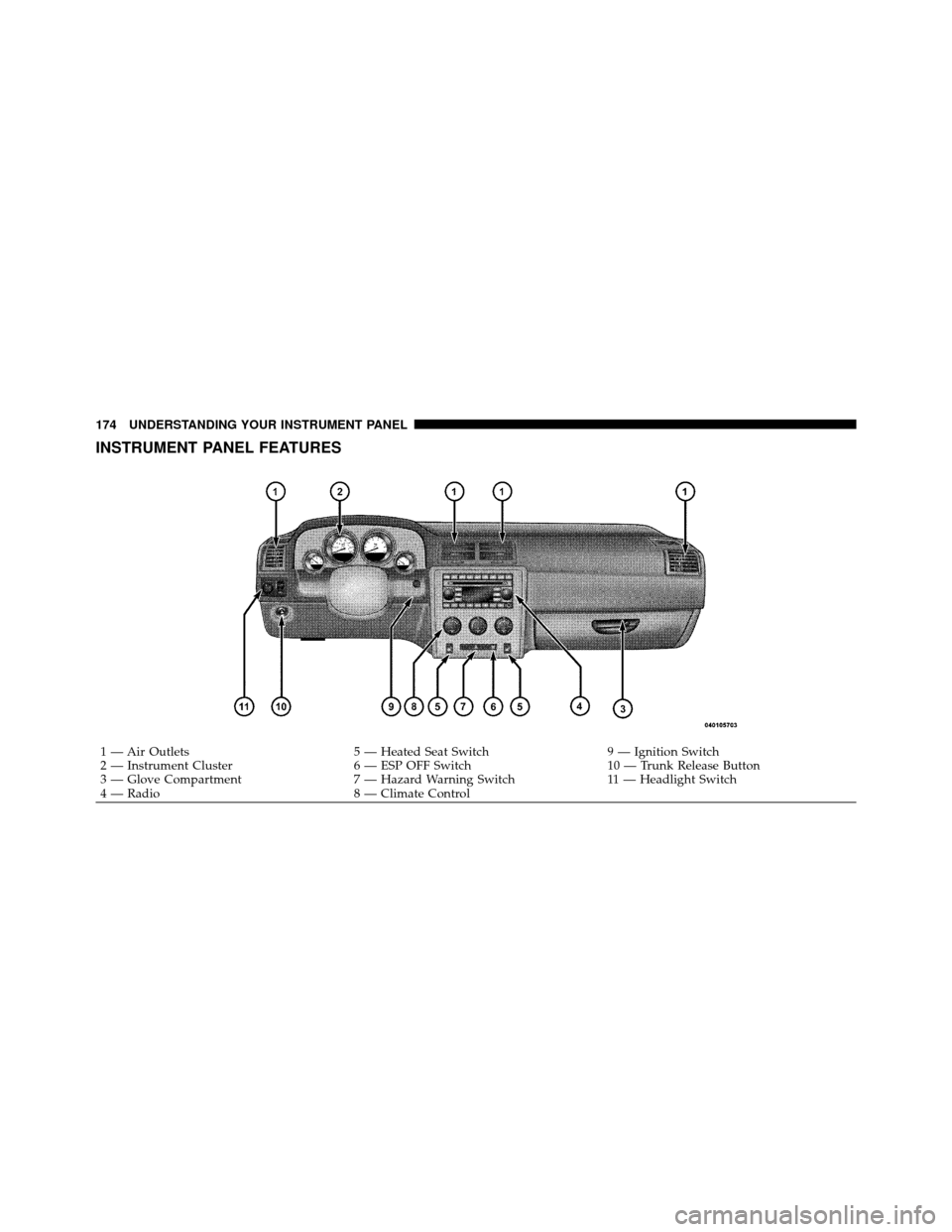
INSTRUMENT PANEL FEATURES
1 — Air Outlets5 — Heated Seat Switch9 — Ignition Switch
2 — Instrument Cluster 6 — ESP OFF Switch10 — Trunk Release Button
3 — Glove Compartment 7 — Hazard Warning Switch11 — Headlight Switch
4 — Radio 8 — Climate Control
174 UNDERSTANDING YOUR INSTRUMENT PANEL
Page 178 of 490

INSTRUMENT CLUSTER DESCRIPTIONS
1. Fuel Gauge
The pointer shows the level of fuel in the fuel tank when
the ignition switch is placed in the ON/RUN position.
2. Trip Odometer Button
Press this button to change the display from odometer to
either of two trip odometer settings. The letter “A” or “B”
will appear when in the trip odometer mode. Push in and
hold the button for two seconds to reset the trip odometer
to 0 miles (km). The odometer must be in TRIP mode to
reset it.
3. Speedometer
Indicates vehicle speed.
4. Electronic Speed Control Indicator LightThis light will turn on when the electronic
speed control is on. 5. Tachometer
The red segments indicate the maximum permissible
engine revolutions per minute (RPM x 1000) for each gear
range. Ease up on the accelerator before reaching the red
area.
6. Charging System Warning Light
This light shows the status of the electrical charg-
ing system. The light should turn on when the
ignition switch is placed in the ON/RUN position and
remain on briefly as a bulb check. If the light stays on or
turns on while driving, turn off some of the vehicle’s
non-essential electrical devices (i.e., radio) or slightly
increase engine speed (if at idle). If the light remains on,
it means that the charging system is experiencing a
problem. See your local authorized dealer to obtain
service immediately.
If jump starting is required, refer to “Jump Starting
Procedures” in “What To Do In Emergencies”.
176 UNDERSTANDING YOUR INSTRUMENT PANEL
Page 199 of 490
•Video Surround
•Audio Surround
While in the Surround Sound menu, press the SELECT
button to change surround modes. The Video Surround
Mode will only be available for video media sources
(DVDs, Video CDs, or other video media supported by
the radio).
Compass Display
The compass readings indicate the direction
the vehicle is facing. Press and release the
MENU button until “Compass” displays in the
EVIC. Press SELECT to display one of eight
compass readings and the outside temperature.
NOTE: The system will display the last known outside
temperature when starting the vehicle and may need to
be driven several minutes before the updated tempera-
ture is displayed. Engine temperature can also affect the displayed temperature; therefore, temperature readings
are not updated when the vehicle is not moving.
Automatic Compass Calibration
This compass is self-calibrating, which eliminates the
need to set the compass manually. When the vehicle is
new, the compass may appear erratic and the EVIC will
display “CAL” until the compass is calibrated. You may
also calibrate the compass by completing one or more 360
degree turns (in an area free from large metal or metallic
objects) until the “CAL” message displayed in the EVIC
turns off. The compass will now function normally.
Manual Compass Calibration
If the compass appears erratic and the “CAL” message
does not appear in the EVIC display, you must put the
compass into the Calibration Mode manually as follows:
1. Turn the ignition switch ON.MENU
Button
4
UNDERSTANDING YOUR INSTRUMENT PANEL 197
Page 204 of 490

Hill Start Assist (HSA) — If Equipped
When on is selected, the HSA system is active. Refer to
“Electronic Brake Control System” in “Starting And
Operating” for system function and operating informa-
tion. To make your selection, press and release the
SELECT button until “ON” or “OFF” appears.
Turn Headlights On with Remote Key Unlock
When this feature is selected, the headlights will activate
and remain on for up to 90 seconds when the doors are
unlocked with the RKE transmitter. To make your selec-
tion, press and release the SELECT button until “OFF,”
“30 sec.,” “60 sec.,” or “90 sec.” appears.
Delay Power Off to Accessories Until Exit
When this feature is selected, the power window
switches, radio, Uconnect™ phone (if equipped), power
sunroof (if equipped), and ignition-powered power out-
lets will remain active for up to 60 minutes after theignition switch is turned OFF. Opening either front
vehicle door will cancel this feature. To make your
selection, press and release the SELECT button until
“Off,” “45 sec.,” “5 min.,” “10 min.,” “30 min.,” or “60
min.” appears.
Turn-by-Turn Navigation — If Equipped
When ON is selected, the Turn-by-Turn directions will
appear in the display as the vehicle approaches a desig-
nated turn within a programmed route. To make your
selection, press and release the SELECT button until
“ON” or “OFF” appears.
Display ECO — If Equipped
The “ECO” message is located in the Compass/
Temperature display; this message can be turned on or
off. To make your selection, press and release the SELECT
button until “ON” or “OFF” appears.
202 UNDERSTANDING YOUR INSTRUMENT PANEL