Page 119 of 490
16. Can this wait?
17. Bye for now
18. When can we meet
19. Send number to call
20. Start without me
Turn SMS Incoming Announcement ON/OFF
Turning the SMS Incoming Announcement OFF will stop
the system from announcing the new incoming mes-
sages.
•Press thebutton.
•After the “Ready” prompt and the following beep, say
“Setup, SMS Incoming Message Announcement,” you
will then be given a choice to change it.
Bluetooth�Communication Link
Mobile phones have been found to lose connection to the
Uconnect™ Phone. When this happens, the connection
can generally be reestablished by switching the phone
off/on. Your mobile phone is recommended to remain in
Bluetooth�ON mode.
Power-Up
After switching the ignition key from OFF to either the
ON or ACC position, or after a language change, you
must wait at least fifteen seconds prior to using the
system.
3
UNDERSTANDING THE FEATURES OF YOUR VEHICLE 117
Page 175 of 490
▫Controlling The iPod� Or External USB
Device Using Radio Buttons ............. 230
▫ Play Mode ......................... 230
▫ List Or Browse Mode ................. 231
▫ Bluetooth Streaming Audio (BTSA) ........ 233
� Kicker� High Performance Sound System With
Driver-Selectable Surround (DSS) –
If Equipped .......................... 234
� Steering Wheel Audio Controls —
If Equipped .......................... 236
▫ Radio Operation ..................... 236 ▫
CD Player ......................... 237
� CD/DVD Disc Maintenance .............. 237
� Radio Operation And Mobile Phones ....... 238
� Climate Controls ...................... 238
▫ Automatic Temperature Control (ATC) ..... 238
▫ Automatic Operation .................. 239
▫ Blower Control ...................... 240
▫ Manual Operation .................... 240
▫ Operating Tips ...................... 244
4
UNDERSTANDING YOUR INSTRUMENT PANEL 173
Page 218 of 490
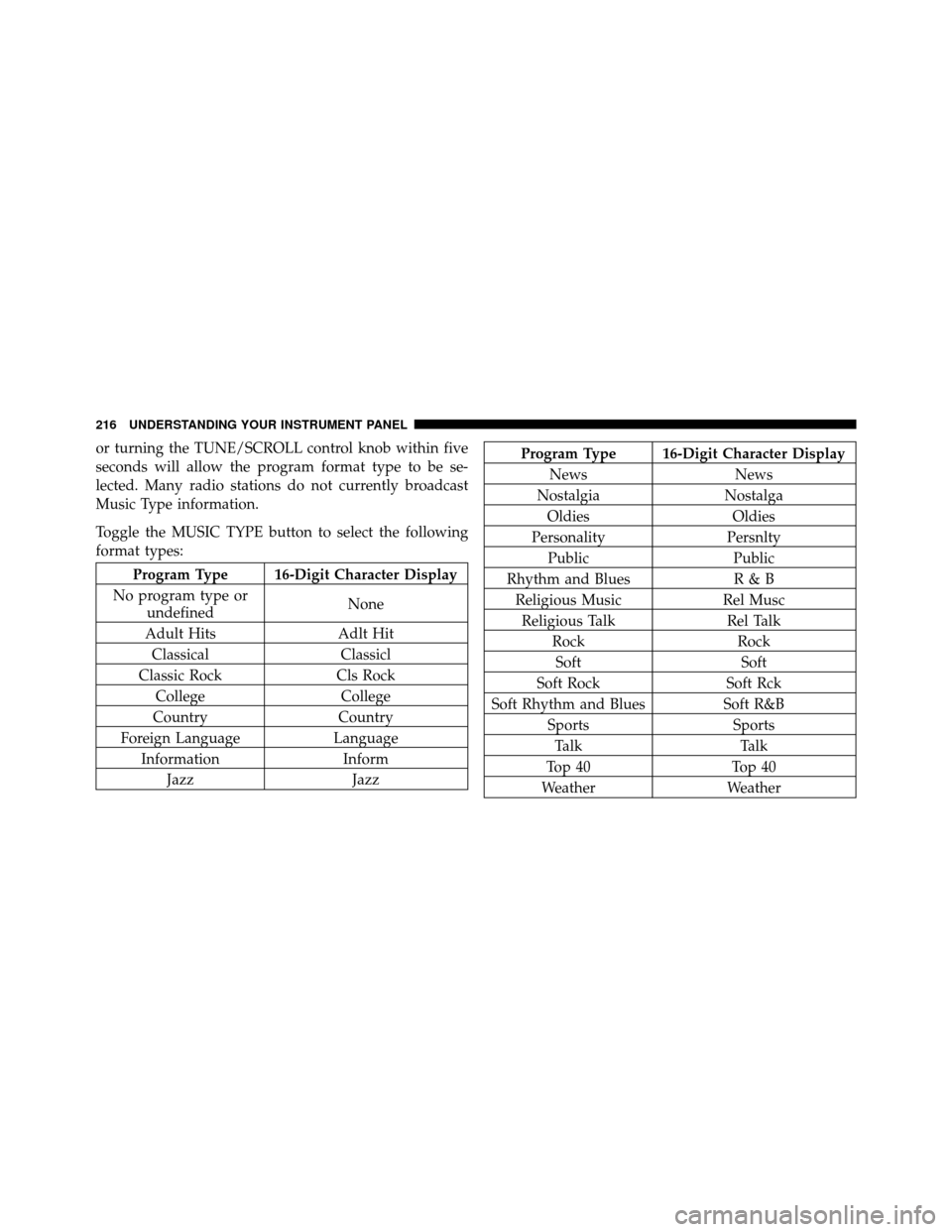
or turning the TUNE/SCROLL control knob within five
seconds will allow the program format type to be se-
lected. Many radio stations do not currently broadcast
Music Type information.
Toggle the MUSIC TYPE button to select the following
format types:
Program Type 16-Digit Character Display
No program type or undefined None
Adult Hits Adlt Hit
Classical Classicl
Classic Rock Cls Rock
College College
Country Country
Foreign Language Language
Information Inform
Jazz Jazz
Program Type 16-Digit Character Display
News News
Nostalgia Nostalga
Oldies Oldies
Personality Persnlty
Public Public
Rhythm and Blues R & B
Religious Music Rel Musc
Religious Talk Rel Talk
Rock Rock
Soft Soft
Soft Rock Soft Rck
Soft Rhythm and Blues Soft R&B
Sports Sports
Talk Talk
Top 40 Top 40
Weather Weather
216 UNDERSTANDING YOUR INSTRUMENT PANEL
Page 235 of 490

CAUTION!
•Leaving the iPod�or external USB device (or any
supported device) anywhere in the vehicle in
extreme heat or cold can alter the operation or
damage the device. Follow the device manufactur-
er ’s guidelines.
•Placing items on the iPod� or external USB device,
or connections to the iPod� or external USB device
in the vehicle, can cause damage to the device
and/or to the connectors.
WARNING!
Do not plug in or remove the iPod� or external USB
device while driving. Failure to follow this warning
could result in an accident.
Bluetooth Streaming Audio (BTSA)
Music can be streamed from your cellular phone to the
Uconnect™ phone system.
Controlling BTSA Using Radio Buttons
To get into the BTSA mode, press either “AUX” button on
the radio or press the VR button and say “Bluetooth
Streaming Audio”.
Play Mode
When switched to BTSA mode, some audio devices can
start playing music over the vehicle’s audio system, but
some devices require the music to be initiated on the
device first, then it will get streamed to the Uconnect™
phone system. Seven devices can be paired to the
Uconnect™ phone system, but just one can be selected
and played.
Selecting Different Audio Device
1. Press PHONE button to begin.
4
UNDERSTANDING YOUR INSTRUMENT PANEL 233
Page 421 of 490
CAUTION!
•When installing the integrated power module
cover, it is important to ensure the cover is prop-
erly positioned and fully latched. Failure to do so
may allow water to get into the integrated power
module and possibly result in an electrical system
failure.
•When replacing a blown fuse, it is important to
use only a fuse having the correct amperage rating.
The use of a fuse with a rating other than indicated
may result in a dangerous electrical system over-
load. If a properly rated fuse continues to blow, it
indicates a problem in the circuit that must be
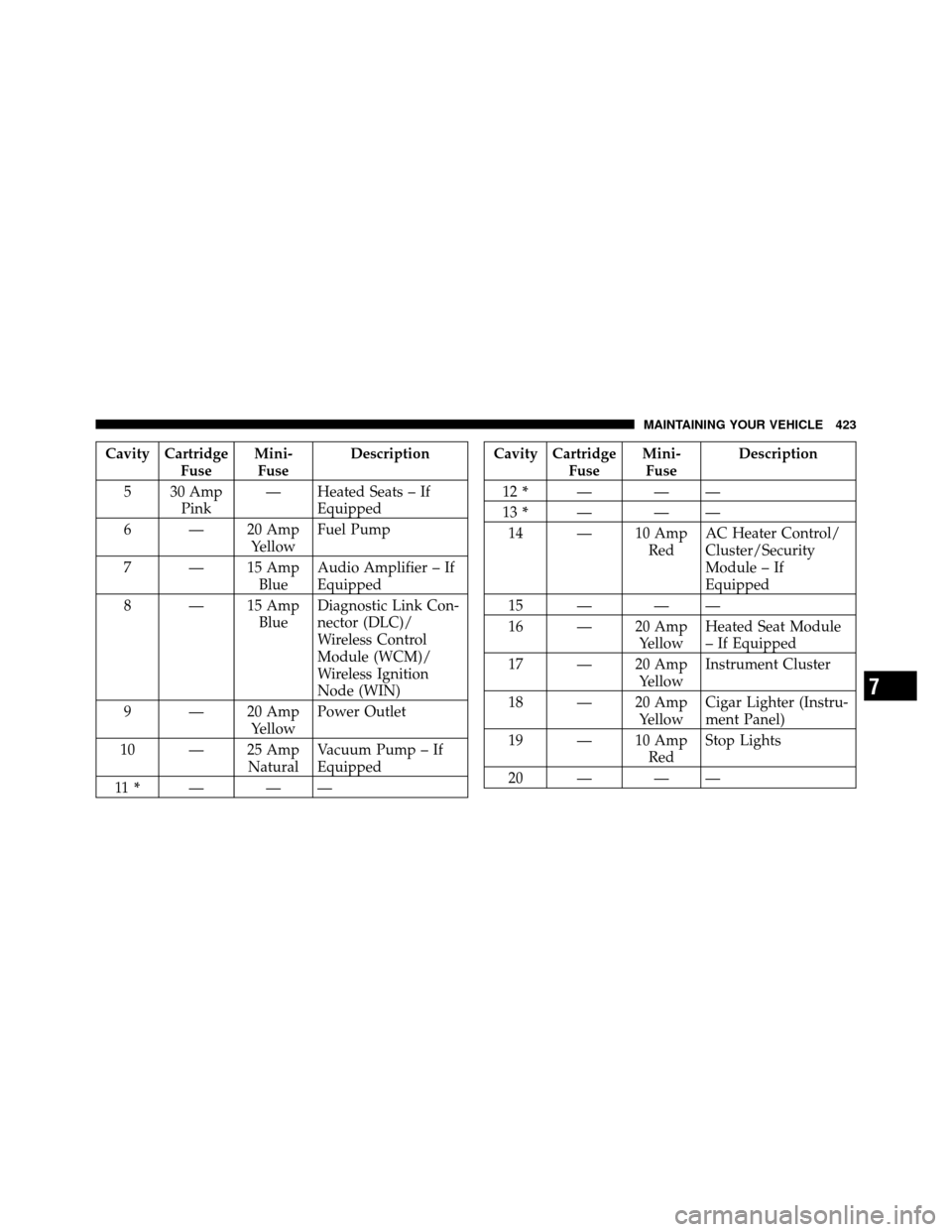
corrected.
Cavity CartridgeFuseMini-
Fuse Description
1 — 15 Amp BlueWasher Motor
2 — 25 Amp NaturalPowertrain Control
Module (PCM)
3 — 25 Amp NaturalIgnition Run/Start
4 — 25 Amp NaturalEGR Solenoid/
Alternator
5 — 15 Amp BluePowertrain Control
Module
6 — 25 Amp NaturalIgnition Coils/
Injectors
7 — 25 Amp NaturalHeadlamp Washer
Relay – If Equipped
8 — 30 Amp GreenStarter
7
MAINTAINING YOUR VEHICLE 419
Page 425 of 490
Cavity CartridgeFuseMini-
Fuse Description
5 30 Amp Pink — Heated Seats – If
Equipped
6 — 20 Amp YellowFuel Pump
7 — 15 Amp BlueAudio Amplifier – If
Equipped
8 — 15 Amp BlueDiagnostic Link Con-
nector (DLC)/
Wireless Control
Module (WCM)/
Wireless Ignition
Node (WIN)
9 — 20 Amp YellowPower Outlet
10 — 25 Amp NaturalVacuum Pump – If
Equipped
11 * ———Cavity Cartridge
FuseMini-
Fuse Description
12 * ———
13 * ———
14 — 10 Amp RedAC Heater Control/
Cluster/Security
Module – If
Equipped
15 — — —
16 — 20 Amp YellowHeated Seat Module
– If Equipped
17 — 20 Amp YellowInstrument Cluster
18 — 20 Amp YellowCigar Lighter (Instru-
ment Panel)
19 — 10 Amp RedStop Lights
20 — — —
7
MAINTAINING YOUR VEHICLE 423
Page 427 of 490
Cavity CartridgeFuseMini-
Fuse Description
36 — 25 Amp NaturalHands-Free Phone –
If Equipped/Radio/
Amplifier Feed
37 — 15 Amp BlueTransmission
38 — 10 Amp RedCargo Light/Vehicle
Information Module
– If Equipped
39 — 10 Amp RedHeated Mirrors – If
Equipped
40 — 5 Amp OrangeAuto Inside Rearview
Mirror/Heated Seats
– If Equipped/Switch
Bank
41 — — —
42 30 Amp Pink — Front Blower MotorCavity Cartridge
FuseMini-
Fuse Description
43 30 Amp Pink — Rear Window De-
froster
44 20 Amp Blue — Amplifier/Sunroof –
If Equipped
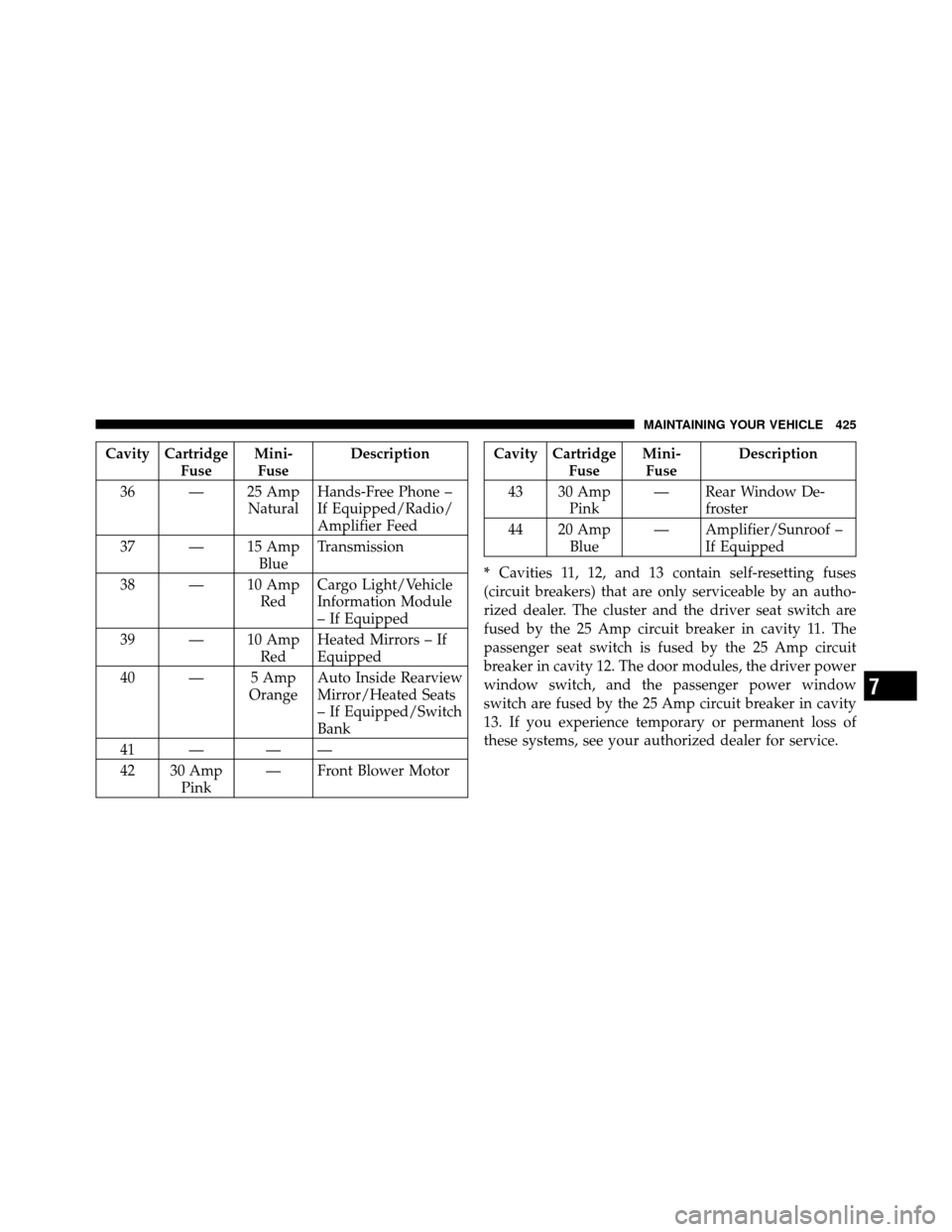
* Cavities 11, 12, and 13 contain self-resetting fuses
(circuit breakers) that are only serviceable by an autho-
rized dealer. The cluster and the driver seat switch are
fused by the 25 Amp circuit breaker in cavity 11. The
passenger seat switch is fused by the 25 Amp circuit
breaker in cavity 12. The door modules, the driver power
window switch, and the passenger power window
switch are fused by the 25 Amp circuit breaker in cavity
13. If you experience temporary or permanent loss of
these systems, see your authorized dealer for service.
7
MAINTAINING YOUR VEHICLE 425
Page 430 of 490

WARNING!
A transient high tension occurs at the bulb sockets of
HID headlamps when the headlamp switch is turned
ON. It may cause serious electrical shock or electro-
cution if not serviced properly. See your authorized
dealer for service.
NOTE: On vehicles equipped with HID headlamps,
when the headlamps are turned on, there is a blue hue to
the lamps. This diminishes and becomes more white after
approximately 10 seconds, as the system charges.
Front/Rear Side Marker Lamp
1. Remove the front/rear side marker. Use a fiber stick or
similar tool to gently pry the lamp on the outboard side
to disengage the clip.
NOTE:
•If a screwdriver is used, make sure a soft material is
placed between the vehicle body and tool so not to
scratch the paint.
2. Rotate the bulb’s socket counterclockwise, and remove
the bulb and socket assembly from the housing.
3. Pull the bulb out of the socket and insert the replace-
ment bulb.
4. Install the bulb and socket assembly into the housing,
and rotate the socket clockwise to lock it in place.
5. Reinstall the front/rear side marker.
428 MAINTAINING YOUR VEHICLE