Page 317 of 562
•Preset 2 – Artists
•Preset 3 – Albums
•Preset 4 – Genres
•Preset 5 – Audiobooks
•Preset 6 – Podcasts
•Pressing a PRESET button will display the current
list on the top line and the first item in that list on
the second line.
•To exit List mode without selecting a track, press the
samePRESET button again to go back to Play
mode.
•LIST button: The LISTbutton will display the top
level menu of the iPod� or external USB device. Turn
the TUNE control knob to list the top-menu item to be
selected and press the TUNEcontrol knob. This will
display the next sub-menu list item on the audio device, then follow the same steps to go to the desired
track in that list. Not all iPod�
or external USB device
sub-menu levels are available on this system.
•MUSIC TYPE button: TheMUSIC TYPE button is
another shortcut button to the genre listing on your
audio device.
CAUTION!
•Leaving the iPod� or external USB device (or any
supported device) anywhere in the vehicle in
extreme heat or cold can alter the operation or
damage the device. Follow the device manufactur-
er ’s guidelines.
•Placing items on the iPod� or external USB device,
or connections to the iPod� or external USB device
in the vehicle, can cause damage to the device
and/or to the connectors.
4
UNDERSTANDING YOUR INSTRUMENT PANEL 315
ProCarManuals.com
Page 322 of 562
The button located in the center of the left-hand switch
will tune to the next preset station that you have pro-
grammed in the radio preset pushbutton.
CD Player
Pressing the top of the switch once will go to the next
track on the CD. Pressing the bottom of the switch once
will go to the beginning of the current track, or to the
beginning of the previous track if it is within one second
after the current track begins to play.
If you press the switch up or down twice it plays the
second track; three times, it will play the third, etc.
The button in the center of the left-hand switch has no
function in this mode.
CD/DVD DISC MAINTENANCE
To keep a CD/DVD in good condition, take the following
precautions:
1.
Handle the disc by its edge; avoid touching the surface.
2. If the disc is stained, clean the surface with a soft cloth,
wiping from center to edge.
3. Do not apply paper or tape to the disc; avoid scratch-
ing the disc.
4. Do not use solvents such as benzene, thinner, cleaners,
or anti-static sprays.
5. Store the disc in its case after playing.
6. Do not expose the disc to direct sunlight.
7. Do not store the disc where temperatures may become
too high.
NOTE:If you experience difficulty in playing a particu-
lar disc, it may be damaged (i.e., scratched, reflective
coating removed, a hair, moisture or dew on the disc)
oversized, or have protection encoding. Try a known
good disc before considering disc player service.
320 UNDERSTANDING YOUR INSTRUMENT PANEL
ProCarManuals.com
Page 325 of 562
A/C button is not pressed. This dehumidifies the air to
help dry the windshield. To improve fuel economy, use
these modes only when necessary.
6. Electronic Rear Window DefrostPress this button to turn on the rear window
defroster and the heated outside mirrors (if
equipped). An indicator in the button will illuminate
when the rear window defroster is on. The rear window
defroster automatically turns off after approximately
10 minutes. For an additional five minutes of operation,
press the button a second time.
NOTE:
•You can turn off the heated mirror feature at anytime
by pressing the rear window defroster switch a second
time.
•To prevent excessive battery drain, use the rear win-
dow defroster only when the engine is operating.
CAUTION!
Failure to follow these cautions can cause damage to
the heating elements:
•Use care when washing the inside of the rear
window. Do not use abrasive window cleaners on
the interior surface of the window. Use a soft cloth
and a mild washing solution, wiping parallel to
the heating elements. Labels can be peeled off
after soaking with warm water.
•Do not use scrapers, sharp instruments, or abra-
sive window cleaners on the interior surface of the
window.
•Keep all objects a safe distance from the window.
7. Recirculation Control Button Press this button to choose between outside air
intake or recirculation of the air inside the
vehicle. A lamp will illuminate when you are in
4
UNDERSTANDING YOUR INSTRUMENT PANEL 323
ProCarManuals.com
Page 326 of 562
RECIRCULATION mode. Only use the RECIRCULA-
TION mode to temporarily block out any outside odors,
smoke, or dust, and to cool the interior rapidly upon
initial start-up in very hot or humid weather.
NOTE:
•If the RECIRCULATION button is pressed when the
system is in MIX, DEFROST, or FLOOR mode the
RECIRCULATION LED indicator will flash 3 times to
indicate RECIRCULATION mode is not allowed.
•Continuous use of the RECIRCULATION mode may
make the inside air stuffy and window fogging may
occur. Extended use of this mode is not recommended.
•In cold or damp weather, the use of the RECIRCULA-
TION mode will cause windows to fog on the inside
because of moisture buildup inside the vehicle. For
maximum defogging, select the outside air position.
•In order to prevent fogging, when the RECIRCULA-
TION button is pressed and the mode control is set to
PANEL, the A/C will engage automatically.
•The A/C can be deselected manually without disturb-
ing the mode control selection.
8. Air Conditioning (A/C) Button Press and release to change the current setting.
The indicator illuminates when the A/C is ON.
NOTE: If your air conditioning performance seems
lower than expected, check the front of the A/C con-
denser (located in front of the radiator), for an accumu-
lation of dirt or insects. Clean with a gentle water spray
from behind the radiator and through the condenser.
Fabric front fascia protectors may reduce airflow to the
condenser, reducing air conditioning performance.
324 UNDERSTANDING YOUR INSTRUMENT PANEL
ProCarManuals.com
Page 327 of 562
9. Floor Mode ButtonAir is directed through the floor outlets with a
small amount through the defrost and side window
demist outlets.
10. Bi-Level Mode Button Air is directed through the panel and floor outlets.
NOTE: There is a difference in temperature (in any
conditions other than full cold or full hot), between the
upper and lower outlets for added comfort. The warmer
air goes to the floor outlets. This feature gives improved
comfort during sunny but cool conditions.
11. Panel Mode Button Air is directed through the outlets in the instrument
panel. These outlets can be adjusted for direction,
and turned on or off to control airflow. NOTE:
For maximum airflow to the rear, the center
instrument panel outlets can be directed toward the rear
seat passengers.
Economy Mode
If ECONOMY mode is desired, press the A/C button to
turn off the indicator light and the A/C compressor.
Rotate the temperature control knob to the desired
temperature.
Max A/C
For maximum cooling use the A/C and RECIRCULA-
TION mode buttons at the same time.
Three-Zone Temperature Control — If Equipped
With the Three-Zone Temperature Control system, each
front seat occupant can independently control the Heat-
ing, Ventilation, and Air Conditioning operations coming
from the outlets on their side of the vehicle.
4
UNDERSTANDING YOUR INSTRUMENT PANEL 325
ProCarManuals.com
Page 330 of 562
7. Front Defrost ModeAir is directed through the windshield and side
window demist outlets. Use DEFROST mode with
maximum blower and temperature settings for best
windshield and side window defrosting.
NOTE: The air conditioning compressor operates in
MIX and DEFROST, or a blend of these modes even if the
A/C button is not pressed. This dehumidifies the air to
help dry the windshield. To improve fuel economy, use
these modes only when necessary.
8. Electronic Rear Window Defrost Press this button to turn on the rear window
defroster and the heated outside mirrors (if
equipped). An indicator in the button will illuminate
when the rear window defroster is on. The rear window
defroster automatically turns off after approximately
10 minutes. For an additional five minutes of operation,
press the button a second time. NOTE:
•You can turn off the heated mirror feature at anytime
by pressing the rear window defroster switch a second
time.
•To prevent excessive battery drain, use the rear win-
dow defroster only when the engine is operating.
CAUTION!
Failure to follow these cautions can cause damage to
the heating elements:
•Use care when washing the inside of the rear
window. Do not use abrasive window cleaners on
the interior surface of the window. Use a soft cloth
and a mild washing solution, wiping parallel to
the heating elements. Labels can be peeled off
after soaking with warm water.
(Continued)
328 UNDERSTANDING YOUR INSTRUMENT PANEL
ProCarManuals.com
Page 331 of 562
CAUTION! (Continued)
•Do not use scrapers, sharp instruments, or abra-
sive window cleaners on the interior surface of the
window.
•Keep all objects a safe distance from the window.
9. Recirculation Control Button Press this button to choose between outside air
intake or recirculation of the air inside the
vehicle. A lamp will illuminate when you are in
RECIRCULATION mode. Only use the RECIR-
CULATION mode to temporarily block out any outside
odors, smoke, or dust, and to cool the interior rapidly
upon initial start-up in very hot or humid weather. NOTE:
•If the RECIRCULATION button is pressed when the
system is in MIX, DEFROST, or FLOOR mode the
RECIRCULATION LED indicator will flash 3 times to
indicate RECIRCULATION mode is not allowed.
•Continuous use of the RECIRCULATION mode may
make the inside air stuffy and window fogging may
occur. Extended use of this mode is not recommended.
•In cold or damp weather, the use of the RECIRCULA-
TION mode will cause windows to fog on the inside
because of moisture buildup inside the vehicle. For
maximum defogging, select the outside air position.
•In order to prevent fogging, when the RECIRCULA-
TION button is pressed and the mode control is set to
PANEL, the A/C will engage automatically.
•The A/C can be deselected manually without disturb-
ing the mode control selection.
4
UNDERSTANDING YOUR INSTRUMENT PANEL 329
ProCarManuals.com
Page 333 of 562
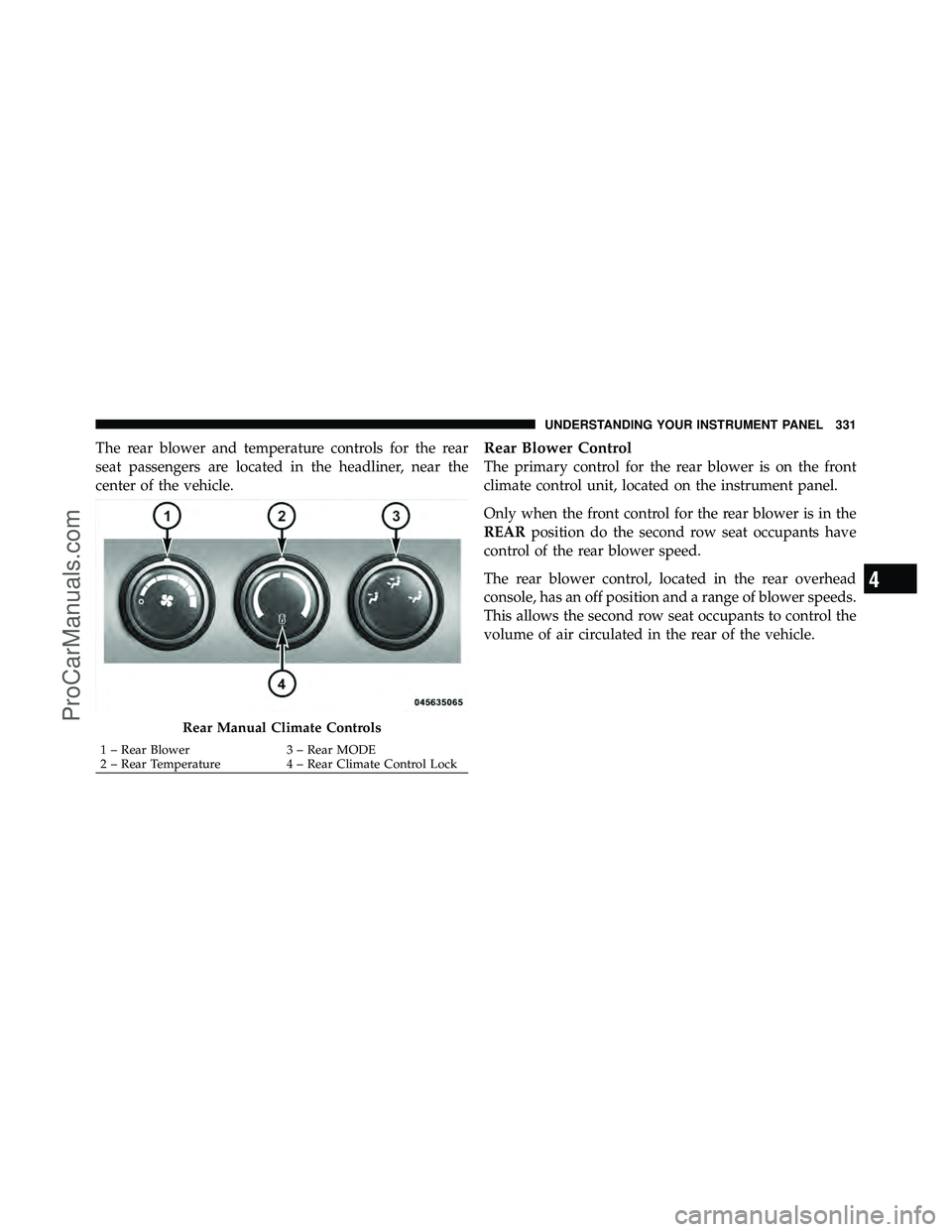
The rear blower and temperature controls for the rear
seat passengers are located in the headliner, near the
center of the vehicle.Rear Blower Control
The primary control for the rear blower is on the front
climate control unit, located on the instrument panel.
Only when the front control for the rear blower is in the
REARposition do the second row seat occupants have
control of the rear blower speed.
The rear blower control, located in the rear overhead
console, has an off position and a range of blower speeds.
This allows the second row seat occupants to control the
volume of air circulated in the rear of the vehicle.
Rear Manual Climate Controls
1 – Rear Blower 3 – Rear MODE
2 – Rear Temperature 4 – Rear Climate Control Lock
4
UNDERSTANDING YOUR INSTRUMENT PANEL 331
ProCarManuals.com