Page 189 of 486
▫Uconnect™ Multimedia (Satellite Radio) —
If Equipped ........................ 256
� iPod� Control — If Equipped ............. 260
▫ Connecting The iPod� ................. 261
▫ Using This Feature ................... 261
▫ Controlling The iPod� Using Radio
Buttons ........................... 262
▫ Play Mode ......................... 262
▫ List Or Browse Mode ................. 263
� iPod�/USB/MP3 Control — If Equipped ..... 265
▫ Connecting The iPod� Or External USB
Device ............................ 266
▫ Using This Feature ................... 267
▫ Controlling The iPod� Or External USB
Device Using Radio Buttons ............. 267▫
Play Mode ......................... 267
▫ List Or Browse Mode ................. 269
▫ Bluetooth Streaming Audio (BTSA) ........ 271
� Steering Wheel Audio Controls —
If Equipped .......................... 272
▫ Radio Operation ..................... 273
▫ CD Player ......................... 273
� CD/DVD Disc Maintenance .............. 273
� Radio Operation And Mobile Phones ....... 274
� Climate Controls ...................... 274
▫ Manual Heating And Air Conditioning ..... 275
▫ Automatic Temperature Control (ATC) —
If Equipped ........................ 279
▫ Operating Tips ...................... 285
4
UNDERSTANDING YOUR INSTRUMENT PANEL 187
Page 190 of 486
INSTRUMENT PANEL FEATURES
1 — Air Outlet5 — Lower Glove Compartment/Beverage Cooler – If Equipped 9 — ESC OFF Switch – If Equipped
2 — Instrument Cluster 6 — Climate Controls 10 — Storage Bins
3 — Radio 7 — Heated Seat Switches – If Equipped 11 — Power Outlet
4 — Passenger Airbag 8 — Hazard Warning Flasher
188 UNDERSTANDING YOUR INSTRUMENT PANEL
Page 191 of 486
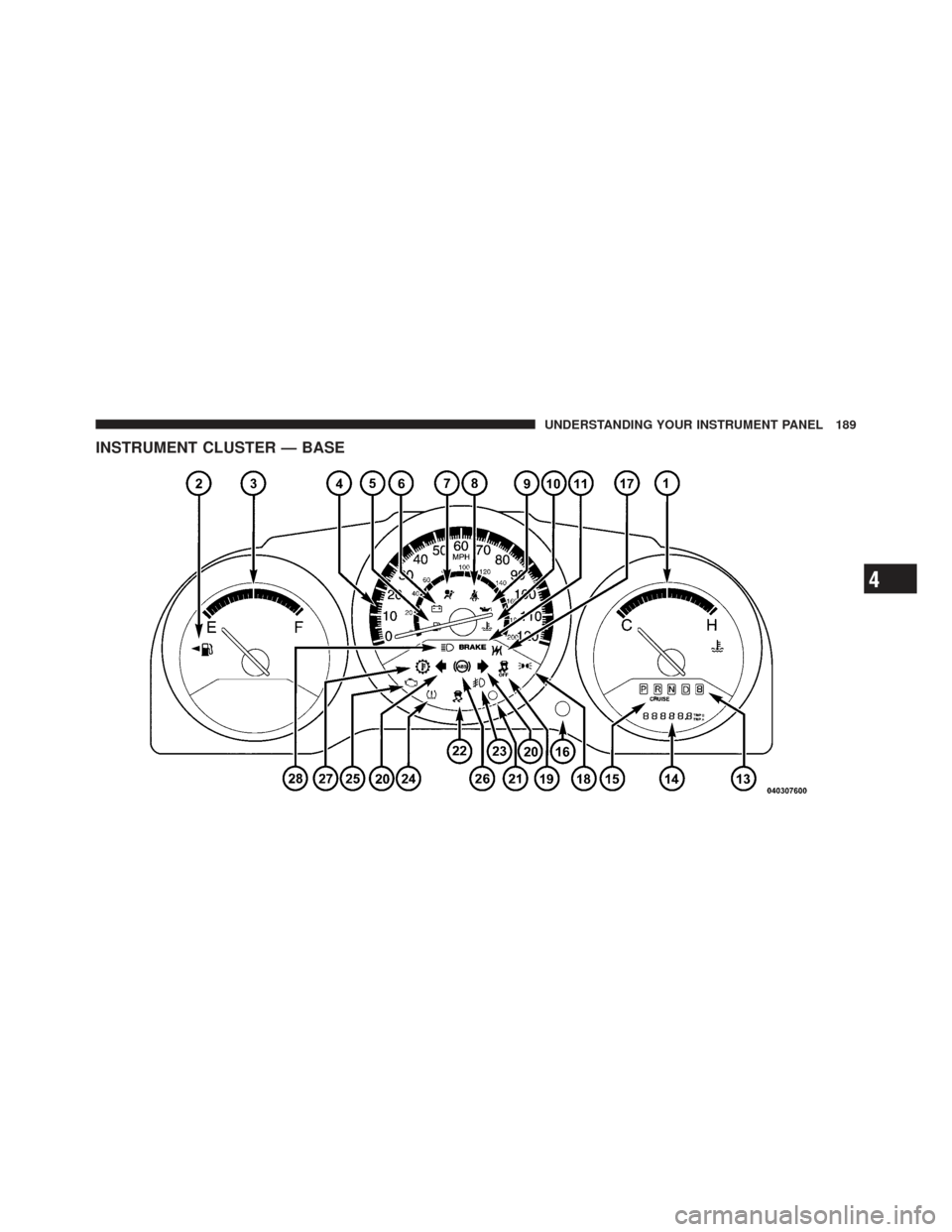
INSTRUMENT CLUSTER — BASE
4
UNDERSTANDING YOUR INSTRUMENT PANEL 189
Page 192 of 486
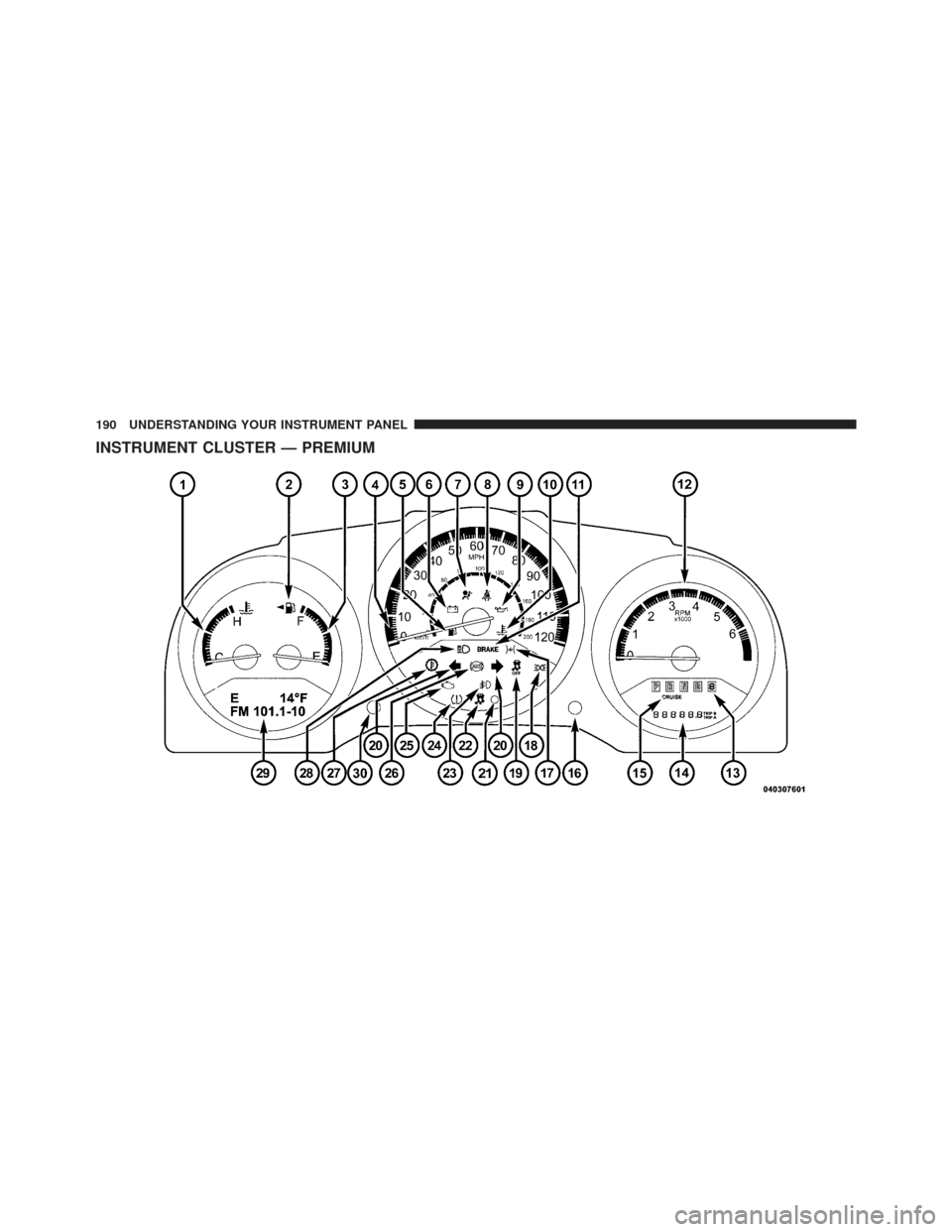
INSTRUMENT CLUSTER — PREMIUM
190 UNDERSTANDING YOUR INSTRUMENT PANEL
Page 193 of 486
INSTRUMENT CLUSTER DESCRIPTIONS
1. Temperature Gauge
The temperature gauge shows engine coolant tempera-
ture. Any reading within the normal range indicates that
the engine cooling system is operating satisfactorily.
The gauge pointer will likely indicate a higher tempera-
ture when driving in hot weather, up mountain grades,
or when towing a trailer. It should not be allowed to
exceed the upper limits of the normal operating range.
CAUTION!
Driving with a hot engine cooling system could
damage your vehicle. If the temperature gauge reads
“H” pull over and stop the vehicle. Idle the vehicle
with the air conditioner turned off until the pointer
drops back into the normal range. If the pointer
remains on the “H” and you hear continuous chimes,
turn the engine off immediately and call an autho-
rized dealership for service.
4
UNDERSTANDING YOUR INSTRUMENT PANEL 191
Page 194 of 486

WARNING!
A hot engine cooling system is dangerous. You or
others could be badly burned by steam or boiling
coolant. You may want to call an authorized dealer-
ship for service if your vehicle overheats. If you
decide to look under the hood yourself, see “Main-
taining Your Vehicle”. Follow the warnings under the
Cooling System Pressure Cap paragraph.
2. Fuel Door Reminder This indicates that the fuel filler door is located
on the left side of the vehicle.
3. Fuel Gauge
When the ignition switch is in the ON/RUN position, the
pointer will show the level of fuel remaining in the fuel
tank. 4. Speedometer
The Speedometer shows the vehicle speed in miles per
hour and/or kilometers per hour (mph/kph).
5. Low Fuel Light
When the fuel level reaches approximately 2.0 gal
(7.8 L) this light will turn on, and remain on until
fuel is added.
6. Charging System Light This light shows the status of the electrical charg-
ing system. The light should come on when the
ignition switch is first turned to ON/RUN and remain on
briefly as a bulb check. If the light stays on or comes on
while driving, turn off some of the vehicle’s non-essential
electrical devices or increase engine speed (if at idle). If
the charging system light remains on, it means that the
vehicle is experiencing a problem with the charging
system. Obtain SERVICE IMMEDIATELY. See an autho-
rized dealer.
192 UNDERSTANDING YOUR INSTRUMENT PANEL
Page 195 of 486

If jump starting is required, refer to “Jump Starting
Procedures” in “What To Do In Emergencies”.
7. Airbag Warning LightThis light will turn on for four to eight seconds
as a bulb check when the ignition switch is first
turned to ON/RUN. If the light is either not on
during starting, stays on, or turns on while
driving, have the system inspected at an authorized
dealer as soon as possible. Refer to “Occupant Restraints”
in “Things To Know Before Starting Your Vehicle” for
further information.
8. Seat Belt Reminder Light When the ignition switch is first turned to ON/
RUN, this light will turn on for four to eight
seconds as a bulb check. During the bulb check, if
the driver’s seat belt is unbuckled, a chime will sound.
After the bulb check or when driving, if the driver’s seat
belt remains unbuckled, the Seat Belt Reminder Light will illuminate and the chime will sound. Refer to
“Occupant Restraints” in “Things To Know Before Start-
ing Your Vehicle” for further information.
9. Oil Pressure Warning Light
This light indicates low engine oil pressure. The
light should turn on momentarily when the engine
is started. If the light turns on while driving, stop the
vehicle and shut off the engine as soon as possible. A
chime will sound for four minutes when this light turns
on.
Do not operate the vehicle until the cause is corrected.
This light does not indicate how much oil is in the engine.
The engine oil level must be checked under the hood.
10. Engine Temperature Warning Light This light warns of an overheated engine condi-
tion. As temperatures rise and the gauge ap-
proaches H, this indicator will illuminate and a
single chime will sound after reaching a set threshold.
4
UNDERSTANDING YOUR INSTRUMENT PANEL 193
Page 196 of 486

Further overheating will cause the temperature gauge to
passH, the indicator will continuously flash and a
continuous chime will occur until the engine is allowed
to cool.
If the light turns on while driving, safely pull over and
stop the vehicle. If the A/C system is on, turn it off. Also,
shift the transmission into NEUTRAL and idle the ve-
hicle. If the temperature reading does not return to
normal, turn the engine off immediately and call for
service. Refer to “If Your Engine Overheats” in “What To
Do In Emergencies” for further information.
11. Brake Warning Light This light monitors various brake functions,
including brake fluid level and parking brake
application. If the brake light turns on it may
indicate that the parking brake is applied, that
the brake fluid level is low, or that there is a problem with
the anti-lock brake system reservoir. If the light remains on when the parking brake has been
disengaged, and the fluid level is at the full mark on the
master cylinder reservoir, it indicates a possible brake
hydraulic system malfunction or that a problem with the
Brake Booster has been detected by the Anti-Lock Brake
System (ABS) / Electronic Stability Control (ESC) system.
In this case, the light will remain on until the condition
has been corrected. If the problem is related to the brake
booster, the ABS pump will run when applying the brake
and a brake pedal pulsation may be felt during each stop.
The dual brake system provides a reserve braking capac-
ity in the event of a failure to a portion of the hydraulic
system. A leak in either half of the dual brake system is
indicated by the Brake Warning Light, which will turn on
when the brake fluid level in the master cylinder has
dropped below a specified level.
The light will remain on until the cause is corrected.
194 UNDERSTANDING YOUR INSTRUMENT PANEL