2011 CITROEN JUMPER key
[x] Cancel search: keyPage 90 of 184

Audio equipment
88
Scroll the
display
Select
Display
Select
Display
Select
Display
Select
Display
Enables you
to…
IGN TIME 20 MIN 00 MIN
Set the audio equipment play time after turning the ignition key to the
"STOP" position:
- 20 MIN to play for 20 minutes,
- 00 MIN to switch off immediately.
Place the key in the "RUNNING" position to switch the audio equipment back on.
NO HICUT HICUT ON
Select the dynamic reduction of the treble:
- ON,
- NO.
VOICE 22 21 ... OFF Select the volume setting:
- 1 to 40,
- OFF to cut off the sound.
SVC OFF SVC LOW SVC
HIGH
Select the automatic control of the volume in relation to
the vehicle speed:
- LOW for yes (low sensitivity),
- HIGH for yes (high sensitivity),
- OFF.
CD NAME
XYZ23ABC
ABCDEFG5
MENU
Select and programme the name of the CD, currently
being played, on the display:
- the name stored previously,
- 8 dashes if it does not have a name.
Use the 4 arrows to select letters then store using MENU.
To clear the name, press and hold the "CLR" button.
If a CD has
been inserted,
this menu is
displayed. or
_ _ _ _ _
_ _ _
Page 95 of 184

93
TECHNOLOGY ON BOAR
D
Bluetooth hands-free system
4
INTRODUCTION
This system allows you to:
- send and receive calls via the Bluetooth® connection with your mobile telephone,
- display the names of your contacts and numbers from the directory of your mobile phone in the instrument panel screen,
- use voice commands to make a call and manage your contacts while keeping both hands on the steering wheel,
- hear your text messages via the voice synthesiser built into the system,
- listen to MP3, WMA, AAC, M4A, MP4 and WAV audio files from a USB storage device,
- display information on the track being played in the radio screen (title, artist, etc...),
- control vocally a portable music player (iPod® type),
- recharge your portable music player (iPod® type) via the USB port.
BLUETOOTH HANDS-FREE SYSTEM
KEY
Indicates that a long press is required to start the action described.
Voice mode
Speak the designated voice command clearly and distinctly. Requires a press on the steering mounted "voice" control before speaking the desired voice command.
Page 102 of 184
100
Bluetooth hands-free system
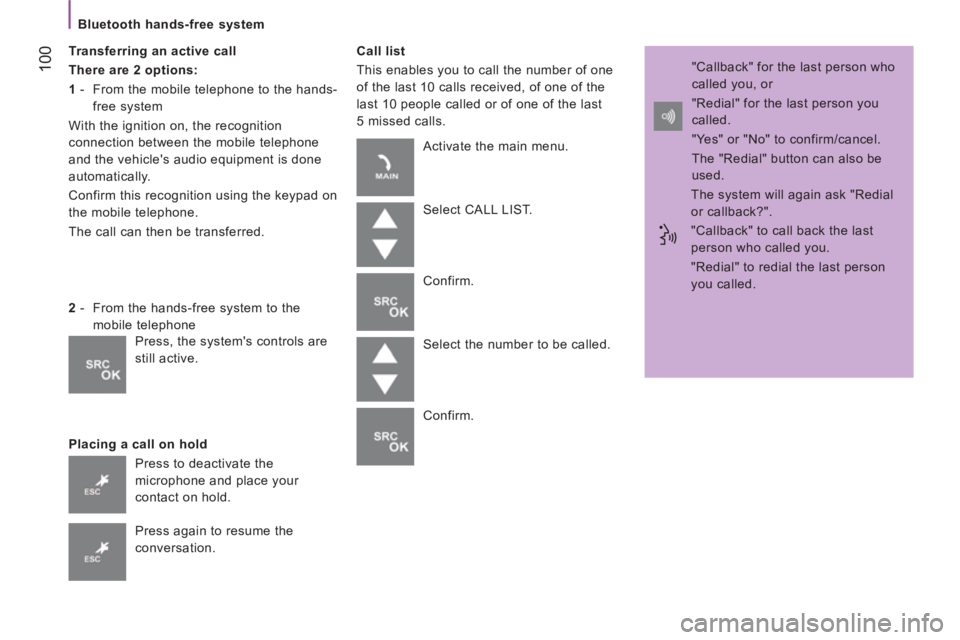
Transferring an active call
There are 2 options:
1
- From the mobile telephone to the hands-
free system
With the ignition on, the recognition
connection between the mobile telephone
and the vehicle's audio equipment is done
automatically.
Confirm this recognition using the keypad on
the mobile telephone.
The call can then be transferred.
Placing a call on hold
Call list
This enables you to call the number of one
of the last 10 calls received, of one of the
last 10 people called or of one of the last
5 missed calls.
2
- From the hands-free system to the
mobile telephone
Press to deactivate the
microphone and place your
contact on hold.
Press again to resume the
conversation. Activate the main menu.
Select CALL LIST.
Confirm.
Select the number to be called.
Confirm. "Callback" for the last person who
called you, or
"Redial" for the last person you
called.
"Yes" or "No" to confirm/cancel.
The "Redial" button can also be
used.
The system will again ask "Redial
or callback?".
"Callback" to call back the last
person who called you.
"Redial" to redial the last person
you called.
Press, the system's controls are
still active.
Page 103 of 184

101
TECHNOLOGY ON BOAR
D
Bluetooth hands-free system
4
VOICE COMMANDS
The key words which can be recognised by the system are organised into three levels (levels 1, 2 and 3).
When you say a level 1 command, the system makes the level 2 commands available; when you say a level 2 command,
the system makes the level 3 commands available.
Settings/pairing
Level 1
Level 2
Level 3
Actions
Settings
Adjust
Configure User data Activation of the hands-free system SETTINGS menu.
Activation of the USER DATA menu.
Delete users Deletion of the data recorded for all of the users.
Delete contacts/
Delete directory/
Delete numbers Deletion of the phone book data.
Copy phone book/
Copy phonebook/
Copy numbers Transfer of the phone books from your mobile telephone to the
hands-free system (available according to the type of mobile telephone).
Add Contacts Transfer of the names from your mobile telephone to the hands-
free system (available according to the type of mobile).
Delete all Deletion of the pairing data and of the phone books/contacts of all
of the telephones paired, with restoration of the default settings of
the hands-free system.
Pairing/Pair/
Pair the user Activation of the pairing procedure for
a new mobile telephone.
Advanced options Activation of the ADVANCED OPTIONS menu.
Page 104 of 184

102
Bluetooth hands-free system
The key words which can be recognised by the system are organised into three levels (levels 1, 2 and 3).
When you say a level 1 command, the system makes the level 2 commands available; when you say a level 2 command,
the system makes the level 3 commands available.
VOICE COMMANDS
Mobile telephone with hands-free function
Level 1
Level 2
Level 3
Actions
Dial/Dial a number One, Two, ... , Plus,
Star, Hash
Call/Dial Entering the digits or symbols to dial
the telephone number.
Delete/Correct Deletion of the last group of digits entered.
Start over Deletion of all of the groups of digits entered with the option of
entering a new number.
Repeat Repeating the telephone number entered and recognised by the
hands-free system.
Cancel Cancellation of dialling of the number.
Sending the call to the number entered verbally.
Call [ Name ] Yes/No Call to the name of the person, stored in the system's phone book.
Mobile
Call to the name of the person with personalisation if there are
several numbers stored in the system. Home
Work/Office
Redial Call to the last person called.
Callback Call to the last person who called.
Page 107 of 184

105
TECHNOLOGY ON BOAR
D
Bluetooth hands-free system
4
VOICE COMMANDS
Message reader
The key words which can be recognised by the system are organised into three levels (levels 1, 2 and 3).
When you say a level 1 command, the system makes the level 2 commands available; when you say a level 2 command,
the system makes the level 3 commands available.
Level 1
Level 2
Level 3
Actions
Message reader
Messages Messages received/
Received Activation of the MESS. READER menu.
Activation of the list of text messages received.
Read/read again Reads the text message selected in the list.
Call Deletion of the phone book data.
Delete Transfer of the phone books from your mobile telephone to the
hands-free system (available according to the type of mobile).
Back/Next/
Next Go to the next text message in the list
Back/Previous Go to the previous test message in the list.
Read last/read last message/read message Read the last text message received.
Delete all/Delete messages/Delete Delete all text messages in the list after confirmation.
Page 111 of 184
109
TECHNOLOGY ON BOAR
D
Bluetooth hands-free system
4
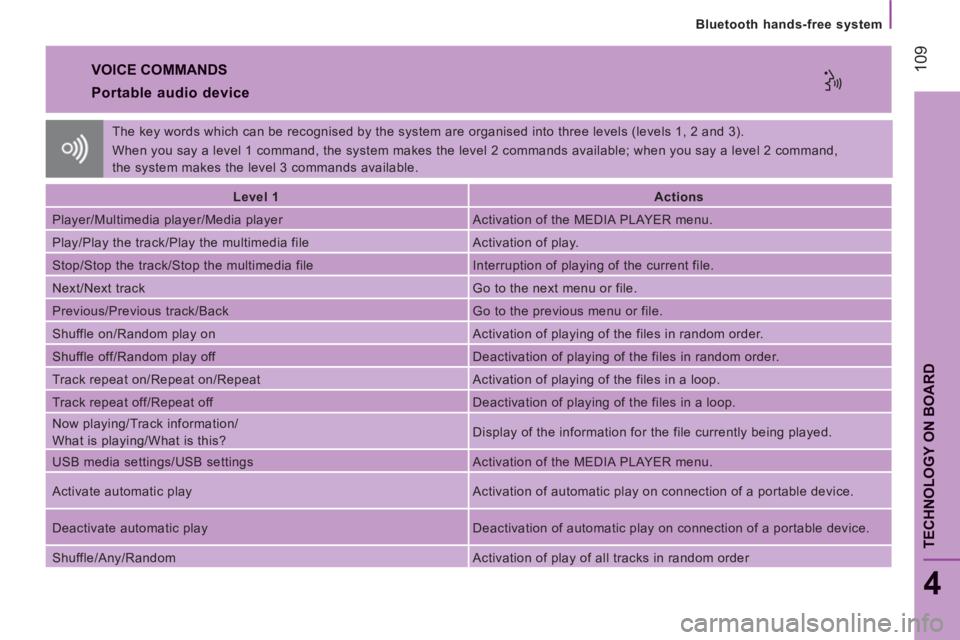
VOICE COMMANDS
Portable audio device
Level 1
Actions
Player/Multimedia player/Media player Activation of the MEDIA PLAYER menu.
Play/Play the track/Play the multimedia file Activation of play.
Stop/Stop the track/Stop the multimedia file Interruption of playing of the current file.
Next/Next track Go to the next menu or file.
Previous/Previous track/Back Go to the previous menu or file.
Shuffle on/Random play on Activation of playing of the files in random order.
Shuffle off/Random play off Deactivation of playing of the files in random order.
Track repeat on/Repeat on/Repeat Activation of playing of the files in a loop.
Track repeat off/Repeat off Deactivation of playing of the files in a loop.
Now playing/Track information/
What is playing/What is this? Display of the information for the file currently being played.
USB media settings/USB settings Activation of the MEDIA PLAYER menu.
Activate automatic play Activation of automatic play on connection of a portable device.
Deactivate automatic play Deactivation of automatic play on connection of a portable device.
Shuffle/Any/Random Activation of play of all tracks in random order The key words which can be recognised by the system are organised into three levels (levels 1, 2 and 3).
When you say a level 1 command, the system makes the level 2 commands available; when you say a level 2 command,
the system makes the level 3 commands available.
Page 131 of 184

12
9
5
SAFETY
Child safety
ADVICE ON CHILD SEATS
The incorrect installation of a child seat in a
vehicle compromises the child’s protection in
the event of an accident.
Remember to fasten the seat belts or the
child seat harnesses keeping the slack
in
relation to the child’s body to a minimum
,
even for short journeys.
For optimum installation of the "forward
facing" child seat, ensure that the back of
the child seat is in contact with the back of
the vehicle’s seat and that the head restraint
does not cause any discomfort.
If the head restraint has to be removed,
ensure that it is stored or attached securely
to prevent it from being thrown around the
vehicle in the event of sharp braking.
Children under the age of 10 must not travel
in the "forward facing" position on the front
passenger seat, unless the rear seats are
already occupied by other children, cannot
be used or are absent. Deactivate the passenger airbag when a
"rear facing" child seat is installed on the
front seat.
Otherwise, the child would risk being
seriously injured or killed if the airbag were
to inflate.
As a safety precaution, do not leave:
- one or more children alone and
unsupervised in a vehicle,
- a child or an animal in a vehicle which
is exposed to the sun, with the windows
closed,
- the keys within reach of children inside
the vehicle.
To prevent accidental opening of the doors,
use the "Child Lock".
Take care not to open the rear windows by
more than one third.
To protect young children from the rays of
the sun, fit side blinds to the rear windows.
Installing a booster seat
The chest part of the seat belt must be
positioned on the child’s shoulder without
touching the neck.
Ensure that the lap part of the seat belt
passes correctly over the child’s thighs.
CITROËN recommends the use of a booster
seat which has a back, fitted with a seat belt
guide at shoulder level.
Crew cab
Do not install child seats, booster cushions
or carrycots on the rear seats of the cab.