2011 Citroen DS5 instrument panel
[x] Cancel search: instrument panelPage 125 of 348
123Driving
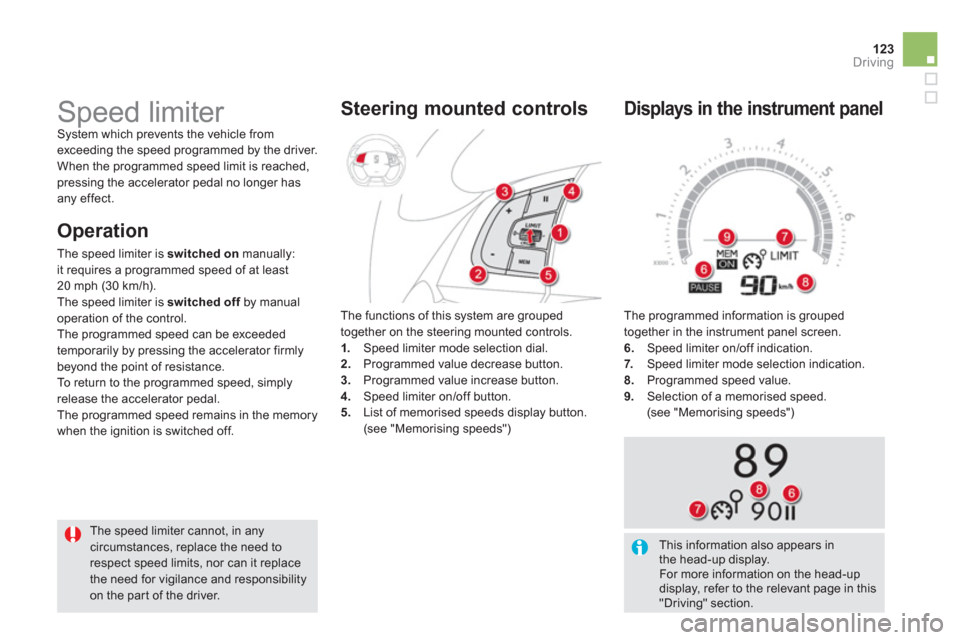
The programmed information is grouped
together in the instrument panel screen.
6. Speed limiter on/off indication. 7. Speed limiter mode selection indication. 8.
Programmed speed value.9. Selection of a memorised speed.
(see "Memorising speeds")
Displays in the instrument panel
Speed limiter System which prevents the vehicle fromexceeding the speed programmed by the driver.
When the programmed speed limit is reached, pressing the accelerator pedal no longer has
any effect.
The speed limiter cannot, in any
circumstances, replace the need to respect speed limits, nor can it replace the need for vigilance and responsibilityon the par t of the driver.The functions of this s
ystem are grouped
together on the steering mounted controls. 1.Speed limiter mode selection dial. 2. Programmed value decrease button. 3.
Programmed value increase button.
4. Speed limiter on/off button.
5. List of memorised speeds display button. (see "Memorising speeds")
Steering mounted controls
O
peration
The speed limiter is switched onmanually:
it requires a programmed speed of at least
20 mph (30 km/h).
The speed limiter is switched offby manual foperation of the control.
The programmed speed can be exceeded
temporaril
y by pressing the accelerator firmlybeyond the point of resistance.
To return to the programmed speed, simply
release the accelerator pedal.
The pro
grammed speed remains in the memory
when the i
gnition is switched off.
This information also appears in the head-up display.
For more information on the head-updisplay, refer to the relevant page in this"Driving" section.
Page 127 of 348

125
Driving
The cruise control system cannot, in any circumstances, replace the need to respect speed limits, nor can it replacethe need for vigilance and responsibility on the par t of the driver.
You are advised to keep your feet near the pedals at all times.
Cruise control System which automatically maintains thespeed of the vehicle at the value programmed
by the driver, without any action on the
accelerator pedal.
The functions of this s
ystem are grouped
together on the steering mounted controls. 1.Cruise control mode selection dial.2. Speed programming/value decreasebutton.3.
Speed programming/value increase button.4.
Cruise control off/resume button.
5. Stored speeds display button.
(see "Storing speeds")
Steering mounted controls
The programmed information is grouped
together in the instrument panel screen.
6. Cruise control off/resume indication.7. Cruise control mode selection indication. 8.
Programmed speed value.9. Selecting a stored speed.
(see "Storing speeds")
Displays in the instrument panel
Operation
The cruise control is switched on
manually:
it requires a minimum vehicle speed of 25 mph(40 km/h) and engagement of:
- fourth gear on the manual gearbox,
- second gear on the electronic gearbox system or automatic gearbox, in sequential
driving mode,
- position A
on the electronic gearboxsystem or Don the automatic gearbox.
The cruise control is switched off manually for by pressing the brake or clutch pedal or on
triggering of the "electronic stability control" system for safety reasons.
It is possible to exceed the programmed speed
temporarily by pressing the accelerator pedal.
To return to the programmed speed, simply
release the accelerator pedal.
Switching off the ignition cancels any programmed speed value. This information also appears in thehead-up display.
For more information on the head-updisplay, refer to the relevant page in this"Driving" section.
Page 130 of 348

In bad weather or in winter, ensure that the sensors are not covered with mud, ice or snow. When reverse gear is
engaged, an audible signal (long beep)indicates that the sensors may be dirty.
When the vehicle is moving at a speed below 6 mph (10 km/h), cer tain sound sources (motorcycle, lorry, pneumatic drill, etc.) may trigger the audiblesignals of the parking sensor system.
In th
e event of a malfunctionof the system, when reverse gear is engaged this warning
lamp is displayed in the instrument paneland/or a message appears in the screen,
accompanied by an audible signal (short beep).
Contact a CITROËN dealer or a qualified
workshop.
Operating fault
In addition to the rear parking sensors, the front parking sensors are triggered when an obstacle
is detected in front and the speed of the vehicle
is still below 6 mph
(10 km/h).
The front parking sensors are interrupted if
the vehicle stops for more than three seconds
in for ward gear, if no fur ther obstacles are
detected or when the speed of the vehicle
exceeds 6 mph (10 km/h).
Front par king sensors
The function will be deactivated automatically if a trailer is being towed or a bicycle carrier is fitted (vehicle fitted with a towbar or bicycle carrier recommended by CITROËN).
Deactivation/Activation of the front and rear parking sensors
The function is deactivated by pressing thisbutton. The indicator lamp in the button comes on.
Pressing this button again reactivates the
function. The indicator lamp in the button
goes off.
The sound emitted by the speaker (front
or rear) indicates whether the obstacle is in front or behind.
Page 135 of 348

Visibility
Selection ring for main lighting mode
Turn the ring to position the symbol required
facing the mark.
Lighting o
ff.
Automatic illumination of headlamps.
Sidelamps only.
Dipped or main beam headlamps.
Stalk for switching headlamps
Pull the stalk to switch the lighting between
dipped/main beam headlamps.
In the li
ghting off and sidelamps modes, the
driver can switch on the main beam headlamps
temporarily ("headlamp flash") by maintaininga pull on the stalk.
Displays
Illumination of the corresponding indicator lamp
in the instrument panel confirms the lighting switched on.
Page 138 of 348

switched on automatically, without any action on
the par t of the driver, when a low level of external
li
ght is detected or in certain cases of activation of
the windscreen wipers.
As soon as the brightness returns to a sufficient
level or after the windscreen wipers are switched
off, the lamps are switched off automaticall
y.
Automatic illumination of
headlamp
s
Activation
)Turn the ring to the "AU TO "position. Theautomatic illumination of headlamps is activated after approximately 1 minute, a message is displayed in the screen.
Deactivation
)Turn the ring to another position. Deactivation is accompanied by a message in the screen.
Associated with the automatic"Guide-me-home" lighting
Association with the automatic lighting provides
the "guide-me-home" lighting with the following
additional options:
- selection of the li
ghting duration of 15, 30or 60 seconds in the vehicle parameters in
the vehicle configuration menu,
- automatic activation of "guide-me-home"lighting when automatic illumination of headlamps is in operation.
Operating fault
In the event of a malfunctionof the sunshine sensor,
the lighting comes on, this
warning lamp is displayed in the instrumentpanel and/or a message appears in the screen,
accompanied by an audible signal.
Contact a CITROËN dealer or a qualified
wor
kshop.
In fog or snow, the sunshine sensor may detect sufficient light. In this case, thelighting will not come on automatically. Do not cover the sunshine sensor,coupled with the rain sensor andlocated in the centre of the windscreen behind the rear view mirror; theassociated functions would no longer be controlled.
Page 139 of 348

137
Visibility
Automatic headlamp dipping
Switching on
System which automatically changes between
dipped and main beam according to the driving conditions, using a camera in the rear viewmirror.
) put the lighting control stalk ring
in the "AUTO" position,
Activation
This automatic headlamp dippingsystem is a driving aid. The driver
remains responsible for the vehicle's lighting, its correct use for the prevailingconditions of light, visibility and trafficand obser vation of driving and vehicle regulations.
)Flash the headlamps,
which causes a change
between dipped and main
beam, the warning lampin the instrument panelcomes on to confirm activation.
)
press the button, its warninglamp comes on.
Switching off
)
press the button, the warninglamp goes off, the headlamps
remain in their current position.
Pause
If the situation requires a change of headlamp beam, driver can take over at any time:
)Flash the headlamps to
temporar
ily deactivate
the system (pause), this changes the headlamps
to dipped beam.
)Flash the headlamps toreactivate the system.
The system will be operational as soon as you have exceeded 15 mph (25 km/h). If the speed drops below 9 mph (15 km/h), the system changes to dipped beam.
Page 140 of 348

Parking lamps
Side markers for the vehicle by illumination of
the sidelamps on the traffic side only.)Within one minute of switching off the
ignition, operate the lighting control stalk
up or down depending on the traffic side(for example: when parking on the left; lighting control stalk upwards; the righthand sidelamps are on).
This is confirmed by an audible signal and
illumination of the corresponding direction
indicator warning lamp in the instrument panel.
To switch off the parking lamps, return the
lighting control stalk to position 0 or switch on
the ignition. Temporarily keeping the dipped beam
headlamps on a
fter the vehicle's ignition has been switched off makes the exit of the vehicle's
occupants easier when the light is poor.
Manual guide-me-home
li
ghting
Switching on
)
Within one minute after switching of the
ignition, "flash" the headlamps using the lighting stalk.) A further "headlamp flash" switches thefunction off.
Switching off
The manual guide-me-home lighting switches
off automatically after a set time (this time is
pro
grammable in the configuration menu).
The system may suffer interference or not work correctly:
- under conditions of poor visibility(for example, snowfall, heavy rain or thick fog, ...),
- if the windscreen is dir ty, misted or obscured (by a sticker, ...) in front of the camera,
- if the vehicle is facing highly reflective signs.
The system is not able to detect:
- road users that do not have their own lighting, such as pedestrians,
- road users whose lighting isobscured, such as vehicles running behind a safety barrier (on amotorway, for example),
- road users at the top or bottom of a steep slope, on twisty roads, oncrossroads.
Page 142 of 348

Manual adjustment
of halogen
headlamps
Automatic adjustment of xenon
headlamps
To avoid causing a nuisance to other road
users, the height of the halogen headlampsshould be adjusted according to the load in the
vehicle.0.1 or 2 people in the front seats. -.Intermediate setting. 1. 5 people + maximum authorised load. -.Intermediate setting. 2.
Driver + maximum authorised load. -.Intermediate setting. 3.
5 people + maximum load in the boot.
The initial setting is position "0".
If a fault occurs, this warning lamp is displayedin the instrument panel,
accompanied by an audible signal and a
message in the instrument panel screen.
The s
ystem then places your headlamps in the lowest position.
In order to avoid causing a nuisance to other road users, this system corrects the height of the
xenon headlamps beam automatically and when
stationary, in relation to the load in the vehicle.
If a fault occurs, do not touch the xenonbulbs. Contact a CITROËN dealer or aqualified workshop.