2011 Citroen C6 RHD light
[x] Cancel search: lightPage 33 of 216

31
II
INSTRUMENT PANEL
WARNING LAMPS
These warning lamps may be accompanied by a message and/or a sound signal
ESP/ASR
Operatin
g
If either of the ESP or ASR systems is active, the warning lamp fl ashes.
For a malfunction
When the vehicle is moving, the lighting of this warning lamp indi-cates a system malfunction.
Contact a CITROËN dealer or a qualifi ed workshop.
Deactivation
The lighting of the warning lamp and of the button ESP indicates
that the system is deactivated.
Electric parkingbrake
When the engine is running,
this warning lamp lights up
to indicate a malfunctioning of the electric parking brake. The brake is not working properly. Place the gearbox in the Park position (P).
Contact a CITROËN dealer or a qualifi ed workshop as soon as possible.
ABS
The ABS warning lamplights up when you switchon the ignition: it should goout after a few seconds. If it doesnot go out, there could be a sys-
tem malfunction. See "Brakes".
Puncture(s)
If this warning lamp comes
on, it indicates a punctureon one or more wheels.
The screen displa
ys an imagewhich shows you which wheelis affected. Contact a CITROËNy
dealer or a qualifi ed workshop.
Door open
If this warning lamp comes
on while the engine is run-ning, it tells you that one of
the doors and/or the boot is open.
Electric parking brake,brake fl uid level,braking distributionmalfunction
With the engine running, the lighting
of this warning lamp indicates that
the parking brake is on or not pro-
perly released, that the brake fl uid level is low or that the braking sys-
tem is malfunctioning.
If the warning lamp remains on although the parking brake is released, stop as soon as it is safe to do so and contact a CITROÀN ,p
dealer or a qualifi ed workshop.
See "Brakes".
SERVICE
This warning lampstays on fi xed for a
major fault. Contacta CITROËN dealer or a qualifi edj
workshop as soon as possible.
This warning lamp stays on tem-porarily for minor faults. Contacta CITROËN dealer or a qualifi edpy
workshop if necessary.
To learn the ori
gin of the corres-
ponding alert, refer to the log of
alerts (See chapter "Multifunction
displays" or NaviDrive).
STOP warning lamp
If this warning lamp comes on, it is impe-rative to stop the vehicle and to switch the engine off. The warning lamp is accompanied by the STOP symbol on the screen as well as
on the Head-up display.
Alert a CITROËN dealer or a quali-fi ed workshop as soon as possible.
Page 34 of 216

32
II
INSTRUMENT PANEL
WARNING LAMPS
Front passenger'sairbag deactivation
See "Airbags".
Left handdirection indicator
See "Signalling".
Right hand directionindicator
See "Signalling".
If the hazard lam
ps are activated, this means that the direction indicatorsfl ash on both sides at the same time.
Sidelamps
See "Signalling".
Front foglamps
See "Signalling".
Dipped beams
If this warning lamp fl ashes, it indicates that the direc-
tional headlamps are mal-functioning.
Contact a CITROËN dealer
or a qualifi ed workshop.
Foglamps (rear)
See "Signalling".
Main beams
See "Signalling".
Driver's seat belt
not fastened
If this warning lamp comes on, it is reminding the driver to fasten his seat belt. While the vehicle is sta-
tionary it remains on until the belt
is fastened.
See "Seat belts warning lamp".
Depollution
system
If this warning lamp fl ashesor lights up while you are driving,
this indicates a problem with the
depollution system.
Contact a CITROËN dealer or a
qualifi ed workshop as soon as
possible.
Diesel enginepreheater
See method for starting the engine.
See "Driving".
Fuel low
When it comes on perma-
nently on level ground, you
have about 8 l of fuel left.
Depending on your driving style and your engine, you have enough fuel
left to drive approximately 30 miles (50 km). You must fi ll up as soon as
possible.
The fuel tank has a capacity of about
72 litres.
Be careful to never drive until you run
out of fuel; it could damage the emis-
sion control and injection systems.
Page 36 of 216
34
II
INSTRUMENT PANEL
MAINTENANCE INDICATOR
It informs you when the next routine service is due in accordance with the vehicle servicing schedule in theMaintenance and Warranty Guide. This information is dependent on two parameters: the mileage covered, and the
time elapsedsince the last visit.
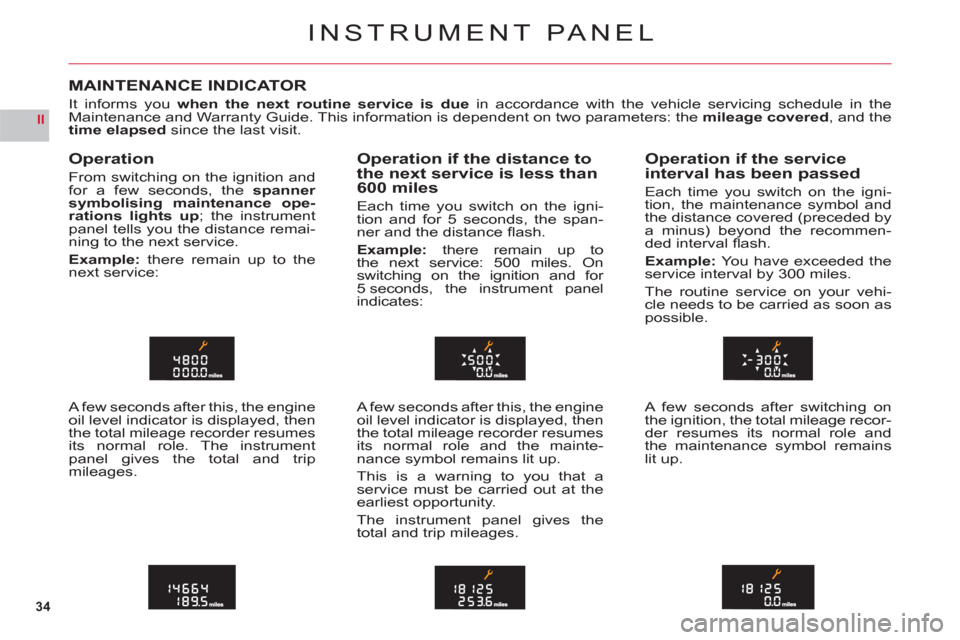
Operation
From switching on the ignition and
for a few seconds, the spanner
symbolising maintenance ope-rations lights up; the instrumentpanel tells you the distance remai-ning to the next service.
Example:there remain up to thenext service:
A few seconds after this, the engine
oil level indicator is displayed, then
the total mileage recorder resumesits normal role. The instrumentpanel gives the total and tripmileages.
Operation if the distance tothe next service is less than
600 miles
Each time you switch on the igni-
tion and for 5 seconds, the span-
n
er and the distance fl ash.
Example: there remain up to
the next service: 500 miles. On
switching on the ignition and for 5 seconds, the instrument panel
indicates:
A few seconds after this, the engine oil level indicator is displayed, then
the total mileage recorder resumes its normal role and the mainte-
nance symbol remains lit up.
This is a warnin
g to you that a service must be carried out at the earliest opportunity.
The instrument panel
gives the
total and trip mileages.
Operation if the service
interval has been passed
Each time you switch on the igni-
tion, the maintenance symbol andthe distance covered (preceded bya minus) beyond the recommen-ded interval fl ash.
Example:Yo u have exceeded theservice interval by 300 miles.
The routine service on your vehi-cle needs to be carried as soon aspossible.
A few seconds after switching on
the ignition, the total mileage recor-der resumes its normal role andthe maintenance symbol remainslit up.
Page 37 of 216
35
II
00
00A
A
INSTRUMENT PANEL
Maintenance intervals
If you use your vehicle in particu-larly diffi cult conditions, it is essen-
tialto use the service schedule for "severe conditions" comprisingshorter intervals between services.See "Maintenance and WarrantyGuide".
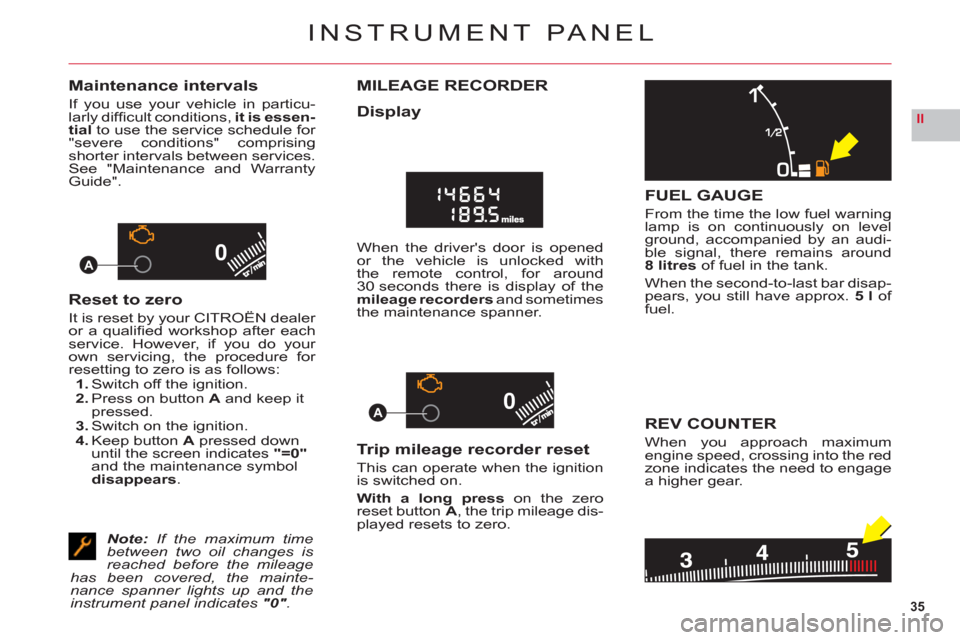
Reset to zero
It is reset by your CITROËN dealer
or a qualifi ed workshop after eachservice. However, if you do your
own servicing, the procedure for resetting to zero is as follows:1. Switch off the ignition.2. Press on button A and keep it pressed.3. Switch on the ignition.4. Keep buttonA pressed down until the screen indicates"=0"
and the maintenance symboldisappears.
Note:If the maximum time between two oil changes is reached before the mileage has been covered, the mainte-nance spanner lights up and the instrument panel indicates "0".
MILEAGE RECORDER
Display
When the driver's door is opened or the vehicle is unlocked with
the remote control, for around
30 seconds there is display of the mileage recorders and sometimes
the maintenance spanner.
Trip mileage recorder reset
This can operate when the ignition is switched on.
With a long press on the zero
reset buttonA, the trip mileage dis-
played resets to zero.
FUEL GAUGE
From the time the low fuel warninglamp is on continuously on levelground, accompanied by an audi-
ble signal, there remains around8 litresof fuel in the tank.
When the second-to-last bar disap-pears, you still have approx. 5 l of
fuel.
REV COUNTER
When you approach maximumengine speed, crossing into the redzone indicates the need to engage
a higher gear.
Page 38 of 216

36
II
B
AC
D
NIGHT DRIVINGA fi rst presson the DARK button puts the display on standby. Only the
time and the temperature remain displayed.
A second
pressswitches off the display and the instrument panel,except for information concerning:The speed indicator.The automatic gearbox.Cruise control/Speed limiter if this has been activated.Note:
Temporary lighting of the display for modifi cation of audio-CD adjustments and air conditioning.
The display lights up if any of the other buttons on the display is pressed. To revert to night driving, press just once on button DARK.KKAll the displays come on if there is an alert.
A third press returns you to normal lighting.
---
-
-
-
DASHBOARD BRIGHTNESS
With lamps switched on, press onbutton Cor Dto alter the intensityof the dashboard lighting.
In the "Main menu", you have a"Confi guration" menu, in which youcan adjust the display brightness.See "Display" and the NaviDrivechapter.
For enhanced visual comfort, youcan also adjust the orientation of
the NaviDrive display by pressingbuttonsA and B.
INSTRUMENT PANEL – DISPLAY
Page 39 of 216
37
II2
1
43
HEAD-UP DISPLAY
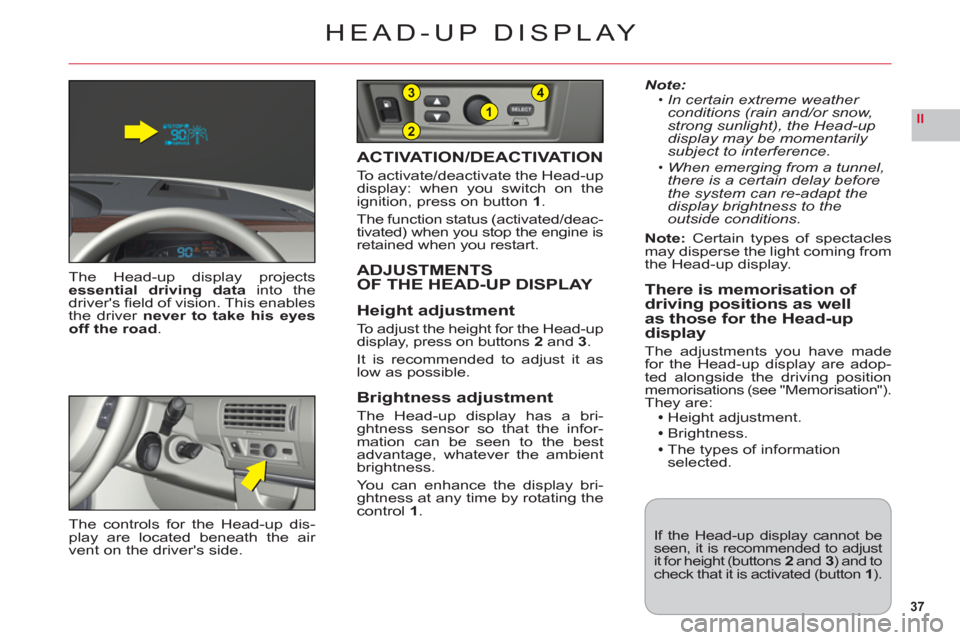
The Head-up display projectsessential driving datainto thedriver's fi eld of vision. This enablesthe driver never to take his eyesoff the road.
ACTIVATION/DEACTIVATION
To activate/deactivate the Head-up
display: when you switch on the
ignition, press on button 1.
The function status (activated/deac-
tivated) when you stop the engine is
retained when you restart.
ADJUSTMENTS
OF THE HEAD-UP DISPLAY
Hei
ght adjustment
To a djust the height for the Head-up display, press on buttons 2 and3.
It is recommended to adjust it as low as possible.
Brightness adjustment
The Head-up display has a bri-ghtness sensor so that the infor-
mation can be seen to the best
advantage, whatever the ambient
brightness.
You can enhance the display bri-
ghtness at any time by rotating the control 1.
Note:In certain extreme weather
conditions (rain and/or snow,strong sunlight), the Head-up display may be momentarily subject to interference.
When emerging
from a tunnel, there is a certain delay beforethe system can re-adapt thedisplay brightness to the outside conditions.
Note:
Certain types of spectaclesmay disperse the light coming from
the Head-up display.
There is memorisation of driving positions as well
as those for the Head-updisplay
The adjustments you have madefor the Head-up display are adop-
ted alongside the driving positionmemorisations (see "Memorisation").They are:Height adjustment.
Brightness.
The types of information selected.
•
•
If the Head-up display cannot beseen, it is recommended to adjustit for height (buttons 2 and 3) and tocheck that it is activated (button1).
The controls for the Head-up dis-play are located beneath the air
vent on the driver's side.
Page 41 of 216

39
II
1432
MULTIFUNCTION DISPLAYS
COLOUR SCREEN C
1-Outside temperature
2 -Display zone
3 -Date
4-Time
When the outside temperature
is between +3 °C and –3 °C, the
temperature display fl ashes (risk
of ice).Note:The outside temperature
displayed may be higher than the
actual temperature if the vehicle is stationary in bright sunlight.
The driver is advised not to ope-
rate the controls described below
while the vehicle is moving.
CONTROLSA Access to the "Main menu" of
the display.
B Scroll through display menus.
C Selection in the menus of thefunction chosen or value tomodify.D Cancellation of the operation or
return to the previous display.
Main Menu
Press on buttonAto bring up the "Main menu" of the multifunc-
tion display. This menu gives you
access to the following functions:
Radio mono CD
See chapter "RDS AudioCompact Disc system".
Trip computer
For:Entering the distance
to the destination.
Access to the log of alerts(recall of the alerts signalled
previously).
Access to the status of functions, for example
automatic lighting of
headlamps, ESP,
windscreen wipe.
Personalisation/Confi guration
For:Activating/deactivating:
Automatic lighting ofheadlamps.Automatic guide-me-home
lighting, with choice ofduration.Daytime-running lamps.
The Xenon dual-function
directional headlamps.The welcome function.And choosing:
The brightness and thecolour of the display, time,date and units.The display language.
-
-
--
-
-
-
Air conditioning
For:Deactivating the air conditioning.
Deactivating/activating the
differential adjustment of the
air conditioning on the driver's side/passenger's side.
Bluetooth®
hands-free kit
See chapter "AUDIO/TELEMATICS".
Page 42 of 216

40
II
MULTIFUNCTION DISPLAYS
COLOUR SCREEN C
TRIP COMPUTER
To enter the distance to be
travelled on the trip computer:1.Press on A.2.UseB to select the icon "Trip computer", then confi rm with a press on C.3.Select entry of distance
usingB. Confi rm your choice
with a press onC.4.To choose the distance, select
the fi gure you wish to modifyby using B, then confi rm with
a press onC.5.UseB to adjust the value, then
validate by pressing C.6.Validate"OK" on the screen.
To access the tripcomputer's log of alerts:1. Press onA.2. Use Bto select the icon "Tripcomputer", then confi rm with apress onC.3. Select the log of alerts.4. When the list displays, useBto scroll through it.5. Press D to return to the perma-
nent display.
To access the status of functions:
proceed in a similar manner.
PERSONALISATION/
CONFIGURATION
To activate/deactivate the
automatic guide-me-home
lighting:1. Press on A.2. UseB to select the icon
"Personalisation-Confi guration"
then confi rm your choice bypressing C.3. Then select the sub-menu
for the vehicle parameters.
Confi rm your choice with a press on C.4. Using B, select lighting andsignalling. Confi rm your choice
with a press onC.5. Press on C to select/deselect
the guide-me-home lighting.
After activation, choose the dura-
tion: press Cthen use B to select
the duration, then press C.
To activate/deactivate
the automatic lighting of
headlamps:
Repeat stages 1 to 4 describedabove.
5. Press on C to select/deselect
the automatic lighting of hea-
dlamps.Note: Activation of this function is immediate while deactivation requi-res the ignition to be switched off.