2011 Citroen C4 AUX
[x] Cancel search: AUXPage 272 of 324

270
11 SCREEN MENU MAP
"SETUP" MENU
Audio settings
Equalizer
Following media source
Eject USB support
Read mode
Normal
Random
Random on all media
Repetition
Audio settings (same as
RADIO)
Activate/Deactivate AUX
input
None
Classical
Jazz
Rock
Techno
Vocal
Bass
Treble
Lou
dness
Distribution
Driver
All passengers
Le-Ri balance
Fr-Re balance
Auto. Volume
Update radio list
"MEDIA" MENU
Display configuration
Choose colour
Harmony
Cartography
Day mode
Night mode
Auto Da
y/Night
Adjust luminosity
Set date and time
Voice synthesis
Guidance instructions volume
Select male voice/Select female voice
1
1
12
1
2
3
3
1
1
1
3
2
2
2
4
3
3
3
3
3
2
2
2
2
2
3
3
2
2
2
1
2
2
1
4
4
2
2
Page 280 of 324
278
01
1
2
7
45
6
3
8
9
10
13
1112
14
FIRST STEPS
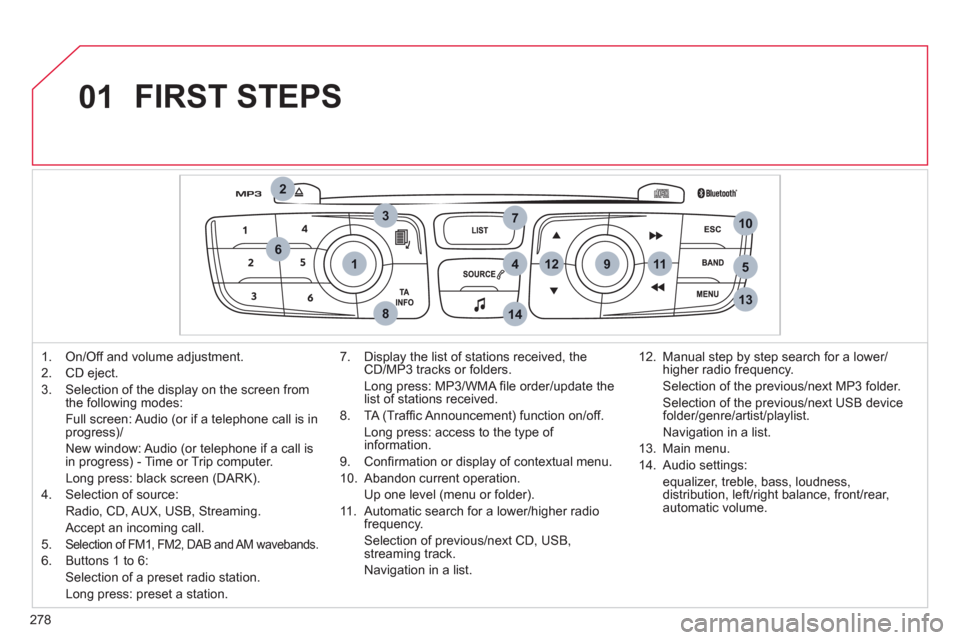
1. On/Off and volume adjustment.
2.
CD eject.
3.
Selection of the display on the screen from
the following modes:
Full screen: Audio
(or if a telephone call is inprogress)/
New window: Audio
(or telephone if a call is
in progress) - Time or Trip computer.
Lon
g press: black screen (DARK).
4.
Selection of source:
Radio,
CD, AUX, USB, Streaming.
Accept an incomin
g call.
5. Selection of FM1, FM2, DAB and AM wavebands.
6. Buttons 1 to 6:
Selection of a preset radio station.
Long press: preset a station.
7. Displa
y the list of stations received, theCD/MP3 tracks or folders.
Lon
g press: MP3/WMA fi le order/update thelist of stations received.
8. TA
(Traffi c Announcement) function on/off.
Lon
g press: access to the type of information.
9. Confi rmation or displa
y of contextual menu.
10. Abandon current operation.
Up one level
(menu or folder).
11 . Automatic search
for a lower/higher radiofrequency.
Selection of previous/next CD, USB,
streaming track.
Navi
gation in a list.12. Manual step b
y step search for a lower/higher radio frequency.
Selection of the previous/next MP3 folder.
Selection of the previous/next USB device folder/genre/artist/playlist.
Navi
gation in a list.
1
3. Main menu.
14. Audio settin
gs:
equa
lizer, treble, bass, loudness,
distribution, left/right balance, front/rear, automatic volume.
Page 290 of 324

288
04AUDIO
IPOD ®
or PORTABLE PLAYER
Management of the device is via the audio system controls.
The audio
fi les on a Mass Storage portable player *
can
be heard through the vehicle's speakers by connectingit to the USB port (cable not supplied).
If the portable pla
yer is not recognised by the USB port,connect it to the auxiliary Jack socket.
The IpodÆ must be updated regularly for the best connection.Æ
The playlists are those defi ned in the IpodÆ .
The Ipod
Æ must be generation 5 or later.
Æ
* Check your player's manual.
Page 291 of 324
289
3
2
4
04
1
AUDIO
AUXILIARY SOCKET (AUX)
AUXILIARY JACK SOCKET
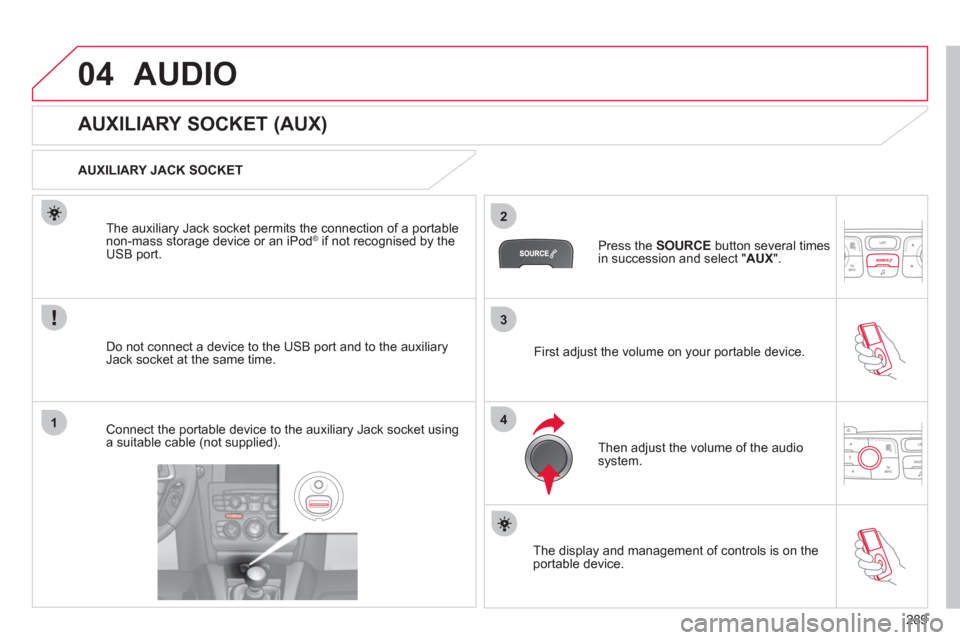
Do not connect a device to the USB port and to the auxiliar
yJack socket at the same time. The auxiliar
y Jack socket permits the connection of a portable
non-mass storage device or an iPod ®if not recognised by the USB port.
Connect the portable device to the auxiliary Jack socket using a suitable cable (not supplied). Pr
ess the SOURCE
button several times in succession and select "AUX
".
First ad
just the volume on your portable device.
Then ad
just the volume of the audio
system.
The displa
y and management of controls is on theportable device.
Page 312 of 324

310
FREQUENTLY ASKED QUESTIONS
QUESTIONANSWERSOLUTION
A telephone connects
automatically,
disconnecting another
telephone. Automatic connection overrides manual connection. Modify the telephone settings to remove automatic connection.
An IPod is not recognised
when connecting to theUSB port.The IPod is of a generation that is not compatible with the USB. Connect the IPod to the AUX Jack socket using a
suitable cable (not supplied).
Th
e hard disk or deviceis not recognised when connecting to the USB port.
Some hard disks and devices need a power supply greater than is
provided by the audio system. Connect the device to the 230 V socket, the 12 V
soc
ket or an external power supply.
Caution
: ensure that the device does not transmit a voltage greater than 5 V (risk of destruction of
the system).
When streamin
g, the
sound cuts momentarily. Some telephones prioritise connection of the "hands-free" profi le. Delete the "hands-free" connection profi le to
improve streaming.
In "Random all" pla
y, not all of the tracks areplayed.In "Random all" pla
y, the system can only take into account up to999 tracks.
With the en
gine off, the
audio system switchesoff after a few minutes of use.When the en
gine is switched off, the audio system operating timedepends on the battery charge.
The switch-o
ff is normal: the audio system switches to economy modeand switches off to prevent discharging the vehicle's battery.
Start the vehicle's engine to increase the batterycharge.
The message "the audio
system is overheated"
appears on the displa
y.In order to protect the installation i
f the surrounding temperature is too
high, the audio system switches to an automatic thermal protection mode
leadin
g to a reduction of the volume or stopping of the playing of the CD.Switch the audio s
ystem off for a few minutes toallow the system to cool.
Page 314 of 324

312
VISUAL SEARCH
INTERIOR
Boot fi ttings ..............................118-120
- rear parcel shelf
- hooks
- 12 V socket
- torch
- lashing eyes
- storage compartment
Luggage cover (C4 enterprise) ...... 121
Rear seats ....................................... 75
Rear armrest/Ski fl ap ...................... 117
Child seats .............................. 122-125
ISOFIX mountings .................. 126-128
Front seats.................................. 70-74
Seat belts................................ 135-137
Airbags ................................... 138-141
Interior fi ttings ..........................109-117
- auxiliary socket/USB port
- cigar lighter/12 V socket
- portable ashtray
- front armrest
- 230 V/50 Hz socket
- mats
Glove box ....................................... 110
Deactivating the passenger's
airbag............................................. 139
Page 317 of 324

315
ALPHABETICAL INDEX
A ABS and EBFD systems ............132
Accessories ................................210
Accessories socket,
12 V ................... 111, 112, 115, 119
Adjusting headlamps ..................100
Adjusting head restraints ..............72
Adjusting seat belt height ...........135
Adjusting the steering wheel ........78
Air conditioning (digital) ..........63, 66
Air conditioning (manual) .......63, 64
Air fi lter .......................................181
Air vents .......................................62
Alarm ............................................87
Anti-lock braking system (ABS) ... 132
Anti-pinch .....................................91
Anti-theft steering lock ..................81
Ashtray, portable ........................ 110
Assistance call ...................134, 224
Audible warning ..........................130
Audio streaming
(Bluetooth) ........................264, 290
Audio system ..................50, 52, 277
Automatic gearbox .............154, 182
Automatic illumination
of headlamps ........................96, 99
Automatic operation of hazard
warning lamps ..........................130
Automatic rain sensitive
windscreen wipers ............103, 104
Auxiliary sockets ........ 111, 265, 289
B Battery ................................181, 202
Battery, remote control ............82-84
Battery recharge .........................203
Bench seat, rear ...........................75
Blind spot sensors ......................162
Bluetooth (hands-free) .......248, 291B Bluetooth (telephone) .........248, 291
Bonnet ........................................175
Bonnet stay ................................175
Boot ..............................................90
Boot lamp ...........................108, 120
Brake discs .................................182
Brake lamps ...............................196
Brake pads .................................182
Brakes ........................................182
Braking assistance system .........132
C Capacity, fuel tank ........................94
CD ..............................................284
CD MP3 ..............................261, 285
Central locking .......................81, 85
Centre console ........................... 112
Changing a bulb ..................192-197
Changing a fuse ..................198-201
Changing a wheel ...............188-191
Changing a wiper blade .....105, 205
Changing the date ..............267, 302
Changing the remote
control battery ......................82, 83
Changing the time ........47, 267, 302
CHECK ...................................30, 46
Checking levels ..................179, 180
Checking the engine oil level .......43
Checking tyre pressures
(using the kit) ............................187
Checks ................................175-182
Child lock ....................................129
Children... 92, 122-129, 137, 139, 143
Child seats .........................122-128
Cigarette lighter .......................... 111
Clock ............................47, 267, 302
Closing the boot .....................81, 90
Closing the doors ...................81, 89C Cold climate screen ....................205
Colour and map
screen ..................55, 56, 229, 268
Connectors, audio ... 111, 265, 287, 289
Control stalk, wipers ............103-105
Coolant level ..............................179
Courtesy lamps ..........................106
Courtesy mirror .......................... 110
Cruise control .....................165, 168
Cup holder .................................. 112
Curtain airbags ...................140, 141
Customisation ..............................49
D Dashboard fusebox ....................199
Date (display) .....................267, 302
Daytime running lamps ...98, 192, 194
Deactivating the passenger
airbag .......................................139
Defrosting .....................................69
Diesel additive level ...................180
Diesel engine .......95, 176, 178, 216
Dimensions ................................221
Dipped beam ................96, 192, 194
Dipstick .................................43, 179
Directional lighting ..............101, 102
Direction
indicators ....99, 130, 192, 193, 196
Door mirrors ...................76, 77, 162
Doors ............................................89
Doors emergency control .............86
Door pockets ..............................109
Driving positions (storing) .............74
Dynamic emergency
braking .............................142, 145
E EBA (Emergency braking
assistance) ...............................132
Economy mode ..........................204