2011 CHEVROLET VOLT horn
[x] Cancel search: hornPage 180 of 516

Black plate (60,1)Chevrolet Volt Owner Manual - 2011
5-60 Instruments and Controls
Remote Left in Vehicle Reminder
When on, the horn will chirp rapidly
three times if an RKE transmitter is
left in the vehicle.
To turn the remote left in vehicle
reminder feature on or off:
1. Press the Vehicle menu.
2. Select Remote Locking,Unlocking, Starting.
3. Turn the remote left in vehicle reminder feature on or off.
4. Press Back to return to the previous menu.
Return to Factory Settings
This returns all of the vehicle
personalization settings to the
factory settings.
1. Press the Vehicle menu.
2. Select Return to FactorySettings.
3. Select Yes or No.
4. Press Back to return to the previous menu.
Universal Remote
System
See Radio Frequency
Statement on page 13‑28 for
information regarding Part 15
of the Federal Communications
Commission (FCC) rules and
Industry Canada Standards
RSS-210/220/310.
Universal Remote System
Programming
If the vehicle has this feature, you
will see these buttons with one
LED indicator next to them in the
overhead console. This system provides a way to
replace up to three remote control
transmitters used to activate
devices such as garage door
openers, security systems, and
home automation devices.
Do not use the Universal Remote
system with any garage door opener
that does not have the stop and
reverse feature. This includes
any garage door opener model
manufactured before April 1,1982.
Read the instructions completely
before attempting to program
the Universal Remote system.
Because of the steps involved, it
may be helpful to have another
person available to assist with
programming the Universal
Remote system.
Page 352 of 516

Black plate (50,1)Chevrolet Volt Owner Manual - 2011
9-50 Driving and Operating
In cold weather conditions, ice
may form around the charge port
door. The charge port door may
not open on the first attempt.
Remove ice from the area and
repeat attempting to open the
charge port door.
2. Open the rear hatch, lift the loadsupport floor covering (A), and
remove the charge cord (D). It is located near the tire sealant
and compressor kit (C). Pull up
on the charge cord handle (D)
to release it from the handle
clip (E). Lift the charge cord up
and rearward to remove it from
the vehicle. The vehicle plug (B)
is stored as shown.
3. Plug the charge cord into the electrical outlet. See Electrical
Requirements for Battery
Charging on page 9‑56.
Verify that the charge cord
status indicators are both green.
See Charge Cord on page 9‑54
for more information.
4. Then plug in the vehicle plug of the charge cord into the
charge port on the vehicle.
Verify that the charging status
indicator illuminates on top of
the instrument panel and a horn
chirp occurs. See Charging
Status Feedback on page 9‑52
for more information.
5. To arm the charge cord theft alert, lock the vehicle with the
RKE transmitter. This feature
can be disabled by a service
technician.
Page 354 of 516

Black plate (52,1)Chevrolet Volt Owner Manual - 2011
9-52 Driving and Operating
Delayed Charging
Override
To temporarily override a delayed
charge event, unplug the charge
cord from the charge port and then
plug it back in within five seconds.
A single horn chirp will sound and
charging will begin immediately.
To cancel a temporary override,
unplug the charge cord, wait for
10 seconds, and then plug the
charge cord back in. A double horn
chirp will sound and charging will
be delayed.
See“Programmable Charging” in
Charging on page 5‑33 for advance
charge scheduling options.
Charging Status
Feedback
The vehicle has a Charging
Status Indicator (CSI) at the
center of the instrument panel near the windshield. When the vehicle is
plugged in and the vehicle power is
off, the CSI indicates the following:
.Solid Green
–Vehicle is plugged
in. Battery is not fully charged.
Battery is charging.
.Long Flashing Green –Vehicle
is plugged in. Battery is not fully
charged. Battery charging is
delayed.
.Short Flashing Green –Vehicle
is plugged in. Battery is fully
charged.
.Solid Yellow –Vehicle is plugged
in. It is normal for the CSI to
turn yellow for a few seconds
after plugging in a compatible
charge cord. Otherwise,
charging system has detected
a fault and will not charge the
battery. See “Charge Cord
Status Indicators” later in
this section.
Page 355 of 516
Black plate (53,1)Chevrolet Volt Owner Manual - 2011
Driving and Operating 9-53
The system may be thermally
conditioning the battery during
any of the states above, requiring
electrical energy to be transferred
to the vehicle.
If the vehicle is plugged in and
vehicle power is on, the CSI will be
on solid green. The same is true
during a remote start if the vehicle
is plugged in.
If the vehicle is plugged in and the
CSI is off, a charging fault has been
detected. See“Charge Cord Status
Indicators” later in this section.
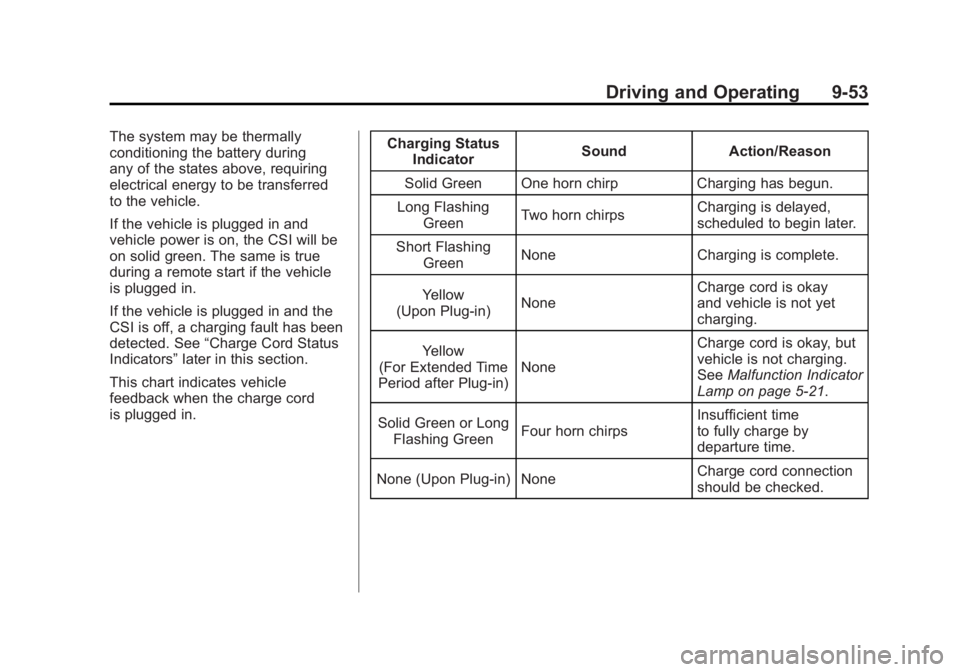
This chart indicates vehicle
feedback when the charge cord
is plugged in. Charging Status
Indicator Sound Action/Reason
Solid Green One horn chirp Charging has begun.
Long Flashing Green Two horn chirps Charging is delayed,
scheduled to begin later.
Short Flashing Green None Charging is complete.
Yellow
(Upon Plug‐in) None Charge cord is okay
and vehicle is not yet
charging.
Yellow
(For Extended Time
Period after Plug‐in) None Charge cord is okay, but
vehicle is not charging.
See
Malfunction Indicator
Lamp on page 5‑21.
Solid Green or Long Flashing Green Four horn chirps Insufficient time
to fully charge by
departure time.
None (Upon Plug‐in) None Charge cord connection
should be checked.
Page 356 of 516

Black plate (54,1)Chevrolet Volt Owner Manual - 2011
9-54 Driving and Operating
Charging StatusIndicator Sound Action/Reason
None (After Green or Yellow CSI
Indication Observed) None Charge cord connection
should be checked.
See
Malfunction Indicator
Lamp on page 5‑21.
None Repeated horn chirps
This feature can be
disabled by a service
technician.
To stop this alert, do one
of the following:
.Unplug the
charge cord.
.Press Unlock symbol
on the RKE.
.Press and hold the
Panic Alarm symbol
on the RKE, then
press again to stop
the panic alarm.
.Press the horn pad. Electricity was
interrupted before
charging was complete.
Charge Cord
See
Radio Frequency
Statement on page 13‑28 for
information regarding Part 15
of the Federal Communications
Commission (FCC) rules and
Industry Canada Standards
RSS-210/220/310.
A. Charge Level Button
B. Charge Level Indicators
C. Charge Cord Status Indicators
D. Vehicle Plug
E. Wall Plug
Page 413 of 516

Black plate (47,1)Chevrolet Volt Owner Manual - 2011
Vehicle Care 10-47
FusesUsage
F10 Regulated Voltage
Control/Ultrasonic
Front and Rear
Parking Assist
(If Equipped)
F11 Horn
F12 Rear Power
Windows
F13 Electric Parking
Brake
F14 Rear Defog
(Upper Grid) Fuses
Usage
F15 Empty
F16 Hatch Release
F17 Empty
F18 Empty
Relays Usage
R1 Rear Defog
(Upper Grid)
R2 Hatch Release
R3 Empty Relays
Usage
R4 Empty
R5 Empty
R6 Empty
R7 Empty
R8 Horn
Diodes Usage DIODE Empty
Page 426 of 516

Black plate (60,1)Chevrolet Volt Owner Manual - 2011
10-60 Vehicle Care
There are two minutes to match
the first tire/wheel position, and
five minutes overall to match all
four tire/wheel positions. If it takes
longer, the matching process stops
and must be restarted.
Follow the TPMS sensor matching
process:
1. Set the parking brake.
2. Put the vehicle in ON/RUN andplace the vehicle in P (Park).
3. If the DIC display is minimized, press the SELECT knob to
maximize it.
4. Use the SELECT knob to scroll to the Tire Pressure display
screen.
5. Press and hold the SELECT knob for five seconds to begin
the sensor matching process.
A message displays confirming
to begin the process. 6. Use the SELECT knob to
select YES with the highlighted
selection, and press the
SELECT knob again to
confirm the selection.
The horn sounds twice to signal
the receiver is in relearn mode
and the TIRE LEARNING
ACTIVE message displays
on the DIC screen.
7. Start with the driver side front tire.
8. Place the relearn tool against the tire sidewall, near the valve
stem. Then press the button
to activate the TPMS sensor.
A horn chirp confirms that the
sensor identification code has
been matched to this tire and
wheel position. 9. Proceed to the passenger
side front tire, and repeat the
procedure in Step 8.
10. Proceed to the passenger side rear tire, and repeat the
procedure in Step 8.
11. Proceed to the driver side rear tire, and repeat the procedure
in Step 8. The horn sounds two
times to indicate the sensor
identification code has been
matched to the driver side
rear tire, and the TPMS sensor
matching process is no longer
active. The TIRE LEARNING
ACTIVE message on the DIC
display screen goes off.
12. Turn the vehicle off.
13. Set all four tires to the recommended air pressure
level as indicated on the Tire
and Loading Information label.
Page 509 of 516

Black plate (5,1)Chevrolet Volt Owner Manual - 2011
INDEX i-5
Fuel (cont.)Low Fuel Warning Light . . . . . . . 5-28
Requirements, California . . . . . 9-58
System Messages . . . . . . . . . . . . 5-48
Function Check Electric Drive Unit ShiftLock Control . . . . . . . . . . . . . . 10-30
Fuses Engine Compartment
Fuse Block . . . . . . . . . . . . . . . . 10-38
Instrument Panel Fuse Block . . . . . . . . . 10-42, 10-43
Rear Compartment Fuse Block . . . . . . . . . . . . . . . . . . . . . . 10-45
G
Garage Door Opener . . . . . . . . . . 5-60
Programming . . . . . . . . . . . . . . . . . 5-60
Gasoline Specifications . . . . . . . . . . . . . . . . . 9-58
Gauges Battery . . . . . . . . . . . . . . . . . . . . . . . 5-16
Driver Efficiency . . . . . . . . . . . . . . 5-17
Fuel . . . . . . . . . . . . . . . . . . . . . . . . . . 5-16
Odometer . . . . . . . . . . . . . . . . . . . . . 5-15 Gauges (cont.)
Speedometer . . . . . . . . . . . . . . . . . 5-15
Trip Odometer . . . . . . . . . . . . . . . . 5-15
Warning Lights and
Indicators . . . . . . . . . . . . . . . . . . . . 5-9
General Information Service and Maintenance . . . . . 11-1
Towing . . . . . . . . . . . . . . . . . . . . . . . . 9-62
Vehicle Care . . . . . . . . . . . . . . . . . . 10-3
Global Positioning System (GPS) . . . . . . . . . . . . . . . . 7-74
Glove Box . . . . . . . . . . . . . . . . . . . . . . 4-1
GM Mobility Reimbursement Program . . . . . . . . . . . . . . . . . . . . . . 13-5
H
Halogen Bulbs . . . . . . . . . . . . . . . . 10-34
Hard Drive Device (HDD) . . . . . . 7-26
Hatch . . . . . . . . . . . . . . . . . . . . . . . . . . 2-12
Hazard Warning Flashers . . . . . . . 6-4
Head Restraints . . . . . . . . . . . . . . . . 3-2
Headlamps . . . . . . . . . . . . . . . . . . . 10-34
Aiming . . . . . . . . . . . . . . . . . . . . . . 10-32
Bulb Replacement . . . . . . . . . . 10-34
Daytime RunningLamps (DRL) . . . . . . . . . . . . . . . . . 6-3 Headlamps (cont.)
Flash-to-Pass . . . . . . . . . . . . . . . . . . 6-2
High-Beam On Light . . . . . . . . . . 5-29
High/Low Beam Changer . . . . . . 6-2
Lamps On Reminder . . . . . . . . . 5-29
Heated Front Seats . . . . . . . . . . . . . 3-6
Heated Mirrors . . . . . . . . . . . . . . . . . 2-16
Heating and Air Conditioning . . . 8-1
High Voltage Battery Gauge . . . 5-16
High Voltage Devices and Wiring . . . . . . . . . . . . . . . . . . . . . . . 10-37
High-Beam On Light . . . . . . . . . . . 5-29
Highway Hypnosis . . . . . . . . . . . . . 9-10
Hill and Mountain Roads . . . . . . . 9-10
Hood . . . . . . . . . . . . . . . . . . . . . . . . . . 10-9
Hood, Door, Hatch Open Light . . . . . . . . . . . . . . . . . . . . . . . . . 5-30
Horn . . . . . . . . . . . . . . . . . . . . . . . . . . . . 5-7
How to Wear Safety Belts
Properly . . . . . . . . . . . . . . . . . . . . . . 3-13